Scratch-blocks: update shadow block with field_number UI issue
Expected Behavior
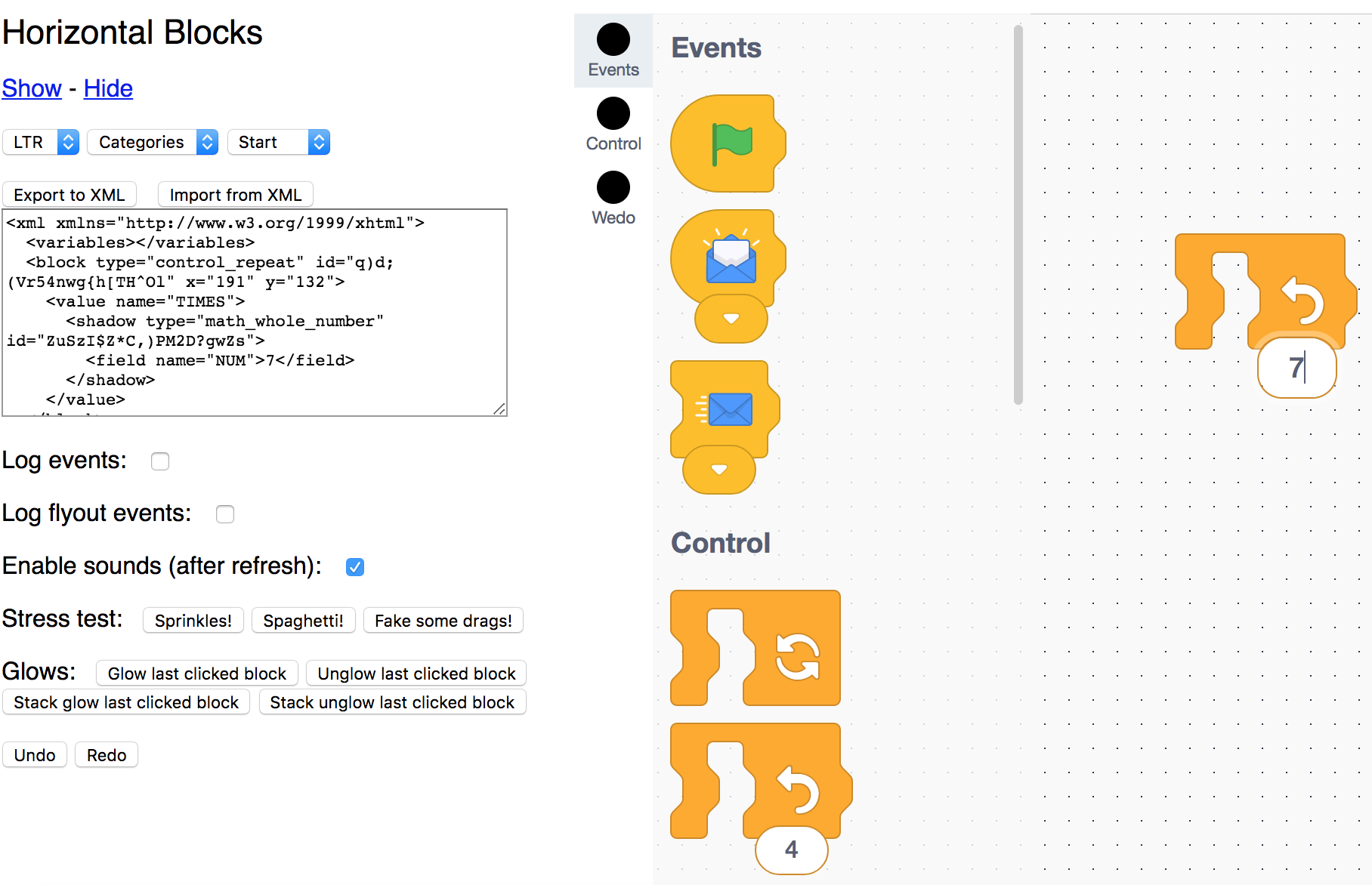
Initially, the control_repeat block displays a default value of 4 for the field_number in the shadow block.

If the field number 4 is changed to 7, for example, then the UI should say 7 as well.
Actual Behavior
The UI isn't updated after changing the number from 4 to 7.
The actual value is changed, and the UI is changed while editing. But once edit mode is over, the UI displays 4 instead of the new value.
Aka. Editing the field value to 7 changes the UI to show 7 while editing.
Issue: after you click away from edit mode, the UI reverts back to 4. But the actual value of the field_number is the new value 7 as shown in the exported xml.

Steps to Reproduce
Go to the http://llk.github.io/scratch-blocks/playgrounds/tests/horizontal_playground.html
or run the horizontal_playground.html test
change the value of a field number, and then click away. The XML updates itself correctly, but the UI doesn't.
If this is the expected behavior, can you point me in the right direction to update the UI myself? Thank you
Operating System and Browser
Mac OSX 10.11.6
Chrome Version 63.0.3239.84
 brianpoor5775
All 4 comments
The same issue happens when you confirm your input by pressing ENTER key.
 darkwave
on 26 Jul 2018
darkwave
on 26 Jul 2018
Is there any update on this issue or can you propose a workaround?
They proposed a solution in #826 but it doesn't seem to be up to date anymore.
Thanks.
 dschelada
on 4 Jan 2019
dschelada
on 4 Jan 2019
If you replace in field_textinput.js
this.sourceBlock_.rendered && this.sourceBlock_.render();
to
this.sourceBlock_.rendered && this.render_();
It will work again at least in my case.
 simeon-iotsyst
on 22 Mar 2019
simeon-iotsyst
on 22 Mar 2019
@simeon-iotsyst are you going to do a PR?
 mraerino
on 25 Mar 2019
mraerino
on 25 Mar 2019
Related issues
 picklesrus
·
3Comments
picklesrus
·
3Comments
 towerofnix
·
6Comments
towerofnix
·
6Comments
 cwillisf
·
4Comments
cwillisf
·
4Comments
 tmickel
·
3Comments
tmickel
·
3Comments
 gengshenghong
·
3Comments
gengshenghong
·
3Comments
Most helpful comment
If you replace in field_textinput.js
this.sourceBlock_.rendered && this.sourceBlock_.render();
to
this.sourceBlock_.rendered && this.render_();
It will work again at least in my case.