Scoop: Timeout whilst download causes installation to break
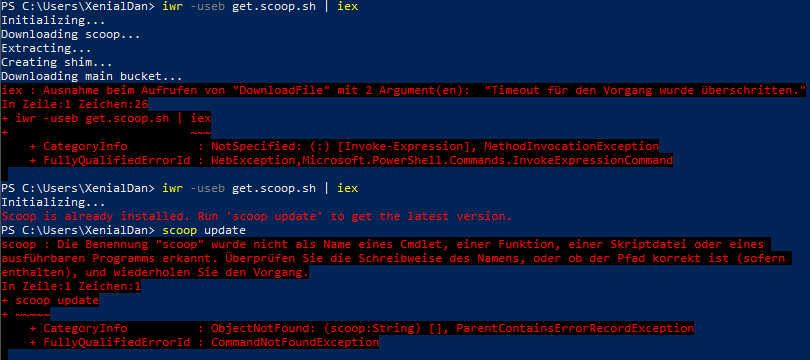
I ran
iwr -useb get.scoop.sh | iex
in powershell. After a while i got a timeout because my internet just acts up sometimes.
 thebigsmileXD
>All comments
I believe I've also had this issue due to hitting the GitHub API limit. After that, in my terminal window, any further attempts to invoke scoop failed silently. I opened a new terminal, and got no scoop installation at all:
PS C:\Users\Gordon> scoop search 7zip
scoop : The term 'scoop' is not recognized as the name of a cmdlet, function, script file, or operable program. Check
the spelling of the name, or if a path was included, verify that the path is correct and try again.
At line:1 char:1
+ scoop search 7zip
+ ~~~~~
    + CategoryInfo          : ObjectNotFound: (scoop:String) [], ParentContainsErrorRecordException
    + FullyQualifiedErrorId : CommandNotFoundException
I tried reinstalling in the new window, and Scoop is detected as installed:
PS C:\Users\Gordon> $Env:Path
C:\Windows\system32;C:\Windows;C:\Windows\System32\Wbem;C:\Windows\System32\WindowsPowerShell\v1.0\;C:\WINDOWS\system32;C:\WINDOWS;C:\WINDOWS\System32\Wbem;C:\WINDOWS\System32\WindowsPowerShell\v1.0\;C:\WINDOWS\System32\OpenSSH\;C:\Program
Files (x86)\NVIDIA Corporation\PhysX\Common;C:\Program Files\NVIDIA Corporation\NVIDIA NvDLISR;C:\WINDOWS\system32;C:\WINDOWS;C:\WINDOWS\System32\Wbem;C:\WINDOWS\System32\WindowsPowerShell\v1.0\;C:\WINDOWS\System32\OpenSSH\;C:\Users\Gordon\AppData\Local\Microsoft\WindowsApps
PS C:\Users\Gordon> set-executionpolicy remotesigned -scope currentuser
PS C:\Users\Gordon> Invoke-Expression (New-Object System.Net.WebClient).DownloadString('https://get.scoop.sh')
Initializing...
Scoop is already installed. Run 'scoop update' to get the latest version.
PS C:\Users\Gordon> scoop update
scoop : The term 'scoop' is not recognized as the name of a cmdlet, function, script file, or operable program. Check
the spelling of the name, or if a path was included, verify that the path is correct and try again.
At line:1 char:1
+ scoop update
+ ~~~~~
    + CategoryInfo          : ObjectNotFound: (scoop:String) [], ParentContainsErrorRecordException
    + FullyQualifiedErrorId : CommandNotFoundException
As reccomended in other issues, I tried deleting the contents of the scoop directory and reinstalling, and this resulted in an error and scoop still missing:
PS C:\Users\Gordon> set-executionpolicy remotesigned -s currentuser
PS C:\Users\Gordon> iex (new-object net.webclient).downloadstring('https://get.scoop.sh')
Initializing...
Downloading scoop...
Extracting...
Creating shim...
Downloading main bucket...
Extracting...
iex : The term 'scoop' is not recognized as the name of a cmdlet, function, script file, or operable program. Check
the spelling of the name, or if a path was included, verify that the path is correct and try again.
At line:1 char:1
+ iex (new-object net.webclient).downloadstring('https://get.scoop.sh')
+ ~~~~~~~~~~~~~~~~~~~~~~~~~~~~~~~~~~~~~~~~~~~~~~~~~~~~~~~~~~~~~~~~~~~~~
    + CategoryInfo          : ObjectNotFound: (scoop:String) [Invoke-Expression], CommandNotFoundException
    + FullyQualifiedErrorId : CommandNotFoundException,Microsoft.PowerShell.Commands.InvokeExpressionCommand
 gordonjb
on 14 Apr 2020
gordonjb
on 14 Apr 2020
👍3
Was this page helpful?
0 / 5 - 0 ratings
Related issues
 vpratfr
·
3Comments
vpratfr
·
3Comments
 muhlpachr
·
3Comments
muhlpachr
·
3Comments
 SinisterBlade
·
3Comments
SinisterBlade
·
3Comments
 thorstenkampe
·
3Comments
thorstenkampe
·
3Comments
 Arnavion
·
3Comments
Arnavion
·
3Comments
Most helpful comment
I believe I've also had this issue due to hitting the GitHub API limit. After that, in my terminal window, any further attempts to invoke scoop failed silently. I opened a new terminal, and got no scoop installation at all:
I tried reinstalling in the new window, and Scoop is detected as installed:
As reccomended in other issues, I tried deleting the contents of the scoop directory and reinstalling, and this resulted in an error and scoop still missing: