Extracted from Discord, suggested by @h404bi
Instead of using write-host there is possible to use $host automatic variable and it's properties. This would allow to return coloured output into stdout (1 stream instead of 6) without additional line breaks.
Allowing users to log every scoop execution for easier processing/matching.
For maintainers it would mean more constant and consistent code.
Proposed implementation
function Write-Info {
    param(
        # ValueFromRemaining arguments to mimic Write-host functionality
        [Parameter(Mandatory = $true, Position=0, ValueFromRemainingArguments, ValueFromPipeline)]
        [String[]] $Message,
        [System.ConsoleColor] $ForegroundColor = $host.UI.RawUI.ForegroundColor,
        [String] $Separator = ' '
    )

    # Aditional checks could be processed
    $old = $host.UI.RawUI.ForegroundColor
    $host.UI.RawUI.ForegroundColor = $ForegroundColor

    Write-Output ($Message -join $Separator)

    $host.UI.RawUI.ForegroundColor = $old
}

 Ash258
All 4 comments
Write-Output will always end with a newline.
 r15ch13
on 20 May 2019
r15ch13
on 20 May 2019
$e = [char]0x1B

$reset = "`e[0m" # resets all colors and attributes
$resetdeko = "`e[20m" # resets only attributes (underline, etc.), leaving colors unchanged
$default = "`e[39m" # resets only foreground color, leaving attributes unchanged

$black = "`e[30m"
$red = "`e[31m"
$green = "`e[32m"
$yellow = "`e[33m"
$blue = "`e[34m"
$magenta = "`e[35m"
$cyan = "`e[36m"
$lightgray = "`e[37m"

$darkgray = "`e[90m"
$lightred = "`e[91m"
$lightgreen = "`e[92m"
$lightyellow = "`e[93m"
$lightblue = "`e[94m"
$lightmagenta = "`e[95m"
$lightcyan = "`e[96m"
$white = "`e[97m"

function Format-AddAsciiEscape {
    [CmdletBinding()]
    param (
        [parameter(ValueFromPipelineByPropertyName,ValueFromPipeline)]
        [string[]]$Messages
    )
    process {
        $str = $_ -ireplace '{reset}',"`e[0m" # resets all colors and attributes
        $str = $str -ireplace '{resetdeko}',"`e[20m" # resets only attributes (underline, etc.), leaving colors unchanged
        $str = $str -ireplace '{default}',"`e[39m" # resets only foreground color, leaving attributes unchanged

        $str = $str -ireplace '{black}',"`e[30m"
        $str = $str -ireplace '{red}',"`e[31m"
        $str = $str -ireplace '{green}',"`e[32m"
        $str = $str -ireplace '{yellow}',"`e[33m"
        $str = $str -ireplace '{blue}',"`e[34m"
        $str = $str -ireplace '{magenta}',"`e[35m"
        $str = $str -ireplace '{cyan}',"`e[36m"
        $str = $str -ireplace '{lightgray}',"`e[37m"

        $str = $str -ireplace '{darkgray}',"`e[90m"
        $str = $str -ireplace '{lightred}',"`e[91m"
        $str = $str -ireplace '{lightgreen}',"`e[92m"
        $str = $str -ireplace '{lightyellow}',"`e[93m"
        $str = $str -ireplace '{lightblue}',"`e[94m"
        $str = $str -ireplace '{lightmagenta}',"`e[95m"
        $str = $str -ireplace '{lightcyan}',"`e[96m"
        $str = $str -ireplace '{white}',"`e[97m"
        $str
    }
}

function Format-RemoveAsciiEscape {
    [CmdletBinding()]
    param (
        [parameter(ValueFromPipelineByPropertyName,ValueFromPipeline)]
        [string[]]$Messages
    )
    process {
        $_ -replace "`e\[[\d;]+m",''
    }
}

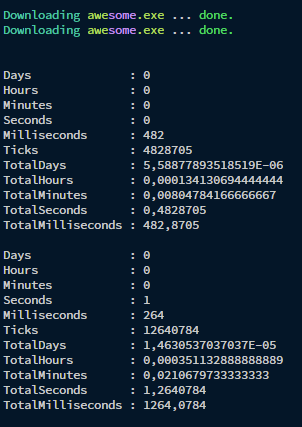
Write-Output "$cyan`Downloading$yellow awe$magenta`some$yellow.exe $lightgray... $green`done.$reset"
Write-Output ("{cyan}Downloading{yellow} awe{magenta}some{yellow}.exe {lightgray}... {green}done.{reset}" | Format-AddAsciiEscape)

Measure-Command { for ($i=0; $i -le 10000; $i++) {
    Write-Output "$cyan`Downloading$yellow awe$magenta`some$yellow.exe $lightgray... $green`done.$reset"
} }
Measure-Command { for ($i=0; $i -le 10000; $i++) {
    Write-Output ("{cyan}Downloading{yellow} awe{magenta}some{yellow}.exe {lightgray}... {green}done.{reset}" | Format-AddAsciiEscape)
} }
Almost all Write-Host -NoNewline calls could be replaced by using Unix escape sequences.
They are just used for multiple colors in one line.
The only use-case where -NoNewline is pretty handy, is for showing the progress with delay (e.g. download ... and later append done).
Everything else could be reordered.
Cleaning the output before using it:
Write-Output "{cyan}Test {green}success{reset}" | Format-RemoveAsciiEscape | Tee-Object .\cosi.txt
r15ch13
on 20 May 2019
@r15ch13 You might need to know that old version of Windows do not support ANSI Escape Sequences.[^1]
 chawyehsu
on 21 May 2019
chawyehsu
on 21 May 2019
Alternatively we can provide simple supporting written in C#, which would handle coloured writing.
Unfortunately you cannot do something like this for unknown reason:
Add-Type @"
using System;

namespace Scoop{
    public static class Cosi {
        public static void Main() {
            # Sure some parameter handling for color, nonewline, separator, ...
            Console.ForegroundColor = ConsoleColor.DarkRed;
            Console.Write("ALFA");
        }
    }
}
"@


[Scoop.Cosi]::Main()
Since it will result into this:

But when you will compile it into exe, you can capture stdout without any problems:

Ash258
on 22 May 2019
Related issues
 jpoehls
·
3Comments
jpoehls
·
3Comments
 muhlpachr
·
3Comments
muhlpachr
·
3Comments
 thorstenkampe
·
3Comments
thorstenkampe
·
3Comments
 brunovieira97
·
3Comments
brunovieira97
·
3Comments
 benplm
·
3Comments
benplm
·
3Comments
Most helpful comment
@r15ch13 You might need to know that old version of Windows do not support ANSI Escape Sequences.[^1]