Scoop: Can scoop install docker for windows?
I used scoop install docker to install docker, but I don't even know how to start it. I tried to use docker run hello-world after installation, but it failed. What should I do before using Docker Toolbox? Can scoop install Docker for Windows instead of Docker Toolbox?
 jiayaoO3O
All 19 comments
You could use docker from my bucket. (https://github.com/Ash258/scoop-Ash258/blob/master/bucket/docker.json)
There was some discussion with @r15ch13 about docker for windows in extras, bucket but i don't know result of this conversation 😂
@r15ch13 Do you know, where we talked about docker for windows?
 Ash258
on 27 Mar 2019
Ash258
on 27 Mar 2019
你可以从我的桶里使用docker。(https://github.com/Ash258/scoop-Ash258/blob/master/bucket/docker.json)
@ r15ch13讨论了关于docker for windows的额外内容,但是我不知道这个对话的结果😂
@ r15ch13 你知道吗,我们在哪里谈到windows的docker?
thanks,I will try :+1:
jiayaoO3O
on 27 Mar 2019
@r15ch13 Found it 😃 #3082
Ash258
on 27 Mar 2019
你可以从我的桶里使用docker。(https://github.com/Ash258/scoop-Ash258/blob/master/bucket/docker.json)
@ r15ch13讨论了关于docker for windows的额外内容,但是我不知道这个对话的结果😂
@ r15ch13 你知道吗,我们在哪里谈到windows的docker?
Installation failed
 jiayaoO3O
on 27 Mar 2019
jiayaoO3O
on 27 Mar 2019
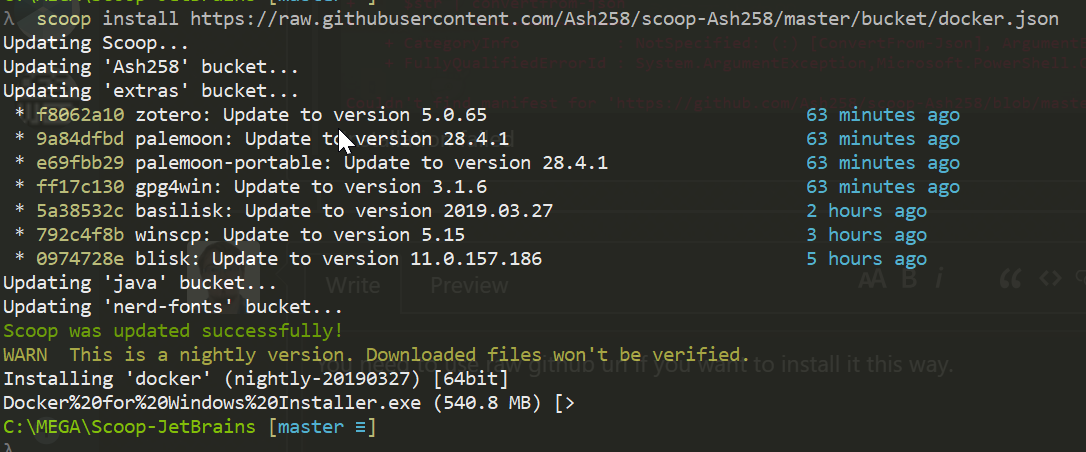
You need to use raw github url if you want to install it this way.
scoop install https://raw.githubusercontent.com/Ash258/scoop-Ash258/master/bucket/docker.json
Ash258
on 27 Mar 2019
You need to use raw github url if you want to install it this way.
scoop install https://raw.githubusercontent.com/Ash258/scoop-Ash258/master/bucket/docker.json
I installed successfully!!! Thanks
But is this different from double-clickingDocker for Windows Installer.exe? Can docker be installed only inC:\Program Files\Docker\Dockerinstead ofC:\Users\jiayao\scoop\apps?
jiayaoO3O
on 27 Mar 2019
Unfortunately no. As said in notes. There is no possible way how to force docker installation into scoopdir. At least before few months. Haven't checked from then.
Ash258
on 27 Mar 2019
ok ,still thanks!
jiayaoO3O
on 27 Mar 2019
can install, but cannot recognize by vscode
 kid1412621
on 6 Sep 2019
kid1412621
on 6 Sep 2019
When i try to install docker with scoop install https://raw.githubusercontent.com/Ash258/scoop-Ash258/master/bucket/docker.json it prompts me to log in with admin rights.
Docker%20for%20Windows%20Installer.exe (834,8 MB) [===========================================================] 100%
Running pre-install script...
Running installer... [15:35:10.186] [InstallHandler] Not run as admin, relaunching with UAC prompt
System.ComponentModel.Win32Exception (0x80004005): El usuario ha cancelado la operación
en System.Diagnostics.Process.StartWithShellExecuteEx(ProcessStartInfo startInfo)
en System.Diagnostics.Process.Start(ProcessStartInfo startInfo)
en CommunityInstaller.ProcessEnvironmentDetector.RelaunchAsAdmin(String[] args)
en CommunityInstaller.Program.Main(String[] args)
 francjpd
on 19 Sep 2019
francjpd
on 19 Sep 2019
And? ... I do not see any issue. Is somewhere in my bucket said it is UAC prompt free?
Ash258
on 19 Sep 2019
Well the main page of Scoop says:
Say goodbye to permission pop-ups
Scoop installs programs to your home directory by default. So you don’t need admin permissions to install programs, and you won’t see UAC popups every time you need to add or remove a program.
I expected all buckets from scoop to be free from asking for admin rights. I guess i was wrong.
francjpd
on 3 Oct 2019
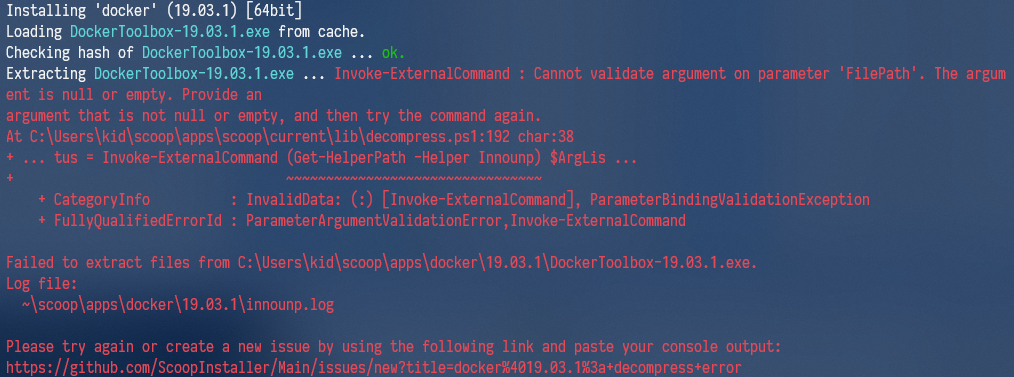
what causes this?
kid1412621
on 30 Oct 2019
I would say you miss innounp.
scoop install innounp
Ash258
on 30 Oct 2019
Then open new issue using link from screenshot. I cannot test / investigate further right now.
Ash258
on 30 Oct 2019
I would say you miss innounp.
scoop install innounp
thanks, my bad. scoop said it's installed. but it(innounp) seems broken or previous installation failed.
I reinstalled it, problem solved.
kid1412621
on 30 Oct 2019
@Ash258 Could you tell me how to add docker daemon to windows service after installation? Cannot find any relative document.
kid1412621
on 31 Oct 2019
No
Ash258
on 31 Oct 2019
When I run:
C:\> scoop install https://raw.githubusercontent.com/Ash258/scoop-Ash258/master/bucket/docker.json
I get the following error:
WARN  error: The remote name could not be resolved: 'http'
Couldn't find manifest for 'https://raw.githubusercontent.com/Ash258/scoop-Ash258/master/bucket/docker.json'.
Note I'm on Windows 10
 aadamsx
on 31 Jan 2020
aadamsx
on 31 Jan 2020
Related issues
 eBaeza
·
3Comments
eBaeza
·
3Comments
 benplm
·
3Comments
benplm
·
3Comments
 bernstein82
·
3Comments
bernstein82
·
3Comments
 muhlpachr
·
3Comments
muhlpachr
·
3Comments
 jpoehls
·
3Comments
jpoehls
·
3Comments
Most helpful comment
You need to use raw github url if you want to install it this way.
scoop install https://raw.githubusercontent.com/Ash258/scoop-Ash258/master/bucket/docker.json