Scoop: `scoop update` fails on Windows 10
I am unable to update scoop on Windows 10 - it appears to just delete itself. I was able to recover from this by downloading the install script from get.scoop.sh and commenting out the if(installed 'scoop') check to force a reinstall.
Error message:
PS C:\Users\Michael Limiero> scoop update
updating scoop...
& : The term 'C:\Users\Michael Limiero\AppData\Local\scoop\apps\scoop\current\bin\scoop.ps1' is not recognized as the
name of a cmdlet, function, script file, or operable program. Check the spelling of the name, or if a path was
included, verify that the path is correct and try again.
At C:\Users\Michael Limiero\AppData\Local\scoop\shims\scoop.ps1:5 char:70
+ ... ion.expectingInput) { $input | & $path @args } else { & $path @args }
+                                                             ~~~~~
    + CategoryInfo          : ObjectNotFound: (C:\Users\Michae...t\bin\scoop.ps1:String) [], ParentContainsErrorRecord
   Exception
    + FullyQualifiedErrorId : CommandNotFoundException
Powershell version info:
PS C:\Users\Michael Limiero> echo $PSVersionTable

Name                           Value
----                           -----
PSVersion                      5.0.10586.122
PSCompatibleVersions           {1.0, 2.0, 3.0, 4.0...}
BuildVersion                   10.0.10586.122
CLRVersion                     4.0.30319.42000
WSManStackVersion              3.0
PSRemotingProtocolVersion      2.3
SerializationVersion           1.1.0.1
 DeltaWhy
All 8 comments
Sorry about that. Thanks for the bug report.
Yes, the first time you run scoop update, scoop removes itself in order to switch to git. The problem is that it calls itself to get proxy configuration to pass to git after it has deleted itself. I'm fixing this now – shouldn't take too long.
 lukesampson
on 1 Jun 2016
lukesampson
on 1 Jun 2016
This is fixed in 376630f.
You'll need to run this script to re-install Scoop to overwrite the bad copy first:
iex (new-object net.webclient).downloadstring('https://gist.githubusercontent.com/lukesampson/210853bdace8e381ff1cb27ef37c8be9/raw/585d44db18b76537e532f16b6e8928587954c5dc/scoop-reinstall.ps1')
Then run scoop update to make sure that it worked. Please let me know if you run into any problems.
lukesampson
on 1 Jun 2016
Did not work:
PS> scoop update
updating scoop...
Too many arguments.

usage: git clone [<options>] [--] <repo> [<dir>]

    -v, --verbose         be more verbose
    -q, --quiet           be more quiet
    --progress            force progress reporting
    -n, --no-checkout     don't create a checkout
    --bare                create a bare repository
    --mirror              create a mirror repository (implies bare)
    -l, --local           to clone from a local repository
    --no-hardlinks        don't use local hardlinks, always copy
    -s, --shared          setup as shared repository
    --recursive           initialize submodules in the clone
    --recurse-submodules  initialize submodules in the clone
    --template <template-directory>
                          directory from which templates will be used
    --reference <repo>    reference repository
    --dissociate          use --reference only while cloning
    -o, --origin <name>   use <name> instead of 'origin' to track upstream
    -b, --branch <branch>
                          checkout <branch> instead of the remote's HEAD
    -u, --upload-pack <path>
                          path to git-upload-pack on the remote
    --depth <depth>       create a shallow clone of that depth
    --single-branch       clone only one branch, HEAD or --branch
    --separate-git-dir <gitdir>
                          separate git dir from working tree
    -c, --config <key=value>
                          set config inside the new repository
    -4, --ipv4            use IPv4 addresses only
    -6, --ipv6            use IPv6 addresses only

mv : Cannot find path 'C:\Users\Michael Limiero\AppData\Local\scoop\apps\scoop\new' because it does not exist.
At C:\Users\Michael Limiero\AppData\Local\scoop\apps\scoop\current\libexec\scoop-update.ps1:61 char:9
+         mv $newdir $currentdir
+         ~~~~~~~~~~~~~~~~~~~~~~
    + CategoryInfo          : ObjectNotFound: (C:\Users\Michae...\apps\scoop\new:String) [Move-Item], ItemNotFoundExce
   ption
    + FullyQualifiedErrorId : PathNotFound,Microsoft.PowerShell.Commands.MoveItemCommand

PS> scoop
& : The term 'C:\Users\Michael Limiero\AppData\Local\scoop\apps\scoop\current\bin\scoop.ps1' is not recognized as the
name of a cmdlet, function, script file, or operable program. Check the spelling of the name, or if a path was
included, verify that the path is correct and try again.
At C:\Users\Michael Limiero\AppData\Local\scoop\shims\scoop.ps1:5 char:70
+ ... ion.expectingInput) { $input | & $path @args } else { & $path @args }
+                                                             ~~~~~
    + CategoryInfo          : ObjectNotFound: (C:\Users\Michae...t\bin\scoop.ps1:String) [], ParentContainsErrorRecord
   Exception
    + FullyQualifiedErrorId : CommandNotFoundException

PS> scoop update
& : The term 'C:\Users\Michael Limiero\AppData\Local\scoop\apps\scoop\current\bin\scoop.ps1' is not recognized as the
name of a cmdlet, function, script file, or operable program. Check the spelling of the name, or if a path was
included, verify that the path is correct and try again.
At C:\Users\Michael Limiero\AppData\Local\scoop\shims\scoop.ps1:5 char:70
+ ... ion.expectingInput) { $input | & $path @args } else { & $path @args }
+                                                             ~~~~~
    + CategoryInfo          : ObjectNotFound: (C:\Users\Michae...t\bin\scoop.ps1:String) [], ParentContainsErrorRecord
   Exception
    + FullyQualifiedErrorId : CommandNotFoundException

PS>
PS> git --version
git version 2.8.2.windows.1
Suspect this is due to the space in my username and quoting issues.
DeltaWhy
on 2 Jun 2016
Great, you found two bugs at once. Should work now, after you reinstall:
iex (new-object net.webclient).downloadstring('https://gist.githubusercontent.com/lukesampson/210853bdace8e381ff1cb27ef37c8be9/raw/585d44db18b76537e532f16b6e8928587954c5dc/scoop-reinstall.ps1')
Looks like that did it, thanks!
DeltaWhy
on 2 Jun 2016
Sir, it doesn't help.
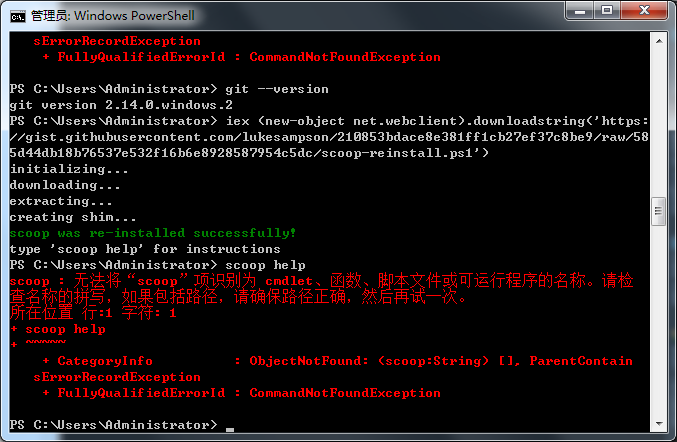
 gmywq
on 7 Sep 2017
gmywq
on 7 Sep 2017
- delete the directory => ${SCOOP}/apps/scoop
- reinstall scoop
iex (new-object net.webclient).downloadstring('https://get.scoop.sh')
 donotlb
on 1 Apr 2019
donotlb
on 1 Apr 2019
still doesn't work
 reshmanair4567
on 15 Oct 2019
reshmanair4567
on 15 Oct 2019
Related issues
 thorstenkampe
·
3Comments
thorstenkampe
·
3Comments
 jpoehls
·
3Comments
jpoehls
·
3Comments
 quantuumsnot
·
3Comments
quantuumsnot
·
3Comments
 bernstein82
·
3Comments
bernstein82
·
3Comments
 mpro7
·
3Comments
mpro7
·
3Comments
Most helpful comment
Looks like that did it, thanks!