Scikit-image: Rolling Ball/Sliding Paraboloid Algorithm for background estimation
Background Rolling Ball Algorithm for background estimation/subtraction
The rolling ball algorithm is a well-known method for background subtraction.
(reference Stanley Sternberg's article,
"Biomedical Image Processing", IEEE Computer, January 1983.)
Exisiting implementations:
This algorithm is implemented for imageJ
https://imagej.nih.gov/ij/developer/source/ij/plugin/filter/BackgroundSubtracter.java.html
and a few one-to-one ports of the FIJI implementation to Python can be found on Github:
https://github.com/nearlyfreeapps/Rolling-Ball-Algorithm
https://github.com/mbalatsko/opencv-rolling-ball
The drawback of these python implementations is that they are not taking into account that nested for loops are inefficient in python. Also, they are limited to uint8 data types.
Feature Request
It would be nice to have a clean, vectorized version in scikit-image. If vectorization is too complicated, Numba could speed up the code of the existing ports signifcantly.
 VolkerH
All 28 comments
That looks very useful, @VolkerH. Are you interested in working on an implementation?
 stefanv
on 6 Nov 2018
stefanv
on 6 Nov 2018
In principle: yes.
Caveat: I don't know when I will actually find the time to do this.
Maybe @jni needs to prod me about it on a weekly basis.
VolkerH
on 6 Nov 2018
@VolkerH Please choose the periodicity of your reminder, and I'll be happy to enact it :)
stefanv
on 7 Nov 2018
Just in case someone else - like me - ended up here just looking for a suitable method to flatten an uneven background, not exactly the rolling ball algorithm implemented in ImageJ:
Check out skimage.filters.threshold_local. For my data, given the right parameters, it produces quite similar results to the rolling-ball algorithm, is several orders of magnitude faster and not restricted to integer input. Here is a minimal example for images with dark background:
from skimage.filters import threshold_local
background = threshold_local(image, 50, offset=np.percentile(image, 1), method='median')
bg_corrected = image - background
I have had best success with method='median' because it had the least tendency to produce dark halos around bright objects (again assuming bright objects on dark background). Actually, the dark halos also appear with the rolling-ball algorithm so in my case the results were even better than with ImageJ.
for bright images do something like this:
def invert(image):
    return np.max(image) - image

image = invert(image)
background = threshold_local(image, 50, offset=np.percentile(image, 1), method='median')
bg_corrected = invert(image - background)
skimage.filters.threshold_local also accepts a custom function as method argument, so it may even be possible to write a proper rolling ball background subtraction algorithm with that.
Here is a skeleton of how such a function could be implemented I believe this class may give you close to what you need for calculating a ball profile.
radius=50


class SubtractBall:
    def __init__(self, radius):
        self.ball = RollingBall(radius)
    def bg(self, surrounding_area): #note that surrounding area is flattened
        return np.min(surrounding_area - self.ball.profile) + np.max(self.ball.profile)


subtract = SubtractBall(radius)
background = threshold_local(image, radius, offset=np.percentile(image, 1), method='generic', param=subtract.bg)
 thawn
on 9 Mar 2020
thawn
on 9 Mar 2020
@thawn thanks for this! Would you be interest in submitting this as a tutorial for our documentation? I think it would be very useful for a lot of people. It will probably need to depend on https://github.com/scikit-image/scikit-image/pull/3945 getting merged, but you can get started with adding the images to the repo, and during review we can change it to use hosted data from somewhere.
 jni
on 10 Mar 2020
jni
on 10 Mar 2020
Note that I have dropped the ball on this now that skimage has morphological attribute openings. For me, background subtraction using a top-hat filter using an area opening is a viable alternative to rolling ball.
VolkerH
on 11 Mar 2020
This issue has been mentioned on Image.sc Forum. There might be relevant details there:
https://forum.image.sc/t/background-subtraction-in-scikit-image/39118/2
 imagesc-bot
on 16 Jun 2020
imagesc-bot
on 16 Jun 2020
Thanks @VolkerH, I sucessfully implemented background subtraction using a top-hat filter, which is even faster than threshold_local. On my data, the result is visually indistinguishable from ImageJ's rolling ball algorithm:
def subtract_background(image, radius=50, light_bg=False):
        from skimage.morphology import white_tophat, black_tophat, disk
        str_el = disk(radius) #you can also use 'ball' here to get a slightly smoother result at the cost of increased computing time
        if light_bg:
            return = black_tophat(image, str_el)
        else:
            return = white_tophat(image, str_el)
@thawn, thanks for the code sample. I actually sometimes use a top-hat with the area opening operator (I find that gives even better results) but using a regular top-hat with a disk structuring element is indeed very similar to rolling ball !
VolkerH
on 17 Jun 2020
@thawn thanks for this! Would you be interest in submitting this as a tutorial for our documentation? I think it would be very useful for a lot of people.
@jni thanks for the invite, I am flattered :-) Currently, I am a bit pressed for time, but I will add writing a tutorial to my todo list. I agree that background subtraction is an important topic, particularly for microscopy data.
thawn
on 17 Jun 2020
I actually sometimes use a top-hat with the area opening operator (I find that gives even better results)
@VolkerH that sounds very interesting. Just to make sure I didn't misunderstand: what you would use is something like:
from skimage.morphology import area_opening, area_closing
def background_subtract_area(image, area_threshold=7000, light_bg=False): #  default area_threshold is similar to the area of a disk with radius 50, which is ImageJ's default
    if light_bg:
        return area_closing(image, area_threshold) - image
    else:
        return image - area_opening(image, area_threshold)
correct, that's basically what I have used successfully in the past. The drawback is that it is (at least in skimage's implmentatoin of attribute openings) considerably slower than an opening with a fixed structuring element.
Dpeneding on the area attribute parameter this can either be a background subtraction or be used to enhance small features.
VolkerH
on 18 Jun 2020
Top-hat plus disk produces very similar results to the "rolling-ball" method because it IS 95% identical. In the original paper (source p.29f) the author essentially provides the formulas for (grayscale) image opening and then uses multiple structural elements. The best clue is the last equation in p.30, which is identical to the definition of image opening; the remaining ones then confirm that he is talking about opening on grayscale images. My hunch is that he doesn't use our current terminology because it wasn't established at that time.
For the structuring elements (he calls them B1, B2, ..., Bk), he shows the result for a single such element in figure 9. It happens to be a disk, so the resulting image (figure 9(d)) is identical to top-hat + disk opening. On p.27 he defines what he means by "opening by a sequence", which is essentially apply erosions B1, ..., Bk, then apply dilations Bk, ..., B1. Alternatively, one can compute a joint structuring element from the sequence and use that in a single opening operation, which he also talks about. He uses this idea for the "rolling-ball" method and provides figure 10 to show the joint structuring element obtained by the sequence B1, ..., B26 of 3x3x3 elements (he doesn't specify the shape).
He then subtracts the opened image from the original image to perform background removal (again see figure 9). original_image - opened_image is what top-hat is doing, so this part is trivially identical.
Based on the above, we should already have 95% of a vectorized version of the "rolling ball" method. All that needs to be changed is to apply the comment from @thawn and use ball instead of disk. (I assume that ball and X_tophat are meant for grayscale and not binary images.)
def rolling_ball(image, radius=50, light_bg=False):
        from skimage.morphology import white_tophat, black_tophat, ball
        str_el = ball(radius)
        if light_bg:
            return = black_tophat(image, str_el)
        else:
            return = white_tophat(image, str_el)
The difference between ball and disk will be a few points of intensity, which (in most cases) should be hard to differentiate with the human eye; hence, both being 95% identical. However, there may be a theoretical consideration, which will affect statistical results (in particular with blot arrays). As far as I am aware, there is a strong correlation between pixel intensity and pixel area of a single blot. When using a ball filter, the intensity of big (and thus intense) blots will be affected slightly differently than the intensity of small (and thus less intense) blots, as compared to using a disk filter. This will only be a marginal difference most of the time, but could be troublesome for some; I expect that the "correct" way will depend on the experimental setup and what is established in the field.
(Disclaimer: Not a biologist, so I don't know much about obtaining medical images; I do know a lot about image processing though. I stumbled across this while talking about quantification with an immunologist, and thought this was a fascinating problem.)
 FirefoxMetzger
on 13 Jul 2020
FirefoxMetzger
on 13 Jul 2020
@FirefoxMetzger thanks a lot for this detailed analysis. I fully agree with your considerations.
Concerning the quantification of blots: I am a biochemist and I usually use the gel quantification tool of ImageJ (and most other programs work similarly). In that case, background is subtracted manually by drawing a straight line at the bottom end of an intensity projection. I would assume that in this case a disk background subtraction would produce a more similar result than a ball.
thawn
on 13 Jul 2020
This issue seems ripe for a PR; if anyone here has time to turn it into one, that would be greatly appreciated! Either way, the discussion has been illuminating, thank you.
stefanv
on 13 Jul 2020
@thawn I checked the procedure in the link; indeed, a disk subtraction will be more similar to what is proposed in figure 7. A ball will "flatten" the peak by the amount by which the ball segment intrudes said peak.
@stefanv I won't have time today but should have some spare time tomorrow after work. Where would the code go? I'll then go and read up on the relevant contribution guidelines.
FirefoxMetzger
on 13 Jul 2020
Since I didn't get any specs as to where to implement the rolling-ball method, I added a PR that provides it as an example.
Note that simply replacing disk with ball did not work, as 3D structuring elements aren't supported with 2D images. I manually implemented the rolling ball filter. I also added the disk version discussed in this issue for comparison. It would be useful if somebody could check my code for bugs/errors. There is a much larger difference between the disk approximation and rolling ball than I expected.
FirefoxMetzger
on 17 Jul 2020
@thawn thanks for this! Would you be interest in submitting this as a tutorial for our documentation? I think it would be very useful for a lot of people. It will probably need to depend on #3945 getting merged, but you can get started with adding the images to the repo, and during review we can change it to use hosted data from somewhere.
Why not adding the function to the library? Here, users will have to copy paste a code... which is not very nice.
 sciunto
on 24 Jul 2020
sciunto
on 24 Jul 2020
Yes, let's include it: this is a well known algorithm and clearly in demand.
stefanv
on 24 Jul 2020
Sure, I can move the function into the core library in the current PR. Would skimage.segmentation be the correct place for it?
I initially just added an example, because the implementation turns out to be rather slow, but it is conceptually quite interesting. Here is a screenshot of a quick profile of the current implementation in the PR (https://github.com/FirefoxMetzger/scikit-image/commit/e97de8b0983b75933c9b823fce6228eed38879c1)
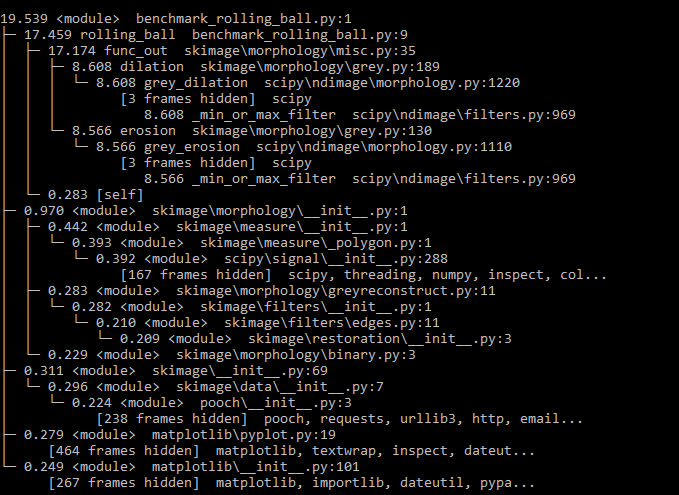
Not sure how much upward mobility there is for optimization.
FirefoxMetzger
on 24 Jul 2020
Maybe in morpholgy as it is mainly made up of morphological functions?
The other suggestion would be to have a more generic function subtract_background or estimate_background with a method argument that would default to "rolling_ball" just in case someone contributes other background estimates later on.
Anyway, just my 2c, the core team members should have a better overview.
VolkerH
on 24 Jul 2020
I'd say morphology and call it rolling ball. Once we have more methods, we can improve the API to incorporate those.
I don't feel strongly about naming, though.
stefanv
on 24 Jul 2020
After cython-izing the rolling_ball algorithm in https://github.com/scikit-image/scikit-image/pull/4851 I added a snippet to the gallery example to attempt to show how much faster the rolling_disk approximation is. Surprisingly, it doesn't seem to be much faster; quite the opposite actually.

FirefoxMetzger
on 1 Aug 2020
I want to apply this algorithm to an XRD pattern signal(see attached), how can I do that using this? Any help is appreciated.

 InvincibleKnight
on 14 Sep 2020
InvincibleKnight
on 14 Sep 2020
@InvincibleKnight there's examples towards the end of #4851 that should come close to your use case. Note that you'll need to compile that branch from source, or wait until scikit-image 0.19 is released, to use that code.
jni
on 15 Sep 2020
It appears this implementation will only work on 8-bit images whereas the one from imagej works also for 16-bit images. What is the limitation to 8-bit? Would simply altering the value 255 in places such as lines 32 and 43 to 65535 by checking for image dtype allow for processing of 16-bit images?
32 working_img = 255 - working_img
43 background = (np.arange(255)[np.newaxis,....
 neili02
on 16 Dec 2020
neili02
on 16 Dec 2020
@neili02 If you are using the latest version of skimage, you can check out restoration.rolling_ball (gallery example) which works on 8-bit, 16-bit, and float images ... any datatype (and dimensionality) really.
@stefanv Just noticed that this issue is still open. Since the rolling ball algorithm for background estimation is merged, should we close this issue?
FirefoxMetzger
on 16 Dec 2020
Whoops! Thanks for the reminder @FirefoxMetzger!
jni
on 16 Dec 2020
Related issues
 hmaarrfk
·
36Comments
hmaarrfk
·
36Comments
 alexdesiqueira
·
33Comments
jni
·
33Comments
jni
·
27Comments
jni
·
30Comments
alexdesiqueira
·
33Comments
jni
·
33Comments
jni
·
27Comments
jni
·
30Comments
Most helpful comment
Just in case someone else - like me - ended up here just looking for a suitable method to flatten an uneven background, not exactly the rolling ball algorithm implemented in ImageJ:
Check out
skimage.filters.threshold_local. For my data, given the right parameters, it produces quite similar results to the rolling-ball algorithm, is several orders of magnitude faster and not restricted to integer input. Here is a minimal example for images with dark background:I have had best success with
method='median'because it had the least tendency to produce dark halos around bright objects (again assuming bright objects on dark background). Actually, the dark halos also appear with the rolling-ball algorithm so in my case the results were even better than with ImageJ.for bright images do something like this:
skimage.filters.threshold_localalso accepts a custom function asmethodargument, so it may even be possible to write a proper rolling ball background subtraction algorithm with that.Here is a skeleton of how such a function could be implemented I believe this class may give you close to what you need for calculating a ball profile.