Scikit-image: transform.resize modes are not working
Description
All modes in transform.resize seem to have the same behavior no matter the mode.
Example
code:
%matplotlib inline
import matplotlib.pyplot as plt

from skimage import data, color
from skimage.transform import rescale, resize, downscale_local_mean

modes = ['constant', 'edge', 'wrap', 'reflect', 'symmetric']
fig, axes = plt.subplots(2, 3, figsize=(15, 15))
ax = axes.ravel()

img = data.camera()

for n, mode in enumerate(modes):
    img_padded = resize(img, (img.shape[0]*2, img.shape[1]*2),
                        mode=mode, preserve_range=True)
    ax[n].imshow(img_padded, cmap = 'gray')
    ax[n].set_title(mode)

for a in ax:
#     a.set_axis_off()
    a.set_aspect('equal')

plt.tight_layout()
plt.show()
Results:

Configuration
I'm running Ubuntu 18.04, python 3.6.5, scikit_image version 0.14
 msis
msis
All 4 comments
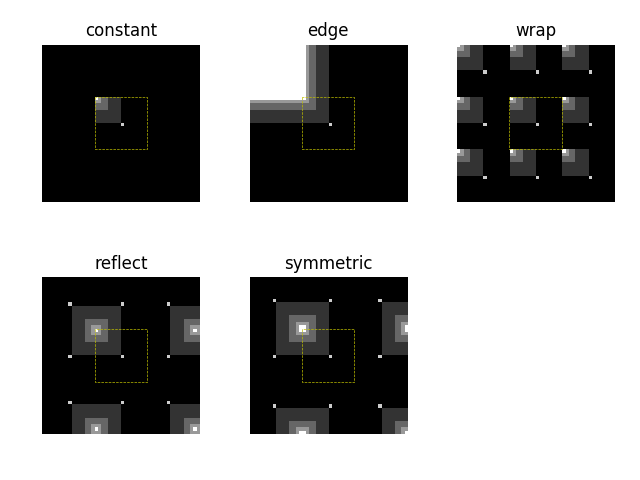
@msis this is expected. The mode defines what the interpolation "sees" outside of the original image, but the output of the operation is the original image "filling" the output shape, so you will only see subtle differences because only the edge pixels are affected. But they are affected:
In [12]: images = [resize(image, (image.shape[0] * 2, image.shape[1] * 2), mode=m, preserve_range=True)
    ...:           for m in modes]
    ...:

In [13]: images[0][0, :10]
Out[13]:
array([ 87.75  , 117.1875, 117.5625, 118.3125, 119.4375, 119.8125,
       119.4375, 119.0625, 118.6875, 118.125 ])

In [14]: images[1][0, :10]
Out[14]:
array([156.  , 156.25, 156.75, 157.75, 159.25, 159.75, 159.25, 158.75,
       158.25, 157.5 ])

In [15]: images[2][0, :10]
Out[15]:
array([145.875 , 147.5625, 148.1875, 149.25  , 150.75  , 151.3125,
       150.9375, 150.8125, 150.9375, 151.875 ])
What behaviour are you looking for?
 jni
on 27 Jul 2018
jni
on 27 Jul 2018
From the documentation, I understood that modes math the behavior of numpy.pad.
So I expect something as described in the interpolation documentation
msis
on 27 Jul 2018
@msis that's what's happening, but then the interpolation is creating an image that fills the entire output image. ie resize creates those arrays as above, then takes the area in the dotted line, and expands it to fill the entire output image. So the stuff outside the dotted line has a small effect on the borders. Try your code with the above image, and you get:
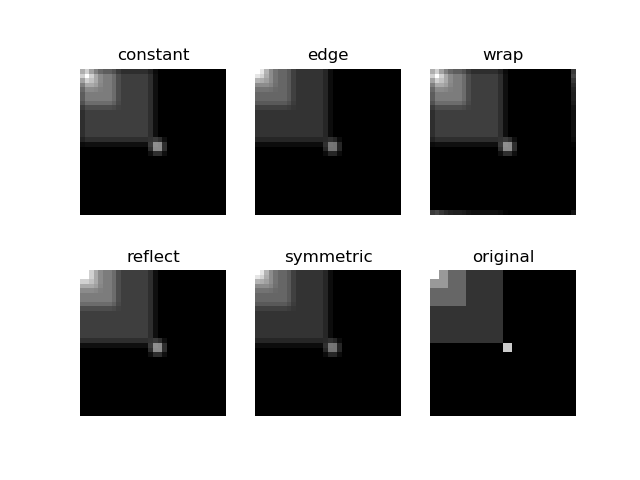
But that's it, only the borders will be affected. If you want to actually pad your array, you should be using numpy.pad, not resize, as the example does.
jni
on 28 Jul 2018
I see.
I didn't understand that the modes affect mostly the border.
I was thinking of something like padding.
Thanks!
msis
on 28 Jul 2018
Related issues
 emmanuelle
·
4Comments
emmanuelle
·
4Comments
 tirthajyoti
·
3Comments
tirthajyoti
·
3Comments
 wenchieh
·
3Comments
wenchieh
·
3Comments
 tolandwehr
·
3Comments
tolandwehr
·
3Comments
 kirk86
·
4Comments
kirk86
·
4Comments
Most helpful comment
From the documentation, I understood that modes math the behavior of numpy.pad.
So I expect something as described in the interpolation documentation
