Sceneform-android-sdk: ARCore Sceneform SceneView Rotate & Scale model
Hi, How can I rotate and scale the rendered model in SceneView using gesture. I know TransformableNode can be used for rotating model in ArFragment but in this case I have to rotate the model in SceneView using gesture & TransformableNode is not available in SceneView
 MuhammadAasharib
All 29 comments
Hy!
Maybe creating a custom node and implement it for yourself? Im pretty sure you can scale / rotate a custom node but im not 100% about that you can add the gesture detector too. I think its worth a try.
 stewe93
on 7 Feb 2019
stewe93
on 7 Feb 2019
did you succeed? @muhammadaasharib
 ishaang10
on 26 Mar 2019
ishaang10
on 26 Mar 2019
@ishaang10 no not till now
MuhammadAasharib
on 28 Mar 2019
@MuhammadAasharib Hi, you have to add Node to the scene as a TransformableNode
transformableNode = TransformableNode(transformationSystem).apply {
rotationController.isEnabled = true
scaleController.isEnabled = true
translationController.isEnabled = false // not support
renderable = model
setParent(node)
}
private fun makeTransformationSystem(): TransformationSystem
val selectionVisualizer = FootprintSelectionVisualizer()
val transformationSystem = TransformationSystem(this.resources.displayMetrics, selectionVisualizer)
return transformationSystem
}
and add listener to the scene
scene.addOnPeekTouchListener { hitTestResult, motionEvent ->
if (this::transformationSystem.isInitialized)
transformationSystem.onTouch(hitTestResult, motionEvent)
}
 ivstka95
on 28 Mar 2019
ivstka95
on 28 Mar 2019
@muhammadaasharib tell.me when you succeed. i havethesame problem but in arsceneview
ishaang10
on 28 Mar 2019
@ivstka95 can you also tell me in arfragment how to add translation to a node( but not a transfomable node) using gesture. thanks
ishaang10
on 28 Mar 2019
@ivstka95 can you please elaborate a little what your code actually do here? whats it for.!
what we do in this code is we simply delegate all touch events from scene to transformation system and this in turn transforms transformable node
ivstka95
on 28 Mar 2019
@ivstka95 can you also tell me in arfragment how to add translation to a node( but not a transfomable node) using gesture. thanks
i don't know, it is not designed for being transformed by gestures. why not to use transformable node for this purpose?
ivstka95
on 28 Mar 2019
@ivstka95 actually im adding button to increase scale of my model in particular axis
so if i add transormable node the buttons dont work as scale controller overrides my scale code. so i have to use just node . or if you know how can i override the i built scalecontroller then please tell me.
ishaang10
on 28 Mar 2019
@ivstka95 actually im adding button to increase scale of my model in particular axis
so if i add transormable node the buttons dont work as scale controller overrides my scale code. so i have to use just node . or if you know how can i override the i built scalecontroller then please tell me.
you can add node as a child of transformable node. just make sure to set renderable to child node, not to parent transformable node. then you can scale node programmatically, and transformable node by gesture(this will scale all childs of transformable node automatically). this is how i solved the same issue
ivstka95
on 28 Mar 2019
Interesting. cool ill try it out in few hours. pls check here after 6-7 hours. if ill have a doubt ill ask here
thank a lot :)
ishaang10
on 28 Mar 2019
@MuhammadAasharib Hi, you have to add Node to the scene as a TransformableNode
transformableNode = TransformableNode(transformationSystem).apply { rotationController.isEnabled = true scaleController.isEnabled = true translationController.isEnabled = false // not support renderable = model setParent(node) }
private fun makeTransformationSystem(): TransformationSystem val selectionVisualizer = FootprintSelectionVisualizer() val transformationSystem = TransformationSystem(this.resources.displayMetrics, selectionVisualizer) return transformationSystem }
and add listener to the scene
scene.addOnPeekTouchListener { hitTestResult, motionEvent -> if (this::transformationSystem.isInitialized) transformationSystem.onTouch(hitTestResult, motionEvent) }
@nbnminds
ivstka95
on 30 May 2019
Any updates?
 AndroidLibrariesYoutube
on 31 May 2019
AndroidLibrariesYoutube
on 31 May 2019
Hi there.
I'm very interested in functionality this too.
Sadly, my code (based on the suggested ideas shown here and there) doesn't work:
public class ModelActivity extends AppCompatActivity {
private SceneView _sceneView;
private Renderable _renderableModel;
private Node _nodeModel;
private TransformationSystem _ts;
private void addRenderableToScene(Renderable param){
_renderableModel=param;
//
TransformableNode nodeRoot=new TransformableNode(_ts);
nodeRoot.getRotationController().setEnabled(true);
nodeRoot.getScaleController().setEnabled(true);
nodeRoot.setParent(_sceneView.getScene());
nodeRoot.select();
//
_nodeModel = new Node();
_nodeModel.setRenderable(_renderableModel);
_nodeModel.setParent(nodeRoot);
}
private void createScene() {
// When you build a Renderable, Sceneform loads its resources in the background while returning
// a CompletableFuture. Call thenAccept(), handle(), or check isDone() before calling get().
ModelRenderable.builder()
.setSource(this, Uri.parse("FooModel.sfb"))
.build()
.thenAccept(renderable -> addRenderableToScene(renderable))
.exceptionally(
throwable -> {
Toast.makeText(this, "Unable to load renderable", Toast.LENGTH_LONG).show();
return null;
});
//
_sceneView.getScene().getCamera().setNearClipPlane(1f);
_sceneView.getScene().getCamera().setFarClipPlane(150f);
//
//_sceneView.getRenderer().setAntiAliasing(com.google.android.filament.View.AntiAliasing.FXAA);
}
@Override
protected void onCreate(Bundle savedInstanceState) {
super.onCreate(savedInstanceState);
setContentView(R.layout.activity_model);
//
_sceneView=findViewById(R.id.sceneView);
//
createScene();
//
_ts = new TransformationSystem(getResources().getDisplayMetrics(), new FootprintSelectionVisualizer());
//
_sceneView.getScene().addOnUpdateListener(new Scene.OnUpdateListener() {
@Override
public void onUpdate(FrameTime frameTime) {
if(_renderableModel!=null) {
_nodeModel.setLocalPosition(new Vector3(0f, 0f, -1f));
}
}
});
_sceneView.getScene().addOnPeekTouchListener(new Scene.OnPeekTouchListener() {
@Override
public void onPeekTouch(HitTestResult hitTestResult, MotionEvent motionEvent) {
try{
_ts.onTouch(hitTestResult,motionEvent);
}
catch (Exception e) {
e.printStackTrace();
}
}
});
}
...
}
Of course, my model is shown but gesture driven rotate and scale doesn't work.
Any ideas?
Thanks for your time.
 vortice3D
on 13 Jun 2019
vortice3D
on 13 Jun 2019
Hello vortice,
Your code looks fine to me- did you select the model first ?
Here is my code ( that works - only the 'rendered circle below the object indicating the model is scale/rotate/translate- able as your are used from ar fragment' is missing
`public class ModelRenderingActivity extends AppCompatActivity {
private static final String TAG = "ModelRenderingActivity";
private SceneView sceneView;
private static final int TROLLBLUME = 0;
private static final int TEUFELSABBISS=1;
private static final int BACHNELKENWURZ=2;
private static final int WIESENKNOPF=3;
private static final int N_RENDERABLES=4;
private final ModelRenderable[] renderables=new ModelRenderable[N_RENDERABLES];
private boolean modelPlaced=false;
private TransformationSystem transformationSystem;
@Override
protected void onCreate(Bundle savedInstanceState) {
super.onCreate(savedInstanceState);
loadModel(TROLLBLUME,R.raw.trollblume_anim_01);
loadModel(TEUFELSABBISS,R.raw.teufelsabbiss_anim_01);
loadModel(BACHNELKENWURZ,R.raw.bachnelkenwurz_anim_01);
loadModel(WIESENKNOPF,R.raw.wiesenknopf_anim_01);
setContentView(R.layout.activity_model_rendering);
sceneView=findViewById(R.id.scene_view);
transformationSystem=new TransformationSystem(getResources().getDisplayMetrics(),new FootprintSelectionVisualizer());
//sceneView.getScene().setOnTouchListener(this::onTouch);
//sceneView.getScene().addOnPeekTouchListener(this::onTouch);
sceneView.getScene().addOnUpdateListener(this::onFrameUpdate);
sceneView.getRenderer().setClearColor(new com.google.ar.sceneform.rendering.Color(Color.LTGRAY));
sceneView.getScene().addOnPeekTouchListener(new Scene.OnPeekTouchListener() {
@Override
public void onPeekTouch(HitTestResult hitTestResult, MotionEvent motionEvent) {
transformationSystem.onTouch(hitTestResult,motionEvent);
}
});
}
@Override
protected void onResume(){
super.onResume();
try {
sceneView.resume();
} catch (CameraNotAvailableException e) {
e.printStackTrace();
}
}
@Override
protected void onPause(){
super.onPause();
sceneView.pause();
}
private void onFrameUpdate(FrameTime frameTime) {
Log.d(TAG,"onFrameUpdate");
if(!modelPlaced){
placeModel();
}
}
private void placeModel(){
ModelRenderable renderable=renderables[0];
if (renderable == null) {
Log.d(TAG,"Renderable not yet ready");
return;
}
//Node modelNode = new Node();
TransformableNode modelNode=new TransformableNode(transformationSystem);
modelNode.getRotationController().setEnabled(true);
modelNode.getScaleController().setEnabled(true);
modelNode.getTranslationController().setEnabled(false);
//TransformableNode modelNode2=new TransformableNode(transformationSystem).apply()
modelNode.setRenderable(renderable);
sceneView.getScene().addChild(modelNode);
modelNode.setLocalPosition(new Vector3(0, 0, -0.5f));
Log.d(TAG,"Placed renderable");
modelPlaced=true;
}
private void loadModel(final int index,final int resourceID){
CompletableFuture<ModelRenderable> future =
ModelRenderable.builder()
.setSource(this, resourceID)
.build()
.thenApply(renderable -> (renderables[index]=renderable))
.exceptionally(throwable ->this.onException(resourceID, throwable));
}
ModelRenderable onException(int id, Throwable throwable) {
Log.d(TAG, "Unable to load renderable: " + id,throwable);
return null;
}
}
`
Note that you mustn't enable the 'translation controller' or else it will crash
Also, you have to select / tap on your model renderable before inputs are properly forwarded, like in ar fragment.
 Consti10
on 27 Jun 2019
Consti10
on 27 Jun 2019
Hi Consti10, and thank you very much for the completeness of your comment.
I'm going to test it today or tomorrow. I'll let you know.
Again, thanks for your time.
vortice3D
on 1 Jul 2019
Hi Consti10; unfortunately your code (more or less the same as mine) is not working in order to rotate/zoom the model (renderable) with gestures.
Any tip on it?
vortice3D
on 2 Jul 2019
Hello,
First, did you select the model before trying to rotate / zoom on it ?
I tested the above code both on pixel 3 and emulator. Note that only rotating (pinch) and scaling (2-finger zoom) will work.
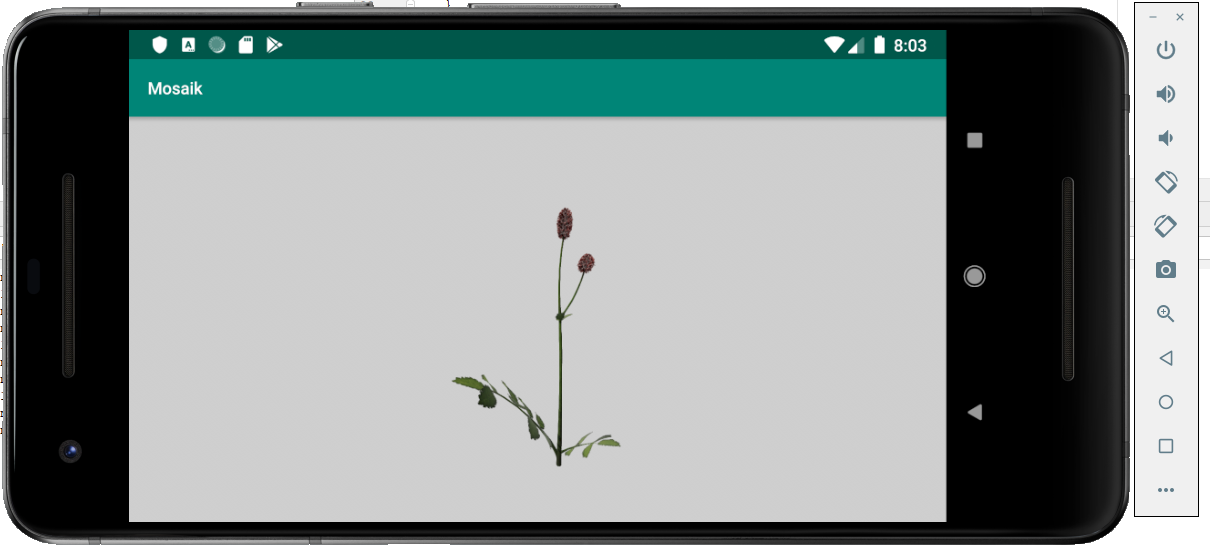
Nonetheless, the gestures from AR planes are not really convenient for 3d model viewing, I might implement a custom solution for that. Will post code here once I am done.
Consti10
on 3 Jul 2019
Here is the code again ( should be almost exactly the same, but could be wrong)
`
public class ModelRenderingActivity extends AppCompatActivity {
private static final String TAG = "ModelRenderingActivity";
private SceneView sceneView;
private static final int TROLLBLUME = 0;
private static final int TEUFELSABBISS=1;
private static final int BACHNELKENWURZ=2;
private static final int WIESENKNOPF=3;
private static final int N_RENDERABLES=4;
private final ModelRenderable[] renderables=new ModelRenderable[N_RENDERABLES];
private boolean modelPlaced=false;
private TransformationSystem transformationSystem;
@Override
protected void onCreate(Bundle savedInstanceState) {
super.onCreate(savedInstanceState);
loadModel(TROLLBLUME,R.raw.trollblume_anim_01);
loadModel(TEUFELSABBISS,R.raw.teufelsabbiss_anim_01);
loadModel(BACHNELKENWURZ,R.raw.bachnelkenwurz_anim_01);
loadModel(WIESENKNOPF,R.raw.wiesenknopf_anim_01);
setContentView(R.layout.activity_model_rendering);
sceneView=findViewById(R.id.scene_view);
transformationSystem=new TransformationSystem(getResources().getDisplayMetrics(),new FootprintSelectionVisualizer());
//sceneView.getScene().setOnTouchListener(this::onTouch);
//sceneView.getScene().addOnPeekTouchListener(this::onTouch);
sceneView.getScene().addOnUpdateListener(this::onFrameUpdate);
sceneView.getRenderer().setClearColor(new com.google.ar.sceneform.rendering.Color(Color.LTGRAY));
sceneView.getScene().addOnPeekTouchListener(new Scene.OnPeekTouchListener() {
@Override
public void onPeekTouch(HitTestResult hitTestResult, MotionEvent motionEvent) {
transformationSystem.onTouch(hitTestResult,motionEvent);
}
});
//move camera a littlebit 'up' from its default position to have a better view
sceneView.getScene().getCamera().setLocalPosition(new Vector3(0,0.2f,0));
}
@Override
protected void onResume(){
super.onResume();
try {
sceneView.resume();
} catch (CameraNotAvailableException e) {
e.printStackTrace();
}
}
@Override
protected void onPause(){
super.onPause();
sceneView.pause();
}
private void onFrameUpdate(FrameTime frameTime) {
Log.d(TAG,"onFrameUpdate");
if(!modelPlaced){
placeModel();
}
}
private void placeModel(){
ModelRenderable renderable=renderables[3];
if (renderable == null) {
Log.d(TAG,"Renderable not yet ready");
return;
}
//Node modelNode = new Node();
TransformableNode modelNode=new TransformableNode(transformationSystem);
modelNode.getRotationController().setEnabled(true);
modelNode.getScaleController().setEnabled(true);
modelNode.getTranslationController().setEnabled(false);
modelNode.setRenderable(renderable);
sceneView.getScene().addChild(modelNode);
modelNode.setLocalPosition(new Vector3(0, 0, -0.25f));
Log.d(TAG,"Placed renderable");
modelPlaced=true;
}
private void loadModel(final int index,final int resourceID){
CompletableFuture<ModelRenderable> future =
ModelRenderable.builder()
.setSource(this, resourceID)
.build()
.thenApply(renderable -> (renderables[index]=renderable))
.exceptionally(throwable ->this.onException(resourceID, throwable));
}
ModelRenderable onException(int id, Throwable throwable) {
Log.d(TAG, "Unable to load renderable: " + id,throwable);
return null;
}
}
`
and xml:
xmlns:tools="http://schemas.android.com/tools"
android:layout_width="match_parent"
android:layout_height="match_parent"
tools:context=".ModelRenderingActivity">
<com.google.ar.sceneform.SceneView
android:id="@+id/scene_view"
android:layout_width="match_parent"
android:layout_height="match_parent"/>
btw, I tested it both on 1.09.0 and 1.10.0
Consti10
on 3 Jul 2019
I just found out, you can select the node via code this way:
transformationSystem.selectNode(modelNode);
e.g.
private void placeModel(){
        ModelRenderable renderable=renderables[3];
        if (renderable == null) {
            Log.d(TAG,"Renderable not yet ready");
            return;
        }
        //Node modelNode = new Node();
        TransformableNode modelNode=new TransformableNode(transformationSystem);
        modelNode.getRotationController().setEnabled(true);
        modelNode.getScaleController().setEnabled(true);
        modelNode.getTranslationController().setEnabled(false);
        modelNode.setRenderable(renderable);
        sceneView.getScene().addChild(modelNode);
        modelNode.setLocalPosition(new Vector3(0, 0, -0.25f));
        Log.d(TAG,"Placed renderable");
        modelPlaced=true;
        **transformationSystem.selectNode(modelNode);**
    }
Consti10
on 3 Jul 2019
Hi again Consti.
First of all thank you for your time.
I'll test it as soon as possible with the addition of the new line:
transformationSystem.selectNode(modelNode);
It looks as that could be the missing piece for the puzzle.
Thank you very much.
vortice3D
on 3 Jul 2019
Hi again Consti.
First of all thank you for your time.
I'll test it as soon as possible with the addition of the new line:
transformationSystem.selectNode(modelNode);It looks as that could be the missing piece for the puzzle.
Thank you very much.
If your model renderable has no collision shape you cannot select it (via tapping).
That's the only missing puzzle I can think of.
Consti10
on 3 Jul 2019
Here is how to control camera manually, just in case somebody need it:
```
@Override
public void onClick(View view) {
Vector3 cameraPosition = mSceneView.getScene().getCamera().getWorldPosition();
switch (view.getId()) {
case R.id.btn_left:
cameraPosition.x += 0.2;
mSceneView.getScene().getCamera().setWorldPosition(cameraPosition);
break;
case R.id.btn_right:
cameraPosition.x += -0.2;
mSceneView.getScene().getCamera().setWorldPosition(cameraPosition);
break;
case R.id.btn_up:
cameraPosition.y += -0.2;
mSceneView.getScene().getCamera().setWorldPosition(cameraPosition);
break;
case R.id.btn_down:
cameraPosition.y += 0.2;
mSceneView.getScene().getCamera().setWorldPosition(cameraPosition);
break;
case R.id.btn_z_plus:
cameraPosition.z += -0.2;
mSceneView.getScene().getCamera().setWorldPosition(cameraPosition);
break;
case R.id.btn_z_minus:
cameraPosition.z += 0.2;
mSceneView.getScene().getCamera().setWorldPosition(cameraPosition);
break;
}
}
```
 vasiledoe
on 11 Jul 2019
vasiledoe
on 11 Jul 2019
Did anyone come to a final solution?
 Desertic
on 28 Sep 2019
Desertic
on 28 Sep 2019
@Consti10 I can get the scale function to work follow your code. But the rotation function still not working.
Edit: OK after reading the source code, I found the TransformSystem is using Twist gesture for object rotating.... https://github.com/google-ar/sceneform-android-sdk/blob/master/sceneformux/ux/src/main/java/com/google/ar/sceneform/ux/TransformableNode.java
 kevinzhow
on 1 Nov 2019
kevinzhow
on 1 Nov 2019
You can use Quaterninon to rotate the 3D Object.
// Create the Anchor.
Anchor anchor = hitResult.createAnchor();
AnchorNode anchorNode = new AnchorNode(anchor);
anchorNode.setParent(fragment.getArSceneView().getScene());
// Create the transformable andy and add it to the anchor.
TransformableNode node= new TransformableNode(fragment.getTransformationSystem());
node.setLocalRotation(Quaternion.axisAngle(new Vector3(0f, 0, 1), 90f));
node.getScaleController().setMaxScale(0.02f);
node.getScaleController().setMinScale(0.01f);
node.setParent(anchorNode);
node.setRenderable(andyRenderable);
node.select();
For example In this example the 3D Object is rotated in the z direction by 90 degree. And it adjusts the scale of the object as min and max. Hence if the object is so closed to device, then its scale is closed to max value, in my code 0.02f.
 cemalaytekin
on 22 Nov 2019
cemalaytekin
on 22 Nov 2019
Hello vortice,
Your code looks fine to me- did you select the model first ?Here is my code ( that works - only the 'rendered circle below the object indicating the model is scale/rotate/translate- able as your are used from ar fragment' is missing
`public class ModelRenderingActivity extends AppCompatActivity {
private static final String TAG = "ModelRenderingActivity";private SceneView sceneView; private static final int TROLLBLUME = 0; private static final int TEUFELSABBISS=1; private static final int BACHNELKENWURZ=2; private static final int WIESENKNOPF=3; private static final int N_RENDERABLES=4; private final ModelRenderable[] renderables=new ModelRenderable[N_RENDERABLES]; private boolean modelPlaced=false; private TransformationSystem transformationSystem; @Override protected void onCreate(Bundle savedInstanceState) { super.onCreate(savedInstanceState); loadModel(TROLLBLUME,R.raw.trollblume_anim_01); loadModel(TEUFELSABBISS,R.raw.teufelsabbiss_anim_01); loadModel(BACHNELKENWURZ,R.raw.bachnelkenwurz_anim_01); loadModel(WIESENKNOPF,R.raw.wiesenknopf_anim_01); setContentView(R.layout.activity_model_rendering); sceneView=findViewById(R.id.scene_view); transformationSystem=new TransformationSystem(getResources().getDisplayMetrics(),new FootprintSelectionVisualizer()); //sceneView.getScene().setOnTouchListener(this::onTouch); //sceneView.getScene().addOnPeekTouchListener(this::onTouch); sceneView.getScene().addOnUpdateListener(this::onFrameUpdate); sceneView.getRenderer().setClearColor(new com.google.ar.sceneform.rendering.Color(Color.LTGRAY)); sceneView.getScene().addOnPeekTouchListener(new Scene.OnPeekTouchListener() { @Override public void onPeekTouch(HitTestResult hitTestResult, MotionEvent motionEvent) { transformationSystem.onTouch(hitTestResult,motionEvent); } }); } @Override protected void onResume(){ super.onResume(); try { sceneView.resume(); } catch (CameraNotAvailableException e) { e.printStackTrace(); } } @Override protected void onPause(){ super.onPause(); sceneView.pause(); } private void onFrameUpdate(FrameTime frameTime) { Log.d(TAG,"onFrameUpdate"); if(!modelPlaced){ placeModel(); } } private void placeModel(){ ModelRenderable renderable=renderables[0]; if (renderable == null) { Log.d(TAG,"Renderable not yet ready"); return; } //Node modelNode = new Node(); TransformableNode modelNode=new TransformableNode(transformationSystem); modelNode.getRotationController().setEnabled(true); modelNode.getScaleController().setEnabled(true); modelNode.getTranslationController().setEnabled(false); //TransformableNode modelNode2=new TransformableNode(transformationSystem).apply() modelNode.setRenderable(renderable); sceneView.getScene().addChild(modelNode); modelNode.setLocalPosition(new Vector3(0, 0, -0.5f)); Log.d(TAG,"Placed renderable"); modelPlaced=true; } private void loadModel(final int index,final int resourceID){ CompletableFuture<ModelRenderable> future = ModelRenderable.builder() .setSource(this, resourceID) .build() .thenApply(renderable -> (renderables[index]=renderable)) .exceptionally(throwable ->this.onException(resourceID, throwable)); } ModelRenderable onException(int id, Throwable throwable) { Log.d(TAG, "Unable to load renderable: " + id,throwable); return null; }}
`Note that you mustn't enable the 'translation controller' or else it will crash
Also, you have to select / tap on your model renderable before inputs are properly forwarded, like in ar fragment.
Where we add this code?Create a new java file or add in main activity?
 Farah7402
on 2 Dec 2019
Farah7402
on 2 Dec 2019
`package com.farah.imagedetectionandroidapplication;
import androidx.appcompat.app.AppCompatActivity;
import android.Manifest;
import android.graphics.Bitmap;
import android.graphics.BitmapFactory;
import android.os.Bundle;
import android.widget.Toast;
import com.google.ar.core.AugmentedImage;
import com.google.ar.core.AugmentedImageDatabase;
import com.google.ar.core.Config;
import com.google.ar.core.Frame;
import com.google.ar.core.Session;
import com.google.ar.core.TrackingState;
import com.google.ar.core.exceptions.CameraNotAvailableException;
import com.google.ar.core.exceptions.UnavailableApkTooOldException;
import com.google.ar.core.exceptions.UnavailableArcoreNotInstalledException;
import com.google.ar.core.exceptions.UnavailableDeviceNotCompatibleException;
import com.google.ar.core.exceptions.UnavailableSdkTooOldException;
import com.google.ar.sceneform.ArSceneView;
import com.google.ar.sceneform.FrameTime;
import com.google.ar.sceneform.Scene;
import com.karumi.dexter.Dexter;
import com.karumi.dexter.PermissionToken;
import com.karumi.dexter.listener.PermissionDeniedResponse;
import com.karumi.dexter.listener.PermissionGrantedResponse;
import com.karumi.dexter.listener.PermissionRequest;
import com.karumi.dexter.listener.single.PermissionListener;
import java.io.IOException;
import java.io.InputStream;
import java.util.Collection;
public class MainActivity extends AppCompatActivity implements Scene.OnUpdateListener {
private ArSceneView arView;
private Session session;
private boolean shouldConfigureSession = false;
@Override
protected void onCreate(Bundle savedInstanceState) {
super.onCreate(savedInstanceState);
setContentView(R.layout.activity_main);
arView = (ArSceneView) findViewById(R.id.arView);
Dexter.withActivity(this)
.withPermission(Manifest.permission.CAMERA)
.withListener(new PermissionListener() {
@Override
public void onPermissionGranted(PermissionGrantedResponse response) {
setupSession();
}
@Override
public void onPermissionDenied(PermissionDeniedResponse response) {
Toast.makeText(MainActivity.this, "Permission need to display camera", Toast.LENGTH_LONG).show();
}
@Override
public void onPermissionRationaleShouldBeShown(PermissionRequest permission, PermissionToken token) {
}
}).check();
initSceneView();
}
private void initSceneView() {
arView.getScene().addOnUpdateListener(this);
}
private void setupSession() {
if (session == null) {
try {
session = new Session(this);
} catch (UnavailableArcoreNotInstalledException e) {
e.printStackTrace();
} catch (UnavailableSdkTooOldException e) {
e.printStackTrace();
} catch (UnavailableDeviceNotCompatibleException e) {
e.printStackTrace();
} catch (UnavailableApkTooOldException e) {
e.printStackTrace();
}
shouldConfigureSession = true;
}
if (shouldConfigureSession) {
configSession();
shouldConfigureSession = false;
arView.setupSession(session);
}
try {
session.resume();
arView.resume();
} catch (CameraNotAvailableException e) {
e.printStackTrace();
session = null;
return;
}
}
private void configSession() {
Config config = new Config(session);
if (!buildDatabase(config)) {
Toast.makeText(this, "Error database", Toast.LENGTH_SHORT).show();
}
config.setUpdateMode(Config.UpdateMode.LATEST_CAMERA_IMAGE);
session.configure(config);
}
private boolean buildDatabase(Config config) {
AugmentedImageDatabase augmentedImageDatabase;
// Bitmap bitmap = loadimage();
// if (bitmap == null)
// return false;
try {
InputStream inputStream = getAssets().open("edmtdev.imgdb");
augmentedImageDatabase = AugmentedImageDatabase.deserialize(session,inputStream);
config.setAugmentedImageDatabase(augmentedImageDatabase);
return true;
}
catch (IOException e) {
e.printStackTrace();
return false;
}
}
private Bitmap loadimage() {
try {
InputStream is = getAssets().open("dino.jpg");
return BitmapFactory.decodeStream(is);
} catch (IOException e) {
e.printStackTrace();
}
return null;
}
@Override
public void onUpdate(FrameTime frameTime) {
Frame frame = arView.getArFrame();
Collection<AugmentedImage> updateAugmentedImg = frame.getUpdatedTrackables(AugmentedImage.class);
for (AugmentedImage image : updateAugmentedImg) {
if (image.getTrackingState() == TrackingState.TRACKING) {
if (image.getName().equals("lion.jpg")) {
MyARNode node = new MyARNode(this, R.raw.van);
node.setImage(image);
arView.getScene().addChild(node);
}
/* else if (image.getName().equals("dino.jpg")) {
MyARNode node = new MyARNode(this, R.raw.andy);
node.setImage(image);
arView.getScene().addChild(node);
}*/
}
}
}
@Override
protected void onResume() {
super.onResume();
Dexter.withActivity(this)
.withPermission(Manifest.permission.CAMERA)
.withListener(new PermissionListener() {
@Override
public void onPermissionGranted(PermissionGrantedResponse response) {
setupSession();
}
@Override
public void onPermissionDenied(PermissionDeniedResponse response) {
Toast.makeText(MainActivity.this, "Permission need to display camera", Toast.LENGTH_LONG).show();
}
@Override
public void onPermissionRationaleShouldBeShown(PermissionRequest permission, PermissionToken token) {
}
}).check();
}
@Override
protected void onPause() {
super.onPause();
if(session!=null)
{
arView.pause();
session.pause();
}
}
}
This is main activity code`
Farah7402
on 2 Dec 2019
`package com.farah.imagedetectionandroidapplication;
import android.content.Context;
import android.view.Display;
import com.google.ar.core.Anchor;
import com.google.ar.core.AugmentedImage;
import com.google.ar.core.Pose;
import com.google.ar.sceneform.AnchorNode;
import com.google.ar.sceneform.Node;
import com.google.ar.sceneform.math.Quaternion;
import com.google.ar.sceneform.math.Vector3;
import com.google.ar.sceneform.rendering.ModelRenderable;
import java.util.concurrent.CompletableFuture;
public class MyARNode extends AnchorNode {
private AugmentedImage image;
private static CompletableFuture<ModelRenderable> modelRenderableCompletableFuture;
public MyARNode(Context context,int modelId)
{
modelRenderableCompletableFuture = ModelRenderable.builder()
.setRegistryId("my_model")
.setSource(context,modelId)
.build();
}
public AugmentedImage getImage() {
return image;
}
public void setImage(final AugmentedImage image) {
this.image = image;
if(!modelRenderableCompletableFuture.isDone())
{
CompletableFuture.allOf(modelRenderableCompletableFuture)
.thenAccept((Void aVoid)->
{
setImage(image);
}).exceptionally(throwable ->
{
return null;
});
}
setAnchor(image.createAnchor(image.getCenterPose()));
Vector3 localPosition = new Vector3();
Node node = new Node();
Pose pose =Pose.makeTranslation(0.0f,0.0f,0.25f);
node.setParent(this);
node.setLocalPosition(new Vector3(pose.tx(),pose.ty(),pose.tz()));
node.setLocalRotation(new Quaternion(pose.qx(),pose.qy(),pose.qz(),pose.qw()));
node.setLocalRotation(Quaternion.axisAngle(new Vector3(1f, 0, 0), 0f));
node.setRenderable(modelRenderableCompletableFuture.getNow(null));
localPosition.set(0.5f * image.getExtentX(), 0.5f, 0.5f * image.getExtentZ());
node = new Node();
node.setParent(this);
node.setLocalPosition(localPosition);
// node.setRenderable(modelRenderableCompletableFuture.getNow(null));
}
}
And this is ArNode code that is java class,I am using arScenceView in my project.And want to rotate a model and zoom in and zoom out when user touches the model`
I
Farah7402
on 2 Dec 2019
Related issues
 KamikX
·
4Comments
KamikX
·
4Comments
 tigran-babajanyan
·
3Comments
tigran-babajanyan
·
3Comments
 peronecode
·
3Comments
peronecode
·
3Comments
 chiaolinghong3d
·
3Comments
chiaolinghong3d
·
3Comments
 LukasStancikas
·
3Comments
LukasStancikas
·
3Comments
Most helpful comment
I just found out, you can select the node via code this way:
transformationSystem.selectNode(modelNode);e.g.
private void placeModel(){
        ModelRenderable renderable=renderables[3];
        if (renderable == null) {
            Log.d(TAG,"Renderable not yet ready");
            return;
        }
        //Node modelNode = new Node();
        TransformableNode modelNode=new TransformableNode(transformationSystem);
        modelNode.getRotationController().setEnabled(true);
        modelNode.getScaleController().setEnabled(true);
        modelNode.getTranslationController().setEnabled(false);
        modelNode.setRenderable(renderable);
        sceneView.getScene().addChild(modelNode);
        modelNode.setLocalPosition(new Vector3(0, 0, -0.25f));
        Log.d(TAG,"Placed renderable");
        modelPlaced=true;
        **transformationSystem.selectNode(modelNode);**
    }