Sceneform-android-sdk: The screenshot is not full.
hi,
To take a screenshot, I'm using the captureScreenshot function like this.
arFragment.getArSceneView().getRenderer().captureScreenshot(new Renderer.OnScreenshotListener() {
    @Override
    public void onScreenshotResult(ByteBuffer image, int width, int height) {
        Bitmap bitmap = Bitmap.createBitmap(width, height, Bitmap.Config.ARGB_8888);
        bitmap.copyPixelsFromBuffer(image);

        ...

        Log.d("testt", width + "//" + height);
    }
});
However, the result was as follows.
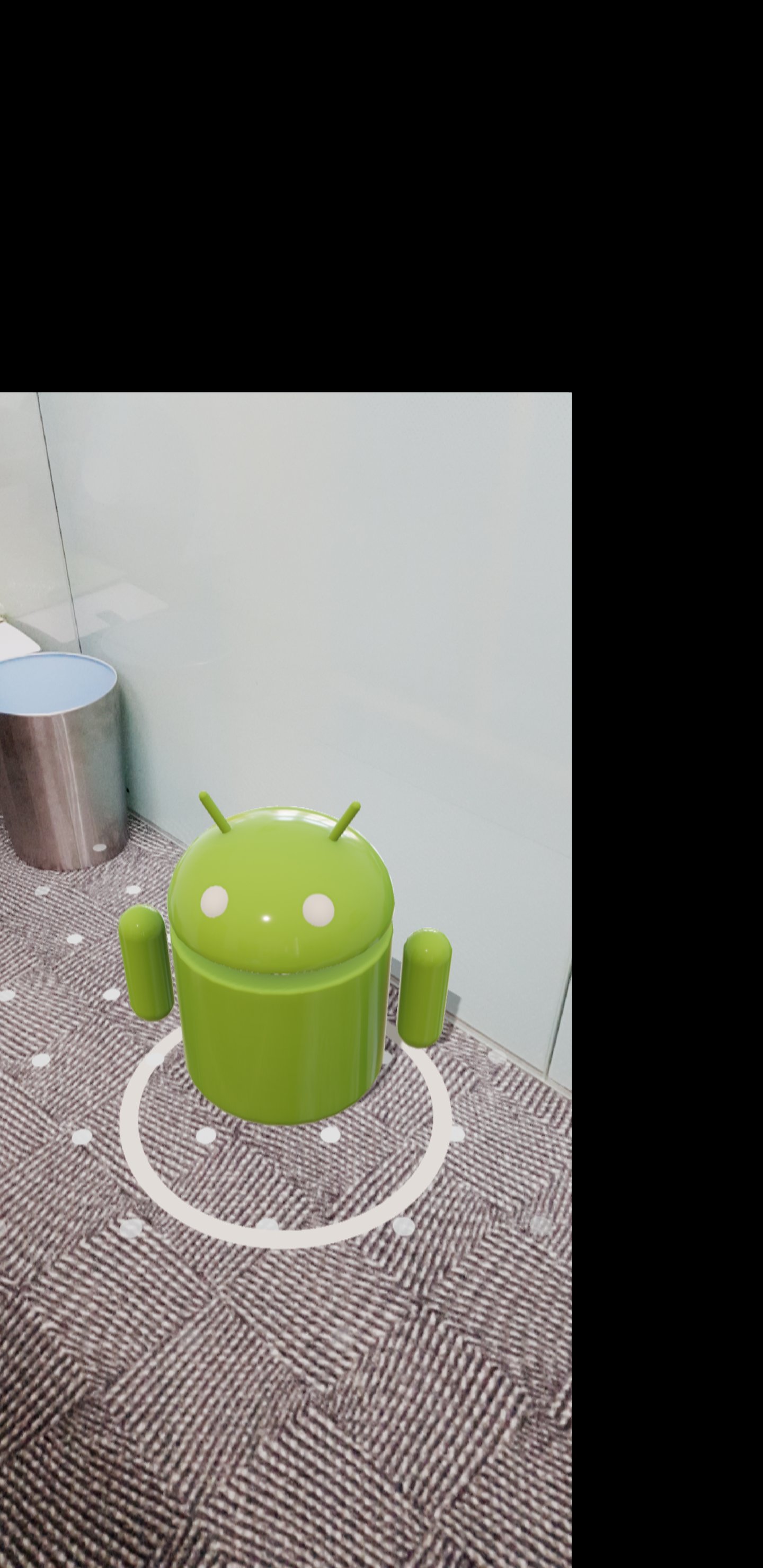
I think this problem is caused by Renderer.MAXIMUM_RESOLUTION.
Because the resolution of the device what i'm using is 1440 * 2960.
Is there any way to solve this problem?
 hcjung2000
All 7 comments
I have the same issue for devices that have a higher resolution than 1080p. The width and height I get from the OnScreenshotListener is the full resolution of the device as well as the buffer, but the actual screenshot is only 1080p and in the bottom left corner.
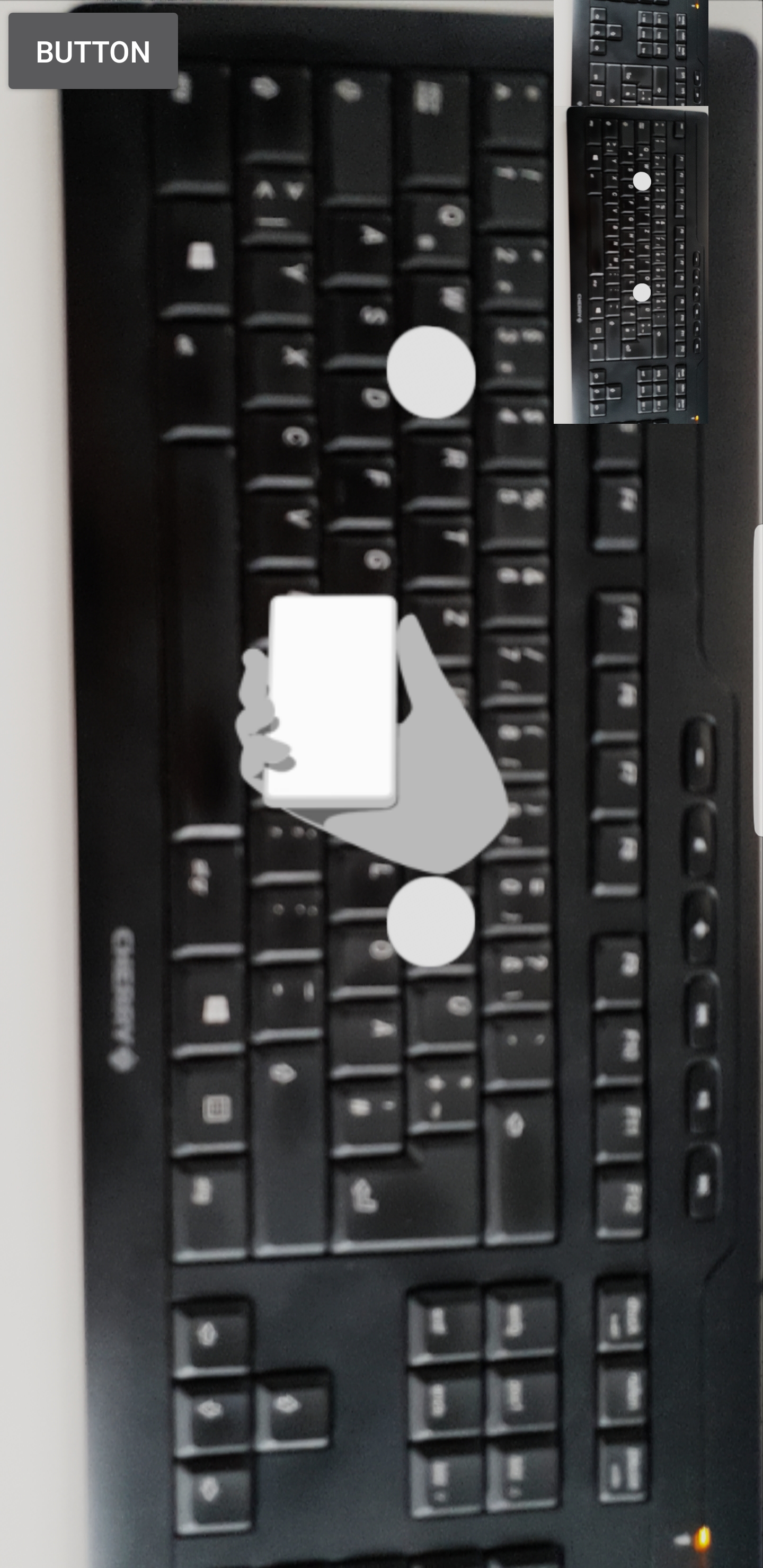
A small addition to that:
When getting the second screenshot parts of the first screenshot are included in the new one but mirrored (see screenshot on Galaxy S9). In this example I just show the captured image in a view in the top right corner of the screen.
 dev4711
on 5 Jul 2018
dev4711
on 5 Jul 2018
Internally Sceneform renders at a max resolution of 1080p for performance reasons. Looks like there could be a bug in the screenshot system reporting the wrong resolution for the captured image.
 romainguy
on 6 Jul 2018
romainguy
on 6 Jul 2018
A better way to capture a screenshot is to use the PixelCopy API which captures a Surface to a Bitmap.
The Codelab for Sceneform has an example on how to do this:
private void takePhoto() {
   final String filename = generateFilename();
   ArSceneView view = fragment.getArSceneView();

   // Create a bitmap the size of the scene view.
   final Bitmap bitmap = Bitmap.createBitmap(view.getWidth(), view.getHeight(),
           Bitmap.Config.ARGB_8888);

   // Create a handler thread to offload the processing of the image.
   final HandlerThread handlerThread = new HandlerThread("PixelCopier");
   handlerThread.start();
   // Make the request to copy.
   PixelCopy.request(view, bitmap, (copyResult) -> {
       if (copyResult == PixelCopy.SUCCESS) {
           try {
               saveBitmapToDisk(bitmap, filename);
           } catch (IOException e) {
               Toast toast = Toast.makeText(MainActivity.this, e.toString(),
                       Toast.LENGTH_LONG);
               toast.show();
               return;
           }
           Snackbar snackbar = Snackbar.make(findViewById(android.R.id.content),
                   "Photo saved", Snackbar.LENGTH_LONG);
           snackbar.setAction("Open in Photos", v -> {
               File photoFile = new File(filename);

               Uri photoURI = FileProvider.getUriForFile(MainActivity.this,
                       MainActivity.this.getPackageName() + ".ar.codelab.name.provider",
                       photoFile);
               Intent intent = new Intent(Intent.ACTION_VIEW, photoURI);
               intent.setDataAndType(photoURI, "image/*");
               intent.addFlags(Intent.FLAG_GRANT_READ_URI_PERMISSION);
               startActivity(intent);

           });
           snackbar.show();
       } else {
           Toast toast = Toast.makeText(MainActivity.this,
                   "Failed to copyPixels: " + copyResult, Toast.LENGTH_LONG);
           toast.show();
       }
       handlerThread.quitSafely();
   }, new Handler(handlerThread.getLooper()));
}
 claywilkinson
on 7 Jul 2018
claywilkinson
on 7 Jul 2018
use this method instead: arFragment.getArSceneView().getRenderer().captureScreenshot(Renderer.ScreenshotType.CAMERA_STREAM, new Renderer.OnScreenshotListener() {
@Override
public void onScreenshotResult(ByteBuffer image, int width, int height) {
Bitmap bitmap = Bitmap.createBitmap(width, height, Bitmap.Config.ARGB_8888);
bitmap.copyPixelsFromBuffer(image);
}
});
 scolar
on 7 Jul 2018
scolar
on 7 Jul 2018
@romainguy I think so too.
@claywilkinson It works, thanks!
@scolar It solves the resolution problem, but the AR products are not displayed (on screenshot).
hcjung2000
on 9 Jul 2018
But still the issue with the wrong resolution exists. Not sure whether this issue should be closed. Most likely this is a bug.
dev4711
on 12 Jul 2018
Re-closing since this is not a public API.
claywilkinson
on 22 Aug 2018
Related issues
 JessHolle
·
3Comments
JessHolle
·
3Comments
 LukasStancikas
·
3Comments
LukasStancikas
·
3Comments
 arilotter
·
3Comments
arilotter
·
3Comments
 rohitagarwal3011
·
4Comments
rohitagarwal3011
·
4Comments
 michaelvogt
·
4Comments
michaelvogt
·
4Comments