Sceneform-android-sdk: Show debugging points
In ARCore sample there are points in the view, how to enable this in Sceneform sample?
I would also like to know how to disable "moving hand".
Thank you.
 izdi
izdi
All 12 comments
For your second question, see #68 . As for the first, I'm also curious about it. I think you can get the known points with this :
PointCloud pC = arFragment.getArSceneView().getArFrame().acquirePointCloud();
FloatBuffer points = pC.getPoints();
But I don't know if there is a simple way to show them other than creating a renderable for each.
 dyavil
on 2 Jul 2018
dyavil
on 2 Jul 2018
ARKit has this option on configuration level of session.
Visually it's easier for me to understand that trackable points exist in the area I taped.
izdi
on 2 Jul 2018
I wrote a PointCloudNode class to primatively display the point cloud. It's currently on my personal fork (I am working to get it checked in here), but feel free to use it or simply look at it for inspiration.
 claywilkinson
on 3 Jul 2018
claywilkinson
on 3 Jul 2018
I would also like to have the point cloud rendering this as a debug option.
It is a good indicator of how good the tracking is working.
 dev4711
on 4 Jul 2018
dev4711
on 4 Jul 2018
@claywilkinson did you find a workaround to display points that are always facing the camera?
Since points are attached to a Node, the drawing takes into account the initial node's rotation, and therefore when you move the camera, they no longer face the camera (and can become invisible when rotation becomes 90°).
Also, points are drawn as triangles but shoulsn't they be squares? (or even cubes to avoid the rotation issue?)
 SimonMarquis
on 5 Jul 2018
SimonMarquis
on 5 Jul 2018
Hi @SimonMarquis - The geometry for the point cloud is updated on every frame (since the point cloud is updated every frame too). The points are in world space coordinates, so adding them to a unrotated node in the scene positions them correctly for the current camera pose.
Are you seeing the points disappearing but still in the cloud, or are they removed from the point cloud data?
I am using triangles to keep it simple, feel free to copy the code and customize it. I'd love to see what you come up with.
claywilkinson
on 7 Jul 2018
Are you seeing the points disappearing but still in the cloud, or are they removed from the point cloud data?
I was hoping to find a way to keep them visible whatever the camera pose.
I am using triangles to keep it simple, feel free to copy the code and customize it.
Then why are you using 4 points in your draw commands? Triangles should only require 3 points (or am I missing something here?)
SimonMarquis
on 9 Jul 2018
@SimonMarquis - I changed the rendering to be pyramids, so they are visible from all angles. Thanks for pointing out that my code was incomplete! PointCloudNode.java.
claywilkinson
on 11 Jul 2018
👍 for the pyramids choice.
Unfortunately, they still appear as flat (2D) triangles when I change the camera orientation.
Did I miss something to enable or configure on the AR rendering side?
SimonMarquis
on 13 Jul 2018
Sorry about that - I had some of the points backwards. Now it works:

claywilkinson
on 13 Jul 2018
Closing due to inactivity. A feature request for PointCloudRenderer is tracked at https://github.com/google-ar/sceneform-android-sdk/issues/207
 malik-at-work
on 25 Jul 2018
malik-at-work
on 25 Jul 2018
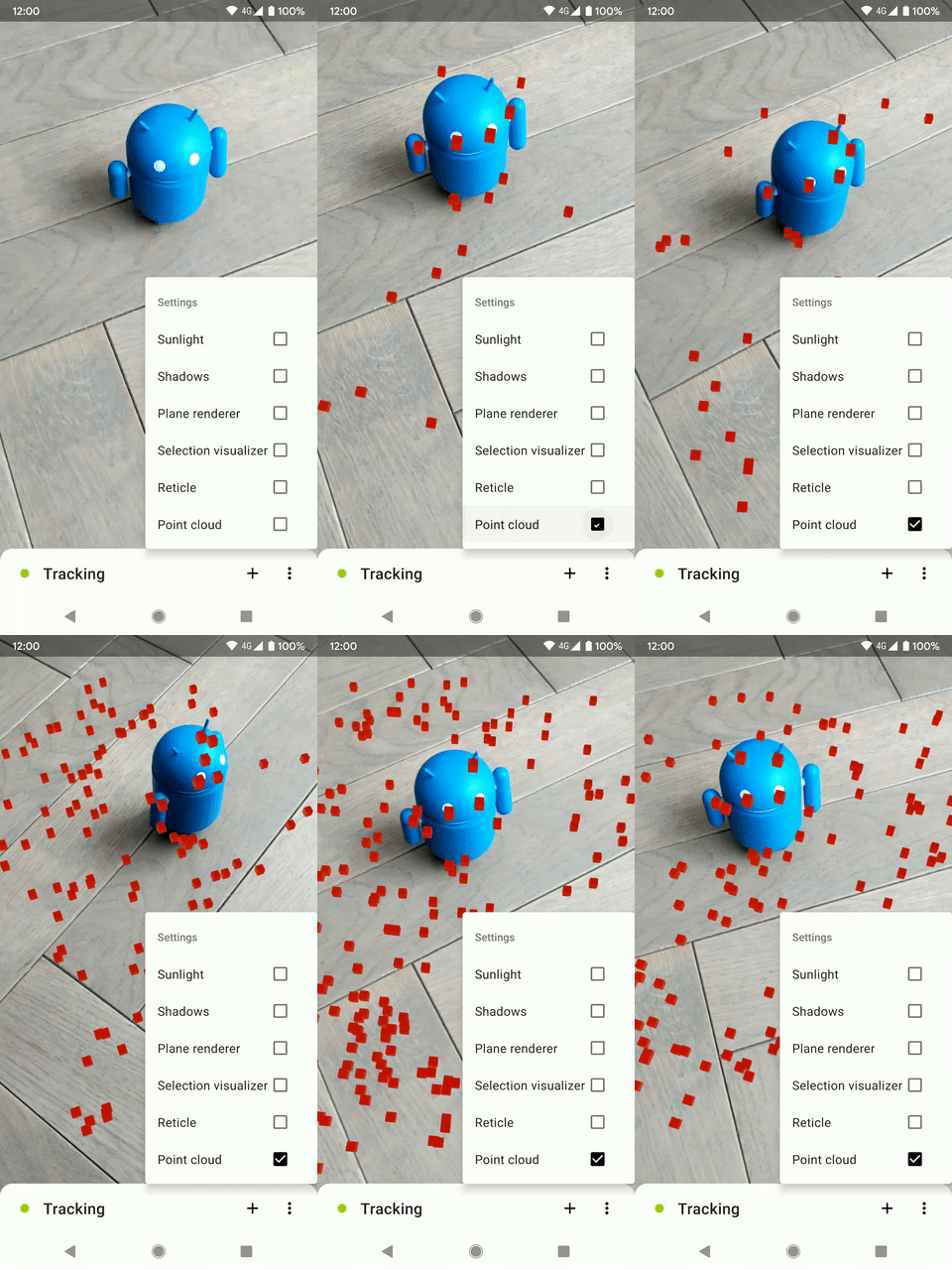
I've finally created my own PointCloud renderer, based on ShapeFactory.makeCube() code.
It renders small 3D cubes on each feature point.
SimonMarquis
on 10 Sep 2019
Related issues
 terezo
·
3Comments
terezo
·
3Comments
 chiaolinghong3d
·
3Comments
chiaolinghong3d
·
3Comments
 rajaselvan
·
4Comments
rajaselvan
·
4Comments
 yashvv
·
3Comments
yashvv
·
3Comments
 LukasStancikas
·
3Comments
LukasStancikas
·
3Comments
Most helpful comment
Sorry about that - I had some of the points backwards. Now it works:

PointCloud.java