Scaffolding fails without details on why, when using certain c# language syntax
Environment:
- ASP.Net Core 2.1
- Unspecificed C# language in project settings, I believe I earlier had downloaded and "installed" a newer c# (7.3) version. Then removed it from the project because of then also scaffolding failing.
- Visual Studio Community 2017, Windows
This was one I really did not like guys! Since the error gives no clue about what is going on I had to backtrack my commits and guess which change broke scaffolding, thankfully i recalled that scaffolding has some internal build mechanism not using same c# version as the current project, and is therefor sensitive to certain c# language syntax, which I assumes is new c# syntax.
Finding the generator 'razorpage'...
Running the generator 'razorpage'...
Attempting to compile the application in memory.
   at Microsoft.VisualStudio.Web.CodeGeneration.ActionInvoker.<BuildCommandLine>b__6_0()
   at Microsoft.Extensions.CommandLineUtils.CommandLineApplication.Execute(String[] args)
   at Microsoft.VisualStudio.Web.CodeGeneration.ActionInvoker.Execute(String[] args)
   at Microsoft.VisualStudio.Web.CodeGeneration.CodeGenCommand.Execute(String[] args)
The problematic code was using implied default value default vs default(CancellationToken)
Does NOT work:
public async override Task<int> SaveChangesAsync(bool acceptAllChangesOnSuccess, CancellationToken cancellationToken = default)
{
  ...
}
Does work:
public async override Task<int> SaveChangesAsync(bool acceptAllChangesOnSuccess, CancellationToken cancellationToken = default(CancellationToken))
{
   ...
}
Suggested fixes/changes from a user perspective:
- (MUST) Validate, then give better error message that code failed validation according to scaffolding build mechanism.
- (MAYBE) Have scaffolding build with same c# version as project (I am on a limb here, I might have missunderstood the tech)
 Andrioden
All 52 comments
@Andrioden - Thanks for reporting this problem. For the short-term, I have this PR #824 in progress to provide better error messaging. For your situation, the error will look like this:

For the bigger problem of needing scaffolding to build with the same C# version as the project, we will need to look into the issue more, before deciding on a course of action.
 seancpeters
on 12 Jul 2018
seancpeters
on 12 Jul 2018
824 will be included in release/2.2
seancpeters
on 1 Sep 2018
So, is it really so that scaffolding doesn't work if you're using C# 7.3? I've spent couple hours now trying to track down a "Failed to get Project Context for.." error and this seems to be my only real clue atm. And I'm really not going to refactor all of C# 7.2 out of the codebase..
 jarnmo
on 3 Sep 2018
jarnmo
on 3 Sep 2018
@jarnmo ; I havent tested it allready, but my planned workaround is to copy the DBContext class and relevant model class into another solution/project and scaffold it there, then copy it back. Maybe its viable for you to?
Andrioden
on 3 Sep 2018
@Andrioden not really. We are pretty much just praying for this to get fixed before we really have to rescaffold. How on earth can a 'stable' first party feature have a limitation of this magnitude. How is it not even communicated anywhere that you can't use scaffolding unless you are happy to stay with C# 7.0 for undefined time. Possibly forever?
I appreciate the work that has gone into this and I hate to whine, but promoting scaffolding as a stable first party supported feature is extremely irresponsible given this limitation.
jarnmo
on 5 Sep 2018
@jarnmo : I agree with you, its a pretty bad one. And disclaimer just so it was clear: I dont work for or are affiliated with MS or this project, it was just a friendly tip from a fellow asp.net developer! : >
Also edit; the response from MS was good, almost instantly and they have it ready within 1 release, which I do find acceptable.
Andrioden
on 5 Sep 2018
@Andrioden if you mean the #824, it's not really a fix though. Or is the actually issue of the scaffolder not supporting the latest C# features being tracked somewhere as well? @seancpeters ?
jarnmo
on 5 Sep 2018
Correct #824 does not fix the issue of scaffolding a project with C# version > 7.0. This github issue tracking the problem.
seancpeters
on 5 Sep 2018
@seancpeters is there any ETA on a fix for this? This is a massive issue on a business critical project for us!
jarnmo
on 21 Sep 2018
@vijayrkn @danroth27
seancpeters
on 21 Sep 2018
@seancpeters - Can you check how much work is required to make scaffolding to build with the same C# version as the project.
 vijayrkn
on 21 Sep 2018
vijayrkn
on 21 Sep 2018
@seancpeters Any update on this?
Also, should it just work if I add <LangVersion>latest</LangVersion> to all of the .csproj files in the repo and rebuild the tool myself?
jarnmo
on 1 Oct 2018
+1 same problem here. Thanks god I found this post and just lost 30 minutes on it.
 InsomniumBR
on 1 Oct 2018
InsomniumBR
on 1 Oct 2018
You'll also at least need to update the version of Microsfot.CodeAnalysis, which may also require some other package version changes to get a consistent package set. There may also be other required changes.
seancpeters
on 6 Oct 2018
@Andrioden @InsomniumBR @seancpeters I think I managed to make it work. I started with the release/2.1, set <LangVersion>latest</LangVersion> to all the .csprojs, and updated a bunch of packages and frameworks. When running the build.cmd I get the following error:
ApiCheck.targets(20,5): error : Unhandled Exception: System.BadImageFormatException: Could not load file or assembly 'e_sqlite3.dll' or one of its dependencies. The module was expected to contain an assembly manifest
Additionally some of the tests fail and some of them seem to just never complete. However, it still manages to build the .nupkg, I can install it and it seems to work fine for my C# 7.3 projects with latest stable packages and frameworks.
My changes are here: https://github.com/jarnmo/Scaffolding/tree/release/2.1, and if you want to try the tool itself, it's here: dotnet-aspnet-codegenerator.2.1.6-rtm-t000.nupkg
jarnmo
on 9 Oct 2018
@Andrioden @InsomniumBR @seancpeters Doesn't look like my changes really help. It just happened that I was testing against a version of our project that the stable scaffolder seems to work for as well.
However, now I actually went through and found the change in our project that caused the scaffolder to start to fail. It looks like generally C# >7.0 features work fine, but I found two patterns that seem to always cause the error discussed in this issue. Both of the examples seem to apply regardless whether they are in your entity classes or somewhere else in your codebase.
Fails
private object Test => default;
Succeeds
private object Test => null;
Fails
private object Test() => new object[] { }.Max(Select);
private static object Select(object o) => o;
Succeeds
private object Test() => new object[] { }.Max(o => Select(o));
private static object Select(object o) => o;
jarnmo
on 10 Oct 2018
Any updates?
 AndreiGorlov
on 21 Feb 2019
AndreiGorlov
on 21 Feb 2019
I noticed that the scaffolder does now give a helpful error message about the usage of an unsupported language feature. This helps a lot already!
jarnmo
on 22 Feb 2019
This issue is on our backlog. As noted above, the better messaging for unsupported language features is now live. But additional work to support newer language versions is not yet scheduled.
seancpeters
on 22 Feb 2019
Any progress on this? It is beyond annoying.
 adimosh
on 22 May 2019
adimosh
on 22 May 2019
@vijayrkn @danroth27
seancpeters
on 22 May 2019
So, nothing C# > 7.0 is supported still if I understand correctly?
 Svetomech
on 22 Jun 2019
Svetomech
on 22 Jun 2019
How can this not be planned? We can only scaffold if we use c# 7 and nothing beyond? How is this a proper product decision?
adimosh
on 22 Jun 2019
There was this commit last week, but not sure how far it will take things: https://github.com/aspnet/Scaffolding/commit/919d307943321fea8d57fec44d16ff7ba14a5774
jarnmo
on 24 Jun 2019
Yes this PR https://github.com/aspnet/Scaffolding/commit/919d307943321fea8d57fec44d16ff7ba14a5774 should fix this issue for both C#7 & C#8. Closing this issue.
vijayrkn
on 24 Jun 2019
If anyone needs a quick fix to this before the PR merge goes out into an official package, I found installing the following packages makes the scaffolding work again:
<PackageReference Include="Microsoft.CodeAnalysis.Common" Version="3.2.0-beta3-final" />
<PackageReference Include="Microsoft.CodeAnalysis.CSharp" Version="3.2.0-beta3-final" />
<PackageReference Include="Microsoft.CodeAnalysis.CSharp.Workspaces" Version="3.2.0-beta3-final" />
 Preecington
on 3 Jul 2019
Preecington
on 3 Jul 2019
Quick fix doesn't work for me sadly.
It's complaining about "using declaration" not being supported and it's telling me to switch to language version preview. My project file is already set to preview language version in the csproj.
Also tried code analysis 3.3.0-beta1-final, exact same thing.
I guess I'll just generate it in a new temp project and copy it over instead...
Edit: Yep did that, that worked... Quite a hassle
 dedmen
on 27 Jul 2019
dedmen
on 27 Jul 2019
Too bad to figure out the limitation that C# 7.1 and above features up to 7.3 cannot be used when scaffolding. Feature 'default literal' in my case prevents from creating about several dozens of pages in the project. Refactoring the code base is no option :-(
 LMerpDev
on 23 Aug 2019
LMerpDev
on 23 Aug 2019
Are you trying with ASP.NET Core 3.0 projects?
vijayrkn
on 23 Aug 2019
Are you trying with ASP.NET Core 3.0 projects?
No. Currently using VS 2019 with ASP.NET Core 2.2.6 projects
LMerpDev
on 23 Aug 2019
If anyone needs a quick fix to this before the PR merge goes out into an official package, I found installing the following packages makes the scaffolding work again:
<PackageReference Include="Microsoft.CodeAnalysis.Common" Version="3.2.0-beta3-final" />
<PackageReference Include="Microsoft.CodeAnalysis.CSharp" Version="3.2.0-beta3-final" />
<PackageReference Include="Microsoft.CodeAnalysis.CSharp.Workspaces" Version="3.2.0-beta3-final" />
Thanks, you can fix this only with one package (its include the rest of the needed packages )
<PackageReference Include="Microsoft.CodeAnalysis.CSharp.Workspaces" Version="3.3.1" />
We are using EF Core 2.2.6 and this issue is not fixed.
 OrihuelaConde
on 25 Oct 2019
OrihuelaConde
on 25 Oct 2019
@OrihuelaConde fix with package 3.3.1 worked for me on my netcore2.2 project.
 ardalis
on 30 Oct 2019
ardalis
on 30 Oct 2019
i'm starting to learn this technology and following all the tutorials Microsoft provide, like:
they should include the @OrihuelaConde solution to the tutorial.
works like a charm for me
 sergeii-55
on 22 Nov 2019
sergeii-55
on 22 Nov 2019
You can see that the latest version of the scaffolding package already references 3.3.1
vijayrkn
on 22 Nov 2019
I have a similar problem, and still not fixed:
For details:
https://stackoverflow.com/questions/61681173/ms-visual-studio-2019-crash-when-adding-a-new-scaffolding-item
 FrankCastle666
on 17 May 2020
FrankCastle666
on 17 May 2020
@pranavkm - Have you seen this error?
Error NU1202. Package Microsoft.AspNetCore.Razor 2.2.0 is not compatible with netcoreapp3.1 (.NETCoreApp,Version=v3.1). Package Microsoft.AspNetCore.Razor 2.2.0 does not support any target frameworks.
vijayrkn
on 17 May 2020
Hi Vijay:
I have looked into that error: one of the recommendations to avoid it, is to change the target framework.
I changed to Net Core 3.0 and the error persists.
If you have any other suggestion, I would appreciate it.
Thanks
FrankCastle666
on 17 May 2020
The package targets .NETStandard2.0, so the app can netcoreapp2.0 & above.
vijayrkn
on 17 May 2020
I still experience this issue with ASP.NET Core 3.1 and Razor Codegen. It doesn't seem to like async Task
 BRB2000
on 25 May 2020
BRB2000
on 25 May 2020
@BRB2000 can you confirm the code generation package version in the csproj file?
vijayrkn
on 25 May 2020
@vijayrkn thank you for the quick reply! These packages are referenced in the .csproj file:
<PackageReference Include="Microsoft.AspNetCore.Diagnostics.EntityFrameworkCore" Version="3.1.4" />
    <PackageReference Include="Microsoft.AspNetCore.Identity.EntityFrameworkCore" Version="3.1.4" />
    <PackageReference Include="Microsoft.AspNetCore.Identity.UI" Version="3.1.4" />
    <PackageReference Include="Microsoft.CodeAnalysis.Common" Version="3.6.0" />
    <PackageReference Include="Microsoft.CodeAnalysis.CSharp" Version="3.6.0" />
    <PackageReference Include="Microsoft.CodeAnalysis.CSharp.Workspaces" Version="3.6.0" />
    <PackageReference Include="Microsoft.EntityFrameworkCore.Proxies" Version="3.1.4" />
    <PackageReference Include="Microsoft.EntityFrameworkCore.Sqlite" Version="3.1.4" />
    <PackageReference Include="Microsoft.EntityFrameworkCore.SqlServer" Version="3.1.4" />
    <PackageReference Include="Microsoft.EntityFrameworkCore.Tools" Version="3.1.4" />
    <PackageReference Include="Microsoft.VisualStudio.Web.CodeGeneration" Version="3.1.3" />
    <PackageReference Include="Microsoft.VisualStudio.Web.CodeGeneration.Design" Version="3.1.3" />
    <PackageReference Include="Microsoft.VisualStudio.Web.CodeGeneration.EntityFrameworkCore" Version="3.1.3" />
BRB2000
on 25 May 2020
You only need the codegeneration.design package. You can remove the other 2 codegeneration references.
<PackageReference Include="Microsoft.VisualStudio.Web.CodeGeneration" Version="3.1.3" /><PackageReference Include="Microsoft.VisualStudio.Web.CodeGeneration.EntityFrameworkCore" Version="3.1.3" />
You are on the latest version. Do you have a sample project that reproduces the issue? @deepchoudhery to help with the analysis
vijayrkn
on 25 May 2020
I guess I've found the problem :). I turns out that I had one function in my project that had an "ü" character in it, and scaffolding didn't seem to like that. I know that this is generally bad practise, but I didn't worry too much about it, since the application compiled and ran just fine.
BRB2000
on 26 May 2020
@BRB2000 - Thanks for diagnosing the root cause. @deepchoudhery - Can you see if you can reproduce it with the above steps? If so, we should handle the error better.
vijayrkn
on 26 May 2020
@BRB2000 what scaffolder were you using?
 deepchoudhery
on 27 May 2020
deepchoudhery
on 27 May 2020
@deepchoudhery I was using Microsoft.WebTools.Scaffolding.Core.ModelBasedCrudRazorPageScaffolder and Microsoft.WebTools.Scaffolding.Core.RazorPages.ModelBasedRazorPageScaffolder.
BRB2000
on 27 May 2020
This is still and Issue today with .net and ef core 5.0.3 Still to this day the dialog shows up with no descriptive error message really Microsoft can this not be updated to a more mean-full message.
Any Ideas @deepchoudhery and @vijayrkn

Visual Studio Verison
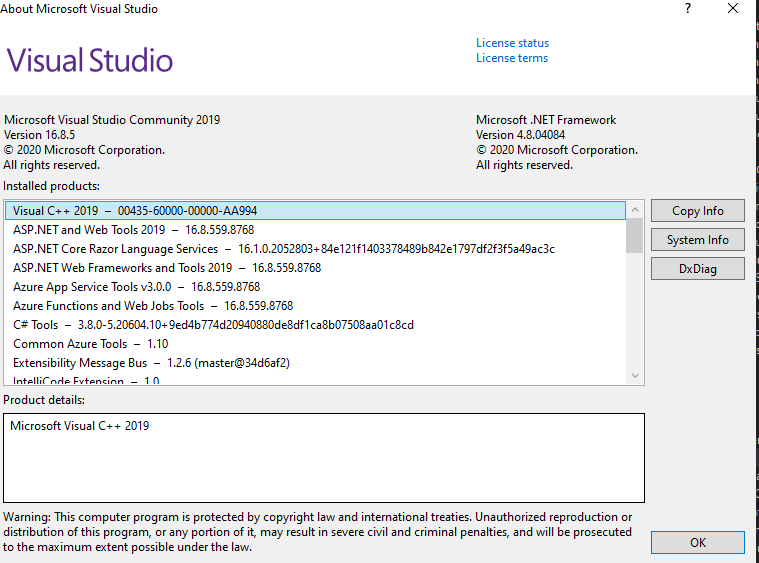
I noticed here looking at my nuget reference that 5.0.3 has not been released yet could that be part of my issue.
https://www.nuget.org/packages/Microsoft.VisualStudio.Web.CodeGeneration.Design/
Here is my project include files
<ItemGroup>
 <PackageReference Include="AutoMapper" Version="10.1.1" />
 <PackageReference Include="FileHelpers" Version="3.4.2" />
 <PackageReference Include="MegaApiClient" Version="1.8.2" />
 <PackageReference Include="Microsoft.AspNetCore.Authentication.Google" Version="5.0.3" />
 <PackageReference Include="Microsoft.AspNetCore.Identity.EntityFrameworkCore" Version="5.0.3" />
 <PackageReference Include="Microsoft.AspNetCore.Identity.UI" Version="5.0.3" />
 <PackageReference Include="Microsoft.EntityFrameworkCore.Relational" Version="5.0.3" />
 <PackageReference Include="Microsoft.EntityFrameworkCore.Sqlite" Version="5.0.3" />
 <PackageReference Include="Microsoft.Extensions.Identity.Core" Version="5.0.3" />
 <PackageReference Include="Microsoft.VisualStudio.Web.CodeGeneration.Design" Version="5.0.2" />
 <PackageReference Include="MimeTypes" Version="2.1.1">
  <PrivateAssets>all</PrivateAssets>
  <IncludeAssets>runtime; build; native; contentfiles; analyzers; buildtransitive</IncludeAssets>
 </PackageReference>
 <PackageReference Include="NToastNotify" Version="7.0.0" />
 <PackageReference Include="Swashbuckle.AspNetCore" Version="6.0.2" />
 <PackageReference Include="Swashbuckle.AspNetCore.Swagger" Version="6.0.2" />
 <PackageReference Include="Swashbuckle.AspNetCore.SwaggerUI" Version="6.0.2" />
  <PackageReference Include="Microsoft.EntityFrameworkCore.SqlServer" Version="5.0.3" />
  <PackageReference Include="Microsoft.EntityFrameworkCore.SqlServer.Design" Version="2.0.0-preview1-final" />
  <PackageReference Include="Microsoft.EntityFrameworkCore.Tools" Version="5.0.3">
    <PrivateAssets>all</PrivateAssets>
    <IncludeAssets>runtime; build; native; contentfiles; analyzers; buildtransitive</IncludeAssets>
  </PackageReference>
  <PackageReference Include="Microsoft.AspNetCore.Authentication.JwtBearer" Version="5.0.3" NoWarn="NU1605" />
  <PackageReference Include="Microsoft.AspNetCore.Authentication.OpenIdConnect" Version="5.0.3" NoWarn="NU1605" />
  <PackageReference Include="Microsoft.EntityFrameworkCore" Version="5.0.3" />
  <PackageReference Include="Microsoft.EntityFrameworkCore.Design" Version="5.0.3">
    <PrivateAssets>all</PrivateAssets>
    <IncludeAssets>runtime; build; native; contentfiles; analyzers; buildtransitive</IncludeAssets>
  </PackageReference>
 davidbuckleyni
on 15 Feb 2021
davidbuckleyni
on 15 Feb 2021
@davidbuckleyni
I noticed here looking at my nuget reference that 5.0.3 has not been released yet could that be part of my issue.
Thanks to you I've found a small workaround (for my case of Identity Scaffolding).
Just change all of the nuget package references from 5.0.3 to 5.0.2 and scaffolding worked.
 OnSive
on 6 Mar 2021
OnSive
on 6 Mar 2021
I am getting this error repeatedly on a new Windows and Visual Studio install on a .Net Core 3.1 Web MVC Template with all the default options selected.
 Michael-Nurse-Dev
on 24 Jun 2021
Michael-Nurse-Dev
on 24 Jun 2021
@Michael-Nurse-Dev Please open a new GitHub issue with details about how to reproduce the problem you're seeing and we'll take a look.
 danroth27
on 25 Jun 2021
danroth27
on 25 Jun 2021
I have the same issue but I was using page.razor and code added in page.razor.cs when i move the code to page.razor the Scaffolding work Fine
 KevinAnass
on 8 Jul 2021
KevinAnass
on 8 Jul 2021
Tracking here - https://github.com/dotnet/Scaffolding/issues/1555. Pretty much the same issue. @KevinAnass
deepchoudhery
on 9 Jul 2021
Related issues
 DaniJG
·
4Comments
danroth27
·
12Comments
DaniJG
·
4Comments
danroth27
·
12Comments
 wasker
·
13Comments
wasker
·
13Comments
 akaahmedkamal
·
7Comments
akaahmedkamal
·
7Comments
 nadavbeno
·
6Comments
nadavbeno
·
6Comments
Most helpful comment
If anyone needs a quick fix to this before the PR merge goes out into an official package, I found installing the following packages makes the scaffolding work again: