Scaffolding using separate assemblies for model/context
Scaffoling using dotnet aspnet-codgenerator --_commands_ only seems to work if the model and DbContext are located in the same assembly as the Mvc app.
Steps to reproduce
1. Add domain model to it's own assembly, i.e. Blog class in AssemblyName.Domain
2. Add EF Context to its own assembly with DbSet<Blog>, i.e. ModelContext class in Assembly.Data
3. Create MvcApp referencing both assemblies above and load ModelContext into DI.
4. Run :: dotnet aspnet-codegenerator --project . controller -name BlogsController -m Blog -dc ModelContext -outDir Controllers
Expected behavior
Writes BlogsController class to the Controllers folder using supplied model and DbContext.
Actual behavior
Could not add Model type 'AssemblyName.Domain.Blog' to DbContext 'AssemblyName.Data.ModelContext'. Please make sure that 'AssemblyName.Data.ModelContext' has a DbS
et property for 'AssemblyName.Domain.Blog'.
   at Microsoft.VisualStudio.Web.CodeGeneration.ActionInvoker.<BuildCommandLine>b__6_0()
   at Microsoft.Extensions.CommandLineUtils.CommandLineApplication.Execute(String[] args)
   at Microsoft.VisualStudio.Web.CodeGeneration.CodeGenCommand.Execute(String[] args)
Environment
dotnet --info output:
.NET Command Line Tools (1.0.0-rc4-004771)

Product Information:
 Version:            1.0.0-rc4-004771
 Commit SHA-1 hash:  d881d45b75

Runtime Environment:
 OS Name:     Windows
 OS Version:  10.0.14393
 OS Platform: Windows
 RID:         win10-x64
 Base Path:   C:\Program Files\dotnet\sdk\1.0.0-rc4-004771
.csproj file
<Project Sdk="Microsoft.NET.Sdk.Web">
  <PropertyGroup>
    <TargetFramework>netcoreapp1.1</TargetFramework>
    <PackageTargetFallback>portable-net45;win8;wp8;wpa81</PackageTargetFallback>
  </PropertyGroup>
  <ItemGroup>
    <PackageReference Include="Microsoft.AspNetCore" Version="1.1.0" />
    <PackageReference Include="Microsoft.AspNetCore.Mvc" Version="1.1.1" />
    <PackageReference Include="Microsoft.AspNetCore.StaticFiles" Version="1.1.0" />
    <PackageReference Include="Microsoft.EntityFrameworkCore.SqlServer" Version="1.1.0" />
    <PackageReference Include="Microsoft.EntityFrameworkCore.SqlServer.Design" Version="1.1.0" />
    <PackageReference Include="Microsoft.Extensions.Logging.Debug" Version="1.1.0" />
    <ProjectReference Include="..\AssemblyName.Data\AssemblyName.Data.csproj" />
    <ProjectReference Include="..\AssemblyName.Domain\AssemblyName.Domain.csproj" />
  </ItemGroup>
  <ItemGroup>
      <DotNetCliToolReference Include="Microsoft.EntityFrameworkCore.Tools.DotNet" Version="1.0.0-msbuild3-final" />
      <PackageReference Include="Microsoft.VisualStudio.Web.CodeGeneration.Design" Version="1.0.0-msbuild3-final" />
      <DotNetCliToolReference Include="Microsoft.VisualStudio.Web.CodeGeneration.Tools" Version="1.0.0-msbuild3-final" />
  </ItemGroup>
</Project>
 jamiewest
All 14 comments
@jamiewest
With 1.0.0-msbuild3-final (and 1.1.0-msbuild3-final) version of scaffolding you could have the model in another assembly, but the DbContext had to be in the same assembly as the MVC app.
This has already been fixed for 1.0.0 and 1.1.0 versions.
These versions will be available on NuGet.org with the VS2017 RTW release.
 prafullbhosale
on 23 Feb 2017
prafullbhosale
on 23 Feb 2017
Thanks @prafullbhosale, I just want to clarify, are you saying with the VS2017 RTW release we will be able to scaffold using a DbContext located in a separate assembly?
jamiewest
on 3 Mar 2017
I just want to clarify, are you saying with the VS2017 RTW release we will be able to scaffold using a DbContext located in a separate assembly?
@jamiewest, yes that is correct. The DbContext being in a separate assembly should be fine.
However, please note that if the DbContext editing (to add the DbSet<> property is not supported in this case)
The below matrix shows which cases are supported based on the DbContext's location.
DbContext location | Creating new DbContext | Adding DbSet<> to DbContext | Using DbContext as is
----------------------|----------------------------|------------------------------------|-------------------------
Web App assembly | Yes | Yes | Yes
Model Assembly | No | No | Yes
Neither model nor web App Assembly | No | No | No
prafullbhosale
on 3 Mar 2017
I see this issue is closed, but I've got the same error in asp core v 1.1.2
I've got 3 assemblies one for model, one for dbcontext, and third for webapp. Model and DbContext assemblies are referenced by WebApp. Everything works fine, but Scaffolding using VisualStudio 2017 (Creating new Controller) gives me error like in this issue.
 cldbrr
on 20 Jun 2017
cldbrr
on 20 Jun 2017
Yes, I have same error with separated DbContext, Models and WebAPI
 zubra5
on 21 Jul 2017
zubra5
on 21 Jul 2017
Same for me: scaffoldinf throw errors if web app, context and model are in separate assemblies
 ciacco85
on 2 Aug 2017
ciacco85
on 2 Aug 2017
Same error in netcoreapp2.0 :(
 steduardo
on 21 Aug 2017
steduardo
on 21 Aug 2017
I had the same problem: (netcoreapp2.0, EF core) I had such projects and references: WebProj (need to add Controller)->AppData (DbContext)->AppDomain(Data class) .. scaffolding had crushed with "Could not add Model type" error ... after I added Explicit link to AppDomain despite of using "use directive" and all started to work well.
public DbSet
 Pavel-Malezhyk
on 25 Aug 2017
Pavel-Malezhyk
on 25 Aug 2017
@prafullbhosale any plans on supporting dbcontext in neither web app nor model assembly?
 ahmadalli
on 11 Sep 2017
ahmadalli
on 11 Sep 2017
@Pavel-Malezhyk thanks, same situation for me, netcoreapp2.0 with separate projects, and you were right, would never thought of this.
But it's really weird, using full type qualifier with DbSet
Not working:
public DbSet<DataClass> DataClasses { get; set; }
Working:
public DbSet<AppDomain.DataClass> DataClasses { get; set; }
 peterres
on 16 Oct 2017
peterres
on 16 Oct 2017
metoo ;)
 julielerman
on 24 Nov 2017
julielerman
on 24 Nov 2017
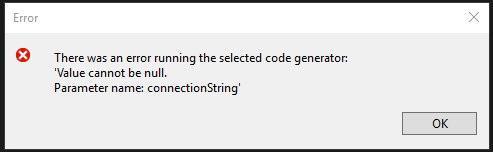
I ran into this problem as well with 2.1.2. I'm now getting a connection string error. I have no idea where this is looking for a connection string. I'd like to express a general bug in the lack of better error messages. They would've saved me a LOT of time working through this. Can anyone offer any insight into where this connection string should be placed?
 EdDraper
on 13 Dec 2017
EdDraper
on 13 Dec 2017
@EdDraper Hey Ed, have you set your connection string in appsettings.json?
Edit: see here for an example
 nbw71791
on 14 Dec 2017
nbw71791
on 14 Dec 2017
Thanks @Pavel-Malezhyk!!
Exactly the same problem with dotNet Core 2.0.
Solved using full name qualifier declaring DbSet inside a DbContext as you suggested.
Environment:
.NET Command Line Tools (2.1.2)
Product Information:
Version: 2.1.2
Commit SHA-1 hash: 5695315371
Runtime Environment:
OS Name: Windows
OS Version: 10.0.14393
OS Platform: Windows
RID: win10-x64
Base Path: C:\Program Files\dotnet\sdk\2.1.2\
Microsoft .NET Core Shared Framework Host
Version : 2.0.3
Build : a9190d4a75f4a982ae4b4fa8d1a24526566c69df
 arostaing
on 15 Jan 2018
arostaing
on 15 Jan 2018
Related issues
 Rick-Anderson
·
8Comments
prafullbhosale
·
7Comments
Rick-Anderson
·
8Comments
prafullbhosale
·
7Comments
 danroth27
·
12Comments
danroth27
·
12Comments
 DaniJG
·
4Comments
DaniJG
·
4Comments
 akaahmedkamal
·
7Comments
akaahmedkamal
·
7Comments
Most helpful comment
@Pavel-Malezhyk thanks, same situation for me, netcoreapp2.0 with separate projects, and you were right, would never thought of this.
But it's really weird, using full type qualifier with DbSet in DbContext solves the problem.
Not working:
public DbSet<DataClass> DataClasses { get; set; }Working:
public DbSet<AppDomain.DataClass> DataClasses { get; set; }