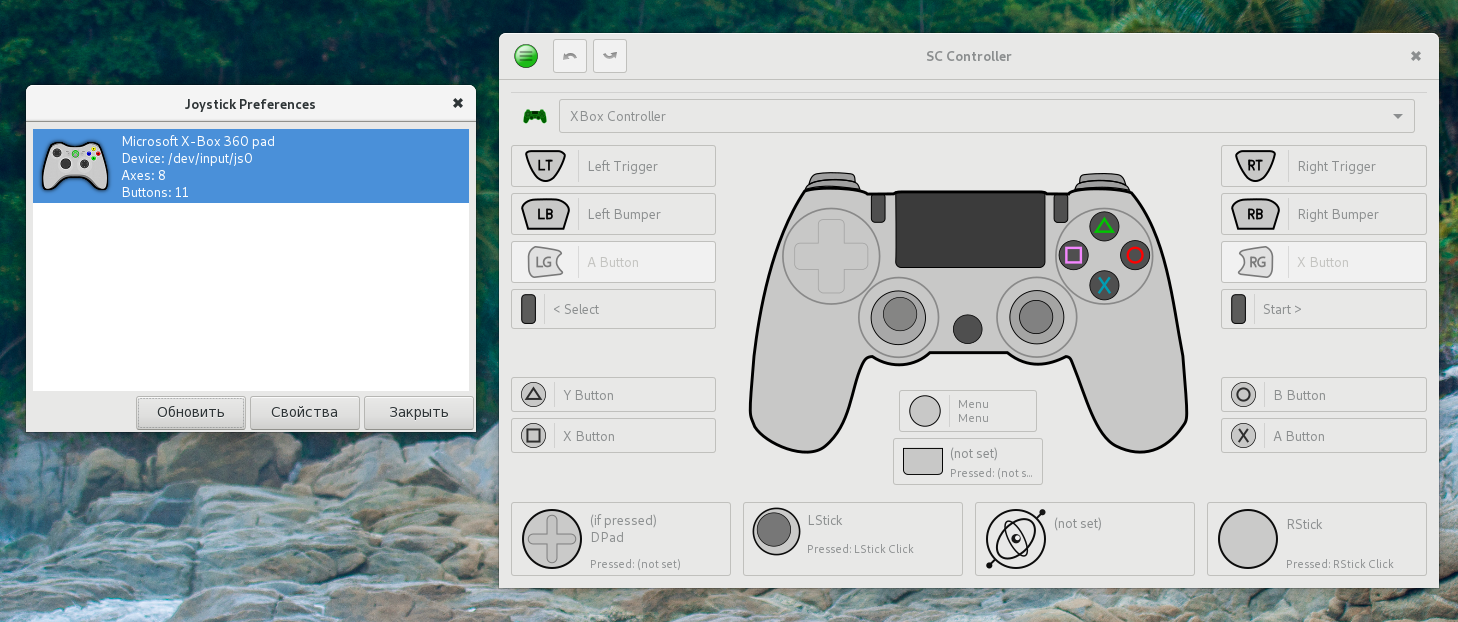
Sc-controller: Not work with ds4 via bluetooth
With usb cable works fine
via bluetooth

via usb cable
 thankjura
All 16 comments
Ah, yeah, bluetooth. Support for such modern things would be nice :)
 kozec
on 23 Apr 2018
kozec
on 23 Apr 2018

I install python-evdev and pyinotify, but not effect. Bluetooth do not supported?
thankjura
on 23 Apr 2018
It is, in theory, as bluetooth gamepad is just another evdev device. But DS4 is treated specifically, support is activated when matching IDs are found on USB. So, link between new evdev controller found and it's ds4 is missing.
I'm trying to add it :)
kozec
on 23 Apr 2018
I should probably note that it's not entirely tested :)
kozec
on 23 Apr 2018
Great. It works for me.
But after turn off gamepad, input device file(/dev/input/js1) do not removed
https://www.youtube.com/watch?v=qog6GFS4NFk&feature=youtu.be
thankjura
on 23 Apr 2018
Most likely this is no sc-controller problem. I try connect/disconnect ds4 via bluetooth without running sc-controller and problem still exists
thankjura
on 23 Apr 2018
I't my bug, I comment "UserspaceHID=true" in /etc/bluetooth/input.conf and problem dissapper(now /dev/input/js1 removed after device disconnected).
Thanks for add support for bluetooth
thankjura
on 24 Apr 2018
I just upgraded to 0.4.2 and I still can't get my 2nd generation DS4 connected over bluetooth, but I suspect that might be because of #364.
 Jimi-James
on 10 May 2018
Jimi-James
on 10 May 2018
Nope, that wasn't why. Now that I can use the controller registration menu, it does detect the DS4 controller over Bluetooth just fine, but before and after I click the Restart Emulation button at the end of the Register New Controller wizard, it continues to act like I never connected it.
EDIT: Uh, it turns out the maintainer of the AUR (Arch Linux) package for sc-controller is routinely pretty bad at keeping track of dependencies. This could easily be another missing dependency, and I'm not sure how to figure that out myself.
Jimi-James
on 11 May 2018
So, DS4 over BT works quite nice now, so this can be closed. If nothing else breaks, it will be included in tomorrow release along with support for SC over BT.
kozec
on 23 May 2018
I just tested 0.4.3, and I'm getting the same behavior as before. Could it be a missing dependency, or something else?
Jimi-James
on 25 May 2018
@Jimi-James Most likely python-evdev. If that's not the case, try running scc-daemon from terminal (turn off emulation from menu and start scc-daemon debug) and check if it says anything interesting.
kozec
on 25 May 2018
I still have python2-evdev installed from when we figured that out before, so it can't be that.
I'm having a little luck with debug, though. First I tried running it and then connecting the DS4 over bluetooth. No extra output. Then I tried the Register New Controller menu, and still no extra output besides 4 lines of D OSD osd.daemon Reloading config... when I first opened the settings window.
Here's where it gets slightly more interesting. Next, I tried connecting the DS4 before running scc-daemon debug, and I did get some extra output:
```D SCCDaemon Starting SCCDaemon...
D SCCDaemon Initializing drivers...
W SCCDaemon Skipping disabled driver 'fake'
D USB Registered USB driver for 054c:09cc
D USB Registered USB driver for 28de:1102
D USB Registered USB driver for 28de:1142
D Mapper Creating virtual devices
D Mapper Keyboard:
D Mapper Mouse:
D Mapper Gamepad:
D SCCDaemon Created control socket /home/jimi/.config/scc/daemon.socket
D SCCDaemon Connected to XServer :0.0
E evdev [Errno 13] Permission denied: '/dev/input/event29'
Traceback (most recent call last):
File "/usr/lib/python2.7/site-packages/scc/drivers/evdevdrv.py", line 506, in get_evdev_devices_from_syspath
dev = evdev.InputDevice(eventnode)
File "/usr/lib/python2.7/site-packages/evdev/device.py", line 130, in __init__
fd = os.open(dev, os.O_RDONLY | os.O_NONBLOCK)
OSError: [Errno 13] Permission denied: '/dev/input/event29'
E evdev [Errno 13] Permission denied: '/dev/input/event30'
Traceback (most recent call last):
File "/usr/lib/python2.7/site-packages/scc/drivers/evdevdrv.py", line 506, in get_evdev_devices_from_syspath
dev = evdev.InputDevice(eventnode)
File "/usr/lib/python2.7/site-packages/evdev/device.py", line 130, in __init__
fd = os.open(dev, os.O_RDONLY | os.O_NONBLOCK)
OSError: [Errno 13] Permission denied: '/dev/input/event30'
Failed to open device: [Errno 16] Device or resource busy
(scc-osd-daemon.py:15168): Gtk-WARNING **: 12:57:34.064: Theme parsing error: gtk.css:63:28: The :prelight pseudo-class is deprecated. Use :hover instead.
(scc-osd-daemon.py:15168): Gtk-WARNING **: 12:57:34.064: Theme parsing error: gtk.css:73:35: The :prelight pseudo-class is deprecated. Use :hover instead.
(scc-osd-daemon.py:15168): Gtk-WARNING **: 12:57:34.064: Theme parsing error: gtk.css:115:31: The :insensitive pseudo-class is deprecated. Use :disabled instead.
(scc-osd-daemon.py:15168): Gtk-WARNING **: 12:57:34.064: Theme parsing error: gtk.css:116:24: The :insensitive pseudo-class is deprecated. Use :disabled instead.
(scc-osd-daemon.py:15168): Gtk-WARNING **: 12:57:34.064: Theme parsing error: gtk.css:145:27: The :insensitive pseudo-class is deprecated. Use :disabled instead.
(scc-osd-daemon.py:15168): Gtk-WARNING **: 12:57:34.064: Theme parsing error: gtk.css:146:29: The :insensitive pseudo-class is deprecated. Use :disabled instead.
(scc-osd-daemon.py:15168): Gtk-WARNING **: 12:57:34.064: Theme parsing error: gtk.css:166:34: The :insensitive pseudo-class is deprecated. Use :disabled instead.
(scc-osd-daemon.py:15168): Gtk-WARNING **: 12:57:34.064: Theme parsing error: gtk.css:187:34: The :inconsistent pseudo-class is deprecated. Use :indeterminate instead.
D OSD DaemonCtrl Connected to daemon, version 0.4.3
D OSD DaemonCtrl Daemon is ready.
I SCCDaemon Registered scc-osd-daemon
I OSD osd.daemon Sucessfully registered as scc-osd-daemon
```
The extra output all happened when the daemon first started up, and it begins with the E evdev [Errno 13] Permission denied: '/dev/input/event29' line and ends with the Failed to open device: [Errno 16] Device or resource busy line. When I tried evtest on /dev/input/event29, none of my HID devices, including the DS4, gave me any output when I pushed a bunch of buttons on them. However, when I disconnected the DS4 (and nothing else), /dev/input/event29 (EDIT: and 30, which I didn't see in there until just now and so didn't evtest) disappeared. So I guess it at least had something to do with it. And guess what: I had to use sudo to not get a "Permission denied" with that evtest. So probably either my DS4 over Bluetooth is requiring superuser privileges to access in ways that it shouldn't, or sc-controller is doing this wrong. I have no idea which or why.
Jimi-James
on 25 May 2018
Well, not having permission for event devices would explain a lot :)
Check what group is set for them (ls -l /dev/input/event*), usually it's "input", and check if your user is member of that group. It should, but I'm not 100% sure if that's case on all distros.
kozec
on 25 May 2018
Wow, how has not a single wiki page or guide ever mentioned the input group to me? That was exactly it! That explains a lot of problems I've had with evtest and jstest situations. Adding myself to the input group (and logging out/in) fixed it, and now it's working over Bluetooth fine.
Jimi-James
on 25 May 2018
@kozec - hit the same issue on ubuntu 19.10 (and probably would be the same on 20.04 of not belonging to input group and also not having python-evdev installed.
anyone trying to fix this here is what i needed to do.
sudo apt install python-evdev
sudo usermod -a -G input $USER
reboot
regardless, thank you so much @kozec - this tool is awesome. i use ds4win in windows and this looks like it will provide all that in ubuntu too, so now my kids can now play windows games on ubuntu, using lutris, on their chromebook (running ubuntu), with a ps4 controller. hurrah! much rejoicing.
 carchrae
on 4 Jul 2020
carchrae
on 4 Jul 2020
Related issues
 notNSANE
·
3Comments
notNSANE
·
3Comments
 sunweaver
·
35Comments
sunweaver
·
35Comments
 ManuelMT21An
·
12Comments
ManuelMT21An
·
12Comments
 neuromancer
·
8Comments
neuromancer
·
8Comments
 C0rn3j
·
19Comments
C0rn3j
·
19Comments
Most helpful comment
So, DS4 over BT works quite nice now, so this can be closed. If nothing else breaks, it will be included in tomorrow release along with support for SC over BT.