Sapper: No such file "__sapper__/dev/build.json" — dev build race condition
Describe the bug
Dev builds fail due to missing /__sapper__/dev/build.json file. It seems to be a race condition.
I use rollup, not sure about webpack but I would assume they are both run into the issue.
My initial thoughts after looking through https://github.com/sveltejs/sapper/blob/master/src/core/create_compilers/inject.ts and https://github.com/sveltejs/sapper/blob/master/src/api/dev.ts are it could be when the server build runs before the client build is finished or something to do with all the extra (and unnecessary?) disk IO introduced in https://github.com/sveltejs/sapper/pull/1415 .
This bug was introduced in sapper v0.28.1.
Logs
Here's the noteworthy part (rest is in "Stacktraces"):
ENOENT: no such file or directory, open '/home/max/Projects/repro-sapper-race/__sapper__/dev/build.json'
(node:150546) UnhandledPromiseRejectionWarning: Error: ENOENT: no such file or directory, open '/home/max/Projects/repro-sapper-race/__sapper__/dev/build.json'
    at Object.openSync (fs.js:465:3)
    at Object.readFileSync (fs.js:368:35)
    at Object.inject_resources (/home/max/Projects/repro-sapper-race/node_modules/sapper/dist/copy_runtime.js:26:28)
    at handle_result (/home/max/Projects/repro-sapper-race/node_modules/sapper/dist/dev.js:174:50)
To Reproduce
See my repro case: https://github.com/MaxMilton/repro-sapper-dev-race-condition
It's the rollup variant of https://github.com/sveltejs/sapper-template with a rollup plugin to force the client build to take a long time.
Expected behavior
A dev build results in all client, server, and service-worker bundles succeeding as per normal.
Stacktraces
Stack trace
ENOENT: no such file or directory, open '/home/max/Projects/repro-sapper-race/__sapper__/dev/build.json'
(node:150546) UnhandledPromiseRejectionWarning: Error: ENOENT: no such file or directory, open '/home/max/Projects/repro-sapper-race/__sapper__/dev/build.json'
at Object.openSync (fs.js:465:3)
at Object.readFileSync (fs.js:368:35)
at Object.inject_resources (/home/max/Projects/repro-sapper-race/node_modules/sapper/dist/copy_runtime.js:26:28)
at handle_result (/home/max/Projects/repro-sapper-race/node_modules/sapper/dist/dev.js:174:50)
at /home/max/Projects/repro-sapper-race/node_modules/sapper/dist/dev.js:359:17
at WatchEmitter.
at WatchEmitter.emit (events.js:314:20)
at Watcher.emit (/home/max/Projects/repro-sapper-race/node_modules/rollup/dist/shared/watch.js:611:22)
at Watcher.run (/home/max/Projects/repro-sapper-race/node_modules/rollup/dist/shared/watch.js:649:18)
(Use node --trace-warnings ... to show where the warning was created)
(node:150546) UnhandledPromiseRejectionWarning: Unhandled promise rejection. This error originated either by throwing inside of an async function without a catch block, or by rejecting a promise which was not handled with .catch(). To terminate the node process on unhandled promise rejection, use the CLI flag --unhandled-rejections=strict (see https://nodejs.org/api/cli.html#cli_unhandled_rejections_mode). (rejection id: 55)
(node:150546) [DEP0018] DeprecationWarning: Unhandled promise rejections are deprecated. In the future, promise rejections that are not handled will terminate the Node.js process with a non-zero exit code.
Information about your Sapper Installation:
Env info:
  System:
    OS: Linux 5.8 Arch Linux
    CPU: (24) x64 AMD Ryzen 9 3900X 12-Core Processor
    Memory: 49.30 GB / 62.78 GB
    Container: Yes
    Shell: 3.1.2 - /usr/bin/fish
  Binaries:
    Node: 14.8.0 - ~/.config/nvm/14.8.0/bin/node
    Yarn: 1.22.4 - /usr/bin/yarn
    npm: 6.14.7 - ~/.config/nvm/14.8.0/bin/npm
  Browsers:
    Brave Browser: unknown
  npmPackages:
    rollup: 2.26.5 => 2.26.5
    sapper: 0.28.1 => 0.28.1
    svelte: 3.24.1 => 3.24.1
I wasn't aware of the envinfo package before, very useful util!
Severity
Not a blocker since it's simple enough to pin the sapper version to v0.28.0. But going forward it's obviously important.
 MaxMilton
All 8 comments
Can confirm, this has started happening for me as of Sapper 0.28.1
Some extra info - it's not just slow builds which cause this, I've checked out the vanilla template and I can't get it to run in dev mode 90% of the time.
 antony
on 26 Aug 2020
antony
on 26 Aug 2020
Is this line somehow involved? https://github.com/sveltejs/sapper/blob/d89d2ddddf7021719fe78acd8babdfb4d149f5c5/src/api/dev.ts#L238
 evdama
on 26 Aug 2020
evdama
on 26 Aug 2020
A simple fix is in dev.js line 174
copy_runtime.inject_resources(path.join(_this.dirs.dest, '/build.json'), path.join(_this.dirs.dest, 'server'));
The forward slash in front of build.json fixes it.
 Sudnym
on 26 Aug 2020
Sudnym
on 26 Aug 2020
It doesn't seem likely to me that adding a forward slash in front of build.json would work. Do you have a reason you tried that? I think more likely you added it and just got lucky on your next run testing it since it's a race condition and sometimes works and sometimes doesn't
 benmccann
on 26 Aug 2020
benmccann
on 26 Aug 2020
The issue is a file resolution error so I figured there was an issue with the file name, so I traced back to the building of the file name and found that the filename builds there, as it was build.json that was unable to resolve, if you type a backslash in front of the b and escape the character, the backslash in the filename disappears which is how I clued into it being an issue. Logically the backslash should've remained and turned the path into dev\uild.json so the occurrence of devuild.json added a logical next step to adding an interchangeable forward slash which then solved the problem. Also, I was having this issue consistently and had no successful builds until adding the forward slash.
Sudnym
on 26 Aug 2020
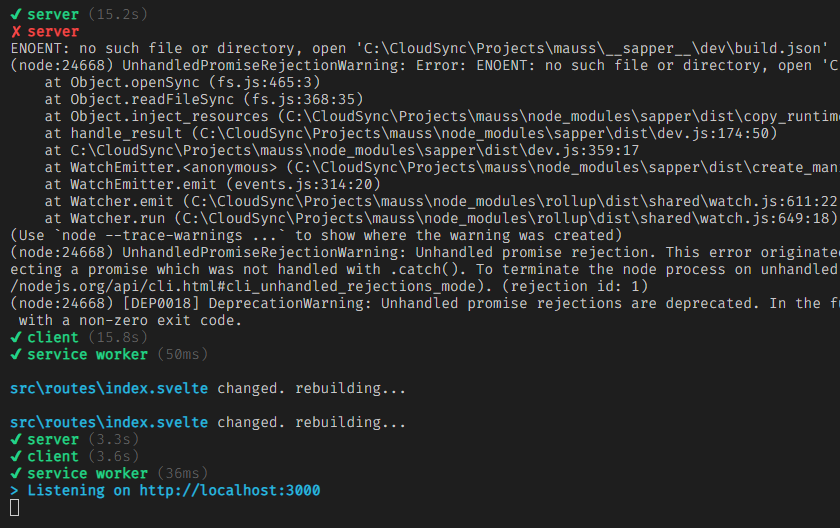
Can confirm, also happening for me. Saving a file after it crashes seems to fix it for me, a temporary workaround before an actual fix
 ignatiusmb
on 26 Aug 2020
ignatiusmb
on 26 Aug 2020
@Sudnym it's not a file resolution error, it's a race condition. The file is resolved as long as it exists, which seems reasonable. Adding / to a segment in path.join would just double slash it on POSIX, and break it in windows. path.join explicitly adds path separators suitable for your operating system.
I would suggest that what you thought was fixing it, was simply you not encountering the race condition on that occasion, since it would simply fetch .../path//build.json in that case, which would likely resolve to the correct location (double slashes are usually ignored)
antony
on 26 Aug 2020
I'm using a windows environment so it definitely doesn't break it in windows. It may be luck, however, I am no longer experiencing the issue despite multiple build attempts.
Sudnym
on 26 Aug 2020
Related issues
 Rich-Harris
·
4Comments
Rich-Harris
·
3Comments
Rich-Harris
·
4Comments
Rich-Harris
·
4Comments
Rich-Harris
·
3Comments
Rich-Harris
·
4Comments
 UnwrittenFun
·
4Comments
Rich-Harris
·
3Comments
UnwrittenFun
·
4Comments
Rich-Harris
·
3Comments
Most helpful comment
Can confirm, also happening for me. Saving a file after it crashes seems to fix it for me, a temporary workaround before an actual fix
