Sapper: service worker: Does not register a service worker that controls page and start_url
Hi folks,
after about ten days of asking Google, Stackoverflow and on discord this issue is my last resort of hope for any pointers for an issue that I'm seeing with my sapper application.
I've not changed or original service-worker.js file from the sapper template:
import { timestamp, files, shell, routes } from '@sapper/service-worker';

const ASSETS = `cache${timestamp}`;

// `shell` is an array of all the files generated by the bundler,
// `files` is an array of everything in the `static` directory
const to_cache = shell.concat(files);
const cached = new Set(to_cache);

self.addEventListener('install', event => {
    event.waitUntil(
        caches
            .open(ASSETS)
            .then(cache => cache.addAll(to_cache))
            .then(() => {
                self.skipWaiting();
            })
    );
});

self.addEventListener('activate', event => {
    event.waitUntil(
        caches.keys().then(async keys => {
            // delete old caches
            for (const key of keys) {
                if (key !== ASSETS) await caches.delete(key);
            }

            self.clients.claim();
        })
    );
});

self.addEventListener('fetch', event => {
    if (event.request.method !== 'GET' || event.request.headers.has('range')) return;

    const url = new URL(event.request.url);

    // don't try to handle e.g. data: URIs
    if (!url.protocol.startsWith('http')) return;

    // ignore dev server requests
    if (url.hostname === self.location.hostname && url.port !== self.location.port) return;

    // always serve static files and bundler-generated assets from cache
    if (url.host === self.location.host && cached.has(url.pathname)) {
        event.respondWith(caches.match(event.request));
        return;
    }

    // for pages, you might want to serve a shell `service-worker-index.html` file,
    // which Sapper has generated for you. It's not right for every
    // app, but if it's right for yours then uncomment this section
    /*
    if (url.origin === self.origin && routes.find(route => route.pattern.test(url.pathname))) {
        event.respondWith(caches.match('/service-worker-index.html'));
        return;
    }
    */

    if (event.request.cache === 'only-if-cached') return;

    // for everything else, try the network first, falling back to
    // cache if the user is offline. (If the pages never change, you
    // might prefer a cache-first approach to a network-first one.)
    event.respondWith(
        caches
            .open(`offline${timestamp}`)
            .then(async cache => {
                try {
                    const response = await fetch(event.request);
                    cache.put(event.request, response.clone());
                    return response;
                } catch(err) {
                    const response = await cache.match(event.request);
                    if (response) return response;

                    throw err;
                }
            })
    );
});
My server.js looks like this:
// @ts-nocheck
// TODO: remove once there are typings in place

const useragent = require('express-useragent')
import './css/tailwind.css'
import { callToIPRegistryAPI } from 'utils'
import * as sapper from '@sapper/server'
import compression from 'compression'
import express from 'express'
import helmet from 'helmet'
import is from 'is_js'
import requestIP from 'request-ip'
import session from 'express-session'
import sirv from 'sirv'
import uuidv4 from 'uuid/v4';


const { PORT, NODE_ENV } = process.env
const dev = NODE_ENV === 'development'
const app = express()


const sessionMiddleware = session( {
  cookie: { secure: 'auto' },
  resave: false,
  saveUninitialized: true,
  secret: 'ROLLUP_EXPRESS_SESSION_COOKIE_SIGNING_SECRET',
  }
)

const getUserIPAddressMiddleware = ( request, response, next ) => {

  if ( is.not.existy( request.session.clientIPAddress ) ) {
    request.session.clientIPAddress = {}
  }

  if ( request.session.clientIPAddress.triedToRetrieve == true ) {
    next()
  } else {
    request.session.clientIPAddress.ip = requestIP.getClientIp( request ) // empty string or null if IP address couldn't be retrieved
    request.session.clientIPAddress.triedToRetrieve = true

    if ( is.ip( request.session.clientIPAddress.ip ) ) {  // FIXME: check needs to be for null and empty string; convert to typescript at some point
      request.session.clientIPAddress.known = true
    } else {
      request.session.clientIPAddress.known = false
    }

    request.session.clientIPAddress.triedToRetrieve = true

    next()
  }
}

const userAgentMiddleware = async ( request, response, next ) => {
  try {
    if ( is.not.existy( request.session.userAgentInfo ) ) {
      request.session.userAgentInfo = {}
    }

    if ( request.session.userAgentInfo.triedToRetrieve == true ) {
      next()
    } else {

      if ( is.object( request.useragent ) && is.propertyDefined( request.useragent, 'isBot' ) ) {
        request.session.userAgentInfo = request.useragent
        request.session.userAgentInfo.available = true
      } else {
        request.session.userAgentInfo.available = false
      }
      request.session.userAgentInfo.triedToRetrieve = true
      next()
    }
  } catch ( error ) {
    console.log ( 'error from userAgentMiddleware' )
  }
}

const IPRegistryMiddleware = async ( request, response, next ) => {
  try {

    if ( is.not.existy( request.session.IPRegistryAPI ) ) {
      request.session.IPRegistryAPI = {}
    }

    if ( request.session.IPRegistryAPI.called == true || request.session.clientIPAddress.known == false ) {
      next()
    } else {

      if ( request.session.userAgentInfo.available && !request.session.userAgentInfo.isBot && !request.session.userAgentInfo.isCurl && !request.session.userAgentInfo.isFacebook ) {
        request.session.IPRegistryAPI.response = await callToIPRegistryAPI( request.session.clientIPAddress.ip, 'hostname,location[in_eu,country.name],security[is_threat,is_anonymous,is_tor_exit,is_bogon]' )
      } else {
        request.session.IPRegistryAPI.response = {}
      }
      request.session.IPRegistryAPI.called = true

      if (
        is.object( request.session.IPRegistryAPI.response ) &&
        is.propertyDefined( request.session.IPRegistryAPI.response, 'hostname' ) &&
        is.propertyDefined( request.session.IPRegistryAPI.response, 'location' ) &&
        is.propertyDefined( request.session.IPRegistryAPI.response, 'security' ) ) {
        request.session.IPRegistryAPI.response.available = true
      } else {
        request.session.IPRegistryAPI.response.available = false
      }
      next()
    }

  } catch ( error ) {
    console.log ( 'error from IPRegistryMiddleware' )
  }
}

const setNonceMiddleware = ( request, response, next ) => {
  response.locals.nonce = uuidv4()
  next()
}

const sapperMiddleware = sapper.middleware( {
  session: ( request, response ) => ( {
    clientIPAddress: request.session.clientIPAddress.known ? request.session.clientIPAddress.ip : null,
    clientSessionID: ( is.existy( request.sessionID ) && is.string( request.sessionID ) ) ? request.sessionID : null,
    clientHostname: ( request.session.IPRegistryAPI.response.available && is.not.null( request.session.IPRegistryAPI.response.hostname ) ) ? request.session.IPRegistryAPI.response.hostname : null,
    clientIsThreat: request.session.IPRegistryAPI.response.available ? request.session.IPRegistryAPI.response.security.is_threat : null,
    clientFromEU: request.session.IPRegistryAPI.response.available ? request.session.IPRegistryAPI.response.location.in_eu : null,
    clientCountry: request.session.IPRegistryAPI.response.available ? request.session.IPRegistryAPI.response.location.country.name : null,
    clientBrowser: request.session.userAgentInfo.available ? request.session.userAgentInfo.browser : null,
    clientOS: request.session.userAgentInfo.available ? request.session.userAgentInfo.os: null,
    } )
  }
)

  const helmetMiddleware = ( request, response, next ) => {
    helmet({
      contentSecurityPolicy: {
        directives: {
          scriptSrc: [
            "'self'",
            ( request, response ) => `'nonce-${ response.locals.nonce }'`,
          ],
        },
        browserSniff: false,
      },
    })
  }


app.set( 'trust proxy', true )

if (dev) {
  app.use( sirv( 'static', { dev } ) )
}

app.use(
  useragent.express(),
  compression( { threshold: 0 } ),
  express.json(),
  sessionMiddleware,
  userAgentMiddleware,
  getUserIPAddressMiddleware,
  IPRegistryMiddleware,
  setNonceMiddleware,
  sapperMiddleware,
  helmetMiddleware,
  ( request, response, next ) => { response.end( `<script nonce="${ response.locals.nonce }"></script>` ) }
)

if (dev) {
  app.listen(PORT, err => { if (err) console.log('error', err) } )
}

export { app }
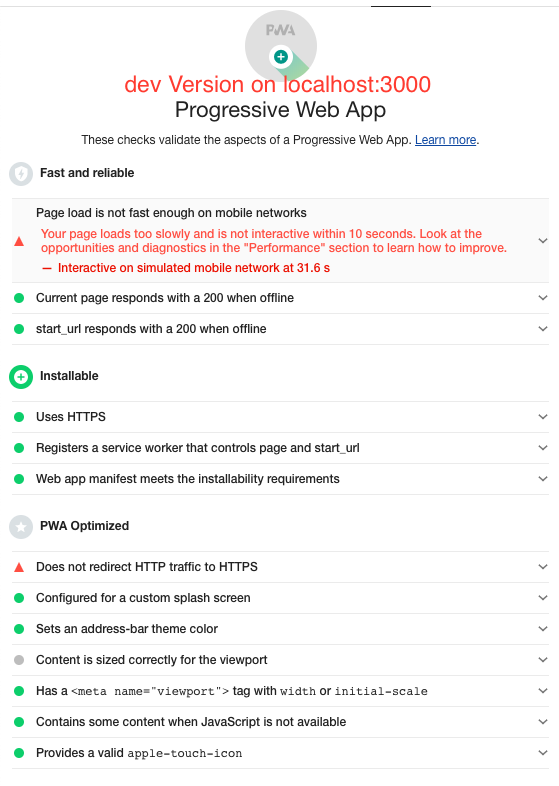
Then when I run a lighthouse test on my local dev server instance on localhost:3000 all is fine:
but the when I push it to firebase all breaks and I get this result

My ssr firebase cloud function looks like this:
// TODO: replace type any for request and response
// Start writing Firebase Functions
// https://firebase.google.com/docs/functions/typescript
// https://github.com/firebase/functions-samples/tree/master/typescript-getting-started
// https://stackoverflow.com/questions/41685054/clarification-on-typescripts-nounusedparameters-compiler-option

import * as functions from 'firebase-functions';

// We have to import the built version of the server middleware.
const { app } = require('../__sapper__/build/server/server');

const oneHour = 60 * 60;
const oneDay = oneHour * 24;
const oneWeek = oneDay * 7;
const oneMonth = oneWeek * 4;

app.get('/', (_request: any, response: any) => {
  response.set(
    'Cache-Control',
    `public, max-age=${oneWeek}, must-revalidate, s-maxage=${oneMonth}, proxy-revalidate, stale-while-revalidate=${oneDay}, stale-if-error=${oneWeek}`
  );
  response.send(app);
});

export const ssr = functions.region('us-central1').https.onRequest(app);
chrome dev tools report the service worker as redundant on my firebase hosted version
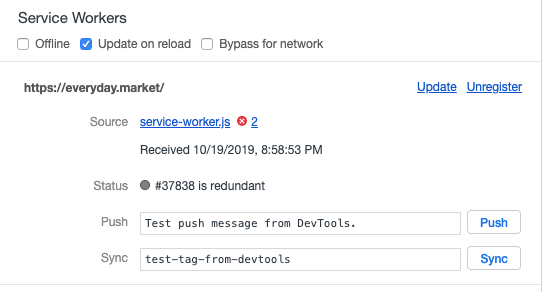
and the browser console shows a TypeError: Request failed from service-worker.js
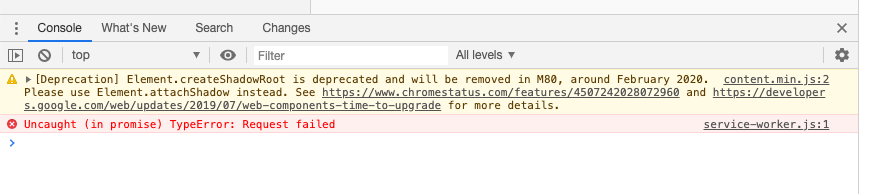
I'm really without any idea where to even start looking to fix this and would be incredibly thankfull for any help with this.
 evdama
All 6 comments
So I've been digging into that for another three days and based on the error message seen from the screenshot above Uncaught (in promise) TypeError: Request failed I found this issue https://github.com/jakearchibald/simple-serviceworker-tutorial/issues/12
In a nutshell: the service worker fails to be installed and registered when it cannot find the files it is supposed to cache, namely files and shell from the import in service-worker.js:
import { timestamp, files, shell, routes } from '@sapper/service-worker'
I then went ahead and fiddled with the build version of service-worker.js, emptied the arrays and pushed online which made everything work:
!function(){"use strict";const e=[].concat([]),t=new Set(e);self.addEventListener("install"....
What I'm not entirely sure yet is wheter that's based on my setup or if I actually discovered a bug, or maybe just the need for an additional check in sapper?
evdama
on 22 Oct 2019
The issue is gone once ./ gets appended to the filenames in dev/service-worker.js
That's what sapper currently creates
(function () {
    'use strict';

    // This file is generated by Sapper — do not edit it!
    const timestamp = 1571748827203;

    const files = [
        "service-worker-index.html",
        ".DS_Store",
        "android-chrome-192x192.png",
        "android-chrome-512x512.png",
        "apple-touch-icon.png",
        "edm_logo.svg",
        "edm_logo_filled_nodes.svg",
        "favicon-16x16.png",
        "favicon-32x32.png",
        "global.css",
        "manifest.json",
        "stories.json",
        "temp-images/.DS_Store",
        "temp-images/exercise-together.jpg",
        "temp-images/greece.jpg",
        "temp-images/office-desk.jpg",
        "temp-images/pizza.jpg",
        "temp-images/strawberries.jpg"
    ];

    const shell = [
        "client/index.a680024a.js",
        "client/app.8d56d2ea.js",
        "client/index.167cea33.js",
        "client/client.9aa10b89.js",
        "client/GoLiveDateInfo.b9f0babd.js",
        "client/index.93a4b2f8.js",
        "client/policies.999ca466.js",
        "client/index.64097324.js",
        "client/signup.b7da15c8.js",
        "client/about.9af49e8c.js",
        "client/users.7875f49e.js",
        "client/sapper-dev-client.89e34bae.js"
    ];

    const ASSETS = `cache${timestamp}`;

    // `shell` is an array of all the files generated by the bundler,
    // `files` is an array of everything in the `static` directory
    const to_cache = shell.concat(files);
    const cached = new Set(to_cache);
...
that's what's fixing the issue
(function () {
    'use strict';

    // This file is generated by Sapper — do not edit it!
    const timestamp = 1571748827203;

    const files = [
        "./service-worker-index.html",
        "./.DS_Store",
        "./android-chrome-192x192.png",
        "./android-chrome-512x512.png",
        "./apple-touch-icon.png",
        "./edm_logo.svg",
        "./edm_logo_filled_nodes.svg",
        "./favicon-16x16.png",
        "./favicon-32x32.png",
        "./global.css",
        "./manifest.json",
        "./stories.json",
        "./temp-images/.DS_Store",
        "./temp-images/exercise-together.jpg",
        "./temp-images/greece.jpg",
        "./temp-images/office-desk.jpg",
        "./temp-images/pizza.jpg",
        "./temp-images/strawberries.jpg"
    ];

    const shell = [
        "./client/index.a680024a.js",
        "./client/app.8d56d2ea.js",
        "./client/index.167cea33.js",
        "./client/client.9aa10b89.js",
        "./client/GoLiveDateInfo.b9f0babd.js",
        "./client/index.93a4b2f8.js",
        "./client/policies.999ca466.js",
        "./client/index.64097324.js",
        "./client/signup.b7da15c8.js",
        "./client/about.9af49e8c.js",
        "./client/users.7875f49e.js",
        "./client/sapper-dev-client.89e34bae.js"
    ];

    const ASSETS = `cache${timestamp}`;

    // `shell` is an array of all the files generated by the bundler,
    // `files` is an array of everything in the `static` directory
    const to_cache = shell.concat(files);
    const cached = new Set(to_cache);
...
@pngwn @Conduitry
Hi guys, can you point me in the right direction here, is this something that I need to fix with my setup or an edge case I hit inside sapper? Sorry for the ping here on github, on discord it didn't work...
based on my limited unterstanding of the sapper code this seems to be the section where one would make a change no?
evdama
on 22 Oct 2019
So now I've found the actual issue. It was ".DS_Store".
After deleting it all works, the prepending with ./ isn't actually necessary.
The how and why I don't know, just after deleting this file and without any change to sapper it works.
Well... 🤔
closing....
evdama
on 23 Oct 2019
@evdama Thank you for the detective work as I was having the same issue. Running this on my repo and re-exporting fixed the issue:
$ find . -name ".DS_Store" -delete
 felideon
on 28 Apr 2020
felideon
on 28 Apr 2020
Yes @evdama I agree this was amazing fortitude. I turned out to have the same issue and discovered same way via Lighthouse complaining re start_url:
- current page does not respond w/a 200 when offline
- start_url does not respond w/a 200 when offline
- Does not register a service worker that controls page and start_ur
I've leverages @felideon recommendation in my scripts so I don't forget this nuance (which probably only affects those of us on Macs). Here's excerpt from my package.json in case it help someone else:
    "images": "node webp.js",
    "export": "yarn images && yarn dsstore:delete && sapper export --legacy",
    "dsstore:delete": "find . -name \".DS_Store\" -delete",
...
Reflecting on all this, something feels wrong that we should have to do this dance though and perhaps something should handle at a lower level 🤔
 roblevintennis
on 20 Jun 2020
roblevintennis
on 20 Jun 2020
Just hit this problem, took a while to figure out. If you don't intent to merge the fix could maybe a warning be written somewhere in the docs perhaps?
Could the problem be related to how the paths are interpreted?
Like with the dot at the start is thinks it is a malformed relative path. Adding the ./ if front fixes it because then it becomes an explicit relative path and it gets parsed correctly.
I had the same problem also with a .htaccess file in my static folder.
And with this path:
<link rel="icon" type="image/png" sizes="16x16" href="/favicon-16x16.png?v=NmbQGvJKYJ">
it throws this error:

It seems the extra parameters after the ? also cause issues
 EnricoMonese
on 21 Sep 2020
EnricoMonese
on 21 Sep 2020
Related issues
 Snugug
·
4Comments
Snugug
·
4Comments
 mylastore
·
3Comments
mylastore
·
3Comments
 keyvan-m-sadeghi
·
4Comments
keyvan-m-sadeghi
·
4Comments
 Rich-Harris
·
4Comments
Rich-Harris
·
3Comments
Rich-Harris
·
4Comments
Rich-Harris
·
3Comments
Most helpful comment
So now I've found the actual issue. It was
".DS_Store".After deleting it all works, the prepending with
./isn't actually necessary.The how and why I don't know, just after deleting this file and without any change to sapper it works.
Well... 🤔
closing....