Sapper: Corruption issues with rollup-plugin-url
Hi there,
I was trying to add rollup-plugin-url to sapper but the files copied by the plugin seems to be corrupted with sapper only.
The issue is reproducible on the default template.
Reproduction steps
The plugin should be added as a rollup plugin in the client object of rollup.config.js:
url({
    'publicPath': 'client/'
}),
And server:
url({
    'publicPath': 'client/',
    'emitFiles': false
}),
NB: emitFiles avoids copying the file during the server bundling (as client already copy it).
We can now import PNG files from components:
<script>
import greatSuccess from '../assets/great-success.png'
</script>

<figure>
    <img alt='Borat' src={greatSuccess}>
    <figcaption>HIGH FIVE!</figcaption>
</figure>
However, the image cannot be loaded by the browser
There is a diff between the copied image and the original one.
$ diff __sapper__/dev/client/2fe1788937b45dff.png src/assets/great-success.png
Binary files __sapper__/dev/client/2fe1788937b45dff.png and src/assets/great-success.png differ
Versions:
[email protected]
[email protected]
[email protected]
[email protected]
I'm currently on Mac OS if that can make a difference.
I can't find any clue on the source of the issue.
Could it be the concurrent build of the server and client bundles ? Is sapper modifiying PNG files after build ?
The issue is not reproducible on a client-side only bundle with the same rollup config.
Any idea on how to solve this ?
Here's a complete rollup.config.js example (mostly from the template)
import resolve from 'rollup-plugin-node-resolve';
import replace from 'rollup-plugin-replace';
import commonjs from 'rollup-plugin-commonjs';
import svelte from 'rollup-plugin-svelte';
import babel from 'rollup-plugin-babel';
import url from 'rollup-plugin-url';
import { terser } from 'rollup-plugin-terser';
import config from 'sapper/config/rollup.js';
import pkg from './package.json';

const mode = process.env.NODE_ENV;
const dev = mode === 'development';
const legacy = !!process.env.SAPPER_LEGACY_BUILD;

export default {
    client: {
        input: config.client.input(),
        output: config.client.output(),
        plugins: [
            url({
                'publicPath': 'client/'
            }),
            replace({
                'process.browser': true,
                'process.env.NODE_ENV': JSON.stringify(mode)
            }),
            svelte({
                dev,
                hydratable: true,
                emitCss: true
            }),
            resolve(),
            commonjs(),

            legacy && babel({
                extensions: ['.js', '.mjs', '.html', '.svelte'],
                runtimeHelpers: true,
                exclude: ['node_modules/@babel/**'],
                presets: [
                    ['@babel/preset-env', {
                        targets: '> 0.25%, not dead'
                    }]
                ],
                plugins: [
                    '@babel/plugin-syntax-dynamic-import',
                    ['@babel/plugin-transform-runtime', {
                        useESModules: true
                    }]
                ]
            }),

            !dev && terser({
                module: true
            })
        ],
    },

    server: {
        input: config.server.input(),
        output: config.server.output(),
        plugins: [
            url({
                'publicPath': 'client/',
                'emitFiles': false
            }),
            replace({
                'process.browser': false,
                'process.env.NODE_ENV': JSON.stringify(mode)
            }),
            svelte({
                generate: 'ssr',
                dev
            }),
            resolve(),
            commonjs()
        ],
        external: Object.keys(pkg.dependencies).concat(
            require('module').builtinModules || Object.keys(process.binding('natives'))
        ),
    },

    serviceworker: {
        input: config.serviceworker.input(),
        output: config.serviceworker.output(),
        plugins: [
            resolve(),
            replace({
                'process.browser': true,
                'process.env.NODE_ENV': JSON.stringify(mode)
            }),
            commonjs(),
            !dev && terser()
        ]
    }
};
 gnuletik
All 6 comments
Hi there
By default url plugin copies files to directory defined in output.dir property in rollup config, so in case of sapper files copied to __sapper__/[dev|build]/client and something brake it(even OS can't open files)… i have no idea why this happens (probably something at sapper build stage, url plugin never acts like that)
But i found solution
// get sapper output config
const output = config.client.output()

// public path for url-plugin. this used to create url for browser, so path should be absolute
const publicPath = '/client/assets/'

export default {
  client: {
    input: config.client.input(),
    output,
    plugins: [
      url({
        destDir: path.join(output.dir, 'assets'), // set dest directory
        publicPath
      })
    ],
  },

  server: {
    input: config.server.input(),
    output: config.server.output(),
    plugins: [
      url({
        publicPath,
        emitFiles: false
      })
    ]
  }
}
Files will be copied to __sapper__/[dev|build]/client/assets and browser successfully opens it.
 Ashot-KR
on 4 Jun 2019
Ashot-KR
on 4 Jun 2019
Awesome ! Thanks @Ashot-KR :)
gnuletik
on 4 Jun 2019
@gnuletik your welcome! 🍻
Ashot-KR
on 4 Jun 2019
no work for me in svelte 3
 ckken
on 9 Jan 2020
ckken
on 9 Jan 2020
ckken
on 9 Jan 2020
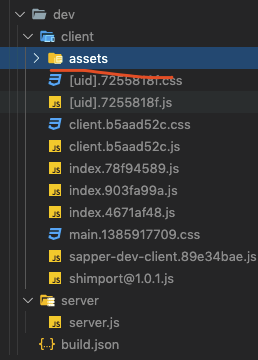
i want set publicPath to http://domain.com/person/ for html src file but no work
ckken
on 9 Jan 2020
Related issues
 Rich-Harris
·
3Comments
Rich-Harris
·
3Comments
 UnwrittenFun
·
4Comments
Rich-Harris
·
3Comments
UnwrittenFun
·
4Comments
Rich-Harris
·
3Comments
 nikku
·
4Comments
nikku
·
4Comments
 benmccann
·
3Comments
benmccann
·
3Comments
Most helpful comment
Hi there
By default url plugin copies files to directory defined in
output.dirproperty in rollup config, so in case ofsapperfiles copied to__sapper__/[dev|build]/clientand something brake it(even OS can't open files)… i have no idea why this happens (probably something at sapper build stage, url plugin never acts like that)But i found solution
Files will be copied to
__sapper__/[dev|build]/client/assetsand browser successfully opens it.