Sanity: Allow function components as custom inputs
I'm fairly new to Sanity and currently following along with Wes Bos's new Gatsby course.
In that course we use a React function component to make a custom input.
However we get warnings in the console...
Warning: Function components cannot be given refs. Attempts to access this ref will fail. Did you mean to use React.forwardRef()?
Check the render method of `FormBuilderInput`.
    in PriceInput (created by FormBuilderInput)
Looking at the Sanity Studio docs, I see they only use class components in the examples.
So would it be possible to allow the use of function components to create custom inputs?
Is your feature request related to a problem? Please describe.
This is a feature request, there is no issue with using class components.
Describe the solution you'd like
To be able to use a function component as a custom input.
Describe alternatives you've considered
Just using a class component.
 bushblade
All 7 comments
I ran into that error too. But, after double checking my code, I found my mistake 😂 the final code sample is here
 jlarmstrongiv
on 26 Sep 2020
jlarmstrongiv
on 26 Sep 2020
Hi @jlarmstrongiv thanks for the reply, sounds like you're taking Wes's course too then?
That's the course code you linked to, which will and does give an error as it's a function component and function components can't be passed a ref.
It's Sanity's FormBuilderInput that passes the ref and where the error/warning comes from.
So as far as I know there is nothing we can do in a function component to fix it, as using a function component is the issue.
Additionally in Wes's code, he tries to destructure inputComponent in props, but there is no inputCompent available in props, so he uses undefined as a ref, so it's not really doing anything meaningful.
There is a type.description.inputComponent which is a function, but I don't think that's the ref either? Best guess is it's a child input component, but I can't find anything in the docs about it. And still wouldn't change the fact that the issue is we are using a function component even if it was a valid ref.
If you want the code for a class component then this works just fine, with no error from FormBuilderInput...
class PriceInput extends Component {
focus() {
this._inputElement.focus()
}
render() {
const { type, value, onChange } = this.props
return (
<div>
<h2>
{type.title}- {value ? formatMoney(value / 100) : ''}
</h2>
<p>{type.description}</p>
<input
type={type.name}
value={value}
onChange={(event) => onChange(createPatchFrom(event.target.value))}
ref={(element) => (this._inputElement = element)}
/>
</div>
)
}
}
@bushblade I am taking the course too! I’ve used gatsby a lot, but sanity.io is new to me.
Please double check your code—the course code does work, and functional components are allowed. I think I forgot a return statement, which caused that error. If you copy and paste directly from the course files, does the error go away?
jlarmstrongiv
on 29 Sep 2020
@jlarmstrongiv it works in that it doesn't error out and visually break anything but there are warnings. Please check your console and you'll see.
Same here yes I've used Gatsby a lot too.
If I copy and paste directly from the course files, the error still shows as that is the issue I'm raising here.
You can't currently use a function component as a custom input without the errors (as far as I can tell anyway).
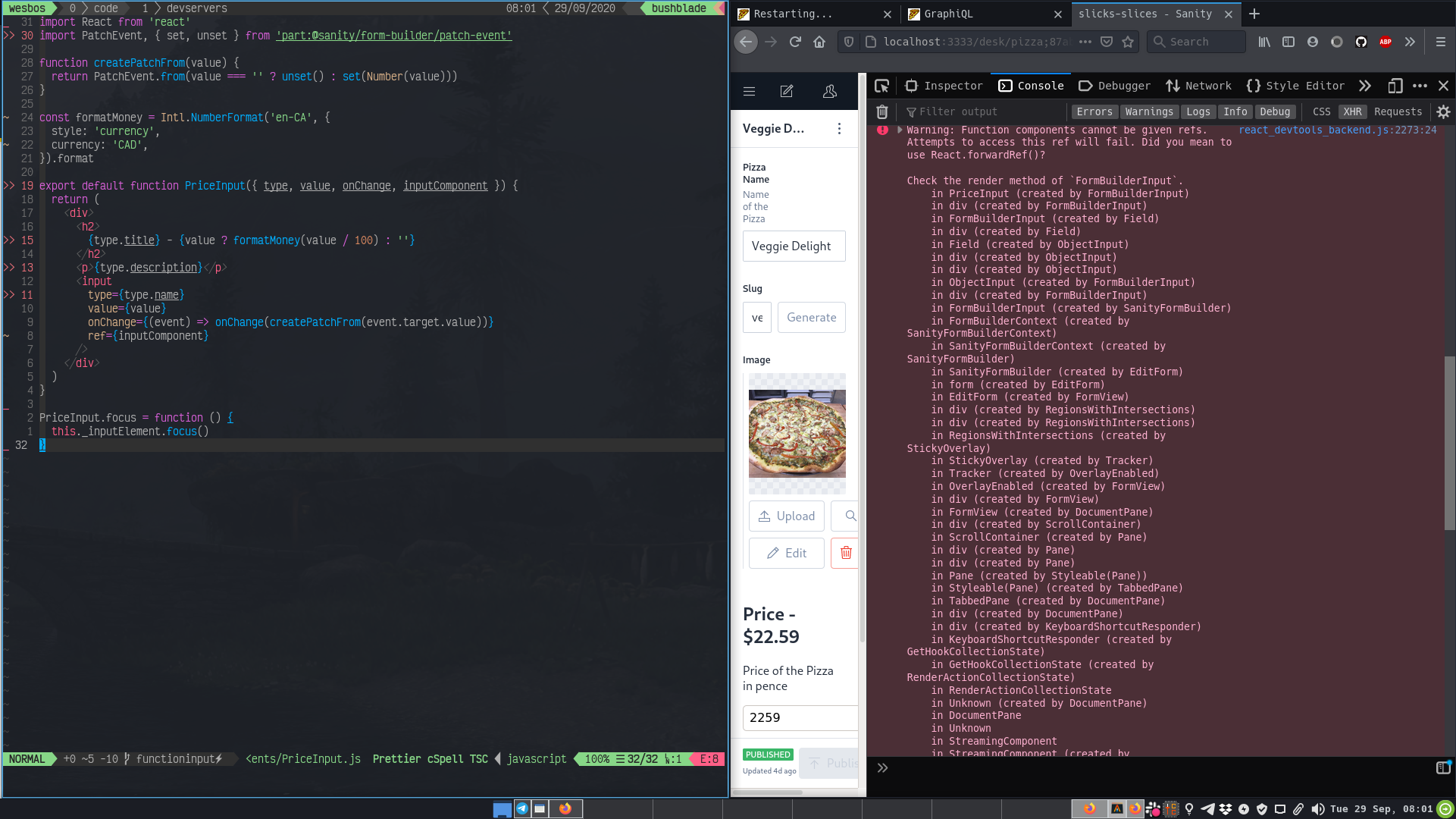
That's the course code component.
Obviously you need the PriceInput in the view when you inspect the console to see the error.
bushblade
on 29 Sep 2020
As a continuation of our Slack discussion, it seems Function Components won't receive forwarded refs implicitly, you have to opt in by using React.forwardRef.
The method React.forwardRef has a function signature of forwardRef(props, ref) where ref will be the second argument to the component. The argument ref will contain the forwarded ref that is passed to the Function Component.
This seems to be a working version of a Custom Input using a Function Component.
const PriceInput = React.forwardRef(({ type, value, onChange }, inputComponent) => {
  console.log(inputComponent);
  return (
    <div>
      <h2>
        {type.title} - {value ? formatMoney(value / 100) : null}
      </h2>
      <p>{type.description}</p>
      <input
        type={type.name}
        value={value}
        onChange={(event) => onChange(createPatchFrom(event.target.value))}
        ref={inputComponent}
      />
    </div>
  );
});
 Asjas
on 30 Sep 2020
Asjas
on 30 Sep 2020
Thanks @Asjas I guess I've learnt a bit about React.forwardRef
inputComponent here is the ref though right? So not a component?
I think that naming could be a little confusing perhaps.
bushblade
on 30 Sep 2020
This seems to work well with no error..
import React, { forwardRef } from 'react'
import PropTypes from 'prop-types'
import PatchEvent, { set, unset } from 'part:@sanity/form-builder/patch-event'

function createPatchFrom(value) {
  return PatchEvent.from(value === '' ? unset() : set(Number(value)))
}

const formatMoney = Intl.NumberFormat('en-GB', {
  style: 'currency',
  currency: 'GBP',
}).format

function PriceInput({ type, value, onChange, forwardedRef }) {
  return (
    <div>
      <h2>
        {type.title}- {value ? formatMoney(value / 100) : ''}
      </h2>
      <p>{type.description}</p>
      <input
        type={type.name}
        value={value}
        onChange={(event) => onChange(createPatchFrom(event.target.value))}
        ref={forwardedRef}
      />
    </div>
  )
}

// Sanity accessibility
PriceInput.focus = function () {
  this._inputElement.focus()
}

PriceInput.propTypes = {
  type: PropTypes.object,
  value: PropTypes.number,
  onChange: PropTypes.func,
  forwardedRef: PropTypes.func,
}

export default forwardRef((props, ref) => (
  <PriceInput {...props} forwardedRef={ref} />
))
Related issues
 robinpyon
·
4Comments
robinpyon
·
4Comments
 hdoro
·
3Comments
hdoro
·
3Comments
 evenwestvang
·
3Comments
evenwestvang
·
3Comments
 maxmoeschinger
·
5Comments
evenwestvang
·
5Comments
maxmoeschinger
·
5Comments
evenwestvang
·
5Comments
Most helpful comment
As a continuation of our Slack discussion, it seems Function Components won't receive forwarded refs implicitly, you have to opt in by using
React.forwardRef.The method
React.forwardRefhas a function signature offorwardRef(props, ref)whererefwill be the second argument to the component. The argumentrefwill contain the forwarded ref that is passed to the Function Component.This seems to be a working version of a Custom Input using a Function Component.