Salt: Salt Minion constantly restarting when using AD user
We are having a windows server (2019 Standart) in remote location. Therefore we are using a different domain that we haven't use for Salt until now.
After installing the Salt minion, the minion registers in the master and it works just fine. When we change the Salt-Minion Service user from "Local System" to domain user that is local admin the servicestart to restart constantly and it has no longer a connection to master.
This is the error we get in the Minion log:
[salt.log.setup :1217][ERROR ][256748] An un-handled exception was caught by salt's global exception handler:
error: (1722, 'NetUserGetLocalGroups', 'The RPC server is unavailable.')
Traceback (most recent call last):
File "c:\salt\bin\Scripts\salt-minion", line 26, in
salt_minion()
File "c:\salt\bin\lib\site-packages\salt\scripts.py", line 191, in salt_minion
minion.start()
File "c:\salt\bin\lib\site-packages\salt\cli\daemons.py", line 343, in start
super(Minion, self).start()
File "c:\salt\bin\lib\site-packages\salt\utils\parsers.py", line 1062, in start
self.prepare()
File "c:\salt\bin\lib\site-packages\salt\cli\daemons.py", line 291, in prepare
pki_dir=self.config['pki_dir'],
File "c:\salt\bin\lib\site-packages\salt\utils\verify.py", line 215, in verify_env
skip_extra=skip_extra)
File "c:\salt\bin\lib\site-packages\salt\utils\verify.py", line 572, in win_verify_env
if salt.utils.win_functions.is_admin(current_user):
File "c:\salt\bin\lib\site-packages\salt\utils\win_functions.py", line 62, in is_admin
groups = get_user_groups(name, True)
File "c:\salt\bin\lib\site-packages\salt\utils\win_functions.py", line 87, in get_user_groups
groups = win32net.NetUserGetLocalGroups(None, name)
pywintypes.error: (1722, 'NetUserGetLocalGroups', 'The RPC server is unavailable.')
This error doesn't appear until we change the service user.
Steps to Reproduce Issue
(Include debug logs if possible and relevant.)
The master is:
Dependency Versions:
cffi: Not Installed
cherrypy: 3.5.0
dateutil: 2.4.2
docker-py: Not Installed
gitdb: 0.6.4
gitpython: 1.0.1
ioflo: Not Installed
Jinja2: 2.8
libgit2: Not Installed
libnacl: Not Installed
M2Crypto: Not Installed
Mako: 1.0.3
msgpack-pure: Not Installed
msgpack-python: 0.4.6
mysql-python: Not Installed
pycparser: Not Installed
pycrypto: 2.6.1
pycryptodome: Not Installed
pygit2: Not Installed
Python: 2.7.12 (default, Aug 22 2019, 16:36:40)
python-gnupg: 0.3.8
PyYAML: 3.11
PyZMQ: 15.2.0
RAET: Not Installed
smmap: 0.9.0
timelib: Not Installed
Tornado: 4.2.1
ZMQ: 4.1.4
System Versions:
dist: Ubuntu 16.04 xenial
locale: UTF-8
machine: x86_64
release: 4.4.0-164-generic
system: Linux
version: Ubuntu 16.04 xenial
The minion is
Python 3: version: 2019.2.0
 kriss0011
All 10 comments
@twangboy Hi, seems like #52596 (which fixes #52577 and probably could help with this issue as well) only exists in 2018.3 branch and was not cherry-picked to 2019.2 branch (or others), can it be done? Thank you
@kriss0011 Try applying the patch in #52596 directly in your minion, hopefully it should help (although the error points to some AD / firewalling issue - https://social.technet.microsoft.com/wiki/contents/articles/4494.windows-server-troubleshooting-the-rpc-server-is-unavailable.aspx )
 lukasraska
on 1 Oct 2019
lukasraska
on 1 Oct 2019
It seems that the issue with error code 5 that has been solved in branch develop it works with error code 1722 as well. The change need to be implemented in the same if statement (line 91):
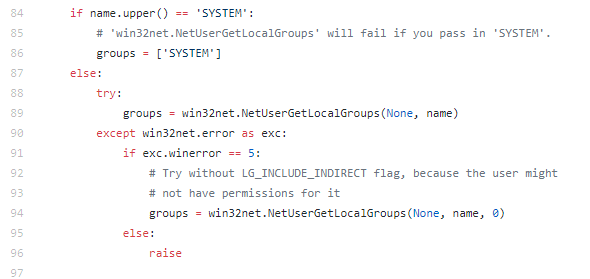
It works with this statement:
if exc.winerror == 5 or exc.winerror == 1722:
This issue seems to appear if you are having multi domain environment.
kriss0011
on 3 Oct 2019
@kriss0011 If you solved it by adding or exc.winerror == 1722, which is not in develop branch, I would suggest to keep the issue opened, as other users might face it as well
lukasraska
on 3 Oct 2019
OK, I'll :) Thank you for your help!
kriss0011
on 3 Oct 2019
Experiencing the same issue in multi-domain environment. Windows Server 2016 box is a member of domain A and the salt-minion service logs on as a user from domain B. The strange part is that we did not experience this in Windows Server 2012r2 with the exact same versions of salt-minion on all boxes.
 amunoz951
on 15 Oct 2019
amunoz951
on 15 Oct 2019
It seems that the issue with error code 5 that has been solved in branch develop it works with error code 1722 as well. The change need to be implemented in the same if statement (line 91):
It works with this statement:
if exc.winerror == 5 or exc.winerror == 1722:
This issue seems to appear if you are having multi domain environment.
This fixed it for me as well. Will this be merged to master?
amunoz951
on 15 Oct 2019
I've created #55780 which targets master, so it might be part of Neon (as probably it will be released this month)
lukasraska
on 3 Jan 2020
Any reason we can't close this issue?
 sagetherage
on 7 Jan 2020
sagetherage
on 7 Jan 2020
Any reason we can't close this issue?
No, it can be closed.
I left it open as @lukasraska suggested.
kriss0011
on 7 Jan 2020
Yes, it can be closed. I forgot to put 'closes' statement in the PR.
lukasraska
on 7 Jan 2020
Related issues
 Oloremo
·
3Comments
Oloremo
·
3Comments
 sfozz
·
3Comments
sfozz
·
3Comments
 zieba88
·
3Comments
zieba88
·
3Comments
 lhost
·
3Comments
lhost
·
3Comments
 twangboy
·
3Comments
twangboy
·
3Comments