Salt: chocolatey bootstrap should support offline installation of Chocolatey itself
Description of Issue/Question
Salt is able to bootstrap Chocolatey with chocolatey.bootstrap. However, there is nowhere to indicate an internal/offline location of the Chocolatey nupkg like you can with Chef and Puppet.
Being able to support a fully internal installation seems like a good request as other folks using Salt are using work arounds to make it happen - https://controlaltfail.wordpress.com/2017/08/03/salt-chocolatey-install-totally-offline/
Thoughts?
 ferventcoder
All 9 comments
cc @twangboy
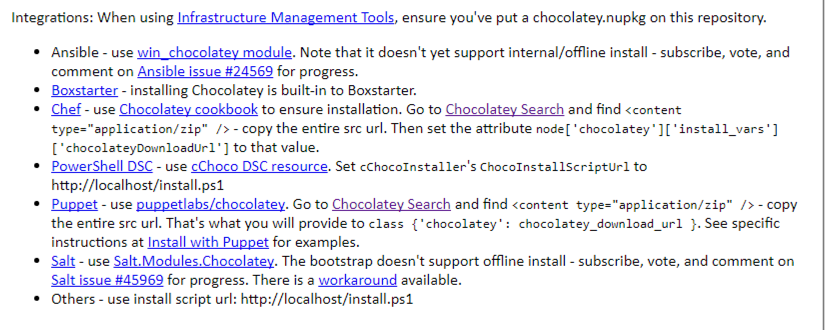
Just as an FYI, I'm writing some user documentation on how to support offline installation across different configuration managers and I'm noting that it's not possible and pointing back to this issue as a placeholder until this is implemented.
ferventcoder
on 11 Feb 2018
FYI here is an image of that documentation included in Chocolatey.Server v0.2.3:
ferventcoder
on 11 Feb 2018
This seems like a great idea.
We would love to see a PR implementing it.
If you dont have time, @dwoz and @twangboy would yall mind taking a look and seeing if this would be quick to implement?
Thanks,
Daniel
 gtmanfred
on 12 Feb 2018
gtmanfred
on 12 Feb 2018
@gtmanfred I don't have the skills necessary to implement it. Or at least quickly and correctly.
ferventcoder
on 12 Feb 2018
We could either add a source option to bootstrap or we could add bootstrap_local. I kind of like bootstrap_local because the bootstrap does a lot more than just install chocolatey.
- It makes sure Windows has the version of PowerShell it needs
- It installs
.NET 4.0 - Then it installs Chocolatey
If we're installing chocolatey from a local source, we would need to assume that's already been done and all that's left is to install Chocolatey.
@UtahDave ?
 twangboy
on 14 Feb 2018
twangboy
on 14 Feb 2018
Adding input parameters seems to be an extensible method to achieving the desired result (IMHO - a better choice) and could support any of them exposed in the chef cookbook implementation @ https://github.com/chocolatey/chocolatey-cookbook/blob/master/attributes/default.rb and all the flexibility it provides.
 abmoham
on 14 Feb 2018
abmoham
on 14 Feb 2018
@twangboy I believe I agree with @abmoham on this - it feels better to have an attribute/parameter of some sort that can control where I install Chocolatey from, with a default value of the community repository (https://chocolatey.org/install.ps1 in this case). Since it is pointing to a script instead of using a local version, allow for me to pass in an alternative script that would achieve the same result.
ferventcoder
on 16 Feb 2018
Add source parameter to chocolatey.bootstrap. Default to https://chocolatey.org/install.ps1
Install by doing the following
- [x] Cache
sourcefrom salt://, URL, or local file (similar to winrepo) - [x] If it is a
ps1file it will run it, return success or failure - [x] If it is a
nupkgfile it will unzip the file to<temp dir> - [x] Run
chocolateyInstall.ps1from<temp dir>\tools, return success or failure
May need to do the following (may be done in the PowerShell script):
- [ ] Ensure the
ChocolateyInstallenvironment variable is present and set to%ProgramData%\Chocolatey - [ ] Ensure
%ChocolateyInstall%\binis in the python environment path
twangboy
on 14 Mar 2019
This issue has been automatically marked as stale because it has not had recent activity. It will be closed if no further activity occurs. Thank you for your contributions.
If this issue is closed prematurely, please leave a comment and we will gladly reopen the issue.
![stale[bot] picture](https://avatars.githubusercontent.com/in/1724?v=4&s=40) stale[bot]
on 8 Jan 2020
stale[bot]
on 8 Jan 2020
Related issues
 Oloremo
·
3Comments
Oloremo
·
3Comments
 sagetherage
·
3Comments
sagetherage
·
3Comments
 icycle77
·
3Comments
icycle77
·
3Comments
 seanacais
·
3Comments
seanacais
·
3Comments
 qiushics
·
3Comments
qiushics
·
3Comments