Salt: High CPU usage in Windows Minions 2017.7 (Python 3)
Description of Issue/Question
I'm having high CPU in Windows Minions . Running Salt Minion 2017.7.0 (Python 3).
Setup
Example high cpu operation: sudo salt 'saltminionname.FQDN' grains.items
Python.exe on the minion then experiences high CPU usage for the next 5 seconds or so.
Salt Master is Ubuntu 16.04 - salt-master 2017.7.0 (Nitrogen). VMware Virtual Machine, 2 CPU 4GB ram, VM version 11, VMXNET 3 network adapter.
Running Salt Minion 2017.7.0 (Python 3). - Server 2008R2 .Netframework 4.7. Domain based. VMware Virtual machine, VM version 11, 1 CPU, 2GB RAM, VMXNET 3 network adapter.
Salt Master and Minion are on the same /24 subnet.
Steps to Reproduce Issue
sudo salt 'saltminionname.FQDN' grains.items
or
sudo salt 'saltminionname.FQDN' pkg.list_pkgs
or
salt '*' state.apply
All have the same issue.
Versions Report
Salt Version:
Salt: 2017.7.0
Dependency Versions:
cffi: Not Installed
cherrypy: 3.5.0
dateutil: 2.4.2
docker-py: Not Installed
gitdb: 0.6.4
gitpython: 1.0.1
ioflo: Not Installed
Jinja2: 2.8
libgit2: Not Installed
libnacl: Not Installed
M2Crypto: Not Installed
Mako: 1.0.3
msgpack-pure: Not Installed
msgpack-python: 0.4.6
mysql-python: Not Installed
pycparser: Not Installed
pycrypto: 2.6.1
pycryptodome: Not Installed
pygit2: Not Installed
Python: 2.7.12 (default, Nov 19 2016, 06:48:10)
python-gnupg: Not Installed
PyYAML: 3.11
PyZMQ: 15.2.0
RAET: Not Installed
smmap: 0.9.0
timelib: Not Installed
Tornado: 4.2.1
ZMQ: 4.1.4
System Versions:
dist: Ubuntu 16.04 xenial
locale: UTF-8
machine: x86_64
release: 4.4.0-78-generic
system: Linux
version: Ubuntu 16.04 xenial
 adampbrush
All 5 comments
If you increase the logging to the debug level are you able to see if the minions are doing anything? Possibly something that would account for the high load on certain actions.
 garethgreenaway
on 8 Aug 2017
garethgreenaway
on 8 Aug 2017
For debug mode, refer to the documentation here: https://docs.saltstack.com/en/latest/topics/troubleshooting/minion.html#what-ports-does-the-minion-need-open
I have this version installed on some different Windows systems and I haven't experienced this yet but I'll keep an eye on it now.
 TheVakman
on 11 Aug 2017
TheVakman
on 11 Aug 2017
Can I have some more guidance for Windows Minion debugging please?
I've now also tested Python 2and3 versions of the x64 and x86 2017.7 release and have the same issues on all of them.
adampbrush
on 16 Aug 2017
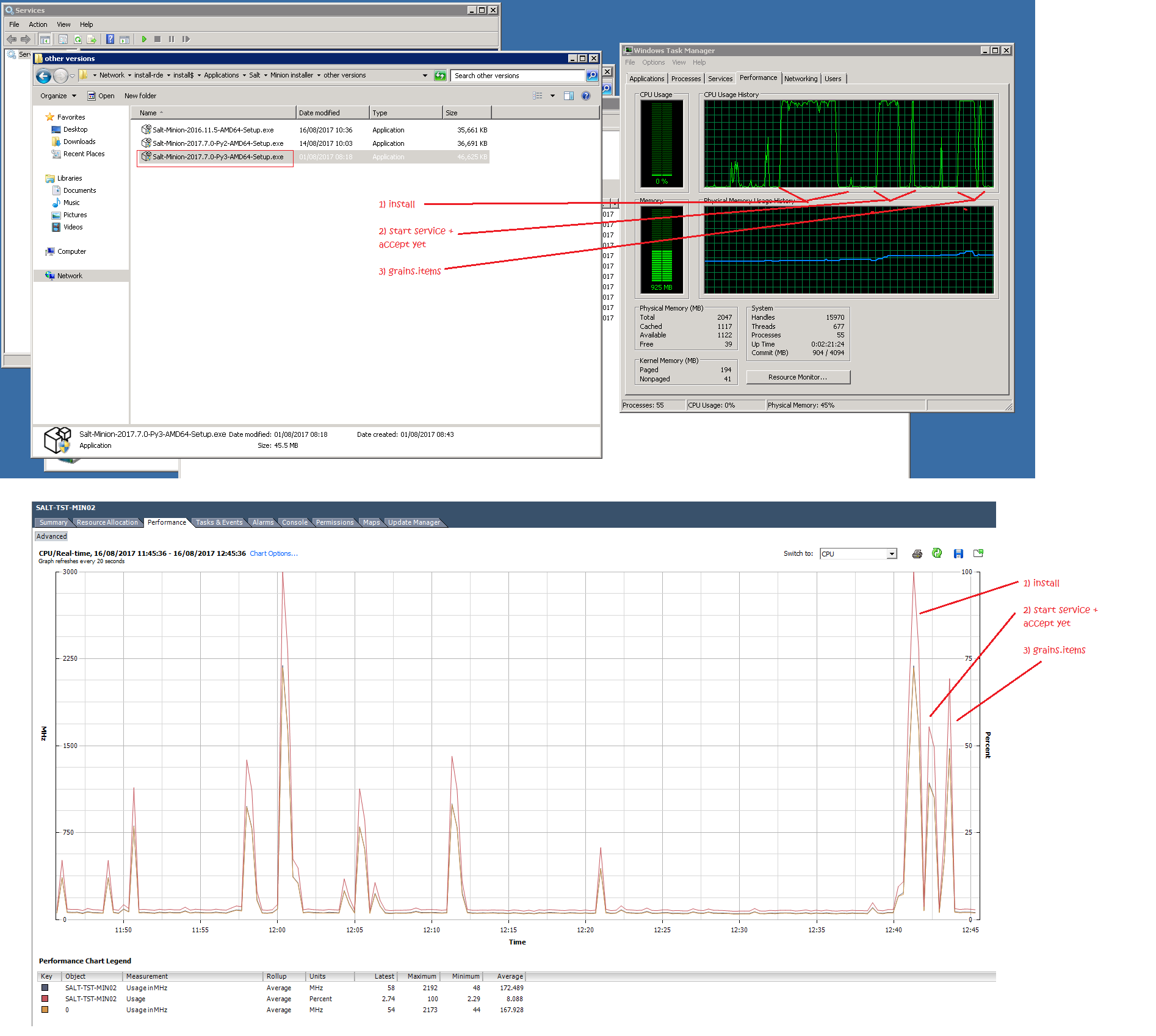
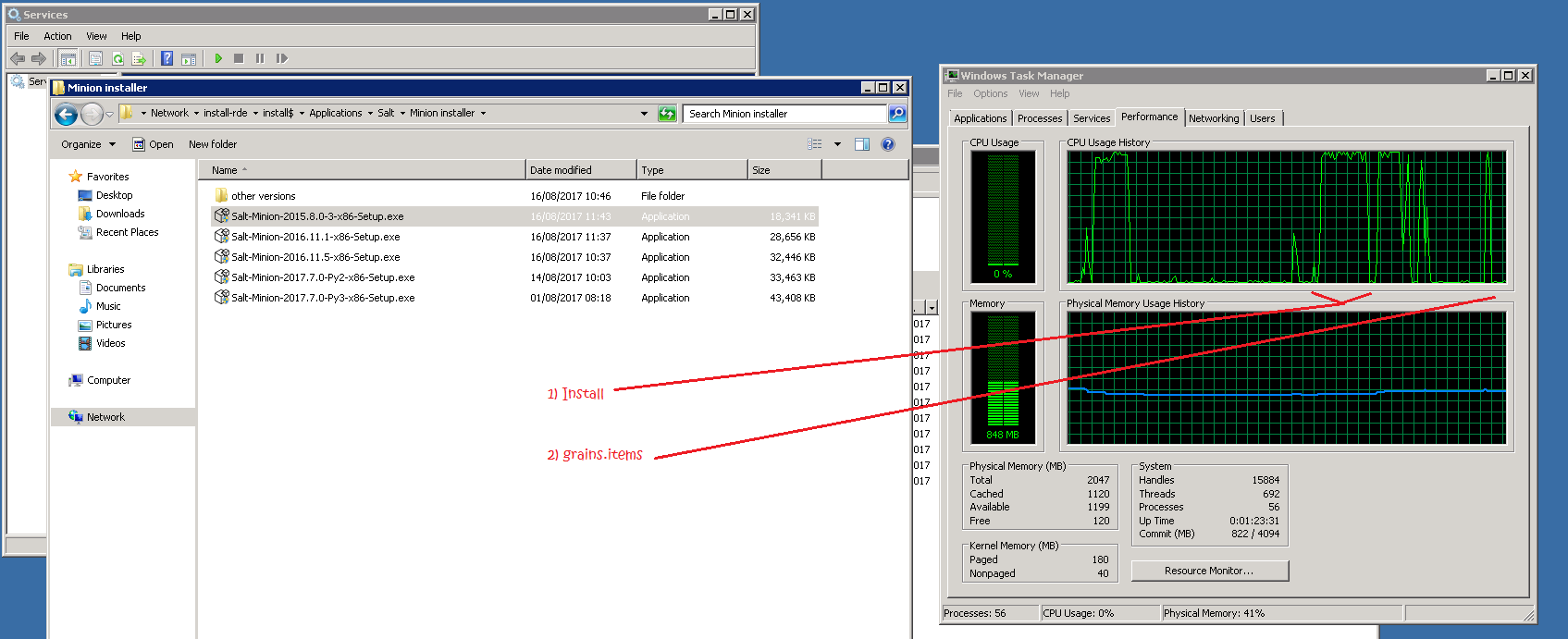
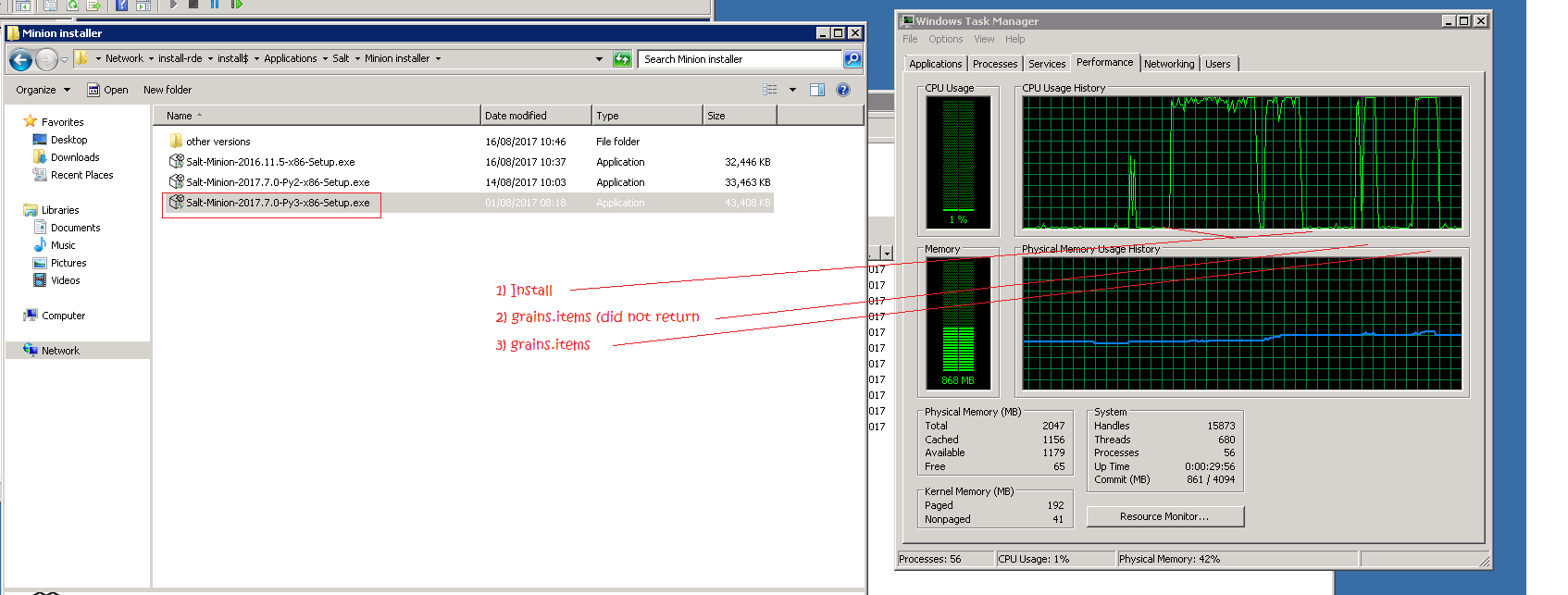
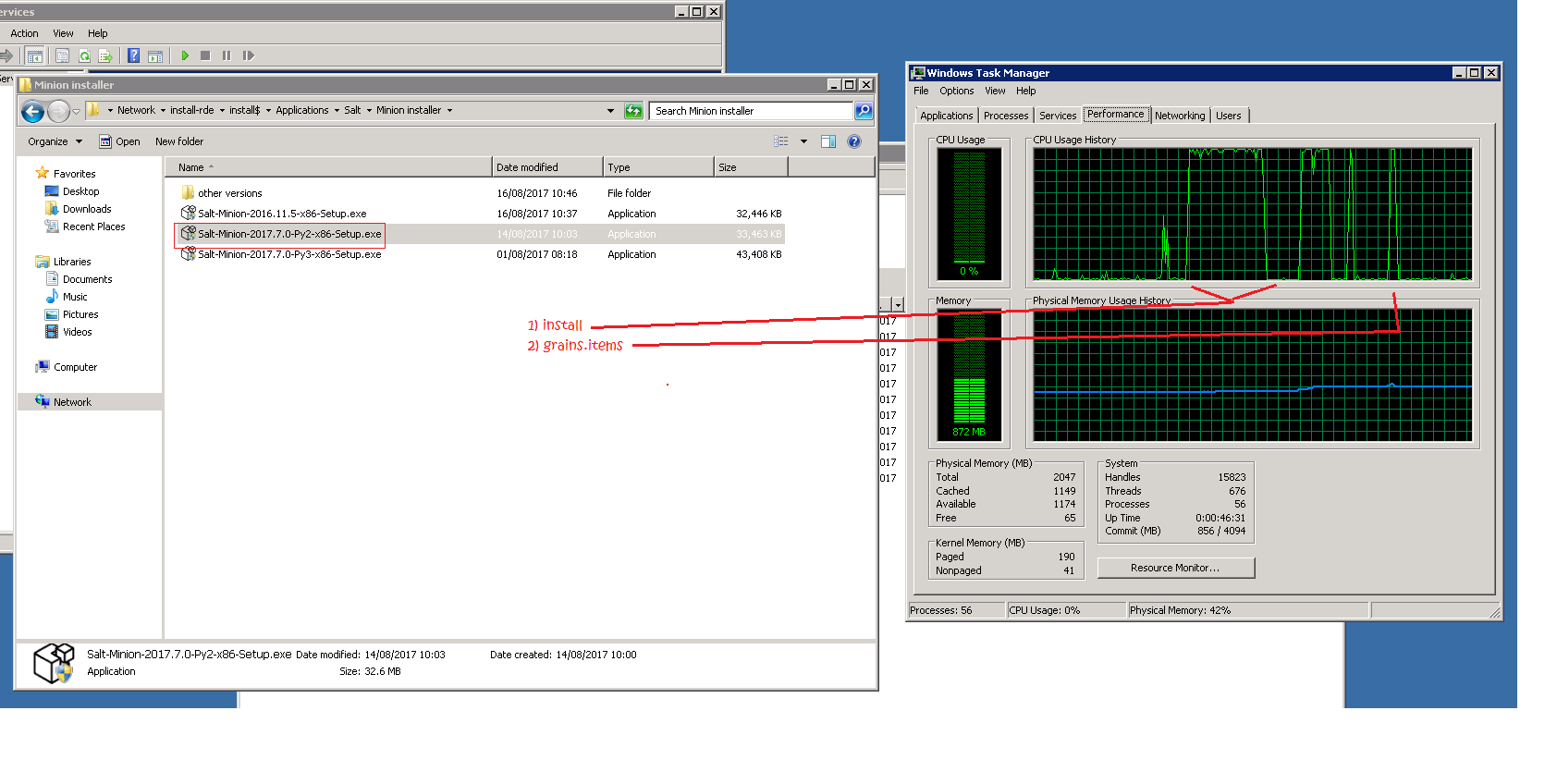
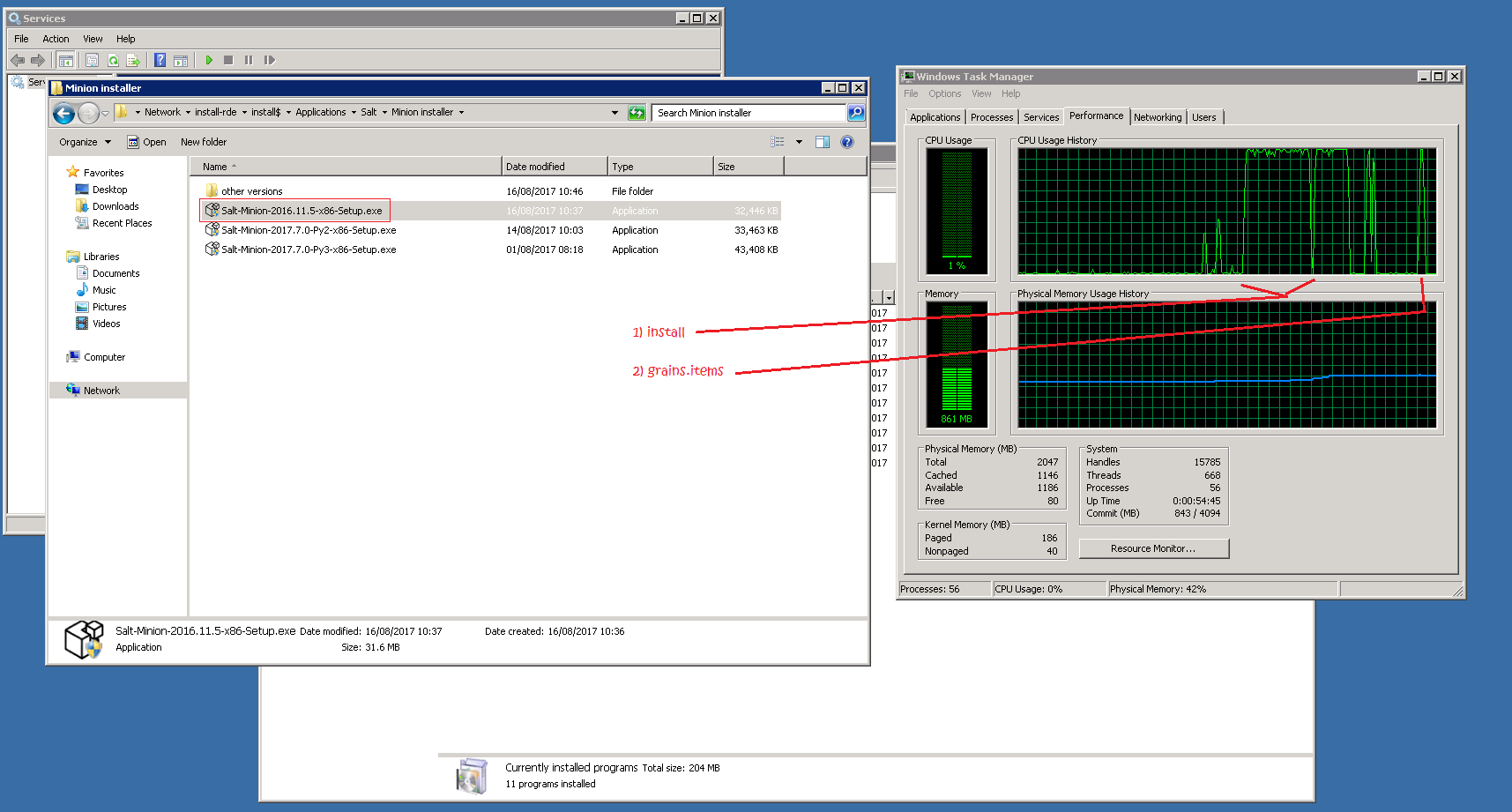
Heres some screenshots of testing various versions of the Windows minion. It appears that later versions of the windows minion cause commands such as grains.items to take longer and longer:
Note the test windows minion only has 1 vCPU and 2GB ram.
adampbrush
on 16 Aug 2017
This issue has been automatically marked as stale because it has not had recent activity. It will be closed if no further activity occurs. Thank you for your contributions.
If this issue is closed prematurely, please leave a comment and we will gladly reopen the issue.
![stale[bot] picture](https://avatars.githubusercontent.com/in/1724?v=4&s=40) stale[bot]
on 21 Aug 2019
stale[bot]
on 21 Aug 2019
Related issues
 commutecat
·
3Comments
commutecat
·
3Comments
 layer3switch
·
3Comments
layer3switch
·
3Comments
 Inveracity
·
3Comments
Inveracity
·
3Comments
 twangboy
·
3Comments
twangboy
·
3Comments
 sagetherage
·
3Comments
sagetherage
·
3Comments
Most helpful comment
Heres some screenshots of testing various versions of the Windows minion. It appears that later versions of the windows minion cause commands such as grains.items to take longer and longer:
Note the test windows minion only has 1 vCPU and 2GB ram.