Salt: win_pkg: Installing packages on internet-less Windows minions
Description of Issue/Question
I get errors indicating the installer needs internet access in order to install packages for Windows minions.
We just started looking at Salt and I am a newbie, so it could be a fault on my side, but I couldn't find an explanation in the docs, in existing issues reported, or on Google.
Our expectation is that packages are installed in the Windows Package Manager repository (I see 235 installed packages by running salt -G 'os:windows' pkg.refresh_db) and installations happen from the local copy on the minion. But all I get when I try to install one of them (for instance, salt -G 'os:windows' pkg.install 'firefox') is the error as shown in the attached screenshot, indicating that the installer is trying to access the internet to complete. As our host is a production server we don't want to allow internet access so that is not an option.
What am I missing?
Setup
(Please provide relevant configs and/or SLS files (Be sure to remove sensitive info).)
Steps to Reproduce Issue
(Include debug logs if possible and relevant.)

Versions Report
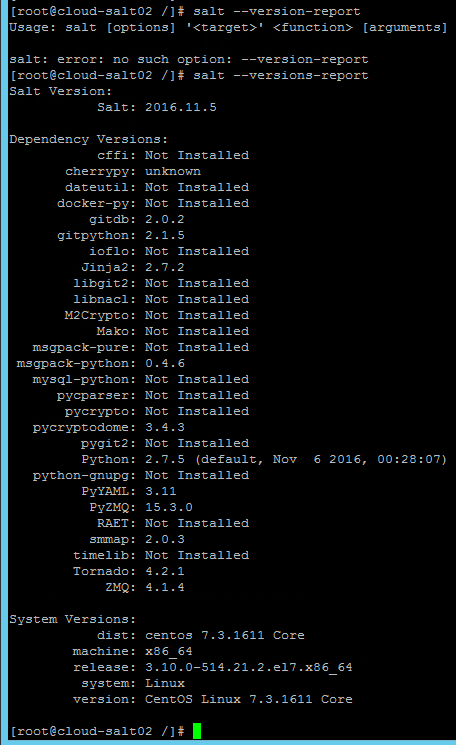
(Provided by running salt --versions-report. Please also mention any differences in master/minion versions.)
 SaltMPA
All 17 comments
That's correct, if you look at the sls files, they will have the source of the install exe/msi.
If you are pulling them down for github, you can stop doing this after making a copy and place then in a different location and edit the the sls files and change the source location, but you will need to download the files yourself to the salt master and use salt:// or place then on an internal web server and use http://
I see 235 installed packages by running salt -G 'os:windows' pkg.refresh_db
I think you mean, you see 235 definitions of packages (i.e. 235 sls files)
I am working on making it easier to change the down load location, so the github files are more of a template.
 damon-atkins
on 19 Jul 2017
damon-atkins
on 19 Jul 2017
I'm going to mark this one as a feature request as currently Salt does not support installing Windows packages from local locations, but it would be a good addition.
 garethgreenaway
on 19 Jul 2017
garethgreenaway
on 19 Jul 2017
I'm going to mark this one as a feature request as currently Salt does not support installing Windows packages from local locations, but it would be a good addition.
@garethgreenaway it supports installing it from where you tell it to fetch it from in the sls file. It just that 90% https://github.com/saltstack/salt-winrepo-ng say get it from the internet, because every company is different. For production salt-winrepo-ng should be treated as examples. The examples need to be copied and edited for production use.
damon-atkins
on 19 Jul 2017
@damon-atkins Makes sense. Maybe an update to documentation to make that a bit more clear?
garethgreenaway
on 19 Jul 2017
Well, that was my first issue on GitHub and I am a newbie, so I was a little alert to what to expect, but I have to say I'm so impressed with the speed and quality (including no bashing newbies! :) ) of the response! Thank you both so much. I think I am going to enjoy being on this platform. :)
@damon-atkins Yes, pardon my loose terminology, 235 sls files in the repo it is. :)
And I found the reference to the installer inside the sls file (value of the 'installer' key):
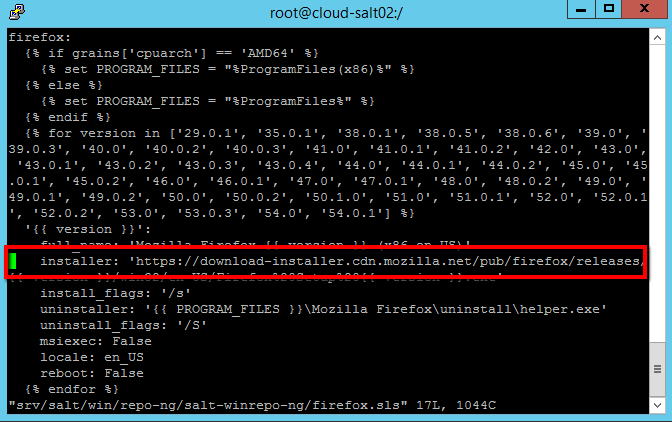
So now I will follow your directions and download the installer from the internet, copy it somewhere on the master and reference that using salt://
I'll let you know how it goes, so you have an indication of how user-friendly the module is for Windows. If I can get it right with so little instruction, anyone can! ;)
SaltMPA
on 20 Jul 2017
You also need change the ....for version ... line. To be only the versions you have downloaded.
Please prefix the title with win_pkg: ... make it easy for others to find help on this topic.
damon-atkins
on 20 Jul 2017
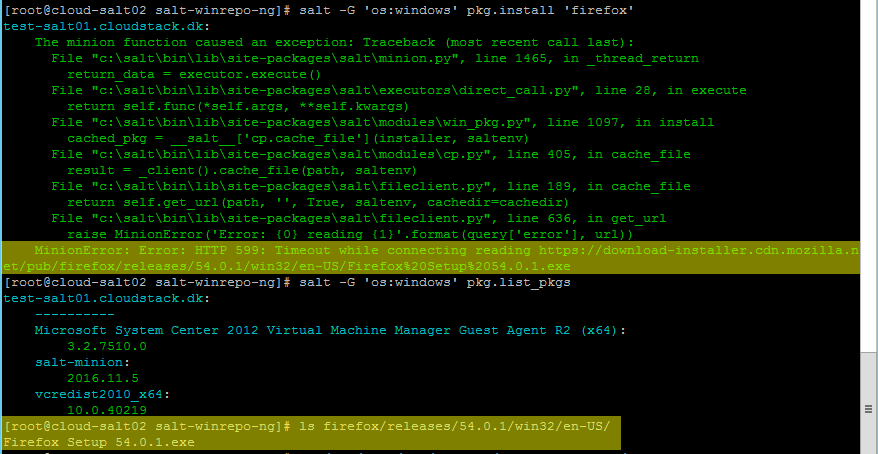
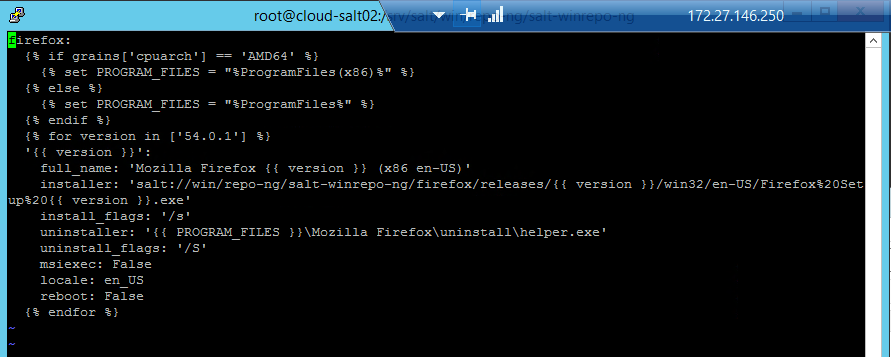
Hmm...I still get an HTTP connectivity error when installing, although I did download the installer and put it in a folder under salt:// and edited the respective sls file to point to it (including the version reference). :(
SaltMPA
on 21 Jul 2017
@SaltMPA did you also run pkg.refresh_db? The sls is cached on the minion, this function will update it.
https://docs.saltstack.com/en/latest/topics/windows/windows-package-manager.html#sync-repo-to-windows-minions
 lorengordon
on 21 Jul 2017
lorengordon
on 21 Jul 2017
Thank you for the tip. I actually didn't. When I try I now get an error (I didn't this morning, so it's probably related to my new edit of the sls file):
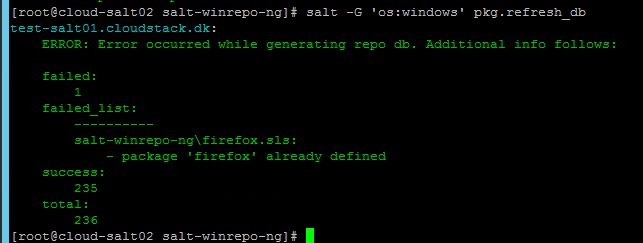
Any suggestion?
SaltMPA
on 21 Jul 2017
Do you maybe have more than one sls that contains a definition for the firefox package? You can add -l debug to the command to get more detail on the execution.
lorengordon
on 21 Jul 2017
Indeed so! I thought I was smart in making a backup copy of the sls file and placing it in the same folder as the initial sls that I then edited. Ha! Now I feel like a newbie - which is what I am. ;)
Now I can do pkg.refresh_db without errors, but a subsequent install issues a new error:

At least now it grabs my local installer, but I have no clue as to the caching thingy...:/
SaltMPA
on 21 Jul 2017
I _think_ the %20 maybe be interpreted differently on the salt:// filesystem vs http[s]://. Try replacing %20 with regular spaces.
lorengordon
on 21 Jul 2017
You were right. After changing the name of the installer, I finally have:
Success!!! 👍

Thank you very much for you patience! 🥇
Do you think I could get an easier installing experience with Windows Package Manager using Chocolatey? But again, I have the complication that installation must be offline (no internet access on our production host machine).
SaltMPA
on 21 Jul 2017
The lack of internet access means all options are probably equally difficult. :) Sticking with salt's winrepo, possibly the easiest thing to do would be to host internally all the software you want (on a webserver or on the salt master), clone the official pkg repo, host it internally also, patch your clone so the urls point to your hosted location, and set the winrepo_remotes_ng config option to point at your clone.
- https://docs.saltstack.com/en/latest/topics/windows/windows-package-manager.html#maintaining-windows-repo-definitions-in-git-repositories
- https://docs.saltstack.com/en/latest/ref/configuration/master.html#winrepo-remotes-ng
lorengordon
on 21 Jul 2017
Thanks again, all very useful help, I will definitely look at it.
I will close the issue now. :)
SaltMPA
on 21 Jul 2017
When I re-wrote the pkg.refresh_db I also added a heap of error checking to make it easier. I also added an option verbose=True which I forgot to doco, the doco was updated in 2017.11
Sample error
failed:
    1
failed_list:
    ----------
    something.sls:
        - package 'something', version number 1 is not a string
        - package 'something', version number 2 is not a string
success:
    240
total:
    241
The down side with the verbose option is it might display information which might contain Unicode characters and salt logging does not support logging Unicode characters.
Most of the pkg functions which change something check if db is older than 6 hours (default). You only need to run pkg.refresh_db against the box your testing against.
refresh_db also has some win* configuration settings on the minion.
Best useful aid is pkg.get_repo_data which dumps the raw db after its been processed by steps within refresh_db
Also a tip is to look at the develop doco, as explanations may be better, even if its documenting some features which do not exist yet.
damon-atkins
on 21 Jul 2017
Thank you very much, I appreciate the time you have spent on helping me out! :)
SaltMPA
on 21 Jul 2017
Related issues
 layer3switch
·
3Comments
layer3switch
·
3Comments
 sfozz
·
3Comments
sfozz
·
3Comments
 lhost
·
3Comments
lhost
·
3Comments
 allyunion
·
3Comments
allyunion
·
3Comments
 nixjdm
·
3Comments
nixjdm
·
3Comments