Salt: Invalid warnings regarding cmd.run python_shell
Description of Issue/Question
Setup
I have a simple state file called resolvconf.sls with the following contents:
resolvconf:
  pkg:
    - installed

/etc/resolvconf/resolv.conf.d/base:
  file.append:
    - text: search {{ salt['cmd.run'](cmd='/bin/dnsdomainname', python_shell=False) }}
    - require:
      - pkg: resolvconf
That should not produce any warnings, and yet I get the following each time the state is executed:
[WARNING ] /usr/lib/python2.7/dist-packages/salt/utils/templates.py:73: DeprecationWarning: Starting in 2015.5, cmd.run uses python_shell=False by default, which doesn't support shellisms (pipes, env variables, etc). cmd.run is currently aliased to cmd.shell to prevent breakage. Please switch to cmd.shell or set python_shell=True to avoid breakage in the future, when this aliasing is removed.
I should not receive a warning because I have explicitly set the value of python_shell, and I am not using any shellisms in my command.
Steps to Reproduce Issue
Just run the above state file and watch the warnings appear.
Versions Report
# apt-cache policy salt-minion | head -n 3
salt-minion:
  Installed: 2016.3.3-1
  Candidate: 2016.3.3-1
# salt-call --versions-report
Salt Version:
           Salt: 2016.3.0

Dependency Versions:
           cffi: 0.8.6
       cherrypy: Not Installed
       dateutil: 2.2
          gitdb: Not Installed
      gitpython: Not Installed
          ioflo: Not Installed
         Jinja2: 2.7.3
        libgit2: Not Installed
        libnacl: Not Installed
       M2Crypto: Not Installed
           Mako: 1.0.0
   msgpack-pure: Not Installed
 msgpack-python: 0.4.2
   mysql-python: 1.2.3
      pycparser: 2.10
       pycrypto: 2.6.1
         pygit2: Not Installed
         Python: 2.7.9 (default, Mar  1 2015, 12:57:24)
   python-gnupg: Not Installed
         PyYAML: 3.11
          PyZMQ: 14.4.0
           RAET: Not Installed
          smmap: Not Installed
        timelib: Not Installed
        Tornado: 4.4.1
            ZMQ: 4.0.5

System Versions:
           dist: debian 8.5
        machine: x86_64
        release: 3.16.0-4-amd64
         system: Linux
        version: debian 8.5
This is on an upgraded minion, but the warning is still there. BTW, this happens a lot - the git tagged release does not report the correct version. Really, the tagged commit should be the one where the version is bumped. I believe that's what's normally done, and it would make things less confusing.
 boltronics
All 8 comments
@boltronics thanks looks like i'm able to replicate this and looking at teh code here it seems it just looks to see if the command you are using cmd.run.
        'cmd.run': 'cmd.shell',
        'cmd': {'run': 'shell'},
and then it changes it to cmd.shell for you. Clearly if the warning is correct you would be able to use cmd.run with python_shell=True and it should work without getting warned. So i'll mark as a bug so we can add some logic check if it python_shell is set and dont warn thanks
 Ch3LL
on 15 Sep 2016
Ch3LL
on 15 Sep 2016
Still an issue in 2016.11.4.
boltronics
on 10 May 2017
I notice the logic has been removed from the develop git branch back in December. I think such fixes need to go through the develop branch first and are optionally back-ported to stable releases as required, if I remember correctly? If so, this bug will never be resolved since the warning isn't applicable to newer major stable releases, and this bug should be closed?
boltronics
on 19 May 2017
I tried to replicate the issue. But on salt version 2017.7.0 it runs flawlessly.
What does that mean ? I am unable to understand why I am not able to replicate the warnings in the new version of salt .

Another important thing, I was trying to inspect whether in nitrogen(2017.7.0) the aliasing is present or not. I found it is .
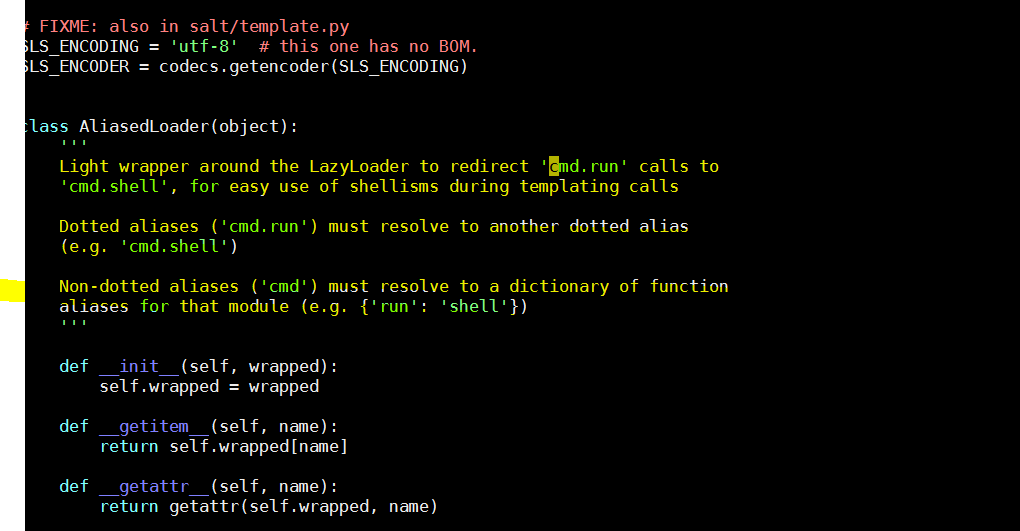
Can anyone help me with this, I am quite confused. What all is going on ?
 golokeshpatra45
on 7 Sep 2017
golokeshpatra45
on 7 Sep 2017
@golokeshpatra45 Since you have explicitly set python_shell, I believe you are not going to get the warning as the intended behaviour has been explicitly set. Which would suggest the bug is fixed.
However, what I don't understand is why this works:
sudo salt-call -l debug cmd.run 'ls / | cat'
No warnings are printed, it's using cmd.run and clearly is using a pipe shell-ism. Confirming even redirects work using cmd.run. Weird (and a bit scary!). Tested in 2017.7.1. Looks like the cmd.run warnings were removed but the alias was not.
boltronics
on 14 Sep 2017
@boltronics according to https://groups.google.com/d/msg/salt-users/oVipgq0opHI/wSK9KnNDAQAJ
By default in salt, we set python_shell=False for most cmd.run and similar functions, to prevent shell injection. With this setting, shellisms such as pipes will not work. There are a couple of exceptions: when you use cmd.run on the command line, since you can already execute arbitrary commands we default to python_shell=True. The same is also true in jinja, but only for cmd.run, we didn't override all of them, which is why it's not working for you.
And since you are issuing that command through the cli, it gets python_shell=True, so no warning and pipes work
 giskou
on 18 Oct 2017
giskou
on 18 Oct 2017
@giskou Nice find. I now understand the reasoning (although it's oddly inconsistent), but the docs really should be updated if this behaviour is still intentional depending on how it's called.
boltronics
on 19 Oct 2017
This issue has been automatically marked as stale because it has not had recent activity. It will be closed if no further activity occurs. Thank you for your contributions.
If this issue is closed prematurely, please leave a comment and we will gladly reopen the issue.
![stale[bot] picture](https://avatars.githubusercontent.com/in/1724?v=4&s=40) stale[bot]
on 11 Feb 2019
stale[bot]
on 11 Feb 2019
Related issues
 seanacais
·
3Comments
seanacais
·
3Comments
 sfozz
·
3Comments
sfozz
·
3Comments
 Inveracity
·
3Comments
Inveracity
·
3Comments
 allyunion
·
3Comments
allyunion
·
3Comments
 layer3switch
·
3Comments
layer3switch
·
3Comments
Most helpful comment
@boltronics thanks looks like i'm able to replicate this and looking at teh code here it seems it just looks to see if the command you are using cmd.run.
and then it changes it to cmd.shell for you. Clearly if the warning is correct you would be able to use cmd.run with python_shell=True and it should work without getting warned. So i'll mark as a bug so we can add some logic check if it python_shell is set and dont warn thanks