Salesforcedx-vscode: Org Browser bug - error when trying to retrieve
Summary
When using the OrgBrowser tool in VS Code, the following error occurs:
Cannot read property 'split' of undefined
Steps To Reproduce:
- Go to OrgBrowser while in a Repo in VS Code
- Go to Email templates and click Retrieve Source from Org
Expected result
OrgBrowser should have pulled the data from my org
Actual result
Cannot read property 'split' of undefined
Additional information

VS Code Version:Version: 1.55.2 (Universal)
Commit: 3c4e3df9e89829dce27b7b5c24508306b151f30d
Date: 2021-04-13T09:36:32.643Z (3 wks ago)
Electron: 11.3.0
Chrome: 87.0.4280.141
Node.js: 12.18.3
V8: 8.7.220.31-electron.0
OS: Darwin x64 19.6.0
SFDX CLI Version: 7.99.0-79e53c6
OS and version:
 LexDD
LexDD
All 24 comments
Experiencing same bug.
 crimmings
on 5 May 2021
crimmings
on 5 May 2021
Same here!
sfdx-cli/7.99.0 darwin-x64 node-v14.16.1
 jlorca
on 6 May 2021
jlorca
on 6 May 2021
Thanks for reporting this. Is this occurring on any metadata type or only for Email Templates?
 smaddox-sf
on 6 May 2021
smaddox-sf
on 6 May 2021
all metadata types. Actually I found it with Reports, but doing some tests I noticed it fails with Apex classes, Contract settings, and many others
jlorca
on 6 May 2021
Ive had it happen with Objects too. Due to the nature of retrieving record types having dependencies on retrieving the fields as well, we are using orgbrowser mainly to pull in record type updates.
Unless there is a better way to pull record type picklist updates without building a whole package, this Orgbrowser bug is blocking us from keeping record types up to date efficiently.
Its great we have others able to reproduce on other types as well. I was just providing its impact on us.
LexDD
on 6 May 2021
Haven't repro'ed it. @LexDD Could you collect the stack trace when this happened by:
- Go to "Salesforce CLI" dropdown (In the Output Panel)
- Choose "Log (Extension Host)"
- Scroll up and copy the "Cannot read property 'split' of undefined" stacktrace
If the above doesn't yield the stacktrace, you could go to Help -> Toggle Developer Tools -> Console.
This would help us further troubleshoot the issue. Thanks!
 xyc
on 7 May 2021
xyc
on 7 May 2021
Perhaps another one following the conversation could chime in. I dont see any stack traces referencing the error.
LexDD
on 7 May 2021
Using the developer console, I see this error message

jlorca
on 7 May 2021
I have two colleagues getting the same error: one is using sfdx-cli/7.99.0 darwin-x64 node-v15.14.0, the other has sfdx-cli/7.100.0 darwin-x64 node-v16.0.0. Both can use SFDX Retrieve in the Explorer successfully, but the org browser fails for all objects.
On the other hand, I'm working fine on two different machines with different versions:
Mac with sfdx-cli/7.98.0 darwin-x64 node-v15.14.0
Windows starting at sfdx-cli/7.96.0 win32-x64 node-v16.0.0, then updated to sfdx-cli/7.100.0 win32-x64 node-v16.0.0
 davidchengIC
on 8 May 2021
davidchengIC
on 8 May 2021
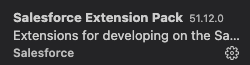
Thanks all for reporting this, we've still been unable to repro this but will continue looking into it! @LexDD, @jlorca, @davidchengIC could you all share what version of the Salesforce Extension Pack you're using? This can be found by clicking on the Marketplace icon on the left toolbar and searching for the Extension Pack.
And are you seeing this issue occurring in with components that _have_ or _haven't_ been previously retrieved? Or is it across all components in the project?
 AnanyaJha
on 11 May 2021
AnanyaJha
on 11 May 2021
My colleagues and I are using 51.12.0. All our objects are previously retrieved.
davidchengIC
on 11 May 2021
Quite some other people within the team are experiencing the same issue.
It happens with components that HAVEN'T been previously retrieved.
As a workaround I noticed that downgrading both extensions "Salesforce CLI Integration" + "Salesforce Extension Pack" from version 51.12.0 to 51.8.0 works for now

jlorca
on 12 May 2021
Same issue also reported on #3234
smaddox-sf
on 12 May 2021
Someone on our team supposedly got around this by doing:
Go to Manage gear icon on bottom left => settings=> type in use deploy retrieve=> uncheck the check box , close and re launch the vs code
I am not sure of the implications of this though.
LexDD
on 13 May 2021
I have the same issue, but when retrieving from the package.xml.
When I try to retrieve a specific component it works fine.
I was trying to retrieve source from my org through the package.xml - SFDX:Retrieve This Source from Org
I was getting this error:
SFDX: Retrieve Source from Org failed to run
Cannot read property 'split' of undefined
I have been working on this project in GitHub and it was working just fine until it suddenly stopped retrieving through the package.xml
I tried to reinstall Salesforce Extension Pack from Visual Studio Code. (Complete Package which comprises of multiple extension) from visual studio and also visual studio itself but I was still getting this error.
If I use the command line sfdx force:source:retrieve -x manifest/package.xml it works. But it only works if I use the command line and before I didn't have to use it.


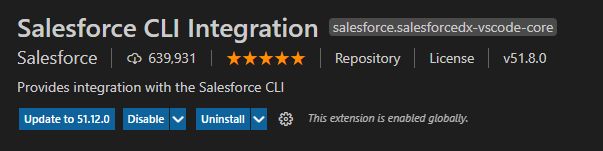
Like @jlorca I tried to downgrade both extensions "Salesforce CLI Integration" + "Salesforce Extension Pack" from version 51.12.0 to 51.8.0 and it also works for now.

 filipaGitHub
on 13 May 2021
filipaGitHub
on 13 May 2021
Hi all! Thank you for the extra info, please confirm if we're understanding correctly:
- With the
Experimental: Deploy/Retrievesetting turned on, retrieving source from org fails
- @filipaGitHub it fails while retrieving via package.xml
- @jlorca & others are seeing it fail via the org browser
- Question: does it pass via the right click
SFDX: Retrieve Source from Orgor Command PaletteSFDX: Retrieve this Source from Orgcommands?
- @LexDD With the
Experimental: Deploy/Retrievesetting turned off, retrieving source from org passes?
Turning the Experimental: Deploy/Retrieve setting off should not cause any issues- it switches all deploy/retrieve commands to use the CLI behind the scenes rather than invoking the library directly. More info here.
@filipaGitHub, @jlorca, @davidchengIC and all, could you try turning the Deploy/Retrieve setting off and running the Retrieve commands?
To turn off the setting: open Command Palette > Preferences: Open Settings (UI) > search Deploy/Retrieve > Turn off Salesforcedx-vscode-core › Experimental: Deploy Retrieve.
Try retrieving via the Org Browser, package.xml, or SFDX: Retrieve Source from Org command and let us know if that fixes the issue.
Unfortunately, we have not been able to reproduce this locally, but we are still actively investigating and will update this thread with more info once we have it! Thank you all for the patience.
AnanyaJha
on 13 May 2021
I already have Experimental: Deploy/Retrieve disabled, I did that several weeks ago due to a different issue (where the leading "0" was being dropped from picklist value metadata).
davidchengIC
on 13 May 2021
This issue has been linked to a new work item: W-9271745
 uip-robot
on 14 May 2021
uip-robot
on 14 May 2021
Hi @AnanyaJha,
Yes, with Experimental: Deploy/Retrieve setting turned on, retrieving source from org failed via package.xml. It did not pass via right click SFDX: Retrieve Source from Org
I tried to turn off the Experimental: Deploy/Retrieve setting and it now works fine. (With the most updated version of the "Salesforce CLI Integration" + "Salesforce Extension Pack" extensions -> v51.12.0)
Thank you
filipaGitHub
on 14 May 2021
I can also confirm turning off the Experimental: Deploy/Retrieve setting allows us to pull. I am not sure of the implications but that is what our team is doing for now.
LexDD
on 19 May 2021
Thanks for confirming that the workaround of turning off the 'Deploy/Retrieve' setting is unblocking most of you. (@davidchengIC - I see your note that this did not help you).
@LexDD - As to your question on the implications - This setting controls whether VS Code is directly calling the CLI for deploy & retrieve commands OR calling directly to a new library that contains the logic instead. The only difference _should be_ that you see faster performance with the option checked, especially for single file operations. We obviously still have some bugs in the library as well, so that is why turning it off is getting you around this issue. If you're curious, you can see a bit more about the libraries in our documentation.
smaddox-sf
on 19 May 2021
We have a fix for this and are working on rolling it out no later than next week.
 brpowell
on 19 May 2021
brpowell
on 19 May 2021
@smaddox-sf I was mistaken - clearing the experimental checkbox did solve the problem for my colleagues.
davidchengIC
on 19 May 2021
This issue should be resolved with version 51.15.0 of the extensions
brpowell
on 27 May 2021
Related issues
 saramorgan
·
3Comments
saramorgan
·
3Comments
 aheber
·
4Comments
aheber
·
4Comments
 Bgallahue
·
3Comments
Bgallahue
·
3Comments
 frackham
·
6Comments
frackham
·
6Comments
 quangxvu
·
5Comments
quangxvu
·
5Comments