Salesforcedx-vscode: Unable to Open the Text Editor, SOQL Editor, and the Results Tab All at Once
Summary
When I try to open with text editor and soql editor, the soql editor overwrites the text editor tab (regardless of what the default is). You then have to re-open the file in the text editor format. Then the problem is that the minute you move that tab it converts back to the soql editor format if you have that format open anywhere else in vscode. This means that you either have to spend a bunch of time working around these bugs to get everything just right or you have to toggle back and forth between the text editor, soql editor, and results tabs.
Steps To Reproduce:
- Open .soql file with text editor
- Open the same .soql file with the soql editor
- Open the same .soql file with the text editor
- Snap that text editor tab to another position in VS Code
- Repeat the same steps above for a new .soql file while keeping the existing tabs open
Expected result
- The .soql file opens in a tab with the text editor format
- The .soql file opens a new tab with the soql editor format
- The .soql file opens a new tab with the text editor format
- The text editor format tab should snap into position and remain in the text editor format
- The above should happen for the new .soql file tabs
Actual result
- The .soql file opens in a tab with the text editor format
- The .soql file opens in the existing text editor format tab and converts to the soql editor format (even if the tab is pinned/saved)
- The .soql file opens a new tab with the text editor format
- The text editor format tab snaps into position and converts to the soql editor format (even if the tab is pinned/saved)
- The above happens for the new .soql files that are opened as well
VS Code Version: 1.51
SFDX CLI Version: 7.75.0
OS and version: Chrome OS - 86.0.4240.198
 rlancejohnson
All 8 comments
Thanks for the detailed feedback @rlancejohnson . This is something that we'll definitely get fixed.
cc @clairebianchi @praksb
 lcampos
on 3 Dec 2020
lcampos
on 3 Dec 2020
This issue has been linked to a new work item: W-8530942
![git2gus[bot] picture](https://avatars.githubusercontent.com/in/19654?v=4&s=40) git2gus[bot]
on 3 Dec 2020
git2gus[bot]
on 3 Dec 2020
@rlancejohnson Thanks again for creating this issue, we really appreciate your feedback. We are going to look into this more but I want to make sure I understand your use case. Would it be possible to include some screenshots, a video or gif to demonstrate what it is you're looking to do?
If you would like to have the text editor and the SOQL Builder UI open at the same time you can try this workflow:
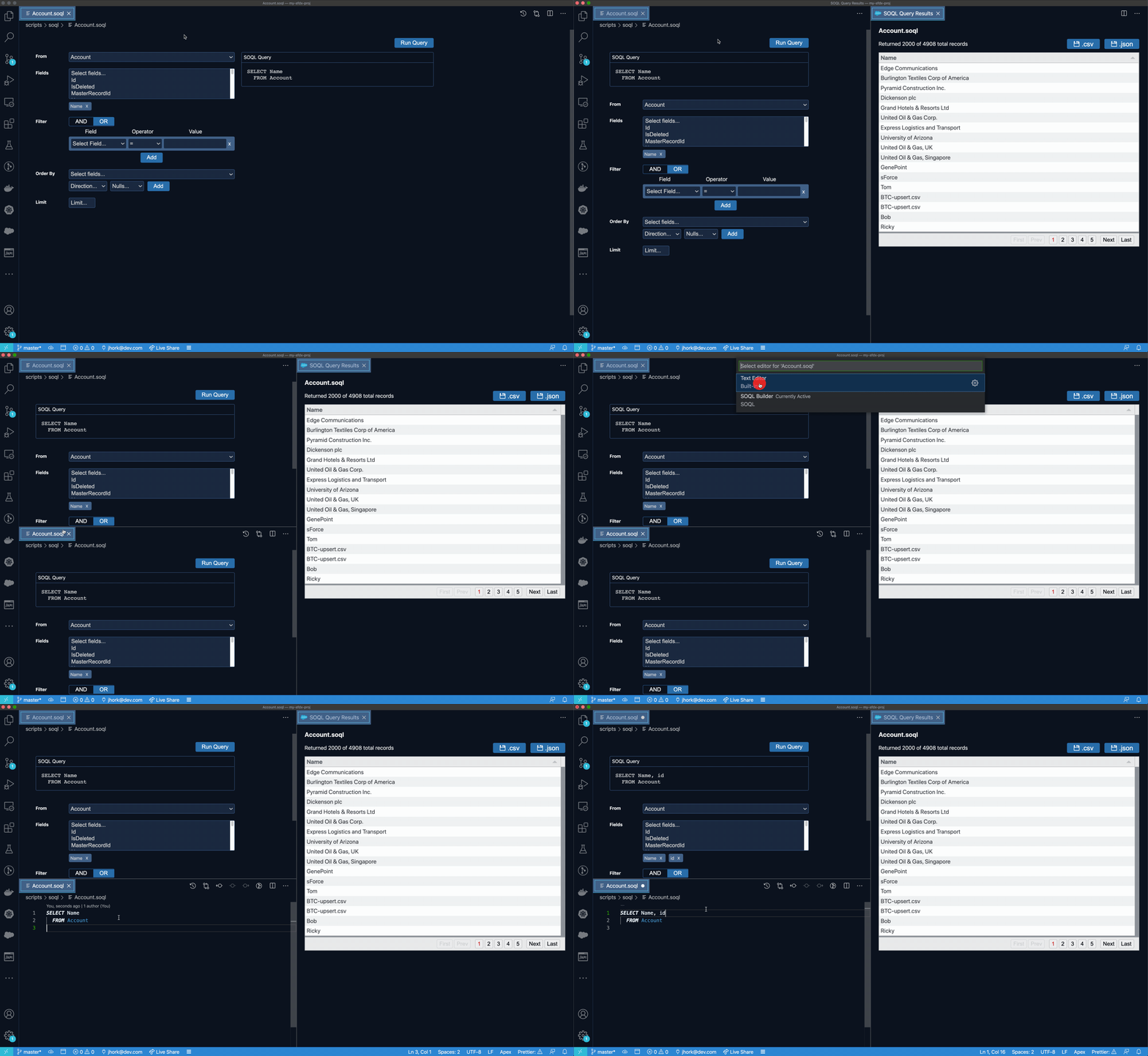
We are still looking to make this process smoother and identify any bugs in our extension or with the use of Custom Editors in VS Code, hopefully the workaround in the gif above will help you in the meantime.
 jonnyhork
on 7 Dec 2020
jonnyhork
on 7 Dec 2020
I opened an issue with VS Code to get more information: https://github.com/microsoft/vscode/issues/112100
jonnyhork
on 8 Dec 2020
@jonnyhork Here is a video showing the main issues that I described earlier. It seems to be that the two editor types cannot co-exist in the same grid space or the text formatted tab will be converted to the soql editor format or become unclickable. Hope this helps.
Also, I test the sequence you describe and that works, so that will help in the meantime. Thanks!
rlancejohnson
on 10 Dec 2020
As best we can tell this is a known issue with the custom editor API in VS Code. The issue can be followed in the link above and other issues referenced there. I am going to close this and follow the conversation on the VS Code repo.
jonnyhork
on 17 Dec 2020
@rlancejohnson Can you update to the latest version of VS Code and try your original scenario? I believe Microsoft now fixed the bug on the custom editor that was causing the issue that you reported in their latest release: Version: 1.53.0
 praksb
on 4 Feb 2021
praksb
on 4 Feb 2021
@praksb Thanks!
rlancejohnson
on 12 May 2021
Related issues
 simonfoden
·
6Comments
simonfoden
·
6Comments
 ghost
·
5Comments
ghost
·
5Comments
 ChuckJonas
·
4Comments
ChuckJonas
·
4Comments
 ddodson3
·
6Comments
ddodson3
·
6Comments
 StanZha
·
4Comments
StanZha
·
4Comments
Most helpful comment
@jonnyhork Here is a video showing the main issues that I described earlier. It seems to be that the two editor types cannot co-exist in the same grid space or the text formatted tab will be converted to the soql editor format or become unclickable. Hope this helps.
Also, I test the sequence you describe and that works, so that will help in the meantime. Thanks!
https://vimeo.com/489158402/011e0b27cc