Salesforcedx-vscode: Starting client failed: Couldn't start client Aura Language Server
- VSCode Version: 1.40.2
- OS Version: windows 10
Steps to Reproduce:
I am using it for salesforce development and install salesforce extension pack
I am getting error from Aura Language server
[Error - 11:36:05 AM] Starting client failed
Error: spawn C:\Users.....\Microsoft VS Code\Code.exe ENOENT
at Process.ChildProcess._handle.onexit (internal/child_process.js:264:19)
at onErrorNT (internal/child_process.js:456:16)
at processTicksAndRejections (internal/process/task_queues.js:84:9)
*Tried reinstalling extension it failed shows same error
and reinstalled vscode also still same.
- Not sure but it is happening after last update. how I can go back to last version?
Does this issue occur when all extensions are disabled?: Yes/No
- Not sure how to do that and also I have to use it with extenstion for salesforce development
if it works without them still it is not useful.

 neelgo
All 11 comments
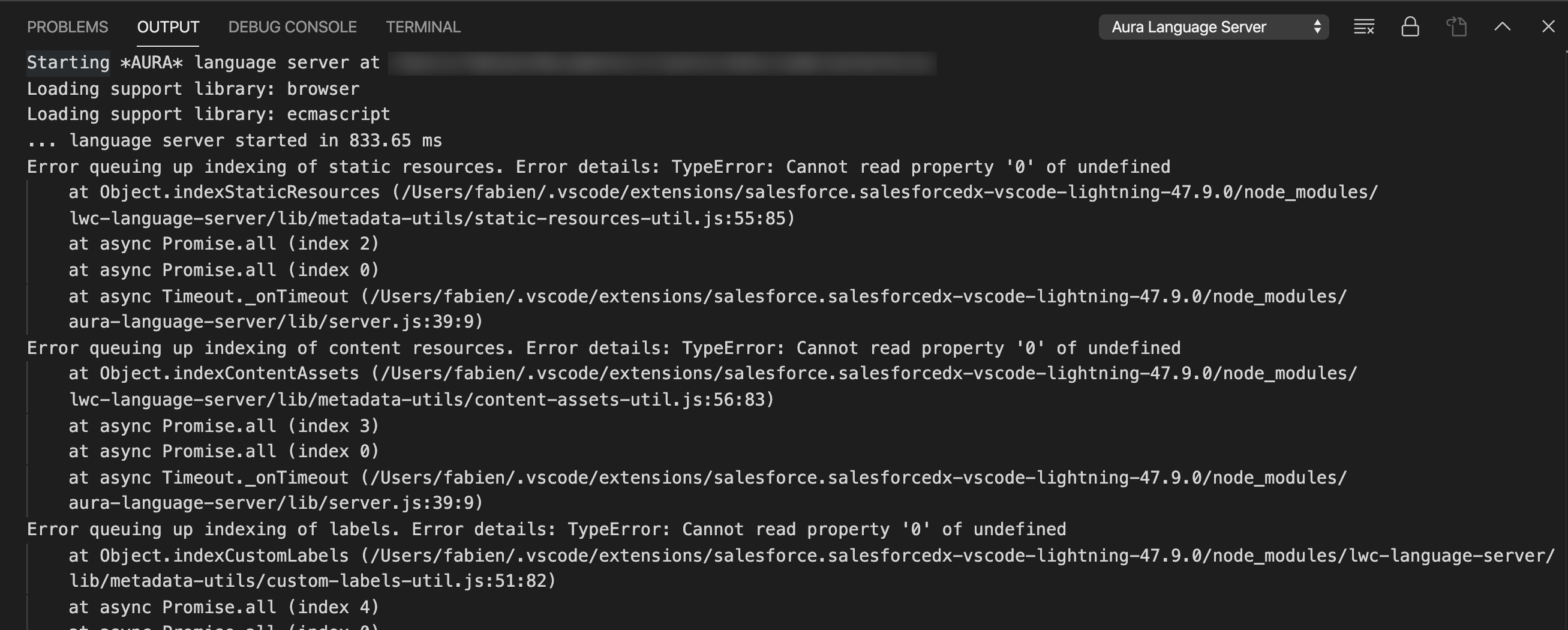
I'm getting errors too, not sure this is the same problem:
 FabienTaillon
on 11 Dec 2019
FabienTaillon
on 11 Dec 2019
Fix will be released tomorrow
 nrkruk
on 11 Dec 2019
nrkruk
on 11 Dec 2019
This should be addressed with our latest release (47.10.0).
 AnanyaJha
on 12 Dec 2019
AnanyaJha
on 12 Dec 2019
Updated it, Still problem persists for me.
neelgo
on 13 Dec 2019
I also tried to disable "Aura Components"
then there was no error but once enabled or updated or installed older version of extension
below error is there:
[Error - 10:06:39 AM] Starting client failed
Error: spawn C:\Users\MyusernameAppData\Local\Programs\Microsoft VS Code\Code.exe ENOENT
at Process.ChildProcess._handle.onexit (internal/child_process.js:229:19)
at onErrorNT (internal/child_process.js:406:16)
at process._tickCallback (internal/process/next_tick.js:63:19)
neelgo
on 13 Dec 2019
@neelgo Just to confirm I'm understanding correctly, you're still seeing the "Indexing Lightning Components" message with the latest version of the extensions (47.10.0)?
AnanyaJha
on 13 Dec 2019
I am seeing the same message that i have posted 3 days before and with initial question.
[Error - 10:06:39 AM] Starting client failed
Error: spawn C:\Users\MyusernameAppData\Local\Programs\Microsoft VS Code\Code.exe ENOENT
at Process.ChildProcess._handle.onexit (internal/child_process.js:229:19)
at onErrorNT (internal/child_process.js:406:16)
at process._tickCallback (internal/process/next_tick.js:63:19)
not the one that you said.
neelgo
on 16 Dec 2019
Same problem all day. First time trying to use VSCode with SFDX
[Error - 16:29:56] Starting client failed
Error: spawn C:\Users\pablo.torres\AppData\Local\Programs\Microsoft VS Code\Code.exe ENOENT
    at Process.ChildProcess._handle.onexit (internal/child_process.js:264:19)
    at onErrorNT (internal/child_process.js:456:16)
    at processTicksAndRejections (internal/process/task_queues.js:84:9)
 ptorreswenance
on 8 Jan 2020
ptorreswenance
on 8 Jan 2020
I updated to most recent version 47.17.1 and received this error. I tried the above troubleshooting steps of downgrading and uninstalling extension to no avail.
Any help would be greatly appreciated, thanks in advance.
[Error - 4:10:42 PM] Starting client failed
Error: spawn C:\Users\Myusername\AppData\Local\Programs\Microsoft VS Code\Code.exe ENOENT
    at Process.ChildProcess._handle.onexit (internal/child_process.js:264:19)
    at onErrorNT (internal/child_process.js:456:16)
    at processTicksAndRejections (internal/process/task_queues.js:84:9)
 billiedd
on 31 Jan 2020
billiedd
on 31 Jan 2020
I am getting the same error. Error below any resolutions on this.
[Error - 11:22:26 pm] Starting client failed
Error: spawn C:\Users\psmAppData\Local\Programs\Microsoft VS Code\Code.exe ENOENT
at Process.ChildProcess._handle.onexit (internal/child_process.js:264:19)
at onErrorNT (internal/child_process.js:456:16)
at processTicksAndRejections (internal/process/task_queues.js:84:9)
 psmmsp
on 2 Feb 2020
psmmsp
on 2 Feb 2020
Also getting the same error
[Error - 10:48:31 AM] Starting client failed
Error: spawn C:\Program Files\Microsoft VS Code\Code.exe ENOENT
at Process.ChildProcess._handle.onexit (internal/child_process.js:264:19)
at onErrorNT (internal/child_process.js:456:16)
at processTicksAndRejections (internal/process/task_queues.js:84:9)
 evaldes
on 13 Feb 2020
evaldes
on 13 Feb 2020
Related issues
 celador
·
4Comments
celador
·
4Comments
 sc5148
·
4Comments
sc5148
·
4Comments
 Bgallahue
·
3Comments
Bgallahue
·
3Comments
 StanZha
·
4Comments
StanZha
·
4Comments
 renatoliveira
·
6Comments
renatoliveira
·
6Comments
Most helpful comment
Fix will be released tomorrow