Salesforcedx-vscode: LWC and Aura Language Servers crash 5x on start
Summary
I was happily developing away, then got an exception ( https://github.com/babel/babel/issues/8689 ), I tried upgrading sfdx to latest, I found a duplicate import statement in a lwc which seemed to resolve the error, but now I am just getting these crashes right when I open vscode for a project.
Is there any way to look at some logs to see what is causing the Aura and LWC language servers to crash?
Steps To Reproduce:
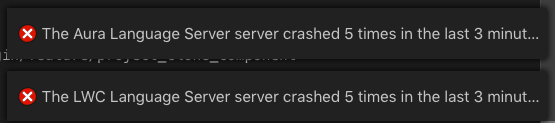
- Can't reproduce in a simple project. In my case I just get this error whenever I open the project in vscode:
Expected result
LWC and Aura Language servers start
Actual result
LWC and Aura Language servers crash 5x then stop on open
Additional information
_Feel free to attach a screenshot_.
VS Code Version:
Version 1.33.1 (1.33.1)
SFDX CLI Version:
sfdx-cli/7.3.0-94ecf2d5ee darwin-x64 node-v10.15.3
OS and version:
macOS Mojave 10.14.1
 mtetlow
All 27 comments
I tried a simplified reproduction in a new minimal project and came up with nothing.
I also deleted the .sfdx/typings dir and still had the error
mtetlow
on 17 Apr 2019
any tips on debugging this? LWC dev is a lot slower without the language server :)
mtetlow
on 22 Apr 2019
I haven't been able to replicate this on my side. I've seen similar behavior with other language servers where they basically exit without properly closing the port they were using and then when you try to restart it the port is blocked/under use.
You mentioned you tried having a small repro project but are not running into that issue. Do you still run into this when switching back to the first project you were working on ?
If you haven't, you could try restarting your machine and see if that unblocks you from running into that issue. That would at least discard that it's an issue with the port being used by another process.
 lcampos
on 24 Apr 2019
lcampos
on 24 Apr 2019
This issue has been automatically closed because there has been no response to our request for more information from the original author. Currently, there is not enough information provided for us to take action. Please reply and reopen this issue if you need additional assistance.
![no-response[bot] picture](https://avatars.githubusercontent.com/u/26350515?v=4&s=40) no-response[bot]
on 1 May 2019
no-response[bot]
on 1 May 2019
Hey @lcampos,
for unforeseen reasons I am now temporarily on a mac which throws the error on lwc/aura language servers crashing.
Which details do I need to provide in order for you to tackle this easier?
mojave, 10.14.4 (18E227)
sfdx-cli/7.6.0-28071a499b darwin-x64 node-v10.15.3
 Szandor72
on 22 May 2019
Szandor72
on 22 May 2019
Hi @Szandor72 what version of the extensions are you on ? Is there anything particular about the project's shape or the components you're working on ?
In case you have a project you can share with us, that would help us debug the issue and work on a fix. We've unfortunately haven't been able to replicate it on our side.
lcampos
on 28 May 2019
I am also experiencing this issue with both Aura and LWC language servers.
Mac OS Mojave, 10.14.5 (18F132)
sfdx-cli/7.8.1-8f830784cc darwin-x64 node-v10.15.3
VS Code, Version 1.34.0 (1.34.0)
Extensions, version 45.15.1
 jjTorrent
on 3 Jun 2019
jjTorrent
on 3 Jun 2019
I am also seeing the same problem with both Aura and LWC language servers, on trivial projects.
Mac OS Mojave, 10.14.5
VS Code Version 1.34.0
sfdx-cli/7.8.1-8f830784cc darwin-x64 node-v10.15.3
LWC/Aura extensions version 45.15.1
I seem to be able to work around the issue by downgrading the LWC/Aura extensions to 45.12.0
 stephenwillcock
on 4 Jun 2019
stephenwillcock
on 4 Jun 2019
@stephenwillcock @jjTorrent @Szandor72 could one of you provide the url for a specific github repository you can reproduce this issue on? That would help me track down exactly what is happening
 nrkruk
on 6 Jun 2019
nrkruk
on 6 Jun 2019
@nrkruk
DevHubTest
jjTorrent
on 6 Jun 2019
For me this occurs immediately after creating a new SFDX project
stephenwillcock
on 7 Jun 2019
@stephenwillcock
Same here. Actually, it's with _all_ projects, for me.
jjTorrent
on 7 Jun 2019
@lcampos @nrkruk can you add any details on how we can generate a useful debug log when this occurs? This may get us closer to resolving it.
mtetlow
on 7 Jun 2019
Try to download/update your _python_ extension. Might be a good idea to also look at other dependencies.
 Postem1
on 9 Jun 2019
Postem1
on 9 Jun 2019
@Postem1
Not sure what you mean. I don't have a Python extension installed in VS Code. Can you clarify?
EDIT: I do have Python installed on my machine... it comes preinstalled on every Mac. I went ahead and updated Python and installed Python3. No change in VS Code's behavior.
jjTorrent
on 9 Jun 2019
@jjTorrent
I was referring to the Python extension (created by Microsoft) in VS Code.
Try downloading it and see if that helps. It is a dependency for the Salesforce pack.
Postem1
on 10 Jun 2019
@Postem1
I wasn't aware of that. If it's a dependency, then why isn't it installed alongside the other dependent extensions for SF? Curious. Anyway, I'll give it a shot!
jjTorrent
on 10 Jun 2019
@Postem1
No change. The language servers continue to crash after installing the Python extension for VS Code created by Microsoft.
jjTorrent
on 10 Jun 2019
@jjTorrent @Postem1 the Salesforce extensions do not depend on any python extension. We are still looking into this and will update this thread once we have a fix ready. Sorry for the trouble this is currently causing.
lcampos
on 10 Jun 2019
Hi guys, same problem over here: I was getting the two errors "The Aura Language Server server crashed 5 times in the last 3 minutes. The server will not be restarted." and "The LWC Language Server server crashed 5 times in the last 3 minutes. The server will not be restarted." after opening a Salesforce DX project in Visual Studio Code. I did not have these problems from the start but I don't remember when they first showed up. After some trial and error, I found the culprit on my system, maybe this information can be helpful for others.
Windows 10 Build Enterprise Version 1803, Visual Studio Code 1.35.1, Salesforce Extension Pack 45.15.1 - May 17, 2019.
After removing "C:\Program Files (x86)\nodejs\" from my system path, the problem went away. This turned out to be a rather old version of nodejs, the command "npm version" gave me npm: '2.11.3' among other things. I think this installation came with Visual Studio (the real Visual Studio), which is also installed on my system. I am currently using version 2017. I then upgraded that installation by running an msi installer downloaded from https://nodejs.org/en/download/, added nodejs back to my system path, and it works now. The command "npm version" now returns npm: '6.9.0'. Hope this helps.
 NightBijou
on 14 Jun 2019
NightBijou
on 14 Jun 2019
@NightBijou's solution has fixed the errors on my system. Thanks!
 sthornley
on 14 Jun 2019
sthornley
on 14 Jun 2019
Likewise - installing Node 10.16.0 (NPM 5.4.1 to 6.9.0) fixed it for me
Thanks @NightBijou !
stephenwillcock
on 14 Jun 2019
Yes!!! I also updated npm via Terminal:
npm install npm@latest -g
Working now!
jjTorrent
on 14 Jun 2019
PR is up with a fix - big thanks to @NightBijou for the useful info- helped me track down and reproduce the issue. This should be resolved in tomorrow's release of the plugins.
nrkruk
on 14 Jun 2019
Hey everyone, I'm glad to see that the problem could be solved. @nrkruk Thanks for your quick response. This tool set is important to us, keep up the good work, I'm looking forward to seeing more cool stuff from you guys in the future.
NightBijou
on 17 Jun 2019
Issue is now resolved in v46.1.0 of the extensions
nrkruk
on 17 Jun 2019
I still get this error.
 domonique-ncino
on 19 Jun 2019
domonique-ncino
on 19 Jun 2019
Related issues
 saramorgan
·
3Comments
saramorgan
·
3Comments
 ChuckJonas
·
4Comments
ChuckJonas
·
4Comments
 SalesforceBobLightning
·
5Comments
SalesforceBobLightning
·
5Comments
 StanZha
·
4Comments
StanZha
·
4Comments
 randi274
·
3Comments
randi274
·
3Comments
Most helpful comment
Hi guys, same problem over here: I was getting the two errors "The Aura Language Server server crashed 5 times in the last 3 minutes. The server will not be restarted." and "The LWC Language Server server crashed 5 times in the last 3 minutes. The server will not be restarted." after opening a Salesforce DX project in Visual Studio Code. I did not have these problems from the start but I don't remember when they first showed up. After some trial and error, I found the culprit on my system, maybe this information can be helpful for others.
Windows 10 Build Enterprise Version 1803, Visual Studio Code 1.35.1, Salesforce Extension Pack 45.15.1 - May 17, 2019.
After removing "C:\Program Files (x86)\nodejs\" from my system path, the problem went away. This turned out to be a rather old version of nodejs, the command "npm version" gave me npm: '2.11.3' among other things. I think this installation came with Visual Studio (the real Visual Studio), which is also installed on my system. I am currently using version 2017. I then upgraded that installation by running an msi installer downloaded from https://nodejs.org/en/download/, added nodejs back to my system path, and it works now. The command "npm version" now returns npm: '6.9.0'. Hope this helps.