Salesforcedx-vscode: When viewing an Apex Test Class and clicking the inline Run Test link the output shows an error saying that <Namespace>.<Namespace> is not a valid class
Summary
When viewing an Apex Test Class and clicking the inline Run Test link the output shows an error saying that
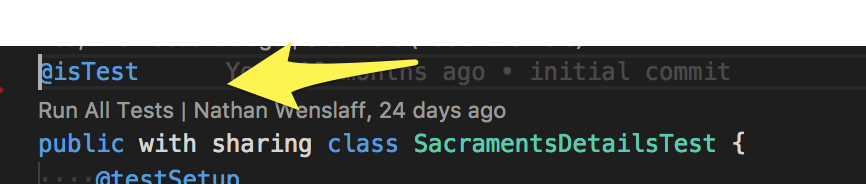

Steps To Reproduce:
Have a namespaced dx project and click Run All Tests on a class.
Expected result
It should successfully run the tests for that class.
Actual result
It has an error
Additional information
_Feel free to attach a screenshot_.
VS Code Version: Version 1.24.1 (1.24.1)
SFDX CLI Version: sfdx-cli/6.23.0-40d6abfa8d (darwin-x64) node-v8.9.4
OS and version: MacOSX
Internal Work Item: W-5171332
 manwe651
All 8 comments
I get the same error. It's also triggered from the Test view when I press the Play button.
But I would also like to say that if I use the SFDX: Invoke Apex Tests... option from the command palette the tests are run. The command issued is different though:
sfdx force:apex:test:run --classnames <HereGoesMyClassName> --synchronous --resultformat human --loglevel error
In the classnames param the namespace is omitted.
 shillem
on 28 Nov 2018
shillem
on 28 Nov 2018
My team is also experiencing this issue. We sometimes create non-namespaced orgs - it's only happening in that environment for us. The command is assuming the org is namespaced and adding the namespace to the class name when it is not. For our namespaced orgs, these run successfully. @shillem's workaround works for us.
(I added these details as a comment in the linked WI as well)
 robertbwatson
on 27 Mar 2020
robertbwatson
on 27 Mar 2020
@robertbwatson same here. The only workaround I see now is to delete the namespace from the example dx command presented in output:
19:59:37.362 sfdx force:apex:test:run --tests <namespace>.<classname>.<testname> --resultformat human --outputdir /Users/julian.joseph/Documents/Repos/spc-integration/.sfdx/tools/testresults/apex --loglevel error
ERROR running force:apex:test:run:  Unable to invoke any tests. Ensure the tests are loaded into the org or valid inputs are supplied. This class name's value is invalid: ccsi01.DataLakeApiService_TEST. Provide the name of an Apex class that has test methods.
Change: sfdx force:apex:test:run --tests <namespace>.<classname>.<testname> --resultformat human --outputdir /Users/julian.joseph/Documents/Repos/spc-integration/.sfdx/tools/testresults/apex --loglevel error
to
sfdx force:apex:test:run --tests <classname>.<testname> --resultformat human --outputdir /Users/julian.joseph/Documents/Repos/spc-integration/.sfdx/tools/testresults/apex --loglevel error
and rerun in terminal
 Julian88Tex
on 28 Mar 2020
Julian88Tex
on 28 Mar 2020
As of today, this issue is still happening. Thanks for the workarounds.
 rodrigoreyes79
on 14 Jan 2021
rodrigoreyes79
on 14 Jan 2021
Created an org with a namespace today and I'm now facing this issue as well. It is really weird, it seems the extension is trying to add the namespace twice...
This class name's value is invalid:
. . Provide the name of an Apex class that has test methods.
 renatoliveira
on 15 Jan 2021
renatoliveira
on 15 Jan 2021
I'm also experiencing this issue, but not on all test methods. I can get one class to work, but I'm not seeing anything stand out as different in this class.
Update: After restarting, they are all failing again
 aaronmorris
on 19 Jan 2021
aaronmorris
on 19 Jan 2021
A workaround that looks to be working for me is:
In the settings there is a new feature that needs to be disabled
In Settings: Salesforcedx-vscode-core > Experimental: Use Apex Library
Disable - Use Apex Library for Apex CLI Commands

aaronmorris
on 19 Jan 2021
Closing since this was fixed in release 51.2.0 of the Salesforce Extensions for VSCode. Thanks for providing feedback.
 lcampos
on 24 Mar 2021
lcampos
on 24 Mar 2021
Related issues
 aheber
·
4Comments
aheber
·
4Comments
 quangxvu
·
5Comments
quangxvu
·
5Comments
 ntotten
·
4Comments
ntotten
·
4Comments
 celador
·
4Comments
celador
·
4Comments
 saramorgan
·
3Comments
saramorgan
·
3Comments
Most helpful comment
A workaround that looks to be working for me is:
In the settings there is a new feature that needs to be disabled
In Settings: Salesforcedx-vscode-core > Experimental: Use Apex Library

Disable - Use Apex Library for Apex CLI Commands