Salesforcedx-vscode: Retrieve and Deploy to sandbox is very slow
Summary
When using the prerelease version against a sandbox the Deploy and Retrieve takes lot of time even though its a single file or component.
Steps To Reproduce:
- Once you retrieve the complete package.
- Try to retrieve a single Apex class. you will see it takes lot of time.
- Same with Deploy as well.
Expected result
Single files should be much faster the whats its today.
Actual result
Performance should be much better.
Additional information
_Feel free to attach a screenshot_.
VS Code Version: 1.26.1
SFDX CLI Version: Pre release
OS and version: Windows 10
Internal Work Item: W-5552612
 amitkumarj1979
All 69 comments
I found the same running on macOS 10.12.
Specifically, a deploy that would take 2-3 secs in MavensMate/SublimeText is takes more than 90 secs with VS Code SDFX.
 evanmcd
on 27 Aug 2018
evanmcd
on 27 Aug 2018
@amitkumarj1979 and @evanmcd - Could you do the following for me in Powershell/Terminal and report:
# Windows

# Go into the correct directory of your project
Measure-Command { sfdx force:source:deploy --sourcepath the/apex/file/to/deploy.cls }

# Mac

# Go into the correct directory of your project
time sfdx force:source:deploy --sourcepath the/apex/file/to/deploy.cls
 vazexqi
on 27 Aug 2018
vazexqi
on 27 Aug 2018
Also could you do a sfdx plugins so that we can see what version of the pre-release of salesforcedx you have.
vazexqi
on 27 Aug 2018
It would be deploy right and not push
On Mon, Aug 27, 2018 at 2:21 PM Nick Chen notifications@github.com wrote:
@amitkumarj1979 https://github.com/amitkumarj1979 and @evanmcd
https://github.com/evanmcd - Could you do the following for me in
Powershell/Terminal and report:Windows
Go into the correct directory of your project
Measure-Command { sfdx force:source:push --sourcepath the/apex/file/to/deploy.cls }
Mac
Go into the correct directory of your project
time sfdx force:source:push --sourcepath the/apex/file/to/deploy.cls
—
You are receiving this because you were mentioned.
Reply to this email directly, view it on GitHub
https://github.com/forcedotcom/salesforcedx-vscode/issues/594#issuecomment-416372894,
or mute the thread
https://github.com/notifications/unsubscribe-auth/AP6M9H_jPiXL86UvHtM4vzmI99zNmMFtks5uVGLYgaJpZM4WIj7z
.>
Thanks
Amit
amitkumarj1979
on 28 Aug 2018
@amitkumarj1979 - Yes, it should be sfdx force:source:deploy. Let me edit the previous message.
vazexqi
on 28 Aug 2018
We have pushed a new version of the salesforce@pre-release dist-tag to public npm that could address some of these issues (this was based on our own internal testing).
Please upgrade using sfdx update. After upgrading, please confirm that sfdx plugins shows the following entries (in addition to others you might have):
salesforcedx 44.0.14 (pre-release)
Let us know if you see improvements (or other issues).
vazexqi
on 28 Aug 2018
Hey @vazexqi, here's what I got from time (though the first time through never resolved, and I needed to restart VSC):
SUN-MBP-EvanM:Sandbox EM evanmcdaniel$ time sfdx force:source:deploy --sourcepath "/Users/evanmcdaniel/Projects/Sandbox EM VSC/Sandbox EM/force-app/main/default/pages/ContractTools.page"
WARNING: apiVersion configuration overridden at 43.0
=== Deployed Source
FULL NAME      TYPE      PROJECT PATH
─────────────  ────────  ────────────────────────────────────────────────────────
ContractTools  ApexPage  force-app/main/default/pages/ContractTools.page
ContractTools  ApexPage  force-app/main/default/pages/ContractTools.page-meta.xml

real    0m17.229s
user    0m2.428s
sys     0m0.337s
SUN-MBP-EvanM:Sandbox EM evanmcdaniel$
Result of plugins is salesforcedx 44.0.14 (pre-release)
evanmcd
on 28 Aug 2018
Hi @vazexqi, Below are the outputs for the commands you requested.
Plugins:
salesforcedx 44.0.14 (pre-release)
Measure Command
Seconds : 42
Milliseconds : 530
Ticks : 425308248
TotalDays : 0.000492254916666667
TotalHours : 0.011814118
TotalMinutes : 0.70884708
TotalSeconds : 42.5308248
TotalMilliseconds : 42530.8248
There are some improvements from the last release.
But i think its slow for such a small Apex class file.
amitkumarj1979
on 28 Aug 2018
@amitkumarj1979 - This timing probably includes the CLI time and also the time for the network compilation. We would need to drill into this a bit more.
Could it be that your single Apex class is like a _God_ class that depends on many other things and trigger a lot of compilation on the server side? Or is it a simple Apex class? The dependencies that the class has also affects deployment times.
The CLI can only affect the packaging (to a .zip file), transmitting, receiving, and un-packaging.
vazexqi
on 28 Aug 2018
@vazexqi comparisons with the same file: from Illuminated Cloud and MavensMate with SublimeTest are about 6-7 seconds.
evanmcd
on 28 Aug 2018
Thanks @evanmcd. That's a useful comparison. We will do some more testing on our side (and maybe output more info on how long each stage takes as a flag to the user to get more info).
vazexqi
on 28 Aug 2018
@vazexqi - Hi Nick, did u have chance to look at the performance issues ?
amitkumarj1979
on 5 Sep 2018
We are adding new logging to the Salesforce CLI so that we can better diagnose this. We are still testing this internally. When it's ready we will provide more details on how to enable it.
vazexqi
on 5 Sep 2018
@vazexqi - Did you find anything on this with the Release date close now ?
amitkumarj1979
on 7 Oct 2018
@amitkumarj1979 @evanmcd just to keep you up to date with this. We did find some areas in the code that need to be changed. While the work for this has started, we did find that the changes needed are bigger than expected. We don't have an estimate on when this work will be ready to be released but we'll post an update on the timeline once we have one.
 lcampos
on 10 Oct 2018
lcampos
on 10 Oct 2018
I still have very slow deployment from time to time, but mostly due to deploy pending server side.
Even if this is not directly linked with this plugin development, waiting for almost 10mn to save a file is not a great experience.

 FabienTaillon
on 24 Oct 2018
FabienTaillon
on 24 Oct 2018
I'm also experiencing slow deploy times. Testing vs MavensMate I find SFDX deploys the entire Lightning Component Bundle (cmp, css, js...) while MavensMate only deploys (on save) the file you saved (just the css file for example). MavensMate is 1.5 seconds vs 10 seconds with SFDX: Deploy this source to org.
Is there a way to deploy a single file instead of the aura bundle with SFDX? I haven't found a way to do that.
 zacrobat
on 27 Nov 2018
zacrobat
on 27 Nov 2018
I wonder why it's using the deploy command instead of using the tooling APIs like the dev console ? Seems much faster.
FabienTaillon
on 27 Nov 2018
We have a fix coming soon that will provide a very significant performance increase.
 ntotten
on 10 Jan 2019
ntotten
on 10 Jan 2019
That will be awesome, looking forward to it. Do you have any ETA for that ?
amitkumarj1979
on 10 Jan 2019
Not exactly, but it will be in the next month or so.
ntotten
on 10 Jan 2019
I wonder why it's using the deploy command instead of using the tooling APIs like the dev console ? Seems much faster. ⸺ _@FabienTaillon_
Check out the (3rd party) SalesforceDX Code Companion VSCode plugin. Might alleviate the pain, while waiting for an official solution.
 e02d96ec16
on 25 Jan 2019
e02d96ec16
on 25 Jan 2019
Anyone on this thread who has experienced slow retrieves/deploys please email me details. We are working on definitively solving this problem once and for all and I need as much data as possible. OrgId, time, logs, command run, etc. The more detail the better. [email protected]
ntotten
on 30 Jan 2019
@ntotten - I'm experiencing this today and I'm on government cloud. Any issues or risks with using salesforce extension pack for vscode/salesforce cli on government cloud?
 trailheaddxvinod
on 6 Feb 2019
trailheaddxvinod
on 6 Feb 2019
@trailheaddxvinod The issue generally isn't with VSCode or the CLI, it is usually with the backend APIs. Feel free to email me details per the instructions here: https://github.com/forcedotcom/salesforcedx-vscode/wiki/How-to-Collect-Performance-Information-for-Support
ntotten
on 6 Feb 2019
Any updates here? Still need more data?
 jjTorrent
on 12 Mar 2019
jjTorrent
on 12 Mar 2019
This is actively being worked on. There are several efforts - one is updates to the CLI that will improve performance, another is work on the backend for performance. It isn't going to be one fix, but it's something we are working on.
ntotten
on 12 Mar 2019
I just wanted to add that there seems to be a considerable delay BEFORE the command even starts to execute when using "deploy on save" (with classic org).
IDK if this is due to intended debouncing, but if that's the case, it should be configurable.
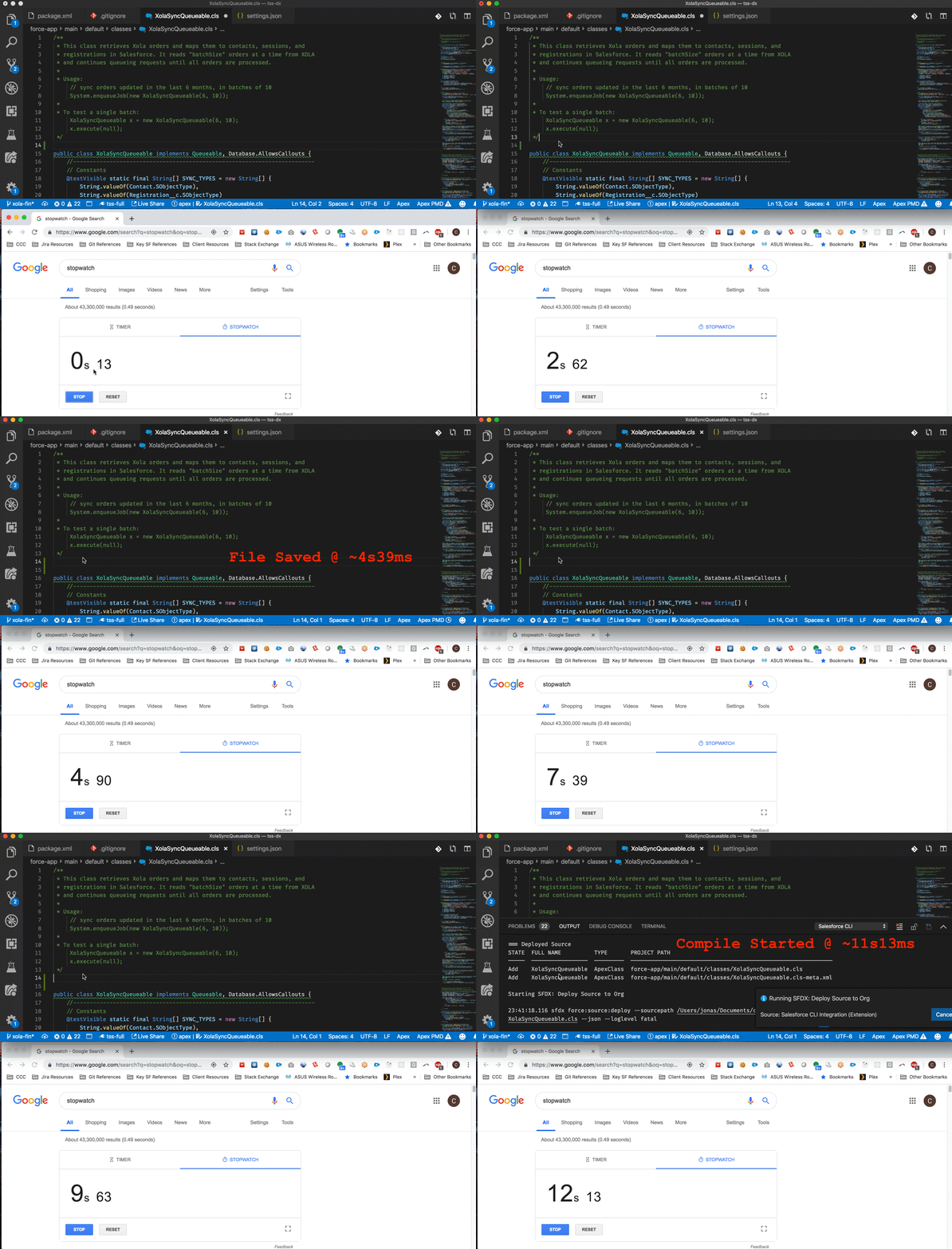
11.13-4.39=6.74s
It seems to consistently take 5-7 seconds before the deploy command even starts to run. If I right click and run "deploy", the prompt comes up immediately.
 ChuckJonas
on 15 Mar 2019
ChuckJonas
on 15 Mar 2019
I must say this is quite odd behavior... Seems like it's trying to avoid sending multiple requests by reseting a 4.5s timeout each time a file is saved then sending a single request for all saved files once the timeout expires?
Curious what the use case is behind this? I get wanting to handle scenarios like Files: save all (this is actually really nice for refactoring), but why such a tremendous timeout? Surely a hundred milliseconds would be enough to accomplish the same thing...
At the very least can we make it configurable?
ChuckJonas
on 15 Mar 2019
Any updates on this is getting very slow, it take a minute to push data to sandbox org, i am developing against sandbox. It used to be saved quickly but after recent update it taking minutes to push changes to sandbox.
Moreover i found that it doesn't saved the apex class to server though it does show successful save message to end user in VS Code.
Let me know if you need any more information from me on this issue.
 sanjuoo7
on 15 Mar 2019
sanjuoo7
on 15 Mar 2019
@ChuckJonas This is something that we plan to fix. I wrote up our proposed solution here: https://github.com/forcedotcom/salesforcedx-vscode/issues/1155
Please let me know what you think. We certainly could make the timeout configurable, but I think the linked proposal is much better.
ntotten
on 15 Mar 2019
I'm also experiencing very long deploy time for single files, like Apex classes. I think the main problem is not vscode itself but the fact that the deploy of single files is done through the Metadata API. Would be possible to switch to Tooling API for individual files?
This is something that IlluminatedCloud supports and was also part of the good old MavensMate.
 maaaaarco
on 3 Apr 2019
maaaaarco
on 3 Apr 2019
Hope this gets fixed soon. Really hard to work with this issue.
 luchom
on 12 Apr 2019
luchom
on 12 Apr 2019
any news?
 enreeco
on 9 May 2019
enreeco
on 9 May 2019
I'm also experiencing very long deploy time for single files, like Apex classes. I think the main problem is not vscode itself but the fact that the deploy of single files is done through the Metadata API. Would be possible to switch to Tooling API for individual files?
This is something that IlluminatedCloud supports and was also part of the good old MavensMate.
This :)
 AlbertoMata
on 9 May 2019
AlbertoMata
on 9 May 2019
It isn't about the Tooling API vs Metadata API. They are both the same on the backend. The issue is that we are using the Metadata API asynchronously because the command was initially optimized for all cases - large deployments or small deployments. We are working to switch to use the Metadata API synchronously for small deployments (probably less than 30 items). The work is scheduled, but we don't have an exact ETA right now. Once we make this switch the performance will be identical to what other tools have through the Tooling API.
ntotten
on 9 May 2019
Hi, this switch will improve the Apex Test Run performances too? The test run is even slower than retrieve/deploy.
 matteobosc
on 14 May 2019
matteobosc
on 14 May 2019
Sometimes deploy works fine, but once it stops working it really stops. Hope this gets fixed soon. Ill try rebooting my computer.
Thanks
 RESTORE-thaierissa
on 15 May 2019
RESTORE-thaierissa
on 15 May 2019
Is there any update on this ? It takes minutes against a Sandbox.
 ivanovivelin
on 31 May 2019
ivanovivelin
on 31 May 2019
Is there any update on this ? It takes minutes against a Sandbox.
I found that if i reauthorize the org first, the issues subside.
RESTORE-thaierissa
on 31 May 2019
Is there any update on this ? It takes minutes against a Sandbox.
I found that if i reauthorize the org first, the issues subside.
Well, for me it is unusable against a Sandbox
ivanovivelin
on 5 Jun 2019
The issue with deployment time against sandboxes is something that is known and we are working on. It is, however, something that is on the backend and not something we can resolve with VS Code. There is an update going out soon that will speed up deployment time against sandboxes for smaller deployments that should help out with this issue. We are continuing to do work to improve this over time, but some of the work is somewhat long term.
ntotten
on 7 Jun 2019
"There is an update going out soon that will speed up deployment time against sandboxes for smaller deployments that should help out with this issue." Where can we find the status of the update or any info regarding the update?
 monirkohi2006
on 7 Jun 2019
monirkohi2006
on 7 Jun 2019
@monirkohi2006 There isn't anything public about it. It's purely internal systems updates and will have no functional changes to APIs, etc. Its a performance update on how queues work internally which is intended to speed up deployments.
ntotten
on 7 Jun 2019
Can confirm this is happening to me as well. 2 minutes to deploy a LWC seems much longer than it should normally take.
 delcs827
on 17 Jun 2019
delcs827
on 17 Jun 2019
I can also confirm that it can take up to 5 minutes to deploy (from VS Code using integrated CLI) and I often have to cancel the deploy and try again multiple times before it is successful within an "acceptable time-frame" nowadays about 20-30 sec.
 aotolbert
on 18 Jun 2019
aotolbert
on 18 Jun 2019
The same here! Could you solve this please :)
 pibenettmodis
on 19 Jun 2019
pibenettmodis
on 19 Jun 2019
Is there any workaround for this? It has become totally unusable at this time.
 arunmitteam
on 20 Jun 2019
arunmitteam
on 20 Jun 2019
This issue was reported on Aug 22, 2018. Any update please?
monirkohi2006
on 21 Jun 2019
I am facing deploy and retrieve times exceeding 10 minutes in my development environment.
 mitchspano
on 27 Jun 2019
mitchspano
on 27 Jun 2019
Same situation here. There is a significant delay when saving and deploy - as described by @ChuckJonas above. https://github.com/forcedotcom/salesforcedx-vscode/issues/917#issuecomment-473167626
I updated sf cli to version: 7.14.0
Do I have to uninstall / install vscode extensions?
Please advise.
UPDATE:
This is now working. I had to recreate the project using sfdx.
 michaelsoriano
on 16 Jul 2019
michaelsoriano
on 16 Jul 2019
+1. Retrieve is currently painfully slow for me too. I actually haven't finished one Retrieve yet so I'm not sure how long it takes but 10+ minutes so far. I even tried the SFDX: Auth first even though I'd assume that shouldn't have to happen every VS Code session (?).
- VS Code 1.36.1
- Salesforce Extension Pack: 46.9.0
- Windows 10 x64
Update #1:
- My Retrieve went for 15 minutes but never ended so I cancelled it.
- BTW I had run Retrieve originally by right-clicking my "\classes" folder
- I ran a new Retrieve by opening my manifest/package.xml, right-clicking in it and initiated another Retrieve Source from Org
- This new Retrieve ended fairly quickly (maybe 1 min or 2).
I'm not sure if my situation is new or the core speed issue w/Retrieve is resolved - but wanted to share my experience/update.
 cemerson
on 13 Aug 2019
cemerson
on 13 Aug 2019
Deploy to Org of a small LWC component takes 2-20mins currently on our project.
 wwwmonkey
on 27 Feb 2020
wwwmonkey
on 27 Feb 2020
@ntotten experiencing 5 minutes to deploy tiny LWC to sandbox
 talcarmi
on 16 Apr 2020
talcarmi
on 16 Apr 2020
I'm experiencing the same as @wwwmonkey 2-20 minutes to deploy LWCs. This has killed my productivity. I can't tell if it is dependent on time of day or not. Right now it is 10 pm for me and deploy source to org is taking 10 minutes on average.
 timswilson
on 15 May 2020
timswilson
on 15 May 2020
I am running into the same problem. It takes anywhere from 2-25 minutes for me to deploy to the source.
 handlerda
on 8 Jun 2020
handlerda
on 8 Jun 2020
@handlerda, my issue ended up being due to a faulty sandbox. I have heard of that happening to other people but hadn't experienced it myself until this issue. I was working in a recently refreshed sandbox that for whatever reason was causing this issue. I created a new sandbox, deployed my code over to it and the issue was resolved.
timswilson
on 8 Jun 2020
@timswilson thanks for the quick response! I am working in GovCloud so that could be part of it. Sometimes it's super quick and sometimes it will take 20+ minutes. I will keep your suggestion in mind to see if other sandboxes are just as slow!
handlerda
on 8 Jun 2020
I am not sure if refreshing sandbox and expecting it to work is a better strategy. It can happen you refresh n times and you get such faulty sandboxes every time. I refreshed 1 today, super slow 3-8 mins for most deployments, I do agree sometimes it does save in 2-3 seconds.
 pranayjswl007
on 8 Jun 2020
pranayjswl007
on 8 Jun 2020
@pranayjswl007 I agree. It's just so inconsistent. Today I have ranged from 2seconds to 22 minutes.
handlerda
on 8 Jun 2020
Just adding to the list of people facing this issue. Facing at least 20 mins for small sfdx force:source:deploy executions. We have also noticed this more recently in our CI process, which in the last week has failed multiple times due to timeout in our job which is waiting for deploy to finish.
 jacobpeterson2012
on 24 Jun 2020
jacobpeterson2012
on 24 Jun 2020
I am guessing its an issue with the extension itself..because using same org and same package file, ForceCode retrieves components in half the time against SFDX Plugin..
 ram4ufriends
on 24 Jul 2020
ram4ufriends
on 24 Jul 2020
I am facing slow deployment issues when I am working on using Apex Enterprise patterns. I don't know, whether it validate something internally or what. But it usually takes > 10 minutes to deploy.

 rajendrasnagar
on 18 Feb 2021
rajendrasnagar
on 18 Feb 2021
@rajendrasnagar & All - We've done significant work to make deploys & retrieves faster, particularly for single file scenarios. The work is still in progress so for now you need to check the "Deploy Retrieve" setting in VS Code to try it the changes.

 smaddox-sf
on 18 Feb 2021
smaddox-sf
on 18 Feb 2021
OMG. This is a true life saver. Good bye to frustrating hours of staring at the screen doing nothing. Good bye to sick and tired of excuses during every sprint meeting why a dev/deploy job that takes hardly an hour ends up taking whole day. Tried single file retrieve and deploy of an Apex and an LWC. It is lightning fast. For the time being I care only about that. Hope other features also speeds up in near future. This is Godsend especially for heavy UI LWC development. You won't even remember what finer UI change you were trying to accomplish if you have to wait for five minutes( and lose focus) to see the results on screen. Hope this speed stays that way. Awesome. Thank you very much.
 vpreet
on 23 Feb 2021
vpreet
on 23 Feb 2021
Hello @smaddox-sf , Thank you for improving speed of retrieve process. Its running lightning fast for some objects. But does fail for some. e.g. I tried for case and opportunity and i ran into some issues. screenshot attached. It does not show any specific error. let me know if i can provide some additional information.

 sushilgit
on 8 Mar 2021
sushilgit
on 8 Mar 2021
Hi @sushilgit - Thanks for trying it out and glad it's helping at least some of the time. Can you open a new issue with the details of the steps you are executing so we can try to repro & fix it?
smaddox-sf
on 9 Mar 2021
Hi All - Closing this issue as the deploy / retrieve performance enhancements are now in use by default. You can check to see if you are using them by checking the "Deploy Retrieve" setting in VS Code.
smaddox-sf
on 3 May 2021
Related issues
 sc5148
·
4Comments
sc5148
·
4Comments
 jpoonam4
·
5Comments
jpoonam4
·
5Comments
 Bgallahue
·
3Comments
Bgallahue
·
3Comments
 SalesforceBobLightning
·
5Comments
SalesforceBobLightning
·
5Comments
 randi274
·
3Comments
randi274
·
3Comments
Most helpful comment
We have a fix coming soon that will provide a very significant performance increase.