Salesforcedx-vscode: sfdx.force.test.view.refresh not found
Summary
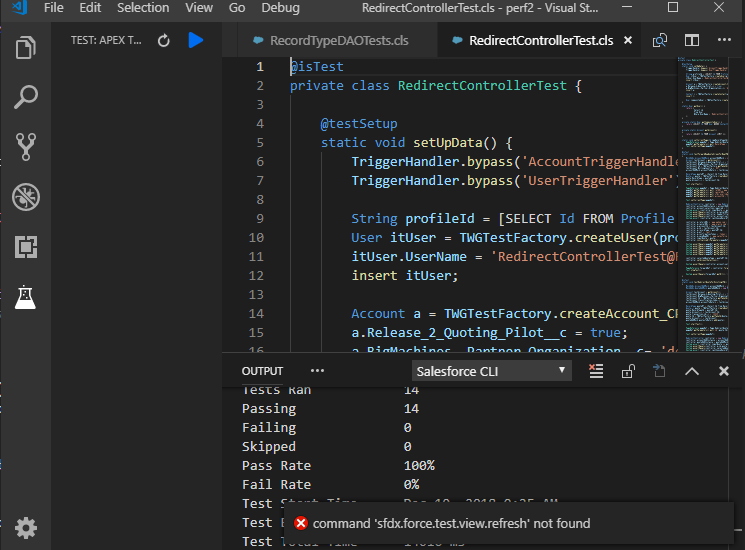
When trying to use the integrated test side bar, no tests are being displayed. When clicking on "refresh" an error message is displayed saying "command 'sfdx.force.test.view.refresh' not found".
Besides, test classes do not show the "run test" commands.
Steps To Reproduce:
- Open project in VSCode
- Open the Test side bar and see that is empty.
- Click on the "Refresh" icon and you will see the error
Expected result
A list of available test is displayed
Actual result
An error message is displayed saying "command 'sfdx.force.test.view.refresh' not found"
Additional information
This is against a Sandbox (not scratch org) just in case it makes any difference.
VS Code Version: 1.29.1
SFDX CLI Version: 6.43.1-6021deb31d
OS and version: Windows 10
 fricco
All 13 comments
@fricco thanks for reporting this. I think I have a way of replicating this but could you confirm the following. Does this happen when you initially open a project or open vscode ? Are you able to eventually see the test in the sidebar ?
 lcampos
on 13 Dec 2018
lcampos
on 13 Dec 2018
Hi, I had the same issue with my scratch org. After updating VCS to version 1.30.0, I remarked a slight difference. Now I'm getting another error.
Starting SFDX: Invoke Apex Tests...
12:48:52.705 sfdx force:apex:test:run --classnames ConvertLinkParametersTest --synchronous --resultformat human --loglevel error
ERROR: Unable to run tests synchronously: [This class name's value is invalid: ConvertLinkParametersTest. Provide the name of an Apex class that has test methods.].
12:48:59.524 sfdx force:apex:test:run --classnames ConvertLinkParametersTest --synchronous --resultformat human --loglevel error ended with exit code 1
The test class is a normal test class that has been created a while ago.
Instead of an empty TEST: APEX TEST screen, I now see a message:
"There is no data provider registered that can provide view data."
 raakk1
on 15 Dec 2018
raakk1
on 15 Dec 2018
This issue has been automatically closed because there has been no response to our request for more information from the original author. Currently, there is not enough information provided for us to take action. Please reply and reopen this issue if you need additional assistance.
![no-response[bot] picture](https://avatars.githubusercontent.com/u/26350515?v=4&s=40) no-response[bot]
on 20 Dec 2018
no-response[bot]
on 20 Dec 2018
I am getting below error, can anyone please let me know what can be done to resolve it.
"There is no data provider registered that can provide view data."
 prabhusajjanam
on 17 Feb 2019
prabhusajjanam
on 17 Feb 2019
I'm having this same issue.
 gnerb
on 14 Mar 2019
gnerb
on 14 Mar 2019
Same here getting same issue
 Sarveshgithub
on 21 Mar 2019
Sarveshgithub
on 21 Mar 2019
Make sure, you installed latest java and java path is updated as shown
below in settings.json (salesforcedx-vscode-apex.java.home) (search in
settings for settings.json)
[image: image.png]
On Thu, Mar 14, 2019 at 11:45 AM gnerb notifications@github.com wrote:
I'm having this same issue.
—
You are receiving this because you commented.
Reply to this email directly, view it on GitHub
https://github.com/forcedotcom/salesforcedx-vscode/issues/809#issuecomment-472927561,
or mute the thread
https://github.com/notifications/unsubscribe-auth/AQFXUozQJvcoze5p1RU54ehrDVwvn8Bxks5vWm6EgaJpZM4ZMCnA
.
prabhusajjanam
on 21 Mar 2019
@prabhusajjanam Image is not showing in your answer
Sarveshgithub
on 21 Mar 2019
@prabhusajjanam Could you please try to post the image again or copy the complete settings.json. I cannot see it either. Thanks
 pedrojuangirones
on 3 Apr 2019
pedrojuangirones
on 3 Apr 2019
@prabhusajjanam thank you
it works
 modestemax
on 4 Apr 2019
modestemax
on 4 Apr 2019
I have the same issue, surprisingly I think it is been happening after the visual studio code update (now 1.33). I was able run test class and see all test class before. I think the version update is the reason.
 admin-bic
on 12 Apr 2019
admin-bic
on 12 Apr 2019
@awahid-bic we haven't made any recent changes to how test run. Can you verify that your vscode is still using Java 8 ? If it's not then here's the link with the instructions for setting it up https://forcedotcom.github.io/salesforcedx-vscode/articles/troubleshooting#set-your-java-version
lcampos
on 23 Apr 2019
@lcampos I needed to update to the latest OpenJDK hotspot (11) for the latest VS Code and SFDX CLI update to work properly with org browser and testing. Following the update, I can see the icons for these two options (which were missing before) but I cannot run tests and the org browser seems to have trouble recognizing some code that was created in the default org last week via dev console. The org browser only sees those after I view them in the sandbox first. Strange, huh? Tests don't want to work from VS Code although I can run them all with the CLI from terminal (I cannot run them selectively from terminal).
 snugsfbay
on 15 Oct 2019
snugsfbay
on 15 Oct 2019
Related issues
 StanZha
·
4Comments
StanZha
·
4Comments
 frackham
·
6Comments
frackham
·
6Comments
 Bgallahue
·
3Comments
Bgallahue
·
3Comments
 simonfoden
·
6Comments
simonfoden
·
6Comments
 SalesforceBobLightning
·
5Comments
SalesforceBobLightning
·
5Comments
Most helpful comment
Make sure, you installed latest java and java path is updated as shown
below in settings.json (salesforcedx-vscode-apex.java.home) (search in
settings for settings.json)
[image: image.png]
On Thu, Mar 14, 2019 at 11:45 AM gnerb notifications@github.com wrote: