Salesforcedx-vscode: Issue turning ON Replay Debugger
I am having a similar issue with version 44.7.0. I am connected to a Sandbox ORG and I am able to deploy from a project locally to the ORG, however when I am triggering the command SFDX: Turn on Apex debug log for Replay Debugger, I get the following error message:
{"message":"Provided external ID field does not exist or is not accessible: null","status":1,"stack":"NOT_FOUND: Provided external ID field does not exist or is not accessible: null\n at HttpApi.getError (C:\Users\luis_\AppData\Local\sfdx\client\node_modules\jsforce\lib\http-api.js:250:13)\n at C:\Users\luis_\AppData\Local\sfdx\client\node_modules\jsforce\lib\http-api.js:95:22\n at tryCallOne (C:\Users\luis_\AppData\Local\sfdx\client\node_modules\promise\lib\core.js:37:12)\n at C:\Users\luis_\AppData\Local\sfdx\client\node_modules\promise\lib\core.js:123:15\n at flush (C:\Users\luis_\AppData\Local\sfdx\client\node_modules\asap\raw.js:50:29)\n at _combinedTickCallback (internal/process/next_tick.js:131:7)\n at process._tickCallback (internal/process/next_tick.js:180:9)","name":"NOT_FOUND","warnings":["All --json output, including on error, is moving to stdout. Use the SFDX_JSON_TO_STDOUT environment variable to move over to the new functionality. This will become the default in version 45."]}

SFDX: Turn On Apex Debug Log for Replay Debugger ended with exit code 1
I am also able to download a debug log from VS Code but launching from the .log downloaded doesn't do anything.
This is my launch.json:
{ // Use IntelliSense to learn about possible attributes. // Hover to view descriptions of existing attributes. // For more information, visit: https://go.microsoft.com/fwlink/?linkid=830387 "version": "0.2.0", "configurations": [ { "name": "Launch Apex Replay Debugger", "type": "apex-replay", "request": "launch", "logFile": "07L3C000005c8RgUAI_20181119115110.log", "stopOnEntry": true, "trace": true } ] }
07L3C000005c8RgUAI_20181119115110.log is the downloaded log file.
 lflorezcyberark
All 9 comments
Hi @lflorezcyberark, could you please include all of the info that is being printed to the output panel for 'Salesforce CLI' when you are running the 'SFDX: Turn on Apex Debug Log for Replay Debugger' command? It may help me identify which part of the command is failing. Thanks!
For example, when I run it, I see:
Starting SFDX: Turn On Apex Debug Log for Replay Debugger

SFDX: Turn On Apex Debug Log for Replay Debugger
Starting SFDX: Turn On Apex Debug Log for Replay Debugger

sfdx force:data:soql:query --query SELECT id, logtype, startdate, expirationdate, debuglevelid, debuglevel.apexcode, debuglevel.visualforce FROM TraceFlag WHERE logtype='DEVELOPER_LOG' --usetoolingapi --json --loglevel fatal
{"status":0,"result":{"size":1,"totalSize":1,"done":true,"queryLocator":null,"entityTypeName":"TraceFlag","records":[{"attributes":{"type":"TraceFlag","url":"/services/data/v44.0/tooling/sobjects/TraceFlag/7tff4000007MVVxAAO"},"Id":"7tff4000007MVVxAAO","LogType":"DEVELOPER_LOG","StartDate":"2017-01-06T19:23:25.000+0000","ExpirationDate":"2017-01-06T19:40:26.000+0000","DebugLevelId":"7dlf4000000DTWhAAO","DebugLevel":{"attributes":{"type":"DebugLevel","url":"/services/data/v44.0/tooling/sobjects/DebugLevel/7dlf4000000DTWhAAO"},"ApexCode":"FINEST","Visualforce":"INFO"}}]}}
sfdx force:data:soql:query --query SELECT id, logtype, startdate, expirationdate, debuglevelid, debuglevel.apexcode, debuglevel.visualforce FROM TraceFlag WHERE logtype='DEVELOPER_LOG' --usetoolingapi --json --loglevel fatal ended with exit code 0

Starting sfdx force:data:record:update --sobjecttype DebugLevel --sobjectid 7dlf4000000DTWhAAO --values ApexCode=FINEST Visualforce=FINER --usetoolingapi --json --loglevel fatal

sfdx force:data:record:update --sobjecttype DebugLevel --sobjectid 7dlf4000000DTWhAAO --values ApexCode=FINEST Visualforce=FINER --usetoolingapi --json --loglevel fatal
{"status":0,"result":{"id":"7dlf4000000DTWhAAO","success":true,"errors":[]}}
sfdx force:data:record:update --sobjecttype DebugLevel --sobjectid 7dlf4000000DTWhAAO --values ApexCode=FINEST Visualforce=FINER --usetoolingapi --json --loglevel fatal ended with exit code 0

Starting sfdx force:data:record:update --sobjecttype TraceFlag --sobjectid 7tff4000007MVVxAAO --values StartDate='Mon, 19 Nov 2018 20:40:17 GMT' ExpirationDate='Mon, 19 Nov 2018 21:10:17 GMT' --usetoolingapi --json --loglevel fatal

sfdx force:data:record:update --sobjecttype TraceFlag --sobjectid 7tff4000007MVVxAAO --values StartDate='Mon, 19 Nov 2018 20:40:17 GMT' ExpirationDate='Mon, 19 Nov 2018 21:10:17 GMT' --usetoolingapi --json --loglevel fatal
{"status":0,"result":{"id":"7tff4000007MVVxAAO","success":true,"errors":[]}}
sfdx force:data:record:update --sobjecttype TraceFlag --sobjectid 7tff4000007MVVxAAO --values StartDate='Mon, 19 Nov 2018 20:40:17 GMT' ExpirationDate='Mon, 19 Nov 2018 21:10:17 GMT' --usetoolingapi --json --loglevel fatal ended with exit code 0

SFDX: Turn On Apex Debug Log for Replay Debugger  ended with exit code 0
 allileong
on 19 Nov 2018
allileong
on 19 Nov 2018
Thank for checking on this. Here is the complete information requested:
Starting SFDX: Turn On Apex Debug Log for Replay Debugger
SFDX: Turn On Apex Debug Log for Replay Debugger
Starting SFDX: Turn On Apex Debug Log for Replay Debugger
sfdx force:data:soql:query --query SELECT id, logtype, startdate, expirationdate, debuglevelid, debuglevel.apexcode, debuglevel.visualforce FROM TraceFlag WHERE logtype='DEVELOPER_LOG' --usetoolingapi --json --loglevel fatal
{"status":0,"result":{"size":18,"totalSize":18,"done":true,"queryLocator":null,"entityTypeName":"TraceFlag","records":[{"attributes":{"type":"TraceFlag","url":"/services/data/v44.0/tooling/sobjects/TraceFlag/7tf500000000T82AAE"},"Id":"7tf500000000T82AAE","LogType":"DEVELOPER_LOG","StartDate":null,"ExpirationDate":"2014-07-29T09:45:38.000+0000","DebugLevelId":null,"DebugLevel":null},{"attributes":{"type":"TraceFlag","url":"/services/data/v44.0/tooling/sobjects/TraceFlag/7tf5000000000vGAAQ"},"Id":"7tf5000000000vGAAQ","LogType":"DEVELOPER_LOG","StartDate":null,"ExpirationDate":"1969-12-31T23:59:59.000+0000","DebugLevelId":null,"DebugLevel":null},{"attributes":{"type":"TraceFlag","url":"/services/data/v44.0/tooling/sobjects/TraceFlag/7tf5000000001AzAAI"},"Id":"7tf5000000001AzAAI","LogType":"DEVELOPER_LOG","StartDate":null,"ExpirationDate":"2013-05-03T13:08:35.000+0000","DebugLevelId":null,"DebugLevel":null},{"attributes":{"type":"TraceFlag","url":"/services/data/v44.0/tooling/sobjects/TraceFlag/7tf5000000001DFAAY"},"Id":"7tf5000000001DFAAY","LogType":"DEVELOPER_LOG","StartDate":"2016-12-02T18:50:20.000+0000","ExpirationDate":"2016-12-02T19:35:20.000+0000","DebugLevelId":"7dl50000000CafJAAS","DebugLevel":{"attributes":{"type":"DebugLevel","url":"/services/data/v44.0/tooling/sobjects/DebugLevel/7dl50000000CafJAAS"},"ApexCode":"FINEST","Visualforce":"INFO"}},{"attributes":{"type":"TraceFlag","url":"/services/data/v44.0/tooling/sobjects/TraceFlag/7tf500000000TpmAAE"},"Id":"7tf500000000TpmAAE","LogType":"DEVELOPER_LOG","StartDate":null,"ExpirationDate":"2014-12-26T20:58:46.000+0000","DebugLevelId":null,"DebugLevel":null},{"attributes":{"type":"TraceFlag","url":"/services/data/v44.0/tooling/sobjects/TraceFlag/7tf500000000V7DAAU"},"Id":"7tf500000000V7DAAU","LogType":"DEVELOPER_LOG","StartDate":"2018-10-09T09:27:18.000+0000","ExpirationDate":"2018-10-09T10:08:18.000+0000","DebugLevelId":"7dl50000000CafJAAS","DebugLevel":{"attributes":{"type":"DebugLevel","url":"/services/data/v44.0/tooling/sobjects/DebugLevel/7dl50000000CafJAAS"},"ApexCode":"FINEST","Visualforce":"INFO"}},{"attributes":{"type":"TraceFlag","url":"/services/data/v44.0/tooling/sobjects/TraceFlag/7tf500000009eEKAAY"},"Id":"7tf500000009eEKAAY","LogType":"DEVELOPER_LOG","StartDate":"2018-05-28T13:08:48.000+0000","ExpirationDate":"2018-05-28T13:34:04.000+0000","DebugLevelId":"7dl50000000CafJAAS","DebugLevel":{"attributes":{"type":"DebugLevel","url":"/services/data/v44.0/tooling/sobjects/DebugLevel/7dl50000000CafJAAS"},"ApexCode":"FINEST","Visualforce":"INFO"}},{"attributes":{"type":"TraceFlag","url":"/services/data/v44.0/tooling/sobjects/TraceFlag/7tf500000009f9RAAQ"},"Id":"7tf500000009f9RAAQ","LogType":"DEVELOPER_LOG","StartDate":"2018-06-18T20:03:42.000+0000","ExpirationDate":"2018-06-18T20:08:42.000+0000","DebugLevelId":"7dl50000000CafJAAS","DebugLevel":{"attributes":{"type":"DebugLevel","url":"/services/data/v44.0/tooling/sobjects/DebugLevel/7dl50000000CafJAAS"},"ApexCode":"FINEST","Visualforce":"INFO"}},{"attributes":{"type":"TraceFlag","url":"/services/data/v44.0/tooling/sobjects/TraceFlag/7tf50000000mUs3AAE"},"Id":"7tf50000000mUs3AAE","LogType":"DEVELOPER_LOG","StartDate":"2018-08-30T13:39:59.000+0000","ExpirationDate":"2018-08-30T14:21:16.000+0000","DebugLevelId":"7dl50000000CafJAAS","DebugLevel":{"attributes":{"type":"DebugLevel","url":"/services/data/v44.0/tooling/sobjects/DebugLevel/7dl50000000CafJAAS"},"ApexCode":"FINEST","Visualforce":"INFO"}},{"attributes":{"type":"TraceFlag","url":"/services/data/v44.0/tooling/sobjects/TraceFlag/7tf50000000mUu9AAE"},"Id":"7tf50000000mUu9AAE","LogType":"DEVELOPER_LOG","StartDate":"2018-10-15T07:38:18.000+0000","ExpirationDate":"2018-10-15T08:19:19.000+0000","DebugLevelId":"7dl50000000CafJAAS","DebugLevel":{"attributes":{"type":"DebugLevel","url":"/services/data/v44.0/tooling/sobjects/DebugLevel/7dl50000000CafJAAS"},"ApexCode":"FINEST","Visualforce":"INFO"}},{"attributes":{"type":"TraceFlag","url":"/services/data/v44.0/tooling/sobjects/TraceFlag/7tf50000000D7FQAA0"},"Id":"7tf50000000D7FQAA0","LogType":"DEVELOPER_LOG","StartDate":"2016-09-14T14:23:01.000+0000","ExpirationDate":"2016-09-14T15:28:03.000+0000","DebugLevelId":"7dl50000000CafJAAS","DebugLevel":{"attributes":{"type":"DebugLevel","url":"/services/data/v44.0/tooling/sobjects/DebugLevel/7dl50000000CafJAAS"},"ApexCode":"FINEST","Visualforce":"INFO"}},{"attributes":{"type":"TraceFlag","url":"/services/data/v44.0/tooling/sobjects/TraceFlag/7tf50000000XZyGAAW"},"Id":"7tf50000000XZyGAAW","LogType":"DEVELOPER_LOG","StartDate":"2018-06-27T07:01:39.000+0000","ExpirationDate":"2018-06-27T07:42:39.000+0000","DebugLevelId":"7dl50000000CafJAAS","DebugLevel":{"attributes":{"type":"DebugLevel","url":"/services/data/v44.0/tooling/sobjects/DebugLevel/7dl50000000CafJAAS"},"ApexCode":"FINEST","Visualforce":"INFO"}},{"attributes":{"type":"TraceFlag","url":"/services/data/v44.0/tooling/sobjects/TraceFlag/7tf50000000r8tTAAQ"},"Id":"7tf50000000r8tTAAQ","LogType":"DEVELOPER_LOG","StartDate":"2018-07-03T15:51:43.000+0000","ExpirationDate":"2018-07-03T15:56:43.000+0000","DebugLevelId":"7dl50000000CafJAAS","DebugLevel":{"attributes":{"type":"DebugLevel","url":"/services/data/v44.0/tooling/sobjects/DebugLevel/7dl50000000CafJAAS"},"ApexCode":"FINEST","Visualforce":"INFO"}},{"attributes":{"type":"TraceFlag","url":"/services/data/v44.0/tooling/sobjects/TraceFlag/7tf50000000rGYCAA2"},"Id":"7tf50000000rGYCAA2","LogType":"DEVELOPER_LOG","StartDate":"2017-10-30T21:15:16.000+0000","ExpirationDate":"2017-10-30T21:36:21.000+0000","DebugLevelId":"7dl50000000CafJAAS","DebugLevel":{"attributes":{"type":"DebugLevel","url":"/services/data/v44.0/tooling/sobjects/DebugLevel/7dl50000000CafJAAS"},"ApexCode":"FINEST","Visualforce":"INFO"}},{"attributes":{"type":"TraceFlag","url":"/services/data/v44.0/tooling/sobjects/TraceFlag/7tf500000011SMhAAM"},"Id":"7tf500000011SMhAAM","LogType":"DEVELOPER_LOG","StartDate":"2018-07-22T11:11:26.000+0000","ExpirationDate":"2018-07-22T11:16:26.000+0000","DebugLevelId":"7dl50000000CafJAAS","DebugLevel":{"attributes":{"type":"DebugLevel","url":"/services/data/v44.0/tooling/sobjects/DebugLevel/7dl50000000CafJAAS"},"ApexCode":"FINEST","Visualforce":"INFO"}},{"attributes":{"type":"TraceFlag","url":"/services/data/v44.0/tooling/sobjects/TraceFlag/7tf500000011SNuAAM"},"Id":"7tf500000011SNuAAM","LogType":"DEVELOPER_LOG","StartDate":"2018-08-16T19:02:47.000+0000","ExpirationDate":"2018-08-16T19:15:48.000+0000","DebugLevelId":"7dl50000000CafJAAS","DebugLevel":{"attributes":{"type":"DebugLevel","url":"/services/data/v44.0/tooling/sobjects/DebugLevel/7dl50000000CafJAAS"},"ApexCode":"FINEST","Visualforce":"INFO"}},{"attributes":{"type":"TraceFlag","url":"/services/data/v44.0/tooling/sobjects/TraceFlag/7tf5000000158c4AAA"},"Id":"7tf5000000158c4AAA","LogType":"DEVELOPER_LOG","StartDate":"2018-11-08T09:45:23.000+0000","ExpirationDate":"2018-11-08T09:50:23.000+0000","DebugLevelId":"7dl50000000CafJAAS","DebugLevel":{"attributes":{"type":"DebugLevel","url":"/services/data/v44.0/tooling/sobjects/DebugLevel/7dl50000000CafJAAS"},"ApexCode":"FINEST","Visualforce":"INFO"}},{"attributes":{"type":"TraceFlag","url":"/services/data/v44.0/tooling/sobjects/TraceFlag/7tf3C0000007s5AQAQ"},"Id":"7tf3C0000007s5AQAQ","LogType":"DEVELOPER_LOG","StartDate":"2018-11-19T19:09:17.000+0000","ExpirationDate":"2018-11-20T04:30:00.000+0000","DebugLevelId":"7dl50000000004NAAQ","DebugLevel":{"attributes":{"type":"DebugLevel","url":"/services/data/v44.0/tooling/sobjects/DebugLevel/7dl50000000004NAAQ"},"ApexCode":"FINEST","Visualforce":"INFO"}}]}}
sfdx force:data:soql:query --query SELECT id, logtype, startdate, expirationdate, debuglevelid, debuglevel.apexcode, debuglevel.visualforce FROM TraceFlag WHERE logtype='DEVELOPER_LOG' --usetoolingapi --json --loglevel fatal ended with exit code 0
Starting sfdx force:data:record:update --sobjecttype DebugLevel --sobjectid --values ApexCode=FINEST Visualforce=FINER --usetoolingapi --json --loglevel fatal
sfdx force:data:record:update --sobjecttype DebugLevel --sobjectid --values ApexCode=FINEST Visualforce=FINER --usetoolingapi --json --loglevel fatal
{"message":"Provided external ID field does not exist or is not accessible: null","status":1,"stack":"NOT_FOUND: Provided external ID field does not exist or is not accessible: null\n at HttpApi.getError (C:\Users\luis_\AppData\Local\sfdx\client\node_modules\jsforce\lib\http-api.js:250:13)\n at C:\Users\luis_\AppData\Local\sfdx\client\node_modules\jsforce\lib\http-api.js:95:22\n at tryCallOne (C:\Users\luis_\AppData\Local\sfdx\client\node_modules\promise\lib\core.js:37:12)\n at C:\Users\luis_\AppData\Local\sfdx\client\node_modules\promise\lib\core.js:123:15\n at flush (C:\Users\luis_\AppData\Local\sfdx\client\node_modules\asap\raw.js:50:29)\n at _combinedTickCallback (internal/process/next_tick.js:131:7)\n at process._tickCallback (internal/process/next_tick.js:180:9)","name":"NOT_FOUND","warnings":["All --json output, including on error, is moving to stdout. Use the SFDX_JSON_TO_STDOUT environment variable to move over to the new functionality. This will become the default in version 45."]}
sfdx force:data:record:update --sobjecttype DebugLevel --sobjectid --values ApexCode=FINEST Visualforce=FINER --usetoolingapi --json --loglevel fatal ended with exit code 1
{"message":"Provided external ID field does not exist or is not accessible: null","status":1,"stack":"NOT_FOUND: Provided external ID field does not exist or is not accessible: null\n at HttpApi.getError (C:\Users\luis_\AppData\Local\sfdx\client\node_modules\jsforce\lib\http-api.js:250:13)\n at C:\Users\luis_\AppData\Local\sfdx\client\node_modules\jsforce\lib\http-api.js:95:22\n at tryCallOne (C:\Users\luis_\AppData\Local\sfdx\client\node_modules\promise\lib\core.js:37:12)\n at C:\Users\luis_\AppData\Local\sfdx\client\node_modules\promise\lib\core.js:123:15\n at flush (C:\Users\luis_\AppData\Local\sfdx\client\node_modules\asap\raw.js:50:29)\n at _combinedTickCallback (internal/process/next_tick.js:131:7)\n at process._tickCallback (internal/process/next_tick.js:180:9)","name":"NOT_FOUND","warnings":["All --json output, including on error, is moving to stdout. Use the SFDX_JSON_TO_STDOUT environment variable to move over to the new functionality. This will become the default in version 45."]}
SFDX: Turn On Apex Debug Log for Replay Debugger ended with exit code 1
lflorezcyberark
on 19 Nov 2018
Hi @lflorezcyberark, I believe I've found the issue and we are working on a fix. As a workaround in the meantime, could you try deleting all of your expired trace flags?
allileong
on 20 Nov 2018
Hi @allileong,
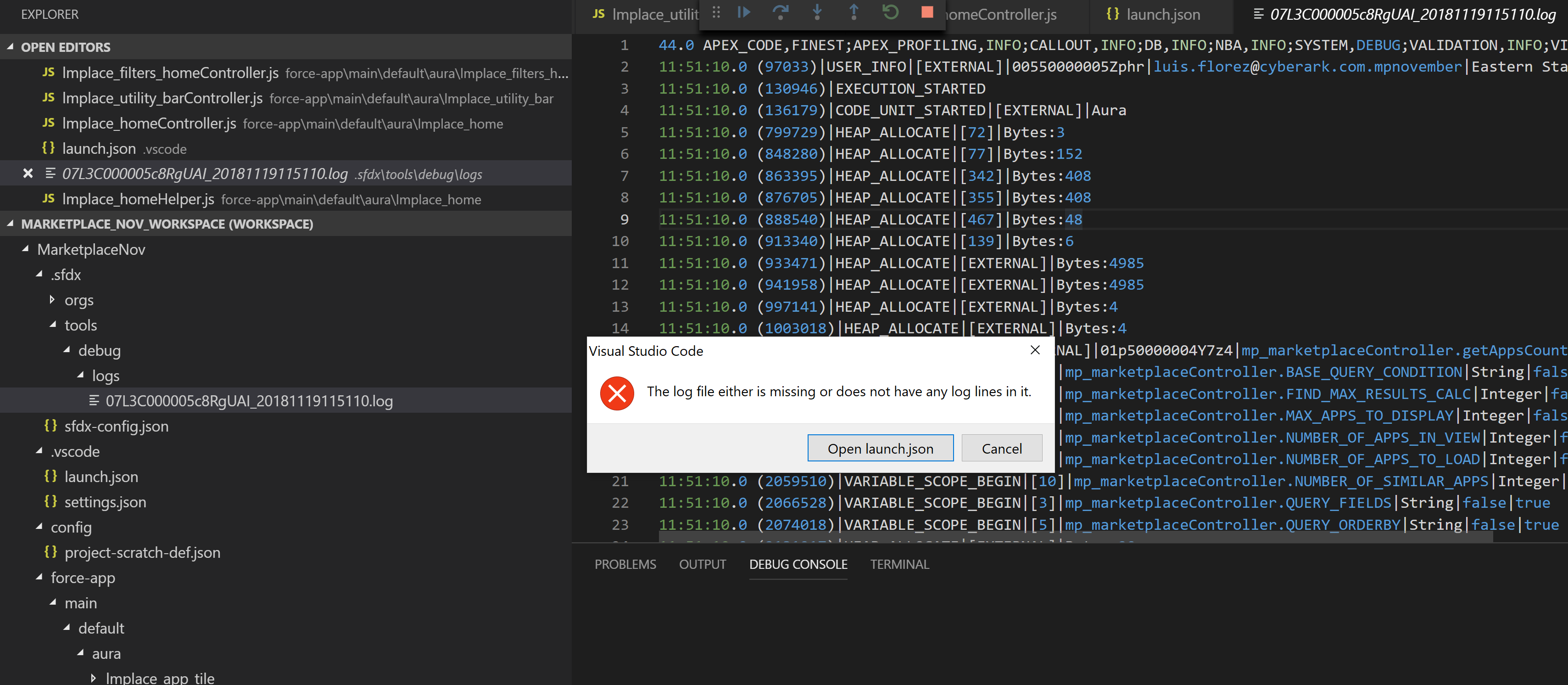
By clearing the traceflags the error cleared. Thank you. However I am still stuck with the error: "The log file either is missing or does not have any log lines in it." See attachment.
Here is my launch.json file:
{
    // Use IntelliSense to learn about possible attributes.
    // Hover to view descriptions of existing attributes.
    // For more information, visit: https://go.microsoft.com/fwlink/?linkid=830387
    "version": "0.2.0",
    "configurations": [
      {
        "name": "Launch Apex Replay Debugger",
        "type": "apex-replay",
        "request": "launch",
        "logFile": "07L3C000005c8RgUAI_20181119115110.log",
        "stopOnEntry": true,
        "trace": true
      }
    ]
  }
lflorezcyberark
on 20 Nov 2018
Hi @lflorezcyberark, you should be able to launch the replay debugger if you use the full path to the log file instead of just the log's file name ("logFile": "07L3C000005c8RgUAI_20181119115110.log",) in your launch.json file. Alternatively, you can also launch the replay debugger by right clicking anywhere on the open log file and selecting SFDX: Launch Apex Replay Debugger with Current File

allileong
on 20 Nov 2018
Hello,
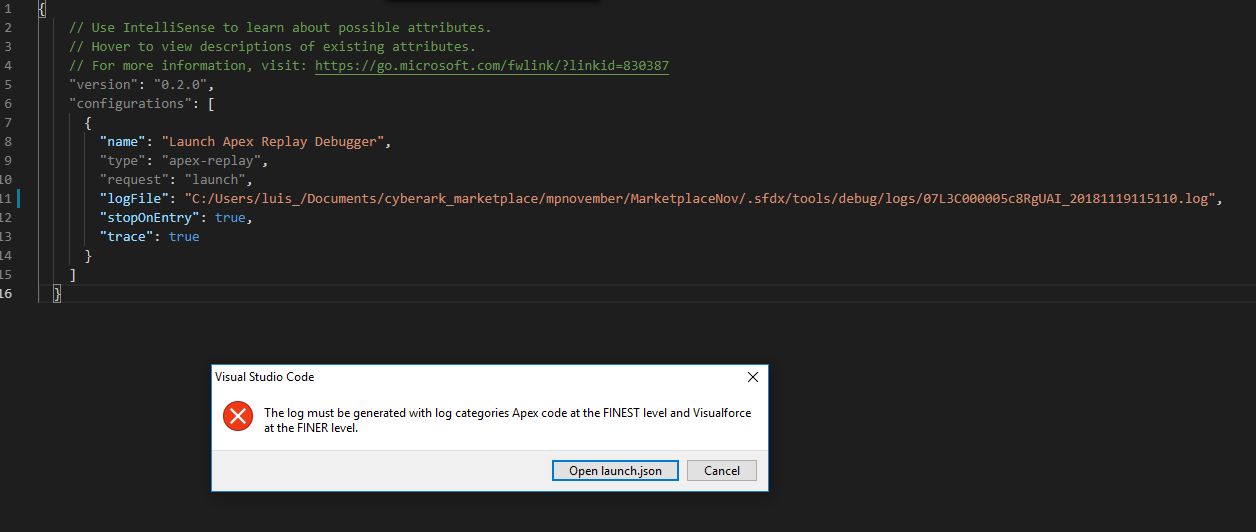
Sorry for my delay on this. I've put the complete path to the file like I show on the attached screenshot. Then I turn ON Apex debug Log for Replay Debugger which doesn't result in error anymore. I go then to Debug tab in VSCode and hit play "Launch Apex Replay Debugger" and results in the error shown on the same attachment.
When I go directly to the file, right click to select Launch Apex Replay Debugger with Current File, doesn't do anything. Nothing is displayed on Output either.
lflorezcyberark
on 28 Nov 2018
Hi @lflorezcyberark, no problem. Did you download this log before you were able to successfully run the SFDX: Turn on Apex Debug Log for Replay Debugger command? The SFDX: Turn on Apex Debug Log for Replay Debugger command sets your log levels to the levels needed by the replay debugger, so it needs to be run before you run the code that generates the debug log. The steps that you have to run in order to use the debugger are:
SFDX: Turn On Apex Debug Log for Replay Debugger- Run the code that will generate the debug log
SFDX: Get Apex Debug Logsand choose the most recent log- Launch the replay debugger on the newly downloaded log
- When you are finished generating debug logs, you can turn off replay debugging with
SFDX: Turn Off Apex Debug Log for Replay Debugger
allileong
on 30 Nov 2018
I was having similar issues and fixed it by downloading Java 8, (jdk-8u192). I had version 9 installed and mostly everything was working, but couldn't get the Apex Replay Debugger to work. Same errors as above.
I think the culprit is the extension pack 'Apex for Visual Studio Code' It says it is powered by the Apex Language Server and dependent on Java 8. I figured I could use a 8 or later, but the Apex Replay Debugger seems to be dependent on 8 because the Apex for Visual Studio Code extension pack seemed to be working cause I could do code completion, code snippets, etc.
After installing Java 8, I modified by JAVA_HOME variable and restarted VS Code and the Apex Replay Debugger started to work.
 sgkmills
on 1 Dec 2018
sgkmills
on 1 Dec 2018
This issue has been automatically closed because there has been no response to our request for more information from the original author. Currently, there is not enough information provided for us to take action. Please reply and reopen this issue if you need additional assistance.
![no-response[bot] picture](https://avatars.githubusercontent.com/u/26350515?v=4&s=40) no-response[bot]
on 11 Dec 2018
no-response[bot]
on 11 Dec 2018
Related issues
 vtandon-wiley
·
3Comments
vtandon-wiley
·
3Comments
 StanZha
·
4Comments
StanZha
·
4Comments
 quangxvu
·
5Comments
quangxvu
·
5Comments
 Bgallahue
·
3Comments
Bgallahue
·
3Comments
 aheber
·
4Comments
aheber
·
4Comments