Saleor: AttributeError: module 'saleor' has no attribute 'discount'
What I'm trying to achieve
…
Hi,
I'm new to here and happy to see such a great project saleor,
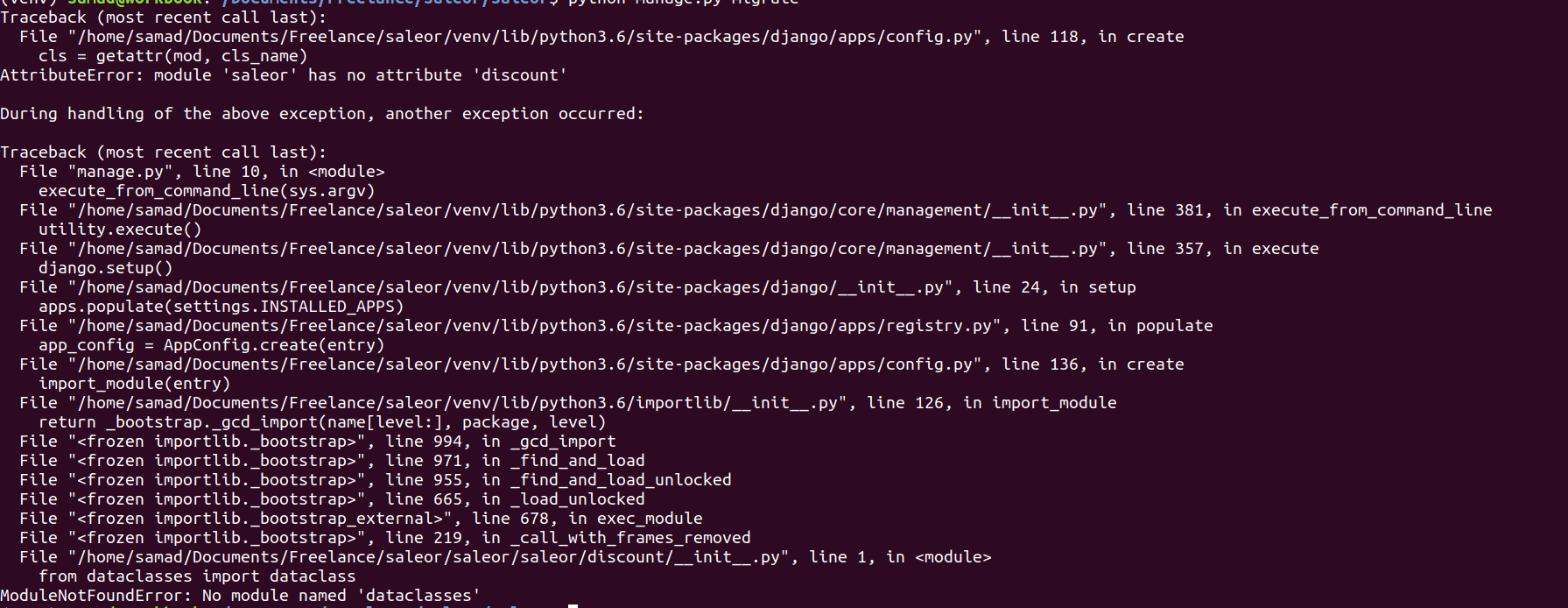
i was trying setup it in my local env, while running migrate command as per installation
doc, its throws the error mentioned in the screenshot.
Thanks in advance.
Steps to reproduce the problem
What I expected to happen
Screenshots
System information**
Operating system:
Browser:
 samadak06
All 5 comments
Hey @samadak06, I see on the screenshot that you're running Saleor with Python 3.6. Saleor doesn't work with that version anymore, you need to run it in at least Python 3.7, but we really recommend Python 3.8.
 maarcingebala
on 4 Dec 2019
maarcingebala
on 4 Dec 2019
PLEASE UPDATE YOUR INSTALL DOCS!!!! Install docs still say python 3.6
 wbfiretoss
on 30 Jan 2020
wbfiretoss
on 30 Jan 2020
If you're using the unreleased version from the master branch, please refer to the next version of the docs: https://docs.getsaleor.com/docs/next/getting-started/installation-macos/.
Be default docs refer to the latest released version 2.9.0 where Python 3.6 was used.
maarcingebala
on 30 Jan 2020
I have updated python3.6 to 3.8 but now its saying no module named celery
`Traceback (most recent call last):
File "manage.py", line 10, in
execute_from_command_line(sys.argv)
File "/usr/lib/python3/dist-packages/django/core/management/__init__.py", line 364, in execute_from_command_line
utility.execute()
File "/usr/lib/python3/dist-packages/django/core/management/__init__.py", line 308, in execute
settings.INSTALLED_APPS
File "/usr/lib/python3/dist-packages/django/conf/__init__.py", line 56, in __getattr__
self._setup(name)
File "/usr/lib/python3/dist-packages/django/conf/__init__.py", line 41, in _setup
self._wrapped = Settings(settings_module)
File "/usr/lib/python3/dist-packages/django/conf/__init__.py", line 110, in __init__
mod = importlib.import_module(self.SETTINGS_MODULE)
File "/usr/lib/python3.8/importlib/__init__.py", line 127, in import_module
return _bootstrap._gcd_import(name[level:], package, level)
File "
File "
File "
File "
File "
File "
File "
File "
File "
File "
File "/home/johny/django/saleor-master/saleor/__init__.py", line 1, in
from .celeryconf import app as celery_app
File "/home/johny/django/saleor-master/saleor/celeryconf.py", line 3, in
from celery import Celery
ModuleNotFoundError: No module named 'celery'
Error in sys.excepthook:
Traceback (most recent call last):
File "/usr/lib/python3/dist-packages/apport_python_hook.py", line 63, in apport_excepthook
from apport.fileutils import likely_packaged, get_recent_crashes
File "/usr/lib/python3/dist-packages/apport/__init__.py", line 5, in
from apport.report import Report
File "/usr/lib/python3/dist-packages/apport/report.py", line 30, in
import apport.fileutils
File "/usr/lib/python3/dist-packages/apport/fileutils.py", line 23, in
from apport.packaging_impl import impl as packaging
File "/usr/lib/python3/dist-packages/apport/packaging_impl.py", line 24, in
import apt
File "/usr/lib/python3/dist-packages/apt/__init__.py", line 23, in
import apt_pkg
ModuleNotFoundError: No module named 'apt_pkg'
Original exception was:
Traceback (most recent call last):
File "manage.py", line 10, in
execute_from_command_line(sys.argv)
File "/usr/lib/python3/dist-packages/django/core/management/__init__.py", line 364, in execute_from_command_line
utility.execute()
File "/usr/lib/python3/dist-packages/django/core/management/__init__.py", line 308, in execute
settings.INSTALLED_APPS
File "/usr/lib/python3/dist-packages/django/conf/__init__.py", line 56, in __getattr__
self._setup(name)
File "/usr/lib/python3/dist-packages/django/conf/__init__.py", line 41, in _setup
self._wrapped = Settings(settings_module)
File "/usr/lib/python3/dist-packages/django/conf/__init__.py", line 110, in __init__
mod = importlib.import_module(self.SETTINGS_MODULE)
File "/usr/lib/python3.8/importlib/__init__.py", line 127, in import_module
return _bootstrap._gcd_import(name[level:], package, level)
File "
File "
File "
File "
File "
File "
File "
File "
File "
File "
File "/home/johny/django/saleor-master/saleor/__init__.py", line 1, in
from .celeryconf import app as celery_app
File "/home/johny/django/saleor-master/saleor/celeryconf.py", line 3, in
from celery import Celery
ModuleNotFoundError: No module named 'celery'`
 hetendra
on 5 May 2020
hetendra
on 5 May 2020
pip install celery, you will get more lot of such issue you have to manually install all these and at last you will get an error that says ,
AttributeError: module 'saleor.core' has no attribute 'logging
where actually i am stuck 😆 . keep searching
 youngheart12
on 3 Dec 2020
youngheart12
on 3 Dec 2020
Related issues
 ranjanprj
·
3Comments
ranjanprj
·
3Comments
 gComet
·
3Comments
gComet
·
3Comments
 Ajorona
·
3Comments
Ajorona
·
3Comments
 mad-anne
·
3Comments
mad-anne
·
3Comments
 mihaildragos
·
3Comments
mihaildragos
·
3Comments
Most helpful comment
PLEASE UPDATE YOUR INSTALL DOCS!!!! Install docs still say python 3.6