Saleor: Drop categories in favor of collections.
At the moment we have two models for organizing products into groups: Category and Collection. We used categories to provide the navigation between product listings in the storefront, but now it can be configured from the dashboard using Menu and MenuItem models. The difference between categories and collections is that categories support nesting and thus creating tree hierarchies of products.
To have the data model clean and understandable, we should have only one solution for grouping products. We propose to drop the Category model and focus on maintaining collections.
 maarcingebala
All 13 comments
For sales channels we should still likely support additional metadata that I think is currently part of the category definition. For example Google uses https://support.google.com/merchants/answer/6324436
Various ONIX classifications exist that could also help us standardize other features: https://www.editeur.org/14/Code-Lists/
GS1 maintains a Global Product Classification standard: https://www.gs1.org/standards/gpc/access-gpc-standards
 patrys
on 18 Jul 2018
patrys
on 18 Jul 2018
In the case of the products breadcrumb, how should we proceed? When using the menu with collection the breadcrumb has always been a big issue as it's redirecting to the category. And as a product can be inside multiple collections.
We should review the way to proceed that. Probably by going for changes in the product URL.
 NyanKiyoshi
on 18 Jul 2018
NyanKiyoshi
on 18 Jul 2018
Good catch about breadcrumbs. Since we have the menu app, maybe breadcrumbs in the storefront should be based on the structure of your menu? I'm only afraid that if the hierarchy of categories/collections is large and complex it would be cumbersome to reflect that in the structure of navigation and maintain that manually.
maarcingebala
on 20 Jul 2018
I think as well that we probably should base the breadcrumbs on the menus. We would have to communicate the menu tree through the URL to the product so the product find the menu the user was coming from.
NyanKiyoshi
on 20 Jul 2018
Will this require manually assigning each collection to a menu item? If so I can see this potentially becoming a little tedious for product sets with large numbers of collections.
Would it not make sense to drop the Collections instead and allow products to belong to multiple categories? Maybe whilst including the ability to set a single "primary" category that can be used for breadcrumbs?
 petedermott
on 23 Jul 2018
petedermott
on 23 Jul 2018
Maybe whilst including the ability to set a single "primary" category that can be used for breadcrumbs?
The issue with that is that the user may come from another tree and may want to use the breadcrumbs and thus be redirected to an unwanted tree.
NyanKiyoshi
on 23 Jul 2018
Has there been any further discussion internally about this? I'm looking at importing our products from another system into Saleor and it would be great to know which way people are leaning with this so I don't waste time writing an import script that will need major modifications.
Something else to think about, what happens if a customer lands at a product directly? What would the breadcrumb trail be from there?
petedermott
on 20 Aug 2018
It seems to me that a product should have a single category used for navigation and such and that attributes should be augmented with tag-like functionality to make collections redundant. I realise that it is trivial to create a 'tag' attribute but the interfaces aren't ideal for such a use case.
Just my tuppence and probably slightly naive. :)
 ajostergaard
on 2 Sep 2018
ajostergaard
on 2 Sep 2018
A sample use-case:
I use categories for product types and sub-categories for sub product type categories e.g. I have a product type and category for Cables, and then sub-category under cables for USB Cables and AUX Cables.
However, lets say I have another category for Cases & Covers. Now if I want to organize the Cases & Covers by mobile phone brands and their models, it becomes very hectic cause if I use collections, it doesn't nest the appropriate phones underneath. e.g. Apple > iPhone 7 or Accessories > Earphones > Wired.
I think collections are a good way to categorize multi-category or multi-product type products together. However, categories are also equally important. I don't think we should make either of them redundant.
If there was a way to add multiple categories to a single product while retaining the nested product category structure, that would great. Either that or give collections the ability to be nested as well. THATS EVEN BETTER!!
 mabdullahabid
on 18 Feb 2019
mabdullahabid
on 18 Feb 2019
If there was a way to add multiple categories to a single product while retaining the nested product category structure, that would great. Either that or give collections the ability to be nested as well. THATS EVEN BETTER!!
@wulaaf Was looking for exactly this. In almost all our projects this was a requirement. Every product needs a canonical url (link rel="canonical") with a primary category. Then it shouldn't be an issue with duplicated content. The breadcrumbs issue is a bit difficult. Maybe saving the category in the browser depending on from which category an user opens a product? And as a default use the primary category?
 vkuzma
on 10 Jul 2019
vkuzma
on 10 Jul 2019
I'm planning on adding to my project. Let me know if this is something that aligns with the current design direction.
Goals
- Products should be able to be placed in an arbitrary number of Categories.
- Categories should be “publishable”: they can be enabled or disabled
- Categories should be orderable. Their order will define a Product’s breadcrumbs (pic). The Category with the highest order will act as the “main” Category for the product and be listed as its breadcrumb.
Backend changes
Roughly speaking, I'm going to turn the existing product models below
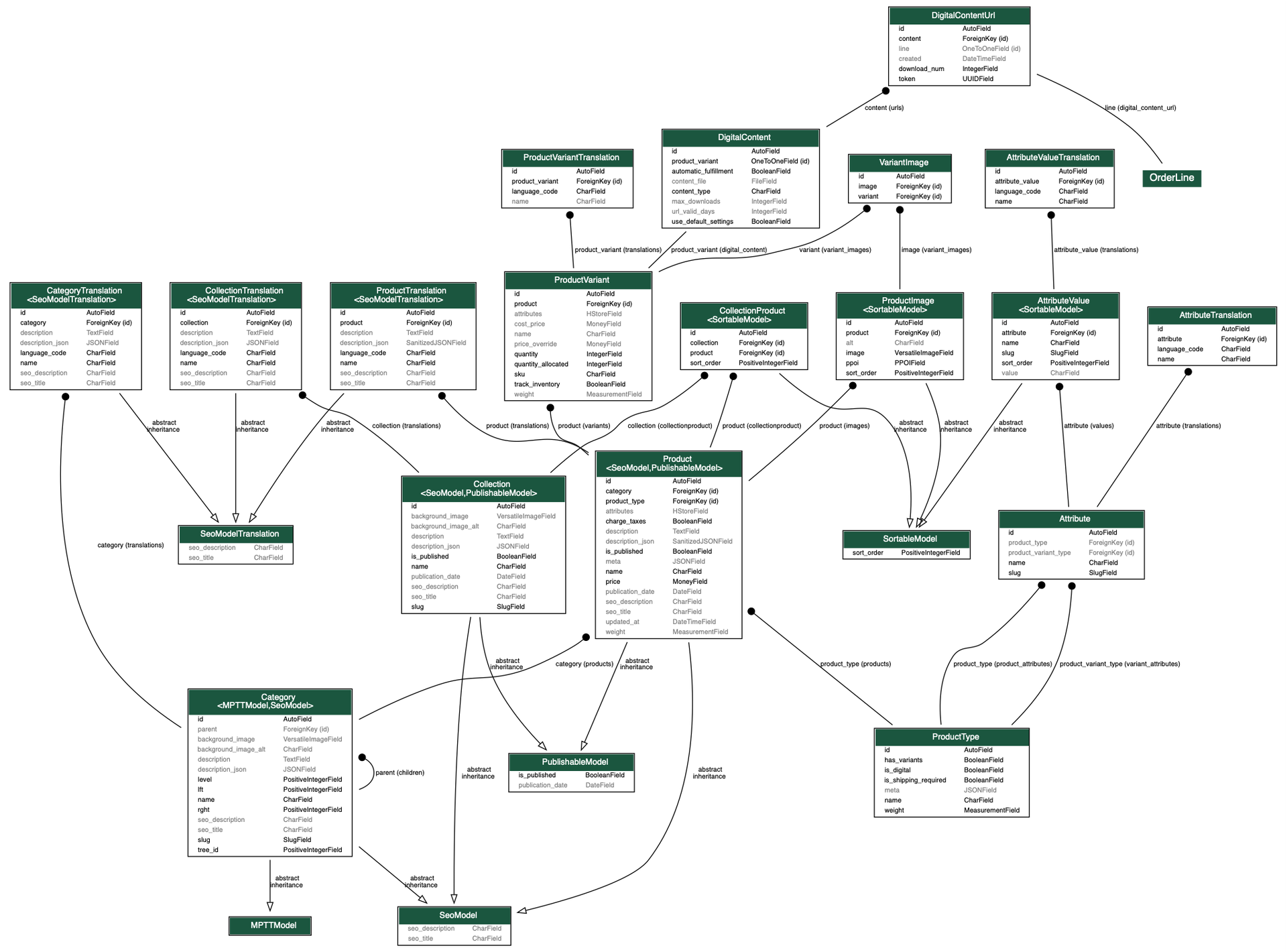
into something more like this:
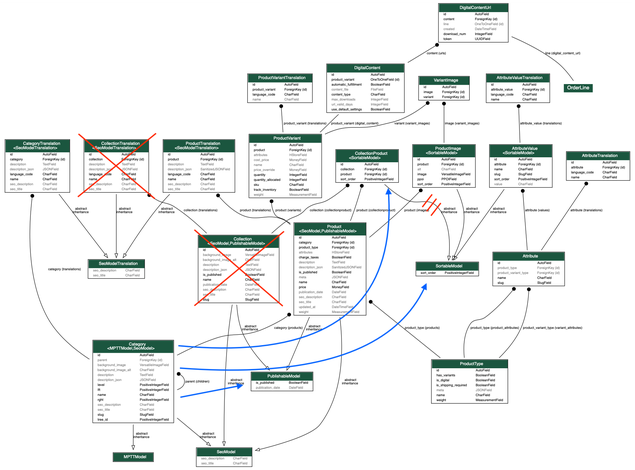
Explicitly removing collections isn't necessary.
Frontend changes
The merchant dashboard category editor should better allow categories to be created, organized, and ordered. I'd like to use this library which is already used in the navigation editor.
Generally:
- On the existing admin Category List screen, we will make the categories drag-and-droppable. Admins can control the orders of categories by arranging them in the desired order.
- Categories must maintain PREORDER.
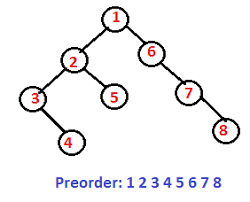
- To implement this, if the order of a Category is changed, the order of all of it’s Subcategories will need to change
- If a Category in the Category List has Subcategories, there should be a button to reveal the Subcategories in the Category List.
- On each Category in the Category List, we will add a button which opens a popup dialog to create a new Subcategory
- When categories are reordered, there should be a SAVE button. Changes should not be saved until this button is clicked. If the user attempts to navigate away from the page with Unsaved changes, a popup dialog should be shown.
The editor might look like this: video
 KyleMcDonell
on 7 Aug 2019
KyleMcDonell
on 7 Aug 2019
This issue has been automatically marked as stale because it has not had recent activity. It will be closed if no further activity occurs. Thank you for your contributions.
![stale[bot] picture](https://avatars3.githubusercontent.com/in/1724?v=4&s=40) stale[bot]
on 1 Nov 2019
stale[bot]
on 1 Nov 2019
Closing this since the current structure still works well and it's not our priority to change it in the nearest future.
maarcingebala
on 3 Dec 2019
Related issues
 PiotrCzapla
·
3Comments
PiotrCzapla
·
3Comments
 ranjanprj
·
3Comments
ranjanprj
·
3Comments
 mad-anne
·
3Comments
mad-anne
·
3Comments
 8BitAce
·
4Comments
8BitAce
·
4Comments
 mihaildragos
·
3Comments
mihaildragos
·
3Comments
Most helpful comment
A sample use-case:
I use categories for product types and sub-categories for sub product type categories e.g. I have a product type and category for Cables, and then sub-category under cables for USB Cables and AUX Cables.
However, lets say I have another category for Cases & Covers. Now if I want to organize the Cases & Covers by mobile phone brands and their models, it becomes very hectic cause if I use collections, it doesn't nest the appropriate phones underneath. e.g. Apple > iPhone 7 or Accessories > Earphones > Wired.
I think collections are a good way to categorize multi-category or multi-product type products together. However, categories are also equally important. I don't think we should make either of them redundant.
If there was a way to add multiple categories to a single product while retaining the nested product category structure, that would great. Either that or give collections the ability to be nested as well. THATS EVEN BETTER!!