Saleor: FileNotFoundError on Dashboard when deployed on Heroku
(Please take the time and describe the problem you're having before you propose a solution.)
What I'm trying to achieve
I wish to deploy my Saleor store on Heroku and load data from a DB dump with python manage.py loaddata db.json and that it works fine showing the products and the associated images.
Steps to reproduce the problem
- Deploy to Heroku with Git on the command line
- Load data from a database dump
- View store but it shows placeholder images
What I expected to happen
- Deploy to Heroku with Git on the command line
- Load data from a database dump
- View store showing product catalog with the right images
What happened instead/how it failed
- After loading database dump, images do not show despite
python manage.py collectstaticshows that the images are there but they are probably not being referenced right.

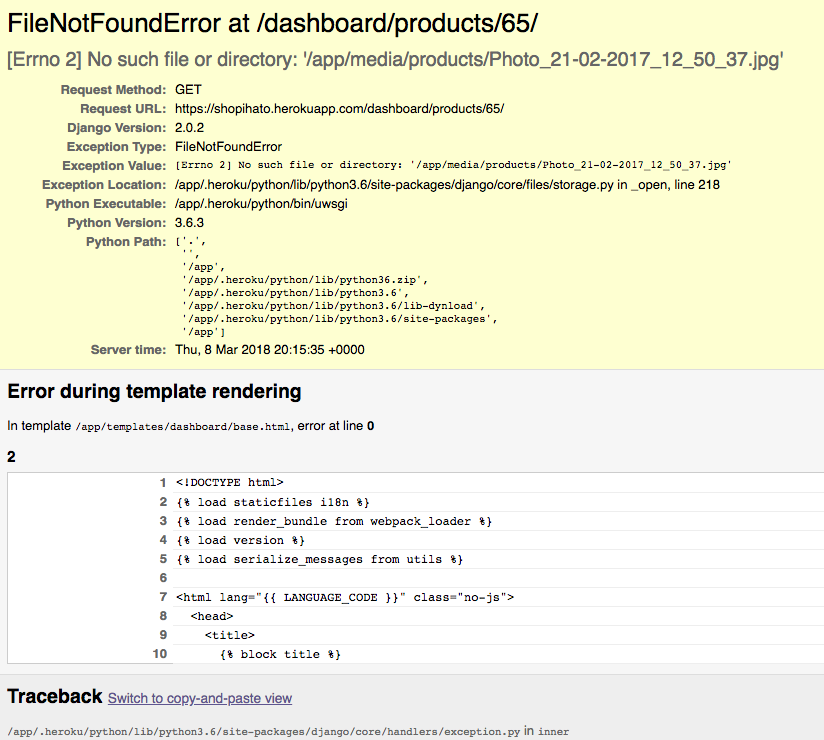
- When I attempt to edit the products to change images on the dashboard, I get the following error:
The settings for the STATIC and Whitenoise look as follows:
STATIC_ROOT = os.path.join(PROJECT_ROOT, 'static')
STATIC_URL = '/static/'
STATICFILES_DIRS = [
    ('assets', os.path.join(PROJECT_ROOT, 'saleor', 'static', 'assets')),
    ('images', os.path.join(PROJECT_ROOT, 'saleor', 'static', 'images')),
    ('dashboard', os.path.join(PROJECT_ROOT, 'saleor', 'static', 'dashboard'))]
STATICFILES_FINDERS = [
    'django.contrib.staticfiles.finders.FileSystemFinder',
    'django.contrib.staticfiles.finders.AppDirectoriesFinder']

MIDDLEWARE = [
    'django.contrib.sessions.middleware.SessionMiddleware',
    'django.middleware.common.CommonMiddleware',
    'django.middleware.csrf.CsrfViewMiddleware',
    'django.contrib.auth.middleware.AuthenticationMiddleware',
    'django.contrib.messages.middleware.MessageMiddleware',
    'django.middleware.locale.LocaleMiddleware',
    'django_babel.middleware.LocaleMiddleware',
    'saleor.core.middleware.discounts',
    'saleor.core.middleware.google_analytics',
    'saleor.core.middleware.country',
    'saleor.core.middleware.currency',
    'saleor.core.middleware.site',
    'whitenoise.middleware.WhiteNoiseMiddleware',
    'social_django.middleware.SocialAuthExceptionMiddleware',
    'impersonate.middleware.ImpersonateMiddleware']

INSTALLED_APPS = [
    # External apps that need to go before django's
    'storages',

    # Django modules
    'django.contrib.contenttypes',
    'django.contrib.sessions',
    'django.contrib.messages',
    'django.contrib.sitemaps',
    'django.contrib.sites',
    'django.contrib.staticfiles',
    'django.contrib.auth',
    'django.contrib.postgres',
    'django.forms',

    # Local apps
    'saleor.account',
    'saleor.discount',
    'saleor.product',
    'saleor.cart',
    'saleor.checkout',
    'saleor.core',
    'saleor.graphql',
    'saleor.order.OrderAppConfig',
    'saleor.dashboard',
    'saleor.shipping',
    'saleor.search',
    'saleor.site',
    'saleor.data_feeds',

    # External apps
    'versatileimagefield',
    'django_babel',
    'bootstrap4',
    'django_fsm',
    'django_prices',
    'django_prices_openexchangerates',
    'graphene_django',
    'mptt',
    'payments',
    'webpack_loader',
    'social_django',
    'django_countries',
    'django_filters',
    'django_celery_results',
    'impersonate',
    'phonenumber_field']
Is there something I am missing? A WhiteNoise setting? Wrong way to load static files to Heroku due to differences between STATIC settings in Saleor and those in Whitenoise? What might I be doing wrong? Please help.
 raybesiga
All 11 comments
As far as I remember Whitenoise is not suitable for serving media files. For security and performance reasons, it scans files only at the startup, can’t really serve user-generated content.
However Saleor works out of the box with AWS S3, we have integration guide for it. I’d strongly recommend to pair it with Heroku App.
 Pacu2
on 8 Mar 2018
Pacu2
on 8 Mar 2018
Yeah the issue with Docker is that files are not persistent, so it requires to use another cloud storage like AWS S3.
Saleor does work with S3 but requires to disable the image creation on demand from versatile otherwise it's slow and will spam requests to S3 (which means it may cost you a few bucks).
I'm not quite sure, if someone could verify that... But I think versatile does not upload to the S3 media bucket at least Saleor does not upload to the S3 bucket when we disable the on demand creation and upload images from the dashboard.
Which means Versatile requires a manual "warm up" (by that, I mean, that we need to generate every picture in accordance to the settings values of VERSATILEIMAGEFIELD_RENDITION_KEY_SETS and upload them to the S3 bucket) which is easily implementable from Saleor side.
Please tell me if I'm wrong. At least if was the issues I ran into with S3 on the January release of Saleor. Then I did some changes to the Saleor code to warm up on image upload which uploads to S3, everything is awesome now.
Edit: @raybesiga for now... The quick fix you could do, is to include (copy) the media folder from your local project to Heroku if you can (if you can find a way to make sure that this data will persist and always be included with the static files as well... I don't know anything about Heroku so you would know better than me how to handle this). It should work correctly (at least copy the media/products folder, at least. So you won't have this issue of missing files in Heroku anymore).
 NyanKiyoshi
on 8 Mar 2018
NyanKiyoshi
on 8 Mar 2018
@NyanKiyoshi
You’re right, there’s no prewarmer for Versatileimagefield in Saleor, so disabling on demand image creation will stop thumbnails/crops from being created.
I think images should be created on demand only if ‘not DEBUG’.
We should address this problem soon.
Pacu2
on 8 Mar 2018
Thanks guys! @NyanKiyoshi I am going to try and copy the folder to Heroku. Fingers crossed I can actually do that.. I do not have much experience with S3 so I will have to invest more time to learn about how to get that working, especially with the Versatile Images. Is this the only way people are handling images in their Saleor apps?
raybesiga
on 9 Mar 2018
@Pacu2 do you have a link to the detailed integration guide for AWS? The documentation only has this:
Set the following environment variables to use S3 to store and serve media files:

`AWS_ACCESS_KEY_ID`
Your AWS access key.
`AWS_SECRET_ACCESS_KEY`
Your AWS secret access key.
`AWS_MEDIA_BUCKET_NAME`
The S3 bucket name to use for media files.
By default static files (such as CSS and JS files required to display your pages) will be served by the application server.

If you intend to use S3 for your static files as well, set an additional environment variable:

`AWS_STORAGE_BUCKET_NAME`
The S3 bucket name to use for static files.
@raybesiga That's the one I was talking about, Saleor wise, that's all you need.
Apart from that, you'll need to sign up and create buckets on AWS S3
Pacu2
on 9 Mar 2018
Thanks @Pacu2. Do I then move the stuff in my media folder into the bucket? Also, that said, I cannot edit/delete the products due to the error I am having. Do you suggest that I delete the Heroku app and wipe my database? What do you recommend I do to get things working again?
raybesiga
on 9 Mar 2018
How do I link the product images in a bucket to the actual products in the Saleor backend dashboard?
raybesiga
on 9 Mar 2018
Copy your media files to s3 bucket, add appropriate settings in Saleor. Apart from that, remember about setting proper CORS policy on the buckets and permissions.
Answering second question, your files should have same structure as on your local instance.
If you want to move your static files to AWS S3 as well, you'll need STATIC_URL env variable set, equal to your bucket's url, take a look at https://github.com/mirumee/saleor/blob/master/webpack.config.js#L13-L18
Pacu2
on 9 Mar 2018
I think this is already resolved
Pacu2
on 27 Apr 2018
It is. Thanks.
On Fri, 27 Apr 2018 at 17:38, Filip Kucharczyk notifications@github.com
wrote:
I think this is already resolved
—
You are receiving this because you were mentioned.
Reply to this email directly, view it on GitHub
https://github.com/mirumee/saleor/issues/1888#issuecomment-384990045,
or mute the thread
https://github.com/notifications/unsubscribe-auth/AAYwwbhg7nq-_DhgrP4479Ns_LSLHmQDks5tsy1bgaJpZM4SjUS2
.>
With optimism,
Raymond Besiga
h: http://raybesiga.com
m: +256791160903
t: @raybesiga http://twitter.com/raybesiga
raybesiga
on 27 Apr 2018
Related issues
 damianarechar
·
3Comments
damianarechar
·
3Comments
 maltitco
·
3Comments
maltitco
·
3Comments
 lewis617
·
3Comments
lewis617
·
3Comments
 purnendushukla
·
4Comments
purnendushukla
·
4Comments
 ranjanprj
·
3Comments
ranjanprj
·
3Comments