Saleor: migration failed due to importError
Hi,
I am trying to install saleor on my local machine. I followed the instructions carefully here http://saleor.readthedocs.io/en/latest/installation.html#installation. I even have a virtual environment as recommended by the Docs.
However, I cannot seem to have it up and running. I am using python 2.7, Django 1.10, pip 9.0.1. The first time I ran a migration, I go this error
ImportError: No module named dj_database_url. I proceeded to install it and other several modules that appeared as an import error when I tried to migrate but could not. I finally reached this module
dj_cache_url but I get this error when i try to install it via pip
Could not find a version that satisfies the requirement dj_cache_url (from versions: )
No matching distribution found for dj_cache_url
Now I cannot pass the migration stage because this module has an issue. What could be the problem?
 HawiCaesar
All 39 comments
Hi,
@HawiCaesar did you ran pip install -r requirements.txt? It looks like you missed this step and you don't have correct requirements installed.
 artursmet
on 10 Jan 2017
artursmet
on 10 Jan 2017
@artursmet I did run it.
There were several issues like so
"
Failed building wheel for cryptography
...
Failed building wheel for psycopg2
....
Failed building wheel for uwsgi
...
"
and the compilation terminated
compilation terminated.
    error: command 'x86_64-linux-gnu-gcc' failed with exit status 1
I also have wheel installed
Have I missed an instruction or critical step with my own install of django?
HawiCaesar
on 10 Jan 2017
Could you share some details about your platform? Which OS are you using?
You can also try with pip install -r requirements.txt --no-binary wheel
artursmet
on 10 Jan 2017
It looks like your machine is lacking the necessary compiler tools. Can you try to install them and give us the name of the distribution and the package names so that I can put them in the docs?
 patrys
on 10 Jan 2017
patrys
on 10 Jan 2017
sorted it out the cache_url package. I spelled it wrong.
However, I get this error when I try to run the migration
ImportError: No module named storages
HawiCaesar
on 10 Jan 2017
@HawiCaesar It's because of failed requirements installation, so not all packages were installed correctly.
Depending on your operating system, you'll have to install additional tools, like development headers for the postgresql client, development headers for cryptography libs.
It really depends on your operating system, if you paste whole log from pip installation, we will be able to help you.
artursmet
on 10 Jan 2017
@HawiCaesar please provide your operating system/Linux distribution name.
patrys
on 10 Jan 2017
Thank @artursmet I got it working.
I dont where to post this here but I get a session cache warning.
WARNINGS:
saleor.W001: Session caching cannot work with locmem backend
    HINT: User sessions need to be globally shared, use a cache server like Redis.
Traceback (most recent call last):
  File "manage.py", line 10, in <module>
    execute_from_command_line(sys.argv)
  File "/home/hawi/Downloads/saleor/local/lib/python2.7/site-packages/django/core/management/__init__.py", line 367, in execute_from_command_line
    utility.execute()
  File "/home/hawi/Downloads/saleor/local/lib/python2.7/site-packages/django/core/management/__init__.py", line 359, in execute
    self.fetch_command(subcommand).run_from_argv(self.argv)
  File "/home/hawi/Downloads/saleor/local/lib/python2.7/site-packages/django/core/management/base.py", line 294, in run_from_argv
    self.execute(*args, **cmd_options)
  File "/home/hawi/Downloads/saleor/local/lib/python2.7/site-packages/django/core/management/base.py", line 345, in execute
    output = self.handle(*args, **options)
  File "/home/hawi/Downloads/saleor/local/lib/python2.7/site-packages/django/core/management/commands/migrate.py", line 83, in handle
    executor = MigrationExecutor(connection, self.migration_progress_callback)
  File "/home/hawi/Downloads/saleor/local/lib/python2.7/site-packages/django/db/migrations/executor.py", line 20, in __init__
    self.loader = MigrationLoader(self.connection)
  File "/home/hawi/Downloads/saleor/local/lib/python2.7/site-packages/django/db/migrations/loader.py", line 52, in __init__
    self.build_graph()
  File "/home/hawi/Downloads/saleor/local/lib/python2.7/site-packages/django/db/migrations/loader.py", line 203, in build_graph
    self.applied_migrations = recorder.applied_migrations()
  File "/home/hawi/Downloads/saleor/local/lib/python2.7/site-packages/django/db/migrations/recorder.py", line 65, in applied_migrations
    self.ensure_schema()
  File "/home/hawi/Downloads/saleor/local/lib/python2.7/site-packages/django/db/migrations/recorder.py", line 52, in ensure_schema
    if self.Migration._meta.db_table in self.connection.introspection.table_names(self.connection.cursor()):
  File "/home/hawi/Downloads/saleor/local/lib/python2.7/site-packages/django/db/backends/base/base.py", line 231, in cursor
    cursor = self.make_debug_cursor(self._cursor())
  File "/home/hawi/Downloads/saleor/local/lib/python2.7/site-packages/django/db/backends/base/base.py", line 204, in _cursor
    self.ensure_connection()
  File "/home/hawi/Downloads/saleor/local/lib/python2.7/site-packages/django/db/backends/base/base.py", line 199, in ensure_connection
    self.connect()
  File "/home/hawi/Downloads/saleor/local/lib/python2.7/site-packages/django/db/utils.py", line 94, in __exit__
    six.reraise(dj_exc_type, dj_exc_value, traceback)
  File "/home/hawi/Downloads/saleor/local/lib/python2.7/site-packages/django/db/backends/base/base.py", line 199, in ensure_connection
    self.connect()
  File "/home/hawi/Downloads/saleor/local/lib/python2.7/site-packages/django/db/backends/base/base.py", line 171, in connect
    self.connection = self.get_new_connection(conn_params)
  File "/home/hawi/Downloads/saleor/local/lib/python2.7/site-packages/django/db/backends/postgresql/base.py", line 176, in get_new_connection
    connection = Database.connect(**conn_params)
  File "/home/hawi/Downloads/saleor/local/lib/python2.7/site-packages/psycopg2/__init__.py", line 164, in connect
    conn = _connect(dsn, connection_factory=connection_factory, async=async)
django.db.utils.OperationalError: FATAL:  password authentication failed for user "saleor"
FATAL:  password authentication failed for user "saleor"
Must I use a cache server on my local machine?
HawiCaesar
on 10 Jan 2017
@HawiCaesar On your local machine no - this is only warning to remind you to enable global cache, when you're deploying the store somewhere else.
Error you've received is about database connection.
Do you use docker for the deployment or do you have a local potgresql server on your machine?
With docker, the default credentials should work fine, but when you use a separated database server, you have to create on your own.
artursmet
on 10 Jan 2017
Hi, I ran into this error while trying to get saleor running on DigitalOcean. I followed the installation instructions along with pip install -r requirements.txt
I also installed postgres. When I tried to migrate "python manage.py migrate" I get this error. Perhaps I have to create a saleor user as well as a database on postgres?
I am using a ubuntu 14.04 droplet on DO.
Thanks!
 kaurao
on 6 Feb 2017
kaurao
on 6 Feb 2017
Hey, been having issues at nearly every step of the way unfortunately whilst trying to get saleor up and running... I'm following the official saleor documentation and I'm on the 5th python manage.py migrate step and have encountered the following error:
$ python manage.py migrate
System check identified some issues:

WARNINGS:
saleor.W001: Session caching cannot work with locmem backend
        HINT: User sessions need to be globally shared, use a cache server like Redis.
Traceback (most recent call last):
  File "C:\Cygwin\home\ddl_9\saleor\lib\site-packages\django\db\backends\base\base.py", line 199, in ensure_connection
    self.connect()
  File "C:\Cygwin\home\ddl_9\saleor\lib\site-packages\django\db\backends\base\base.py", line 171, in connect
    self.connection = self.get_new_connection(conn_params)
  File "C:\Cygwin\home\ddl_9\saleor\lib\site-packages\django\db\backends\postgresql\base.py", line 176, in get_new_connection
    connection = Database.connect(**conn_params)
  File "C:\Cygwin\home\ddl_9\saleor\lib\site-packages\psycopg2\__init__.py", line 164, in connect
    conn = _connect(dsn, connection_factory=connection_factory, async=async)
psycopg2.OperationalError: FATAL:  password authentication failed for user "saleor"


The above exception was the direct cause of the following exception:

Traceback (most recent call last):
  File "manage.py", line 10, in <module>
    execute_from_command_line(sys.argv)
  File "C:\Cygwin\home\ddl_9\saleor\lib\site-packages\django\core\management\__init__.py", line 367, in execute_from_command_line
    utility.execute()
  File "C:\Cygwin\home\ddl_9\saleor\lib\site-packages\django\core\management\__init__.py", line 359, in execute
    self.fetch_command(subcommand).run_from_argv(self.argv)
  File "C:\Cygwin\home\ddl_9\saleor\lib\site-packages\django\core\management\base.py", line 294, in run_from_argv
    self.execute(*args, **cmd_options)
  File "C:\Cygwin\home\ddl_9\saleor\lib\site-packages\django\core\management\base.py", line 345, in execute
    output = self.handle(*args, **options)
  File "C:\Cygwin\home\ddl_9\saleor\lib\site-packages\django\core\management\commands\migrate.py", line 83, in handle
    executor = MigrationExecutor(connection, self.migration_progress_callback)
  File "C:\Cygwin\home\ddl_9\saleor\lib\site-packages\django\db\migrations\executor.py", line 20, in __init__
    self.loader = MigrationLoader(self.connection)
  File "C:\Cygwin\home\ddl_9\saleor\lib\site-packages\django\db\migrations\loader.py", line 52, in __init__
    self.build_graph()
  File "C:\Cygwin\home\ddl_9\saleor\lib\site-packages\django\db\migrations\loader.py", line 203, in build_graph
    self.applied_migrations = recorder.applied_migrations()
  File "C:\Cygwin\home\ddl_9\saleor\lib\site-packages\django\db\migrations\recorder.py", line 65, in applied_migrations
    self.ensure_schema()
  File "C:\Cygwin\home\ddl_9\saleor\lib\site-packages\django\db\migrations\recorder.py", line 52, in ensure_schema
    if self.Migration._meta.db_table in self.connection.introspection.table_names(self.connection.cursor()):
  File "C:\Cygwin\home\ddl_9\saleor\lib\site-packages\django\db\backends\base\base.py", line 231, in cursor
    cursor = self.make_debug_cursor(self._cursor())
  File "C:\Cygwin\home\ddl_9\saleor\lib\site-packages\django\db\backends\base\base.py", line 204, in _cursor
    self.ensure_connection()
  File "C:\Cygwin\home\ddl_9\saleor\lib\site-packages\django\db\backends\base\base.py", line 199, in ensure_connection
    self.connect()
  File "C:\Cygwin\home\ddl_9\saleor\lib\site-packages\django\db\utils.py", line 94, in __exit__
    six.reraise(dj_exc_type, dj_exc_value, traceback)
  File "C:\Cygwin\home\ddl_9\saleor\lib\site-packages\django\utils\six.py", line 685, in reraise
    raise value.with_traceback(tb)
  File "C:\Cygwin\home\ddl_9\saleor\lib\site-packages\django\db\backends\base\base.py", line 199, in ensure_connection
    self.connect()
  File "C:\Cygwin\home\ddl_9\saleor\lib\site-packages\django\db\backends\base\base.py", line 171, in connect
    self.connection = self.get_new_connection(conn_params)
  File "C:\Cygwin\home\ddl_9\saleor\lib\site-packages\django\db\backends\postgresql\base.py", line 176, in get_new_connection
    connection = Database.connect(**conn_params)
  File "C:\Cygwin\home\ddl_9\saleor\lib\site-packages\psycopg2\__init__.py", line 164, in connect
    conn = _connect(dsn, connection_factory=connection_factory, async=async)
django.db.utils.OperationalError: FATAL:  password authentication failed for user "saleor"
Any ideas on what's happening? Running Windows 10, Python 3.5 and Django 1.10
Thanks!!
 DDiran
on 6 Mar 2017
DDiran
on 6 Mar 2017
The docs need to put more stress on proper database configuration. Saleor used to work with SQLite but now requires some extra work to be put in setting up PostgreSQL before using it.
patrys
on 6 Mar 2017
This postgres configuration (in bash and postgres cli) works for me. Most likely it is not as secure as it could be.
`sudo su - postgres
psql
password
CREATE DATABASE saleor;
CREATE USER saleor WITH PASSWORD 'saleor';
GRANT ALL PRIVILEGES ON DATABASE saleor TO saleor;
\q
psql -h localhost
ALTER USER saleor with password 'saleor';
\q
psql -d postgres
ALTER USER saleor WITH SUPERUSER;
\q
exit`
kaurao
on 7 Mar 2017
I am facing the same issue. I have checked both Redis and Django-Redis have been installed within the virtual environment. I think the issue is the following check in the settings file:
if os.environ.get('REDIS_URL'):
    CACHES['default'] = {
        'BACKEND': 'django_redis.cache.RedisCache',
        'LOCATION': os.environ.get('REDIS_URL')}
So the REDIS_URL environment variable is not set. Do we need to explicitly set this ?
 amyth
on 17 May 2017
amyth
on 17 May 2017
@kaustubhrpatil @patrys Hi. Iam trying to setup saleor. I am using Windows 7, python 3.6 and django. I have installed Cygnix in my Windows Terminal as well. facing this issue.
> (DjangoSaleor) C:\Users\125\Django_saleor_project\saleor>python manage.py migrate
System check identified some issues:

WARNINGS:
saleor.W001: Session caching cannot work with locmem backend
        HINT: User sessions need to be globally shared, use a cache server like Redis.
Traceback (most recent call last):
  File "C:\Users\125\Anaconda3\envs\DjangoSaleor\lib\site-packages\django\db\backends\base\base.py", line 213, in ensure_connection
    self.connect()
  File "C:\Users\125\Anaconda3\envs\DjangoSaleor\lib\site-packages\django\db\backends\base\base.py", line 189, in connect
    self.connection = self.get_new_connection(conn_params)
  File "C:\Users\125\Anaconda3\envs\DjangoSaleor\lib\site-packages\django\db\backends\postgresql\base.py", line 176, in get_new_connection
    connection = Database.connect(**conn_params)
  File "C:\Users\125\Anaconda3\envs\DjangoSaleor\lib\site-packages\psycopg2\__init__.py", line 130, in connect
    conn = _connect(dsn, connection_factory=connection_factory, **kwasync)
psycopg2.OperationalError: FATAL:  password authentication failed for user "saleor"

The above exception was the direct cause of the following exception:

Traceback (most recent call last):
  File "manage.py", line 10, in <module>
    execute_from_command_line(sys.argv)
  File "C:\Users\125\Anaconda3\envs\DjangoSaleor\lib\site-packages\django\core\management\__init__.py", line 364, in execute_from_command_line
    utility.execute()
  File "C:\Users\125\Anaconda3\envs\DjangoSaleor\lib\site-packages\django\core\management\__init__.py", line 356, in execute
    self.fetch_command(subcommand).run_from_argv(self.argv)
  File "C:\Users\125\Anaconda3\envs\DjangoSaleor\lib\site-packages\django\core\management\base.py", line 283, in run_from_argv
    self.execute(*args, **cmd_options)
  File "C:\Users\125\Anaconda3\envs\DjangoSaleor\lib\site-packages\django\core\management\base.py", line 330, in execute
    output = self.handle(*args, **options)
  File "C:\Users\125\Anaconda3\envs\DjangoSaleor\lib\site-packages\django\core\management\commands\migrate.py", line 83, in handle
    executor = MigrationExecutor(connection, self.migration_progress_callback)
  File "C:\Users\125\Anaconda3\envs\DjangoSaleor\lib\site-packages\django\db\migrations\executor.py", line 20, in __init__
    self.loader = MigrationLoader(self.connection)
  File "C:\Users\125\Anaconda3\envs\DjangoSaleor\lib\site-packages\django\db\migrations\loader.py", line 52, in __init__
    self.build_graph()
  File "C:\Users\125\Anaconda3\envs\DjangoSaleor\lib\site-packages\django\db\migrations\loader.py", line 209, in build_graph
    self.applied_migrations = recorder.applied_migrations()
  File "C:\Users\125\Anaconda3\envs\DjangoSaleor\lib\site-packages\django\db\migrations\recorder.py", line 65, in applied_migrations
    self.ensure_schema()
  File "C:\Users\125\Anaconda3\envs\DjangoSaleor\lib\site-packages\django\db\migrations\recorder.py", line 52, in ensure_schema
    if self.Migration._meta.db_table in self.connection.introspection.table_names(self.connection.cursor()):
  File "C:\Users\125\Anaconda3\envs\DjangoSaleor\lib\site-packages\django\db\backends\base\base.py", line 254, in cursor
    return self._cursor()
  File "C:\Users\125\Anaconda3\envs\DjangoSaleor\lib\site-packages\django\db\backends\base\base.py", line 229, in _cursor
    self.ensure_connection()
  File "C:\Users\125\Anaconda3\envs\DjangoSaleor\lib\site-packages\django\db\backends\base\base.py", line 213, in ensure_connection
    self.connect()
  File "C:\Users\125\Anaconda3\envs\DjangoSaleor\lib\site-packages\django\db\utils.py", line 94, in __exit__
    six.reraise(dj_exc_type, dj_exc_value, traceback)
  File "C:\Users\125\Anaconda3\envs\DjangoSaleor\lib\site-packages\django\utils\six.py", line 685, in reraise
    raise value.with_traceback(tb)
  File "C:\Users\125\Anaconda3\envs\DjangoSaleor\lib\site-packages\django\db\backends\base\base.py", line 213, in ensure_connection
    self.connect()
  File "C:\Users\125\Anaconda3\envs\DjangoSaleor\lib\site-packages\django\db\backends\base\base.py", line 189, in connect
    self.connection = self.get_new_connection(conn_params)
  File "C:\Users\125\Anaconda3\envs\DjangoSaleor\lib\site-packages\django\db\backends\postgresql\base.py", line 176, in get_new_connection
    connection = Database.connect(**conn_params)
  File "C:\Users\125\Anaconda3\envs\DjangoSaleor\lib\site-packages\psycopg2\__init__.py", line 130, in connect
    conn = _connect(dsn, connection_factory=connection_factory, **kwasync)
django.db.utils.OperationalError: FATAL:  password authentication failed for user "saleor"
If this is a problem related to assigning username and password for postgresql, can you please guide me to resolve this issue. Thanks.
 TeslaDevX
on 26 Dec 2017
TeslaDevX
on 26 Dec 2017

I am getting this error while setting up saleor on windows 7 with python 3.6 django 2.0 and postgres 10 with virtual environment.?any help please.
 prabhatb2000np
on 7 May 2018
prabhatb2000np
on 7 May 2018
Hey! This is not an error, but a warning. You can (should) totally ignore this warning, as you are using a development environment.
 NyanKiyoshi
on 7 May 2018
NyanKiyoshi
on 7 May 2018
Hi NyanKiyoshi,
Thank you I will try.Can I be in touch with you if you can share gmail or Skype?
prabhatb2000np
on 7 May 2018
Sure! Just look at my profile, you will find my email address.
NyanKiyoshi
on 7 May 2018
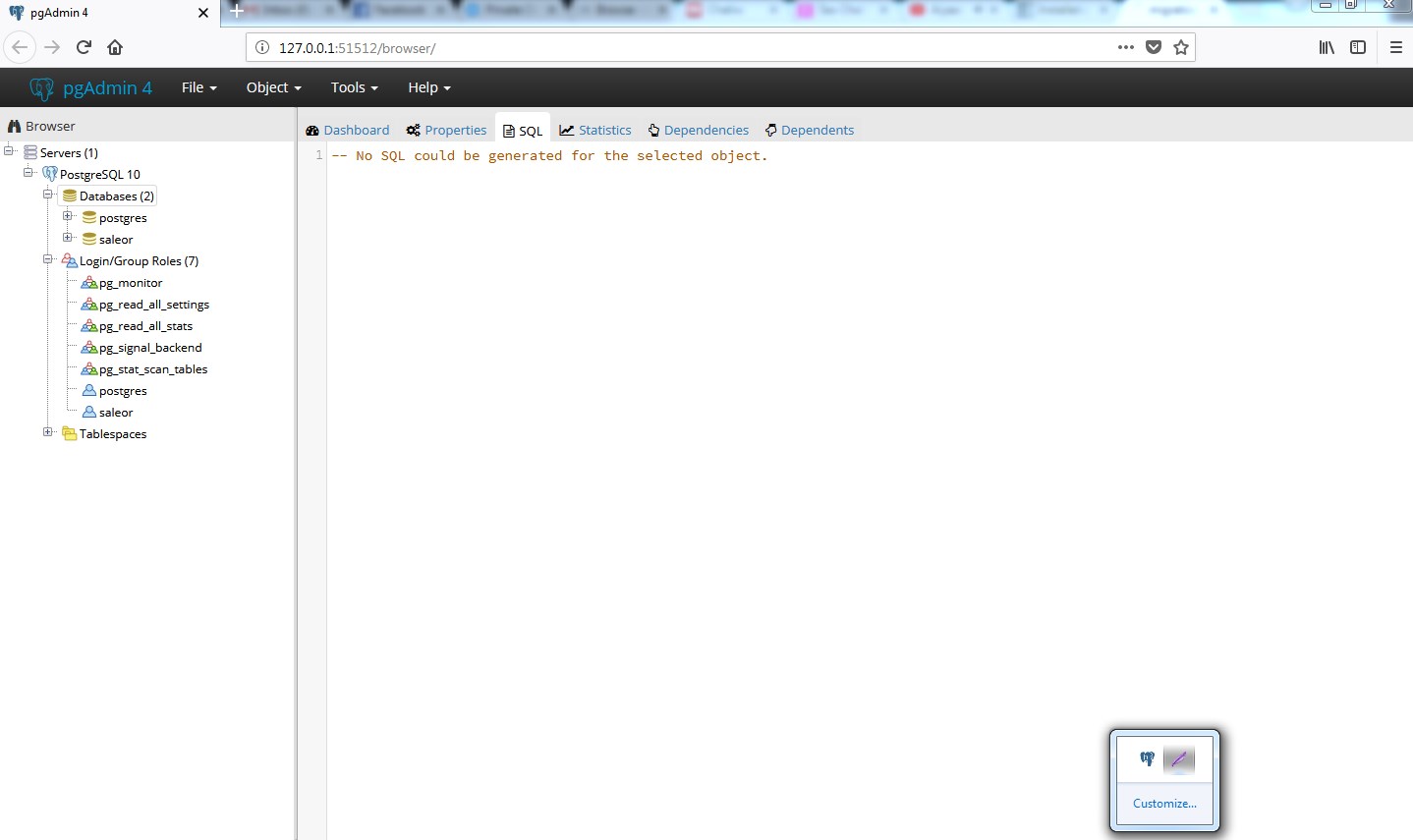
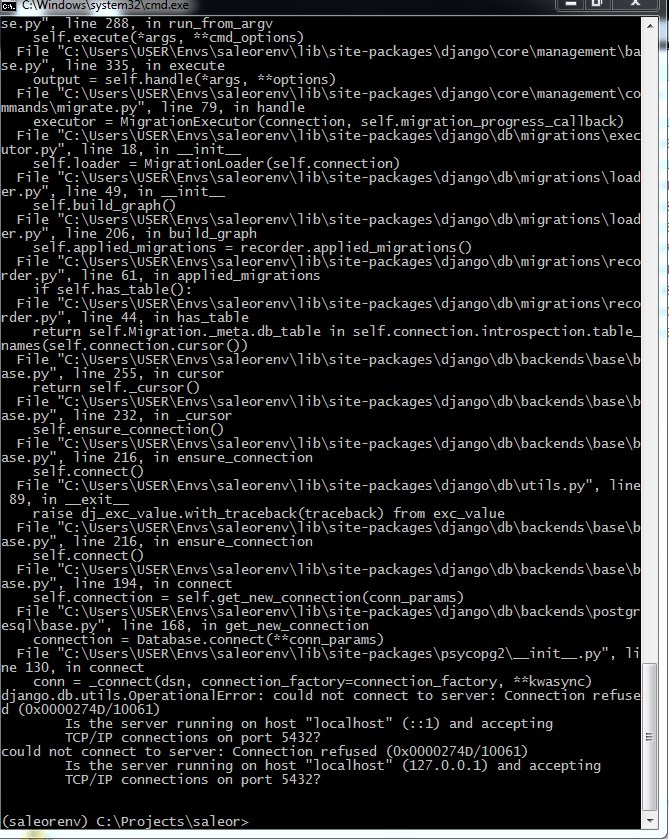
can anyone help me connecting saleor to postgres on windows 7?
prabhatb2000np
on 14 May 2018
Are you sure the server is listening on 127.0.0.1:5432 (e.g: not on :5433)?
NyanKiyoshi
on 14 May 2018
DATABASES = {
'default': dj_database_url.config(
default='postgres://saleor:saleor@localhost:5432/saleor',
conn_max_age=600)}
above is in my settings.py
prabhatb2000np
on 14 May 2018
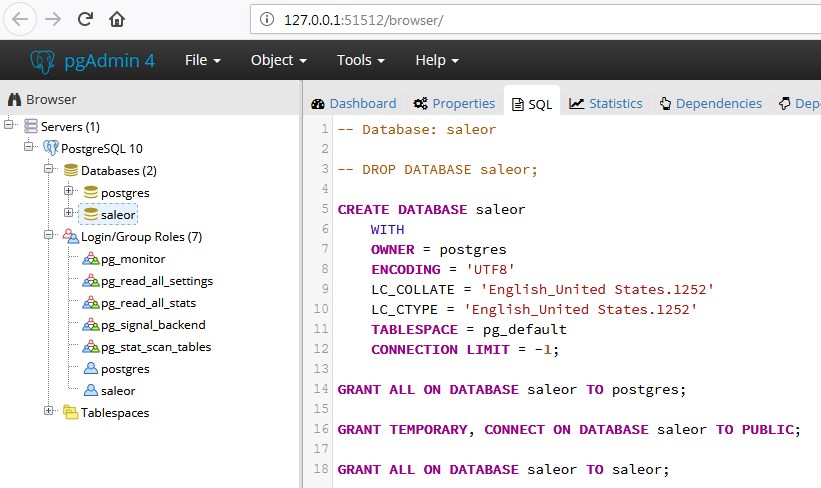
prabhatb2000np
on 14 May 2018
Click on "PostgreSQL 10" (under "Servers (1)") and look if the port is 5432 on the right column.

NyanKiyoshi
on 14 May 2018
Sure I check now.
prabhatb2000np
on 14 May 2018
NyanKiyoshi,
Thank you very much as it has port 5433 and now connecting.If something more I will catch you NyanKiyoshi.
prabhatb2000np
on 14 May 2018
Awesome! Version 10 of postgres seems to be defaulting to 5433 I noticed.
NyanKiyoshi
on 14 May 2018
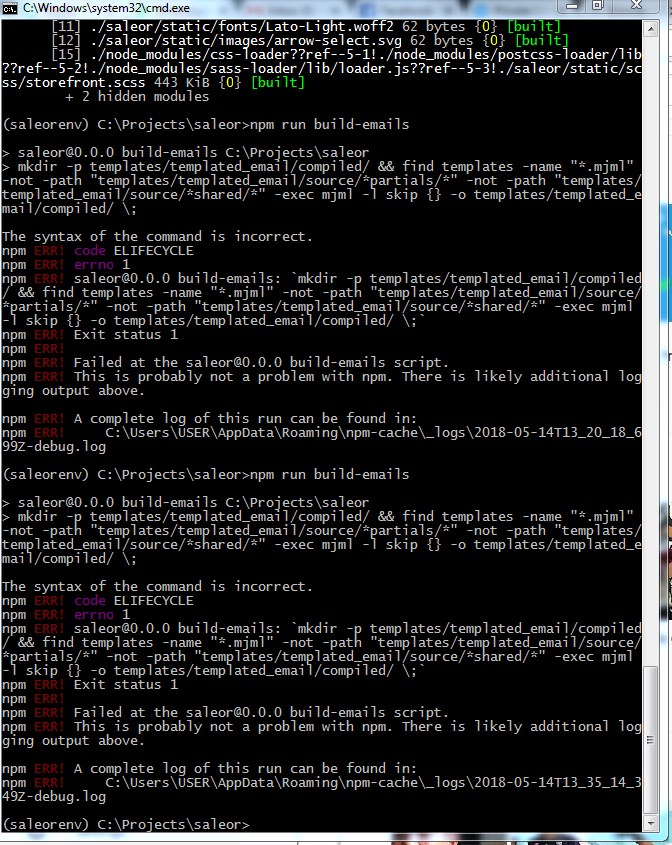
any idea for this errs?
prabhatb2000np
on 14 May 2018
You need to run this on a bash shell (you can get one simple to install here).
For more information, see #1860 and #2143.
NyanKiyoshi
on 14 May 2018

can anyone help me with this?
prabhatb2000np
on 15 May 2018
Hi i am using windows 7 so where can i find bash shell?
prabhatb2000np
on 15 May 2018
Like said above: here
NyanKiyoshi
on 15 May 2018

how can i add products from backend locally after installation like books and all?
prabhatb2000np
on 20 May 2018
@prabhatb2000np depends.
- If you ran
populatedb--createsuperuser, you can login as[email protected]withadminas password; - If you did not ran with
--createsuperuser, you can runmanage.py createsuperuser(don't forget to set theSECRET_KEYbefore running this command).
NyanKiyoshi
on 20 May 2018
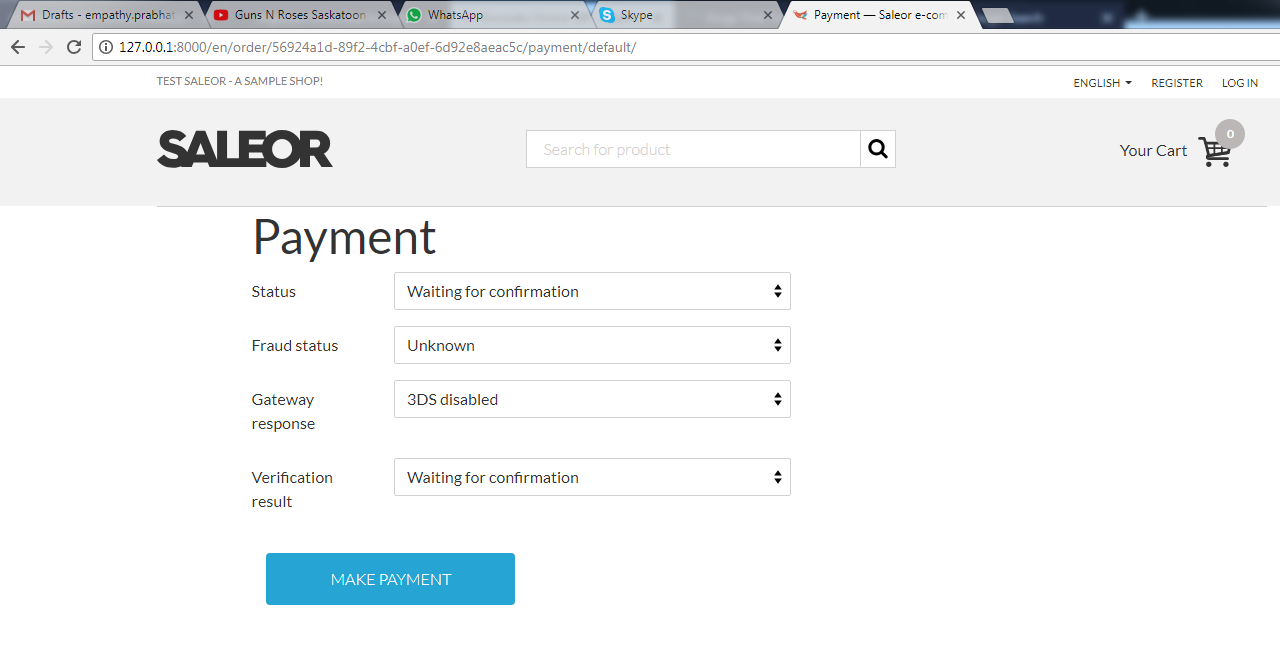
here i am confused.when i click make payment can i get email with order info?how can i do that?
prabhatb2000np
on 21 May 2018
(Question was handled).
NyanKiyoshi
on 21 May 2018
This postgres configuration (in bash and postgres cli) works for me. Most likely it is not as secure as it could be.
`sudo su - postgres
psqlpassword
CREATE DATABASE saleor;
CREATE USER saleor WITH PASSWORD 'saleor';
GRANT ALL PRIVILEGES ON DATABASE saleor TO saleor;
\qpsql -h localhost
ALTER USER saleor with password 'saleor';
\qpsql -d postgres
ALTER USER saleor WITH SUPERUSER;
\qexit`
@kaustubhrpatil
@NyanKiyoshi
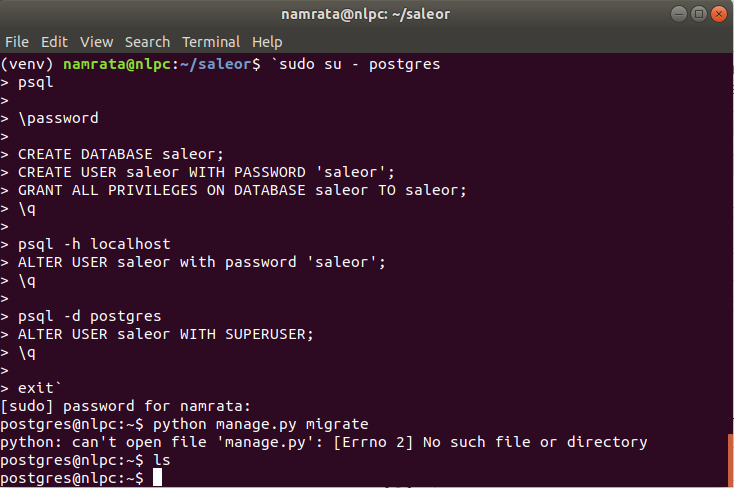
I tried doing this but the user is being changed to postgres and there are no files in the directory as shown in the image. How to migrate after this?
 Namrata7199
on 10 Oct 2019
Namrata7199
on 10 Oct 2019
Hi, you need to change your working directory to where Saleor is located/installed.
NyanKiyoshi
on 10 Oct 2019
Hi, you need to change your working directory to where Saleor is located/installed.
Hey that worked!
Thanks a lot
Namrata7199
on 13 Oct 2019
Related issues
 tanvirraj
·
3Comments
tanvirraj
·
3Comments
 jujes
·
4Comments
jujes
·
4Comments
 gComet
·
3Comments
gComet
·
3Comments
 mad-anne
·
3Comments
mad-anne
·
3Comments
 Pacu2
·
4Comments
Pacu2
·
4Comments
Most helpful comment
This postgres configuration (in bash and postgres cli) works for me. Most likely it is not as secure as it could be.
`sudo su - postgres
psql
password
CREATE DATABASE saleor;
CREATE USER saleor WITH PASSWORD 'saleor';
GRANT ALL PRIVILEGES ON DATABASE saleor TO saleor;
\q
psql -h localhost
ALTER USER saleor with password 'saleor';
\q
psql -d postgres
ALTER USER saleor WITH SUPERUSER;
\q
exit`