Sails: How to use a Vue component in Layout ?
Node version: v10.16.3
Sails version _(sails)_: 1.2.3
Hello,
I try to use a vue component in layout.ejs but we can't. I created a component for the navbar and now I need to put the navbar in layout.ejs.
Do you have any idea ?
Thanks a lot
 M2613
M2613
All 6 comments
@BenArthuys Thanks for posting! We'll take a look as soon as possible.
In the mean time, there are a few ways you can help speed things along:
- look for a workaround. _(Even if it's just temporary, sharing your solution can save someone else a lot of time and effort.)_
- tell us why this issue is important to you and your team. What are you trying to accomplish? _(Submissions with a little bit of human context tend to be easier to understand and faster to resolve.)_
- make sure you've provided clear instructions on how to reproduce the bug from a clean install.
- double-check that you've provided all of the requested version and dependency information. _(Some of this info might seem irrelevant at first, like which database adapter you're using, but we ask that you include it anyway. Oftentimes an issue is caused by a confluence of unexpected factors, and it can save everybody a ton of time to know all the details up front.)_
- read the code of conduct.
- if appropriate, ask your business to sponsor your issue. _(Open source is our passion, and our core maintainers volunteer many of their nights and weekends working on Sails. But you only get so many nights and weekends in life, and stuff gets done a lot faster when you can work on it during normal daylight hours.)_
- let us know if you are using a 3rd party plugin; whether that's a database adapter, a non-standard view engine, or any other dependency maintained by someone other than our core team. _(Besides the name of the 3rd party package, it helps to include the exact version you're using. If you're unsure, check out this list of all the core packages we maintain.)_
Please remember: never post in a public forum if you believe you've found a genuine security vulnerability. Instead, disclose it responsibly.
For help with questions about Sails, click here.
 sailsbot
on 11 Feb 2020
sailsbot
on 11 Feb 2020
Hi, @BenArthuys!
You should be able to insert your component as described in the Vue.js docs.
If you've tried this and it hasn't worked, can you tell us more about what kind of behavior you're seeing? A minimal repo that reproduces that behavior would also really help us investigate the source of your problem.
 whichking
on 17 Feb 2020
whichking
on 17 Feb 2020
Hi, @madisonhicks
Thanks for your reply. I've created a new parasails component "navabar"
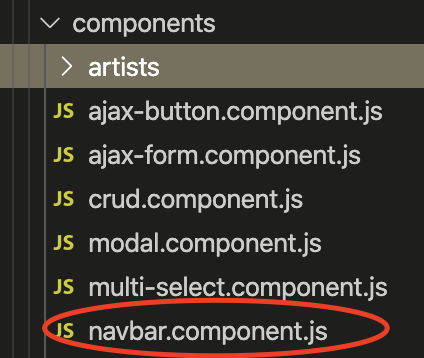
and now I would like to insert it in layout.ejs like this :
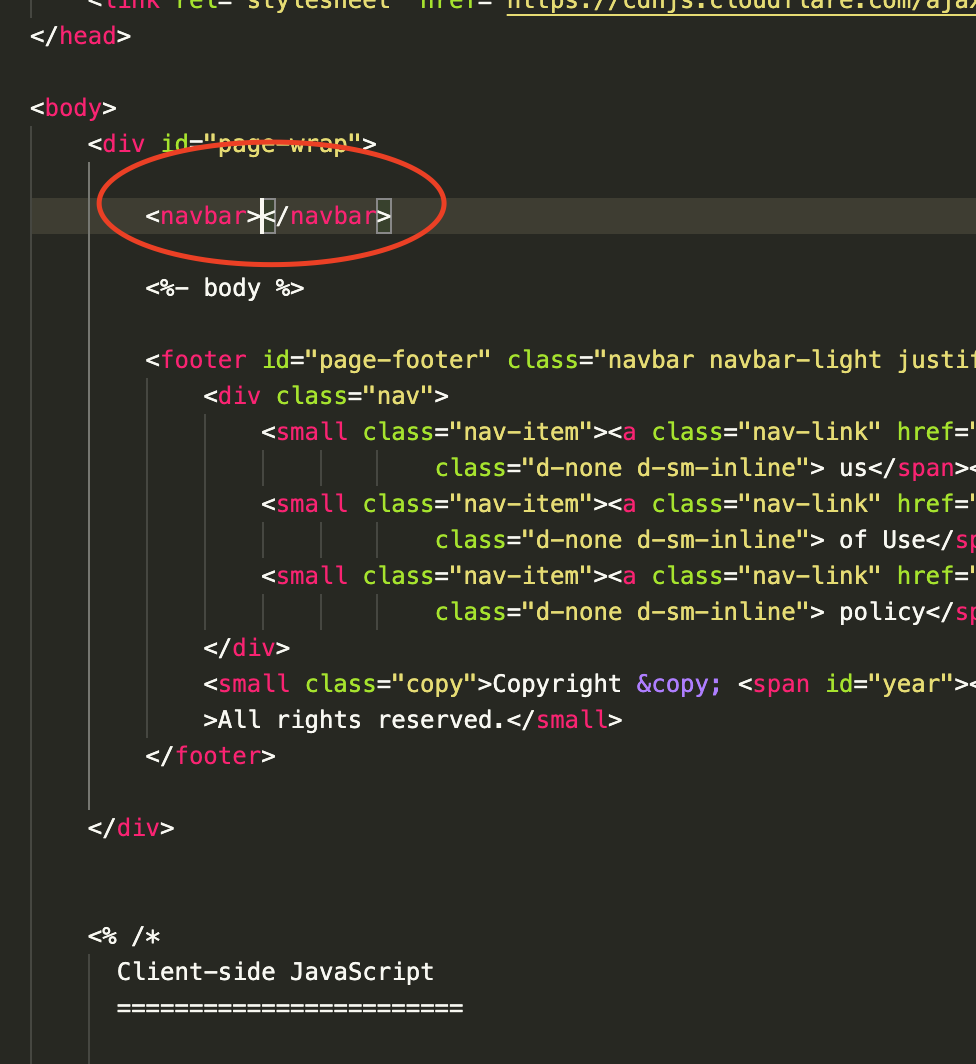
I've tried to put SAILS_LOCALS in layout.ejs but it's not working. It seems layout not detect parasails component.
Thanks
M2613
on 18 Feb 2020
I have also just noticed this behaviour and am also very interested in a solution.
 dailez
on 18 Feb 2020
dailez
on 18 Feb 2020
Hey, @BenArthuys!
For some reason, it didn't register in my pea brain that you're trying to use your component in layout.ejs specifically. Your supposition that layout.ejs isn't detecting the parasails component is correct, with the reason being that layout.ejs lives outside of the Vue instance.
The good news is that this is expected behavior. The bad news is that you'll have to stick that component of yours into the EJS file of every page on which you want it to appear. We find that this isn't too much extra effort, and it has the added benefit of allowing you to customize navigation on a page-by-page basis using props.
whichking
on 18 Feb 2020
@madisonhicks Thanks for your help.
It's what I did, I didn't know if there was a better solution. But yes with this solution we can custom the component on each page 🙂
M2613
on 19 Feb 2020
Related issues
 anissen
·
3Comments
anissen
·
3Comments
 Salakar
·
4Comments
Salakar
·
4Comments
 Alirezamohammadi
·
4Comments
Alirezamohammadi
·
4Comments
 randallmeeker
·
4Comments
randallmeeker
·
4Comments
 edy
·
4Comments
edy
·
4Comments