Sage: The `style.css` file should be in the root directory
Submit a feature request or bug report
- [ ] I've read the guidelines for Contributing to Roots Projects
- [ ] This is a feature request
- [x] This is a bug report
- [ ] This request isn't a duplicate of an existing issue
- [ ] I've read the docs and NPM Debugging Guidelines post and followed them (if applicable)
- [x] This is not a personal support request that should be posted on the Roots Discourse forums
What is the current behavior?
The style.css file of the theme is in the resources/ directory, causing the WordPress theme installer to not recognize it as a theme.
What is the expected or desired behavior?
From the WordPress Theme Handbook: "In order for WordPress to recognize the set of theme template files as a valid theme, the style.css file needs to be located in the root directory of your theme, not a subdirectory."
https://developer.wordpress.org/themes/basics/main-stylesheet-style-css/#location
Other relevant information:
A user of WP Pusher (I'm the creator) has reported that Sage themes won't install. However, this is actually not a WP Pusher error, but an error message from the core WordPress theme installer, which only recognize a theme if a style.css file is present in the root directory. It turns out that if you manually upload the theme to the server (instead of using the WordPress installer), the theme will kind of work (because WordPress actually looks one level deep to find the template), but technically the theme is still invalid. There will still be quirks I think. As an example if you try to delete a theme without a style.css in the root directory with WordPress, it will fail and you will have to manually remove the files from the server. Here's the error message if you try to install a Sage based theme by uploading a zipball:
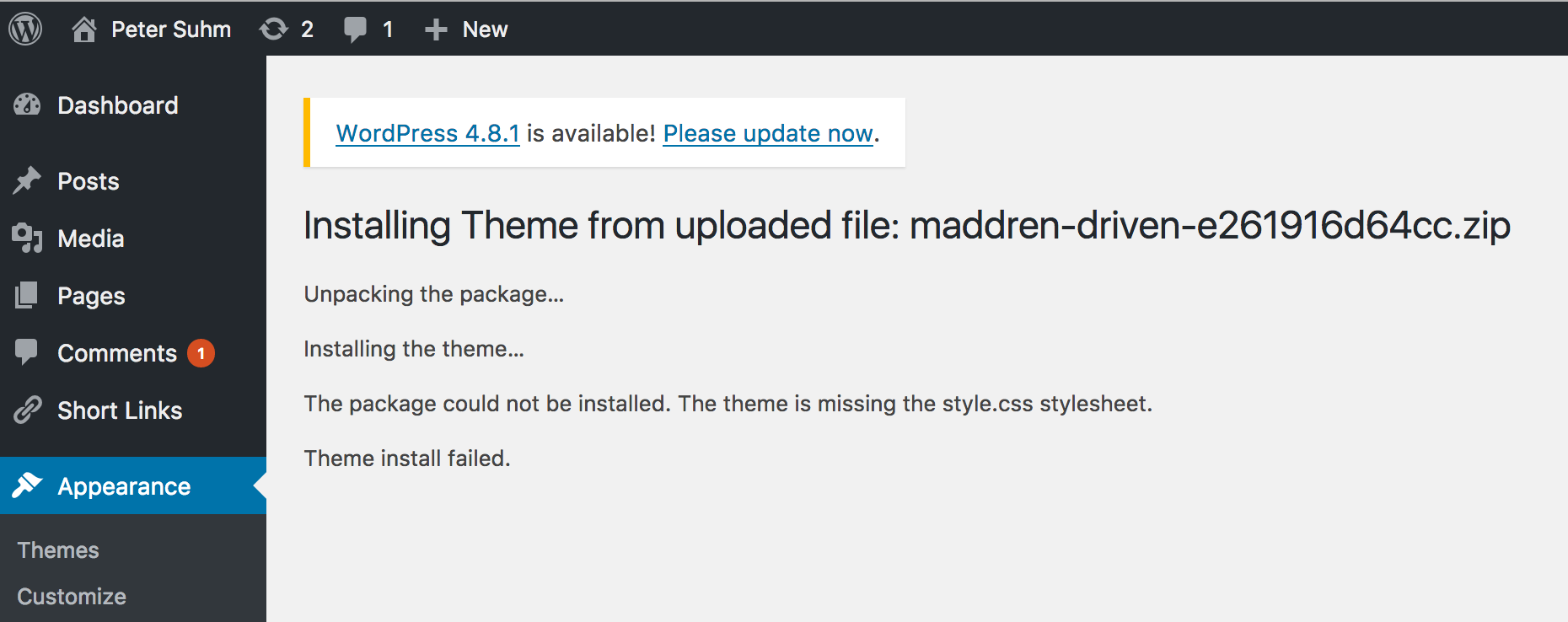
Here's a recent forum post by (apparently) another WP Pusher user: https://discourse.roots.io/t/setting-up-sage-9-theme-on-shared-hosting-with-wp-pusher-or-ftp/10105
 petersuhm
All 7 comments
Users are certainly free to move style.css, functions.php, and index.php to the root folder if they want. Just gotta make sure the autoloading stuff in functions.php is pointed at the right place.
We can probably introduce this as an option in sage-installer. If you don't mind, can you post an issue in the sage-installer repo? If not, I can post it later; I'm just on my phone right now.
 QWp6t
on 5 Aug 2017
QWp6t
on 5 Aug 2017
Hi, I have had an issue with this. I have tried following the instruction you have mentioned @QWp6t however I have bumped into some problems. Here is what I have done so far:
- Moved style.css, index.php and functions.php to the root of the theme.
- Changed the source of the autoloading conditional in functions.php:
    if (!file_exists($composer = __DIR__.'/vendor/autoload.php')) {
        $sage_error(
            __('You must run <code>composer install</code> from the Sage directory.', 'sage'),
            __('Autoloader not found.', 'sage')
        );
    }
- Changed the source of the app map:
$file = "/app/{$file}.php";
I have tried using my theme after these changes and I get this weird error with the installer.
It seems to duplicate my theme and it's unusable.
Any idea what else I need to do?
Thanks
 nicholasmaddren
on 6 Aug 2017
nicholasmaddren
on 6 Aug 2017
@nicholasmaddren you need to deactivate/activate the theme.
 kimhf
on 7 Aug 2017
kimhf
on 7 Aug 2017
@QWp6t alright, was just pointing out that this might be an issue for a lot of users :)
petersuhm
on 7 Aug 2017
@Kimers I have tried that with no success, the second theme that shows as primary disappears and then when reactivate my theme it appears again with the error.
 nickmaddren
on 8 Aug 2017
nickmaddren
on 8 Aug 2017
I have exactly the same problem.
 jkwasniak
on 8 Aug 2017
jkwasniak
on 8 Aug 2017
Let's go ahead and continue discussion here: https://github.com/roots/sage-installer/issues/3
QWp6t
on 8 Aug 2017
Related issues
 retlehs
·
3Comments
retlehs
·
3Comments
 tofraser
·
5Comments
tofraser
·
5Comments
 jlariza
·
5Comments
jlariza
·
5Comments
 NickTomlin
·
6Comments
NickTomlin
·
6Comments
 swalkinshaw
·
6Comments
swalkinshaw
·
6Comments
Most helpful comment
Users are certainly free to move style.css, functions.php, and index.php to the root folder if they want. Just gotta make sure the autoloading stuff in functions.php is pointed at the right place.
We can probably introduce this as an option in sage-installer. If you don't mind, can you post an issue in the sage-installer repo? If not, I can post it later; I'm just on my phone right now.