Rxswift: RxTest referencing to invalid libswiftXCTest.dylib
Hello everyone, I was wondering if someone here had my same issue.
I have an iOS project in which there are multiple modules. each module has its own test bundle.
Tests run perfectly until I install via cocoa pods RxTest.
After install, test bundles crash with the following message in console:
2019-09-25 17:46:29.756701+0100 xctest[70947:11876875] The bundle “MyModuleTests” couldn’t be loaded because it is damaged or missing necessary resources. Try reinstalling the bundle.
2019-09-25 17:46:29.756838+0100 xctest[70947:11876875] (dlopen_preflight(/Users/.../Library/Developer/Xcode/DerivedData/.../Products/Debug-Dev-iphonesimulator/MyModuleTests.xctest/MyModuleTests): Library not loaded: /usr/lib/swift/libswiftXCTest.dylib
Referenced from: /Users/.../Library/Developer/Xcode/DerivedData/.../Build/Products/Debug-Dev-iphonesimulator/MyModuleTests.xctest/MyModuleTests/RxTest.framework/RxTest
Reason: no suitable image found. Did find:
/usr/lib/swift/libswiftXCTest.dylib: mach-o, but not built for iOS simulator)
Program ended with exit code: 9
I checked already the usual suspects: The run path searchPath is $(inherited) '@executable_path/Frameworks' '@loader_path/Frameworks'as it should be.
I tried for quite a lot of time to get this to work playing with build configurations, but all without any success. If I remove RxTest, everything goes back to normal and tests start running again.
Suggestions?
 gringoireDM
All 32 comments
I am also experiencing this issue. RxTest seems to break my test bundle after updating to Xcode 11.0
 muehlemann
on 26 Sep 2019
muehlemann
on 26 Sep 2019
@muehlemann did you solve this somehow?
gringoireDM
on 27 Sep 2019
No, I had to downgrade to Xcode 10.3 to be able and continue development.
muehlemann
on 27 Sep 2019
I noticed the same issue. But it seems that I can run the tests from XCode 11 on the iOS 13 simulator. But when I try to run them on a simulator with an older iOS version (in my case iOS 11.4) I see that exact same errors as you do
 schroepf
on 30 Sep 2019
schroepf
on 30 Sep 2019
@schroepf Same for me. Tests run on iOS 13 simulator, but fail on everything older than that.
muehlemann
on 30 Sep 2019
Can anyone confirm this on the latest Xcode 11.2 beta?
 freak4pc
on 3 Oct 2019
freak4pc
on 3 Oct 2019
@freak4pc
I just checked, and This crash also occurred on Xcode 11.2 beta.
FYI: There is a related reported issue on CocoaPods https://github.com/CocoaPods/CocoaPods/issues/9165
 freddi-kit
on 8 Oct 2019
freddi-kit
on 8 Oct 2019
just tried with the latest public Xcode. same result.
gringoireDM
on 15 Oct 2019
anyway, in my case any simulator won't run the tests. no idea why.
gringoireDM
on 15 Oct 2019
Correction. just pre iOS 13 simulators have this issue. just like previously reported
gringoireDM
on 15 Oct 2019
I solved the same issue in my project by switching everything to Swift 5 and adding a line of code in the podspec that requires XCTest.
Before:
  s.frameworks = 'XCTest', 'XCTAutomationSupport'

  s.xcconfig = {
    'LD_RUNPATH_SEARCH_PATHS' => '$(inherited) "$(PLATFORM_DIR)/Developer/Library/Frameworks" "$(PLATFORM_DIR)/Developer/Library/PrivateFrameworks"',
    'FRAMEWORK_SEARCH_PATHS' => '$(inherited) "$(PLATFORM_DIR)/Developer/Library/Frameworks" "$(PLATFORM_DIR)/Developer/Library/PrivateFrameworks"'
  }
After:
  s.frameworks = 'XCTest', 'XCTAutomationSupport'

  s.xcconfig = {
    'LIBRARY_SEARCH_PATHS' => '$(TOOLCHAIN_DIR)/usr/lib/swift-$(SWIFT_VERSION)/$(PLATFORM_NAME) $(inherited)',
    'LD_RUNPATH_SEARCH_PATHS' => '$(inherited) "$(PLATFORM_DIR)/Developer/Library/Frameworks" "$(PLATFORM_DIR)/Developer/Library/PrivateFrameworks"',
    'FRAMEWORK_SEARCH_PATHS' => '$(inherited) "$(PLATFORM_DIR)/Developer/Library/Frameworks" "$(PLATFORM_DIR)/Developer/Library/PrivateFrameworks"'
  }
I hope this can help.
 artyom-razinov
on 16 Oct 2019
artyom-razinov
on 16 Oct 2019
I checked that adding LIBRARY_SEARCH_PATHS alone without switching to Swift 5 did not help!
artyom-razinov
on 16 Oct 2019
I checked Quick and Nimble Podspec and they actually do have LIBRARY_SEARCH_PATHS. No problem with those. @freak4pc can we add this to the podspec? What do you think? I can open a PR myself and check if it works if you are busy.
gringoireDM
on 17 Oct 2019
Let me run a few tests first and I’ll take care of it if everything looks good.
Thanks,
Shai.
On 17 Oct 2019, 1:13 +0300, Giuseppe Lanza notifications@github.com, wrote:
I checked Quick and Nimble Podspec and they actually do have LIBRARY_SEARCH_PATHS. No problem with those. @freak4pc can we add this to the podspec? What do you think? I can open a PR myself and check if it works if you are busy.
—
You are receiving this because you were mentioned.
Reply to this email directly, view it on GitHub, or unsubscribe.
freak4pc
on 17 Oct 2019
Thank you @freak4pc , please let me know if you need at any point any help.
gringoireDM
on 17 Oct 2019
@gringoireDM I've checked both Quick and Nimble and can't find it being used. Where did you see it?
https://github.com/Quick/Nimble/search?q=LIBRARY_SEARCH_PATHS&unscoped_q=LIBRARY_SEARCH_PATHS
freak4pc
on 21 Oct 2019
Perhaps you're referring to FRAMEWORK_SEARCH_PATHS ?
freak4pc
on 21 Oct 2019
@freak4pc
Sorry, it is not LIBRARY_SEARCH_PATH, still I can see something it's not in RxTest podspec that might actually make the difference:
https://github.com/Quick/Quick/blob/f287329dc8ee80df75540f064e900383a38a4eff/Quick.podspec#L35
gringoireDM
on 21 Oct 2019
I don't really know what makes that podspec special. I see Quick running with no issues at all on xcode11 any simulator, while RxTest doesn't on simulators < iOS 13
gringoireDM
on 21 Oct 2019
I’ll run a few tests tomorrow morning and post updates here :)
Shai.
On 21 Oct 2019, 19:29 +0300, Giuseppe Lanza notifications@github.com, wrote:
I don't really know what makes that podspec special. I see Quick running with no issues at all on xcode11 any simulator, while RxTest doesn't on simulators < iOS 13
—
You are receiving this because you were mentioned.
Reply to this email directly, view it on GitHub, or unsubscribe.
freak4pc
on 21 Oct 2019
I can't seem to reproduce the issue you're having.
I'm on Xcode 11 with the following test with RxTest and RxBlocking installed via CocoaPods:
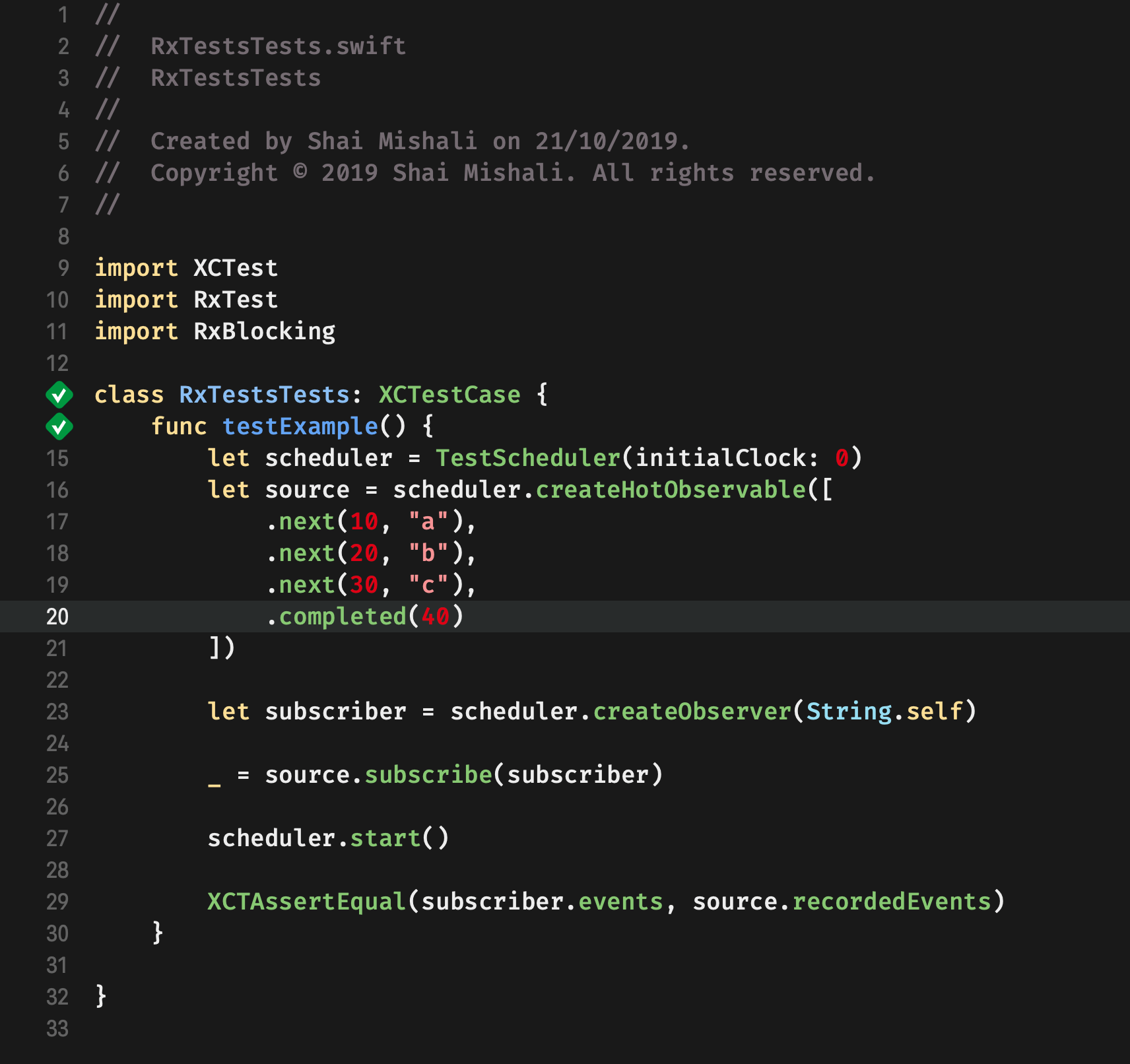
I tried with iOS 11.4 and 13 deployment targets and have no issues.
Can anyone provide a reproducible project here please?
freak4pc
on 21 Oct 2019
Forgot to tag people who had issues @gringoireDM @muehlemann @freddi-kit @schroepf @artyom-razinov
freak4pc
on 22 Oct 2019
@freak4pc I tried to reproduce it on a clean project and I couldn't. After more investigation I came to the conclusion that the problem was in the specific project on which I was having the issue. It's a new codebase for me, so I didn't know that we had custom xcconfig files. The problem was with those + cocoa pods ones conflicting.
Thank you so much for your time.
For me we can close this issue.
gringoireDM
on 28 Oct 2019
@freak4pc Cant reproduce in a clean project either.
@gringoireDM Any pointers on the conflicting areas? I'm working on a project that uses custom xcconfig files as well but have not been able to figure out the issue yet.
muehlemann
on 28 Oct 2019
Thanks. Closing this for now.
freak4pc
on 28 Oct 2019
@muehlemann I just removed the xcconfig files and add the custom configurations as user defined build configs directly to the project (which is equivalent if you have just one project).
gringoireDM
on 30 Oct 2019
hi @freak4pc in my project we also use custom xcconfig files and it will be really hard and a massive effort to get rid of them... is there any other known workaround for this issue? or will there be a RxSwift update which fixes that issue?
Do we already know the root cause why this only happens for RxTest and no other pods?
schroepf
on 6 Nov 2019
Given the xcconfig files are the only difference, this doesn’t seem to be an issue with RxSwift itself so we probably won’t spend time investigating it.
freak4pc
on 6 Nov 2019
oh... ok... :)
I checked the RxTest.podspec and it contains:
s.pod_target_xcconfig = { 'ENABLE_BITCODE' => 'NO' }
which might be what's causing that issues... do you know if that's critical for RxTest to work correctly? According to cocoapods' issue tracker that shouldn't be necessary: https://github.com/CocoaPods/CocoaPods/issues/3936
schroepf
on 6 Nov 2019
I finally found a solution for this issue. Turns out that it's an Apple bug. Anybody thats looking for a fix should reference this gist: https://gist.github.com/liamnichols/3507faf70ecca201cb4300645caa9b74
Just swap out your simulator version and you should be good to go.
muehlemann
on 12 Nov 2019
Hi!
'$(TOOLCHAIN_DIR)/usr/lib/swift-$(SWIFT_VERSION)/$(PLATFORM_NAME)' worked for me only in combination with DEAD_CODE_STRIPPING = YES; on XCode 11.2.1.
Hope it helps!
 AlexShubin
on 2 Dec 2019
AlexShubin
on 2 Dec 2019
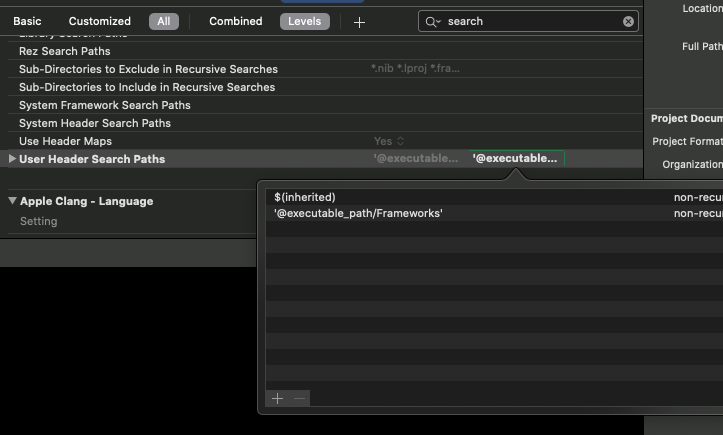
$(inherited) '@executable_path/Frameworks'
For me, it helped when I went into the Build Settings and pasted $(inherited) '@executable_path/Frameworks'
into User Header Search Paths and then restart Xcode.
 verebes1
on 10 Oct 2020
verebes1
on 10 Oct 2020
Related issues
 MortyMerr
·
24Comments
MortyMerr
·
24Comments
 kbala
·
24Comments
kbala
·
24Comments
 koke
·
22Comments
koke
·
22Comments
 keith
·
35Comments
keith
·
35Comments
 StefaniOSApps
·
22Comments
StefaniOSApps
·
22Comments
Most helpful comment
I noticed the same issue. But it seems that I can run the tests from XCode 11 on the iOS 13 simulator. But when I try to run them on a simulator with an older iOS version (in my case iOS 11.4) I see that exact same errors as you do