Runtime: Add EventCounter for ArrayPoolEventSource
I've been doing some performance investigation recently around how ASP.NET Core uses the ArrayPool and it would be great to have some counters for the existing events:
- BuffersAllocated
- BuffersRented
- BuffersReturned
cc @noahfalk @adamsitnik
 davidfowl
All 10 comments
Tagging subscribers to this area: @tannergooding, @pgovind
See info in area-owners.md if you want to be subscribed.
![msftbot[bot] picture](https://avatars2.githubusercontent.com/in/26612?v=4&s=40) msftbot[bot]
on 14 Aug 2020
msftbot[bot]
on 14 Aug 2020
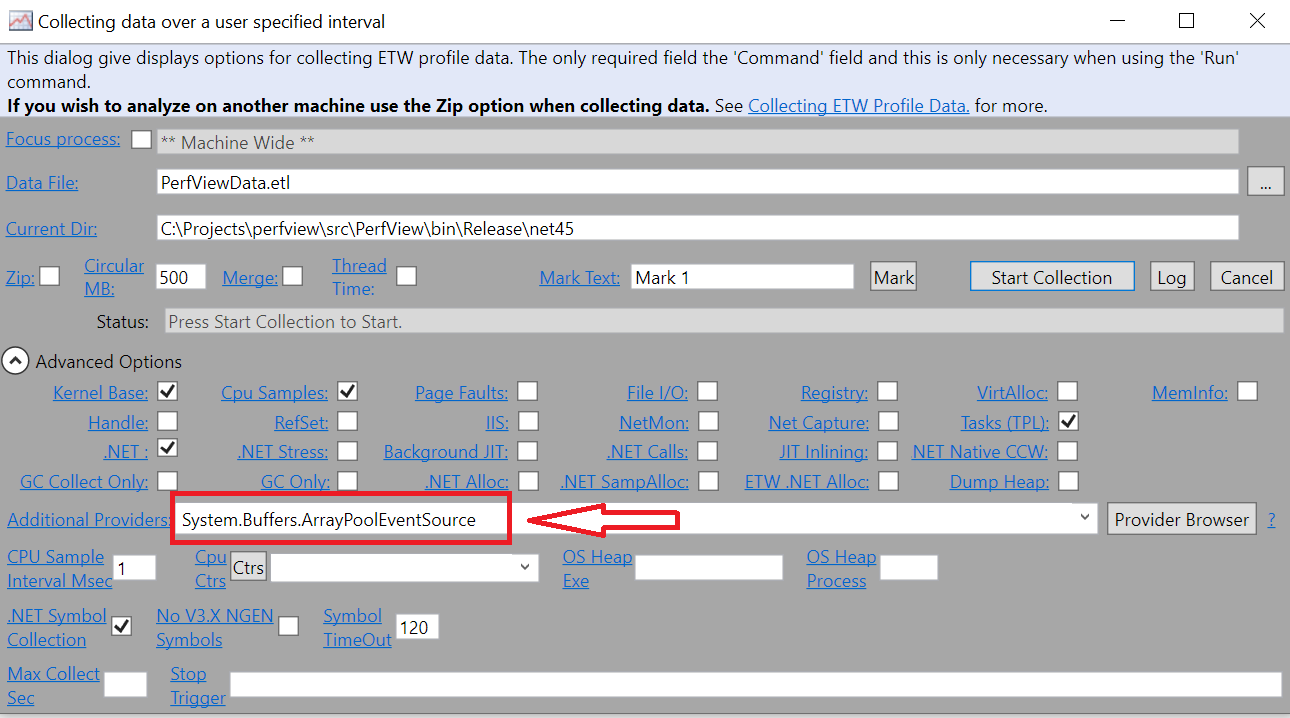
@davidfowl have you tried using ArrayPool EventSource ?
It's not enabled in PerfView by default so when using PerfView you have to put its name like this before starting the collection:
 adamsitnik
on 14 Aug 2020
adamsitnik
on 14 Aug 2020
@adamsitnik 😊 Yes I know how to add custom providers in perfview and using dotnet trace. I'm specifically asking for event counters though.
davidfowl
on 14 Aug 2020
This would be pretty expensive non-pay-for-play counter. We do not have counter that tracks number of regular objects allocated either.
 jkotas
on 14 Aug 2020
jkotas
on 14 Aug 2020
This would be pretty expensive non-pay-for-play counter. We do not have counter that tracks number of regular objects allocated either.
Wait why would it be expensive? Counting using interlocked in this code path is too expensive?
davidfowl
on 14 Aug 2020
Counting using interlocked in this code path is too expensive?
Yes!
jkotas
on 15 Aug 2020
@jkotas Can we do a performance test to make sure? I believe you, but we should measure the overhead before we do something more complex.
davidfowl
on 15 Aug 2020
I assumed @davidfowl was seeking a counter that would only track the count when someone enabled this provider. The only cost we'd pay by default would be the log.IsEnabled() check returning false and skipping the remainder of the logic, which is already a cost we incur now.
 noahfalk
on 15 Aug 2020
noahfalk
on 15 Aug 2020
Can we do a performance test to make sure?
Here you go:
using System;
using System.Diagnostics;
using System.Buffers;
using System.Threading;

class Program
{
    static int rents;
    static int returns;

    static void Work()
    {
        for (int i = 0; i < 100000000; i++)
        {
            Interlocked.Increment(ref rents);
            var a = ArrayPool<byte>.Shared.Rent(100);
            for (int j = 0; j < 100; j++) a[j] = (byte)j;
            Interlocked.Increment(ref returns);
            ArrayPool<byte>.Shared.Return(a);
        }
    }

    static void Main(string[] args)
    {
        for (int i = 0; i < Environment.ProcessorCount - 1; i++)
            new Thread(Work).Start();
        Stopwatch sw = new Stopwatch();
        sw.Start();
        Work();
        sw.Stop();
        Console.WriteLine(sw.ElapsedMilliseconds);
    }
}
On my Surfacebook:
Without Interlock.Increments: 13348ms
With Interlocked.Increments: 33192ms
The difference will be even more on higher end server machine.
jkotas
on 15 Aug 2020
Setting this as 6.0.0 since I'm not seeing this meet the bar at the moment.
 ericstj
on 18 Sep 2020
ericstj
on 18 Sep 2020
Related issues
 btecu
·
3Comments
btecu
·
3Comments
 omajid
·
3Comments
omajid
·
3Comments
 jchannon
·
3Comments
jchannon
·
3Comments
 omariom
·
3Comments
omariom
·
3Comments
 EgorBo
·
3Comments
EgorBo
·
3Comments
Most helpful comment
Here you go:
On my Surfacebook:
Without Interlock.Increments: 13348ms
With Interlocked.Increments: 33192ms
The difference will be even more on higher end server machine.