Runtime: HttpClient on net5 should fallback to TLS1.2 with Windows Insider builds
Description
I'm on the NuGet team, and several customers (internal and external) have reported problems doing a restore and being unable to connect to api.nuget.org. I created a gist to test using HttpClientHandler with various SslProtocols values: https://gist.github.com/zivkan/5291f507c8c5724d41a18357b7afcd30
Here NuGet's customers reported their results: https://github.com/NuGet/Home/issues/9893#issuecomment-672187595
We can see that SslProtocols.None, which is supposed to be "use operating system defaults" works on netcoreapp3.1, but fails on net5.0. Therefore it appears that net5.0 is no longer using TLS 1.2 by default.
Configuration
Please see the thread on NuGet/Home: https://github.com/NuGet/Home/issues/9893#issuecomment-672187595
Regression?
yes, customers report that it works on netcoreapp3.1, but not net5.0.
Other information
Explicitly configuring HttpClientHandler to use SslProtocols.Tls12 works for customers writing their own app, but it doesn't help customers trying to use NuGet when NuGet doesn't attempt to specify SslProtocols at all, leaving the default value.
@terrajobst was the first to report this problem to me, so if you need someone internal to help test/reproduce the problem, he might be able to help.
 zivkan
All 20 comments
Tagging subscribers to this area: @dotnet/ncl
See info in area-owners.md if you want to be subscribed.
![msftbot[bot] picture](https://avatars2.githubusercontent.com/in/26612?v=4&s=40) msftbot[bot]
on 11 Aug 2020
msftbot[bot]
on 11 Aug 2020
@wfurt Do you know what's going on here?
 geoffkizer
on 11 Aug 2020
geoffkizer
on 11 Aug 2020
to be more specific:
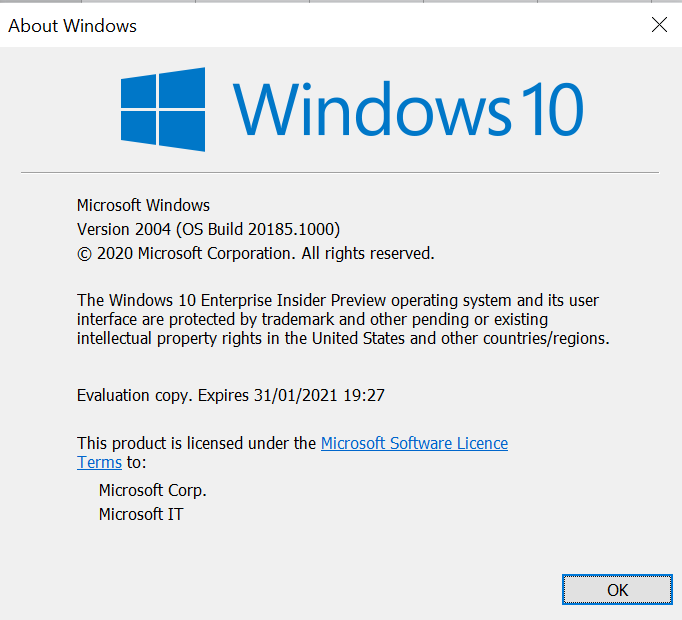
People with issue are using Windows Insider Build 20185 (not sure if it impact other build)
The RC1 used was 5.0.100-rc.1.20379.10 (nightly consumed by dotnet/AspNetCore on commit 983e7ed635f4d128edce4191b51869bd7be8aced)
| | rc1 net5.0 | rc1 netcoreapp3.1 | preview7 net5.0 | preview7 netcoreapp3.1 |
|-------|------------|-------------------|-----------------|------------------------|
| None | false | true | true | true |
| TLS12 | true | true | true | true |
        private static async Task<bool> TestProtocolAsync(SslProtocols protocol)
        {
            try
            {
                var httpMessageHandler = new HttpClientHandler()
                {
                    SslProtocols = protocol
                };
                var client = new HttpClient(httpMessageHandler);
                var request = new HttpRequestMessage(HttpMethod.Get, "https://api.nuget.org/v3/index.json");
                var response = await client.SendAsync(request);
                return true;
            }
            catch
            {
                return false;
            }
        }
 tebeco
on 11 Aug 2020
tebeco
on 11 Aug 2020
Tagging subscribers to this area: @dotnet/ncl
See info in area-owners.md if you want to be subscribed.
msftbot[bot]
on 11 Aug 2020
not yet @geoffkizer. I could not reproduce on older Windows version. I'm in process of getting latest insider build.
This works on normal Windows versions AFAIK.
 wfurt
on 11 Aug 2020
wfurt
on 11 Aug 2020
This is likely a regression in Insider builds of Windows. There is new API in Windows that allows us to go to TLS 1.3 -- that API (or our usage of it) stopped working properly on latest Insider builds ... @wfurt is investigating.
cc @blowdart
 karelz
on 11 Aug 2020
karelz
on 11 Aug 2020
This is likely a regression in Insider builds of Windows. There is new API in Windows that allows us to go to TLS 1.3
thx a lot @karelz for the follow up ;)
I'm curious why it still works with 5.0.x-preview7 SDK on that same Windows Build though.
Is it because Preview7 does not relies on that new API but Rc1 does ?
Also both Preview7 and Rc1 fails with explicit TLS 1.3.
This is an unknown world to me, I'm just being curious and might not be important to the resolution of this specific issue
tebeco
on 12 Aug 2020
The new API was fairly recent, so I don't think we use it in Preview7 just yet.
The old API does not support TLS 1.3 at all (it used to do it under an experimental switch over a range of Windows builds).
If the Windows API regressed for TLS 1.2, it might have regressed also for TLS 1.3 -- or our usage is wrong and it used to work and now it doesn't -- something to dig into.
karelz
on 12 Aug 2020
(thx)
tebeco
on 12 Aug 2020
I was able to finally get local repro.
Hre is workaround:
HKEY_LOCAL_MACHINE\SYSTEM\CurrentControlSet\Control\SecurityProviders\SCHANNEL\Protocols\TLS 1.3\Client
Setting Enabled=0 should fix it.
wfurt
on 13 Aug 2020
Related: https://github.com/dotnet/sdk/issues/12741
I'm running insider builds as well, and didn't quite think it would be related with that. Interesting...
 Gnbrkm41
on 14 Aug 2020
Gnbrkm41
on 14 Aug 2020
Script (Run from elevated powershell instance):
$RegistryPath = "HKLM:\SYSTEM\CurrentControlSet\Control\SecurityProviders\SCHANNEL\Protocols"
$KeyName = "TLS 1.3"
$SubkeyName = "Client"
$PropertyName = "Enabled"
$PropertyType = "DWORD"
$PropertyValue = 0

# The TLS1.3 Key does not seem to exist by default.
$KeyPath = Join-Path $RegistryPath $KeyName
if (!(Test-Path $KeyPath))
{
    New-Item -Path $KeyPath
}

$SubkeyPath = Join-Path $KeyPath $SubkeyName
if (!(Test-Path $SubkeyPath))
{
    New-Item -Path $SubkeyPath
}

New-ItemProperty -Path $SubkeyPath -Name $PropertyName -PropertyType $PropertyType -Value $PropertyValue
You may need to restart your PC for the change to apply. After disabling TLS1.3 it seems to restore fine.
Gnbrkm41
on 14 Aug 2020
Perhaps we can set DisabledByDefault to 1 instead of entirely disabling it? https://docs.microsoft.com/en-us/windows-server/security/tls/tls-registry-settings#tls-12
Edit: This also seems to work.
Gnbrkm41
on 14 Aug 2020
I'm working with Windows team to trace this down. The None works as intended e.g. give the decision to the OS.
BTW earlier Windows versions had TLS13 disabled by default but that changed very recently and it us one unless you disable it. That will help finding bugs - like this. I think that is price for using latest dev builds.
wfurt
on 14 Aug 2020
I see it as a win since this needs to be seen before november 12th ;)
tebeco
on 14 Aug 2020
Triage: Moving to 6.0 -- it should be fixed by OS change in next Insider build. We still want to make some change, but not critical.
karelz
on 25 Aug 2020
Triage: Moving to 6.0 -- it should be fixed by OS change in next Insider build. We still want to make some change, but not critical.
Confirmed that it now functions properly on 10.0.20206 without disabling TLS 1.3
 snickler
on 3 Sep 2020
snickler
on 3 Sep 2020
great. thanks for confirmation. I still want to make some changes to improve the behavior so I'll leave this open.
wfurt
on 3 Sep 2020
I just hit this (raised https://github.com/dotnet/sdk/issues/14542) and wasted a day on it before stumbling on this closed issue. Now I just need to reinstall VS 😢.
The workaround works but turning off TLS 1.3 seems like a bad idea. Is there a long term fix?
 RehanSaeed
on 14 Nov 2020
RehanSaeed
on 14 Nov 2020
Is there a long term fix?
Update to latest Windows Insider build
 jkotas
on 14 Nov 2020
jkotas
on 14 Nov 2020
Related issues
 jchannon
·
3Comments
jchannon
·
3Comments
 matty-hall
·
3Comments
matty-hall
·
3Comments
 aggieben
·
3Comments
aggieben
·
3Comments
 EgorBo
·
3Comments
EgorBo
·
3Comments
 Timovzl
·
3Comments
Timovzl
·
3Comments
Most helpful comment
I was able to finally get local repro.
Hre is workaround:
HKEY_LOCAL_MACHINE\SYSTEM\CurrentControlSet\Control\SecurityProviders\SCHANNEL\Protocols\TLS 1.3\Client
Setting Enabled=0 should fix it.