Runtime: SocketsHttpHandler.EnableMultipleHttp2Connections exceeds server stream limit
Description
SocketsHttpHandler exceeds the maximum stream limit when EnableMultipleHttp2Connections is true and 250 requests are created simultaneously.
You can see the server reach 100 streams and then receive another new stream here:
0.139s SERVER Microsoft.AspNetCore.Server.Kestrel - Trace: Connection id "0HM1N977N3S3G" received HEADERS frame for stream ID 199 with length 164 and flags END_HEADERS
0.139s SERVER Microsoft.AspNetCore.Server.Kestrel - Debug: Connection id "0HM1N977N3S3G" reached the maximum number of concurrent HTTP/2 streams allowed.
0.139s SERVER Microsoft.AspNetCore.Server.Kestrel - Trace: Connection id "0HM1N977N3S3G" received HEADERS frame for stream ID 201 with length 164 and flags END_HEADERS
0.141s SERVER Microsoft.AspNetCore.Server.Kestrel - Debug: Connection id "0HM1N977N3S3G": HTTP/2 stream error.
Microsoft.AspNetCore.Server.Kestrel.Core.Internal.Http2.Http2StreamErrorException: HTTP/2 stream ID 201 error (REFUSED_STREAM): A new stream was refused because this connection has reached its stream limit.
   at Microsoft.AspNetCore.Server.Kestrel.Core.Internal.Http2.Http2Connection.StartStream()
   at Microsoft.AspNetCore.Server.Kestrel.Core.Internal.Http2.Http2Connection.DecodeHeadersAsync(Boolean endHeaders, ReadOnlySequence`1& payload)
   at Microsoft.AspNetCore.Server.Kestrel.Core.Internal.Http2.Http2Connection.ProcessHeadersFrameAsync[TContext](IHttpApplication`1 application, ReadOnlySequence`1& payload)
   at Microsoft.AspNetCore.Server.Kestrel.Core.Internal.Http2.Http2Connection.ProcessFrameAsync[TContext](IHttpApplication`1 application, ReadOnlySequence`1& payload)
   at Microsoft.AspNetCore.Server.Kestrel.Core.Internal.Http2.Http2Connection.ProcessRequestsAsync[TContext](IHttpApplication`1 application)
Complete log: http2streamerror.log
Configuration
SDK 5.0.100-rc.1.20401.3
Regression?
Yes. Also happens when EnableMultipleHttp2Connections is the default value (3.1 behavior)
Other information
Test where I observed this error: https://github.com/JamesNK/grpc-dotnet/commit/9fbef7c8f5455df0990bf4f4f63ce909b055fdd2
@alnikola
 JamesNK
All 92 comments
Tagging subscribers to this area: @dotnet/ncl
See info in area-owners.md if you want to be subscribed.
![msftbot[bot] picture](https://avatars2.githubusercontent.com/in/26612?v=4&s=40) msftbot[bot]
on 3 Aug 2020
msftbot[bot]
on 3 Aug 2020
@jamesnk But not when EnableMultipleHttp2Connections = false?
@alnikola
 geoffkizer
on 3 Aug 2020
geoffkizer
on 3 Aug 2020
It happens when EnableMultipleHttp2Connections = false as well.
I'll test whether it happens in 3.1. Update: I ran the test 5 times and each time the client didn't exceed the limit on the server. This bug is a regression.
3.1 log: http2stream31.log
JamesNK
on 3 Aug 2020
@alnikola can you take a look?
geoffkizer
on 3 Aug 2020
Looking at it.
 alnikola
on 3 Aug 2020
alnikola
on 3 Aug 2020
@JamesNK Do you have a repro for this? You mentioned above that some test was run.
I ran the test 5 times
alnikola
on 3 Aug 2020
I linked to the unit test I saw this in the first post.
I didn't split it out into its own app because they repro seems pretty simple: create a lot of new HTTP/2 requests simultaneously. If you can't recreate it then I can make an isolated repro.
JamesNK
on 3 Aug 2020
Ah sorry, I overlooked that link to commit. Will check it.
alnikola
on 3 Aug 2020
It seems there is a race condition between receiving and applying a SETTINGS with the correct value of SettingId.MaxConcurrentStreams and checking we still have available stream credits for starting a new stream.
When a new Htt2Connection is created, we set the maximum of concurrent streams to int.MaxValue in the constructor and update it to the actual value some time later once MaxConcurrentStreams is received from the server. This effectively permits an unlimited number of concurrent streams to be accepted by the connection for some period. If requests are sent one by one, it works well, but once we start a lot of them concurrently, they get a chance to rush through the credit check before the correct MaxConcurrentStreams gets applied.
As far as I see, this race also exists in .Net Core 3.1, but it is mostly (not at 100%) compensated there by _headerSerializationLock acquired before we check for available stream credits. This lock allows only one stream at a time to proceed effectively eliminating concurrency. Therefore, given the most common value MaxConcurrentStreams == 100, there is enough time to receive and apply the correct MaxConcurrentStreams sent by the server.
On the other hand, in .NET 5 header serialization lock was moved inside PerformWrite, thus a bunch of requests manages to pass _concurrentStreams guard before the server's MaxConcurrentStreams gets enforced.
alnikola
on 3 Aug 2020
Why do we start the allowed number of streams at int.MaxValue rather than 0 (or 1)?
 stephentoub
on 3 Aug 2020
stephentoub
on 3 Aug 2020
Because the standard says initially it has no limit.
SETTINGS_MAX_CONCURRENT_STREAMS (0x3):
... Initially, there is no limit to this value. It is recommended that this value be no smaller than 100, so as to not unnecessarily limit parallelism.
I believe there is some unclarity in the standard because Stream concurrency section demands that exceeding this limit must be treated as a protocol error.
An endpoint that receives a HEADERS frame that causes its advertised concurrent stream limit to be exceeded MUST treat this as a stream error (Section 5.4.2) of type PROTOCOL_ERROR or REFUSED_STREAM.
Having both of the stipulations combined, inevitably leads to a race condition as far as I see it.
alnikola
on 3 Aug 2020
It's fine for the server to respond with a stream error of type REFUSED_STREAM; we will treat this as a retryable error.
It's impossible for the client to avoid exceeding the concurrent stream limit if it hasn't received the SETTINGS that update the limit yet. But it's fine for the server to respond with REFUSED_STREAM in this case.
geoffkizer
on 3 Aug 2020
@geoffkizer Do you mean it is not a bug at all? Can we then close the issue as "by design"?
alnikola
on 3 Aug 2020
Yes, I think this is not a bug.
geoffkizer
on 3 Aug 2020
BTW, this is one of the unfortunate quirks of HTTP2 and is addressed in QUIC, so it's no longer a problem there.
geoffkizer
on 3 Aug 2020
Closing as a known protocol limitation.
alnikola
on 3 Aug 2020
This is not a bug, but the few servers i've seen all default to 100, and some don't even allow config of it. We should start at 100, not int.MaxValue -- this would result in more consistent burst performance.
 scalablecory
on 3 Aug 2020
scalablecory
on 3 Aug 2020
Not all servers default to 100, but 100 is the recommended minimum. No server I know of is lower than 100.
I think it is good to set the initial limit to 100. With that setting then:
- If someone has customized the server to have a limit lower than 100 then we have the current behavior (REFUSED_STREAM). The only way to avoid this would be to also have a max concurrent streams settings on
SocketsHttpHandlerand have it set lower or equal to the server. I don't think we should worry about that for now. If people run into this problem then we could add a setting in the future. - If the server has a higher limit then a burst of requests when the connection starts will be briefly queued until the settings frame is received (or additional connections will be created if
EnableMultipleHttp2Connectionsis true). This is fine.
I think the small downside of 2 is well worth it to avoiding failing requests.
JamesNK
on 3 Aug 2020
I'm find with making this change, and agree 100 is a reasonable value to choose.
That said, I do think this really only affects mostly artificial scenarios like perf tests. where we are intentionally issuing many requests at essentially the same time.
@JamesNK
I think the small downside of 2 is well worth it to avoiding failing requests.
There shouldn't be any failing requests here; we should get REFUSED_STREAM and then retry the request again, and it should succeed the second time. Are you seeing something different?
geoffkizer
on 4 Aug 2020
That said, I do think this really only affects mostly artificial scenarios like perf tests. where we are intentionally issuing many requests at essentially the same time.
My previous job did this fairly often, actually. But, I don't think it would be a bottleneck.
scalablecory
on 4 Aug 2020
There shouldn't be any failing requests here; we should get REFUSED_STREAM and then retry the request again, and it should succeed the second time. Are you seeing something different?
Hmm, my test was failing because all 250 requests weren’t ending up waiting on the server. I assumed that refused requests were failing completely. I will double check that.
JamesNK
on 4 Aug 2020
I'm find with making this change, and agree 100 is a reasonable value to choose.
@geoffkizer @JamesNK We can do that, but I'd like to point out it would be kind of a deviation from the standard because the following statements imply that peers can have an infinite number of streams if neither of them send MaxConcurrentStreams to the other.
A peer can limit the number of concurrently active streams using the SETTINGS_MAX_CONCURRENT_STREAMS parameter (see Section 6.5.2) within a SETTINGS frame. The maximum concurrent streams setting is specific to each endpoint and applies only to the peer that receives the setting.
SETTINGS_MAX_CONCURRENT_STREAMS (0x3):
... Initially, there is no limit to this value. It is recommended that this value be no smaller than 100, so as to not unnecessarily limit parallelism.
alnikola
on 4 Aug 2020
Refused streams are definitely not being retried. Or if they are then a side effect is everything grinding to a halt.
Reproduction: repos.zip
I've removed the gRPC client from the repo but tried to simulate a gRPC call as much as possible. How much is required I don't know. It is late!
- dotnet run -c Release -p WebApplication61
- dotnet run -c Release -p ConsoleApp59
The console app is making 250 simultaneous calls. The server is waiting until it has all 250 calls before returning.
If the calls are started simultaneously then, on my computer only, about 120ish make it to the server before everything completely hangs. You can change the log level on the server in Program.cs down to Trace if you want to see frame logs.
If the calls are started with a 1ms delay between each one then they all make it to the server and responses are returned.
JamesNK
on 4 Aug 2020
If the calls are started simultaneously then, on my computer only, about 120ish make it to the server before everything completely hangs. You can change the log level on the server in Program.cs down to Trace if you want to see frame logs.
If the calls are started with a 1ms delay between each one then they all make it to the server and responses are returned.
Yes, this mostly works as it's expected by the current implementation. We just need to decide on what is missing here:
- Ensure
REFUSED_STREAMis retried. Fix it if necessary - Initialize
_concurrentStreamswith something less thanint32.MaxValue
Something else?
alnikola
on 4 Aug 2020
@geoffkizer @JamesNK We can do that, but I'd like to point out it would be kind of a deviation from the standard because the following statements imply that peers can have an infinite number of streams if neither of them send MaxConcurrentStreams to the other.
Yes, this is a good point. The server is not required to include MAX_CONCURRENT_STREAMS in their initial SETTINGS, in which case there's no limit. If we make this change, we'd artificially limit to 100.
I suppose we could use a temporary limit of 100 until we receive the first SETTINGS from the server, but that's a more complicated change.
geoffkizer
on 4 Aug 2020
If the calls are started simultaneously then, on my computer only, about 120ish make it to the server before everything completely hangs. You can change the log level on the server in Program.cs down to Trace if you want to see frame logs.
Is ASP.NET closing the connection? Does it send a GOAWAY? I seem to recall hitting an issue where ASP.NET would treat REFUSED_STREAM as reason to terminate the connection, which could be what we are seeing here.
Either way, we should track this down and figure out what's going on.
geoffkizer
on 4 Aug 2020
Yes a GOAWAY is sent. The server is closing the connection because the client is not sending it request data in a timely fashion. Perhaps because of a hang? Or a built in delay from REFUSED_STREAM?
This is the log from the repo I linked to: log.txt
info: WebApplication61.Startup[0]
      Received 118. Read data length 3. Total 9
dbug: Microsoft.AspNetCore.Server.Kestrel[27]
      Connection id "0HM1OLV0U6QN1", Request id "(null)": the request timed out because it was not sent by the client at a minimum of 240 bytes/second.
dbug: Microsoft.AspNetCore.Server.Kestrel[36]
      Connection id "0HM1OLV0U6QN1" is closed. The last processed stream ID was 217.
trce: Microsoft.AspNetCore.Server.Kestrel[37]
      Connection id "0HM1OLV0U6QN1" sending GOAWAY frame for stream ID 0 with length 8 and flags 0x0
dbug: Microsoft.AspNetCore.Server.Kestrel.Transport.Sockets[7]
      Connection id "0HM1OLV0U6QN1" sending FIN because: "Reading the request body timed out due to data arriving too slowly. See MinRequestBodyDataRate."
What does request ID "(null)" mean here?
I suspect there's something wonky with ASP.NET's handling of REFUSED_STREAM.
geoffkizer
on 4 Aug 2020
I'll look into that.
There are also very interesting results when there is no request body from the client. Log file: log.txt
Requests eventually all make it to the server, but it takes a long time (a second per request). I think some are stuck in a retry loop on the original connection.
trce: Microsoft.AspNetCore.Server.Kestrel[37]
      Connection id "0HM1OM5MI1C0S" received HEADERS frame for stream ID 485 with length 32 and flags END_STREAM, END_HEADERS
dbug: Microsoft.AspNetCore.Server.Kestrel[30]
      Connection id "0HM1OM5MI1C0S": HTTP/2 stream error.
      Microsoft.AspNetCore.Server.Kestrel.Core.Internal.Http2.Http2StreamErrorException: HTTP/2 stream ID 485 error (REFUSED_STREAM): A new stream was refused because this connection has reached its stream limit.
         at Microsoft.AspNetCore.Server.Kestrel.Core.Internal.Http2.Http2Connection.StartStream()
         at Microsoft.AspNetCore.Server.Kestrel.Core.Internal.Http2.Http2Connection.DecodeHeadersAsync(Boolean endHeaders, ReadOnlySequence`1& payload)
         at Microsoft.AspNetCore.Server.Kestrel.Core.Internal.Http2.Http2Connection.ProcessHeadersFrameAsync[TContext](IHttpApplication`1 application, ReadOnlySequence`1& payload)
         at Microsoft.AspNetCore.Server.Kestrel.Core.Internal.Http2.Http2Connection.ProcessFrameAsync[TContext](IHttpApplication`1 application, ReadOnlySequence`1& payload)
         at Microsoft.AspNetCore.Server.Kestrel.Core.Internal.Http2.Http2Connection.ProcessRequestsAsync[TContext](IHttpApplication`1 application)
trce: Microsoft.AspNetCore.Server.Kestrel[37]
      Connection id "0HM1OM5MI1C0S" sending RST_STREAM frame for stream ID 485 with length 4 and flags 0x0
trce: Microsoft.AspNetCore.Server.Kestrel[37]
      Connection id "0HM1OM5MI1C0U" received HEADERS frame for stream ID 85 with length 32 and flags END_STREAM, END_HEADERS
info: Microsoft.AspNetCore.Hosting.Diagnostics[1]
0HM1OM5MI1C0S is full but continuously being retried.
0HM1OM5MI1C0U is then used and it succeeds.
This is repeated for every request after the original 100. It seems like it takes a second per request.
JamesNK
on 4 Aug 2020
What does request ID "(null)" mean here?
It is null because the message is used for HTTP/1.1 and HTTP/2. There will be a specific ID for HTTP/1.1, but since all streams share the same connection in HTTP/2 it is "(null)".
I don't think this is related to ASP.NET Core + refused streams. I think there are requests on the server waiting for data and HttpClient has not sent it to them.
@halter73
JamesNK
on 4 Aug 2020
I think there are requests on the server waiting for data and HttpClient has not sent it to them.
Ok, but which ones? That's why the "(null)" confuses me; I'd expect it to indicate the particular stream that's not behaving properly.
geoffkizer
on 4 Aug 2020
I think that is a little difficult to indicate the offending stream in that message. Which stream ID do you report? Every stream ID on the connection that is trying to read data at the point the error happened? The stream ID that has been trying to read data the longest?
Another log, this time what happens when minimum data rate is disabled on the server: log.txt
webBuilder.ConfigureKestrel(options =>
{
    options.Limits.MinRequestBodyDataRate = null;
    //options.Limits.Http2.MaxStreamsPerConnection = 5;
});
You can see it takes a long time for the server to receive calls from the client. Eventually there is a GOAWAY because the client attempted to send request body data to a closed stream.
JamesNK
on 4 Aug 2020
Strange. We need to investigate further.
geoffkizer
on 5 Aug 2020
- Repo with a timeout log written when reading incoming request body takes longer than 1 second - repos.zip
- Logs - log.txt
Searching the logs show that few DATA frames are making it to the server, which would explain the min data rate timeout. The initial burst of 100 requests are sending HEADER frames to the server, starting server requests and trying to read the request body. Because the client hasn't sent many of the DATA frames then Kestrel is killing the connection because server requests are waiting for data and less than 240b/s is being received. It believes the connection is malicious and is killing it. Min data rate behavior here is correct.
To avoid additional complications I've disabled Kestrel's min data rate timeout in the repo.
I'm pretty sure the issues here are isolated to the client.
JamesNK
on 5 Aug 2020
But, you only see this when you hit the stream limit? That's what's particularly weird to me.
geoffkizer
on 5 Aug 2020
Log with 100 calls from client and 100 expected on server: log.txt
Completes without error in under a second. I'm guessing something about getting a REFUSED_STREAM really messes up SocketsHttpHandler.
JamesNK
on 5 Aug 2020
I suspect there's something weird happening with the retry logic. Like we're getting stuck in an endless retry loop or something. But if we were actually retrying on the wire, then we'd see a lot more new streams being created over and over again, which we don't seem to see.
Do you know if this happens in 3.1?
We need to investigate more here.
geoffkizer
on 5 Aug 2020
I have found out the following. After having received a REFUSED_STREAM frame, on reading the next frame in ReadFrameAsync Http2Connection gets 0 bytes from _stream.ReadAsync and therefore throws a non-retriable IOException indicating a missing frame which terminates the whole connection. In essence, it means we cannot retry a refused stream in this case.
As far as I understand, _stream.ReadAsync returns 0 bytes when the stream gets closed by the server, so it seems the question: why does Kestrel close connection after sending REFUSED_STREAM?
alnikola
on 5 Aug 2020
The server logs are available so you can see what Kestrel is doing.
In the log here you can see Kestrel is closing a connection here because data is being received on a closed stream:
41.5770 dbug: Microsoft.AspNetCore.Server.Kestrel[29]
      Connection id "0HM1OQ02379OT": HTTP/2 connection error.
      Microsoft.AspNetCore.Server.Kestrel.Core.Internal.Http2.Http2ConnectionErrorException: HTTP/2 connection error (STREAM_CLOSED): The client sent a DATA frame to closed stream ID 489.
         at Microsoft.AspNetCore.Server.Kestrel.Core.Internal.Http2.Http2Connection.ProcessDataFrameAsync(ReadOnlySequence`1& payload)
         at Microsoft.AspNetCore.Server.Kestrel.Core.Internal.Http2.Http2Connection.ProcessFrameAsync[TContext](IHttpApplication`1 application, ReadOnlySequence`1& payload)
         at Microsoft.AspNetCore.Server.Kestrel.Core.Internal.Http2.Http2Connection.ProcessRequestsAsync[TContext](IHttpApplication`1 application)
41.5775 info: WebApplication61.Startup[0]
      <Client ID 7, Stream ID 13> Received 7. Read data length 1. Total 150
41.5775 info: WebApplication61.Startup[0]
      <Client ID 9, Stream ID 29> Received 9. Read data length 1. Total 150
41.5775 info: WebApplication61.Startup[0]
      <Client ID 4, Stream ID 33> Received 4. Read data length 1. Total 150
41.5775 info: WebApplication61.Startup[0]
      <Client ID 18, Stream ID 23> Received 18. Read data length 2. Total 150
41.5775 info: WebApplication61.Startup[0]
      <Client ID 24, Stream ID 49> Received 24. Read data length 2. Total 150
41.5775 info: WebApplication61.Startup[0]
      <Client ID 10, Stream ID 21> Received 10. Read data length 2. Total 150
41.5775 info: WebApplication61.Startup[0]
      <Client ID 8, Stream ID 17> Received 8. Read data length 1. Total 150
41.5775 info: WebApplication61.Startup[0]
      <Client ID 16, Stream ID 3> Received 16. Read data length 2. Total 150
41.5775 info: WebApplication61.Startup[0]
      <Client ID 13, Stream ID 31> Received 13. Read data length 2. Total 150
41.5775 info: WebApplication61.Startup[0]
      <Client ID 17, Stream ID 41> Received 17. Read data length 2. Total 150
41.5775 info: WebApplication61.Startup[0]
      <Client ID 27, Stream ID 45> Received 27. Read data length 2. Total 150
41.5775 info: WebApplication61.Startup[0]
      <Client ID 29, Stream ID 51> Received 29. Read data length 2. Total 150
41.5775 info: WebApplication61.Startup[0]
      <Client ID 28, Stream ID 37> Received 28. Read data length 2. Total 150
41.5775 info: WebApplication61.Startup[0]
      <Client ID 19, Stream ID 43> Received 19. Read data length 2. Total 150
41.5775 info: WebApplication61.Startup[0]
      <Client ID 20, Stream ID 35> Received 20. Read data length 2. Total 150
41.5775 info: WebApplication61.Startup[0]
      <Client ID 33, Stream ID 59> Received 33. Read data length 2. Total 150
41.5775 info: WebApplication61.Startup[0]
      <Client ID 36, Stream ID 57> Received 36. Read data length 2. Total 150
41.5775 info: WebApplication61.Startup[0]
      <Client ID 22, Stream ID 61> Received 22. Read data length 2. Total 150
41.5775 info: WebApplication61.Startup[0]
      <Client ID 26, Stream ID 47> Received 26. Read data length 2. Total 150
41.5775 info: WebApplication61.Startup[0]
      <Client ID 25, Stream ID 55> Received 25. Read data length 2. Total 150
41.5775 info: WebApplication61.Startup[0]
      <Client ID 43, Stream ID 65> Received 43. Read data length 2. Total 150
41.5775 info: WebApplication61.Startup[0]
      <Client ID 35, Stream ID 63> Received 35. Read data length 2. Total 150
41.5775 info: WebApplication61.Startup[0]
      <Client ID 5, Stream ID 1> Received 5. Read data length 1. Total 150
41.5776 info: WebApplication61.Startup[0]
      <Client ID 21, Stream ID 39> Received 21. Read data length 2. Total 150
41.5776 info: WebApplication61.Startup[0]
      <Client ID 2, Stream ID 15> Received 2. Read data length 1. Total 150
41.5776 info: WebApplication61.Startup[0]
      <Client ID 15, Stream ID 27> Received 15. Read data length 2. Total 150
41.5776 info: WebApplication61.Startup[0]
      <Client ID 14, Stream ID 5> Received 14. Read data length 2. Total 150
41.5776 info: WebApplication61.Startup[0]
      <Client ID 11, Stream ID 7> Received 11. Read data length 2. Total 150
41.5776 info: WebApplication61.Startup[0]
      <Client ID 3, Stream ID 19> Received 3. Read data length 1. Total 150
41.5776 info: WebApplication61.Startup[0]
      <Client ID 12, Stream ID 25> Received 12. Read data length 2. Total 150
41.5776 info: WebApplication61.Startup[0]
      <Client ID 23, Stream ID 53> Received 23. Read data length 2. Total 150
41.5777 info: WebApplication61.Startup[0]
      <Client ID 6, Stream ID 9> Received 6. Read data length 1. Total 150
41.5776 info: WebApplication61.Startup[0]
      <Client ID 1, Stream ID 11> Received 1. Read data length 1. Total 150
41.5812 dbug: Microsoft.AspNetCore.Server.Kestrel[36]
      Connection id "0HM1OQ02379OT" is closed. The last processed stream ID was 499.
41.5827 trce: Microsoft.AspNetCore.Server.Kestrel[37]
      Connection id "0HM1OQ02379OT" sending GOAWAY frame for stream ID 0 with length 8 and flags 0x0
If you search for stream ID 489 you can see that it was earlier refused.
35.5718 trce: Microsoft.AspNetCore.Server.Kestrel[37]
      Connection id "0HM1OQ02379OT" received HEADERS frame for stream ID 489 with length 28 and flags END_HEADERS
35.5721 dbug: Microsoft.AspNetCore.Server.Kestrel[30]
      Connection id "0HM1OQ02379OT": HTTP/2 stream error.
      Microsoft.AspNetCore.Server.Kestrel.Core.Internal.Http2.Http2StreamErrorException: HTTP/2 stream ID 489 error (REFUSED_STREAM): A new stream was refused because this connection has reached its stream limit.
         at Microsoft.AspNetCore.Server.Kestrel.Core.Internal.Http2.Http2Connection.StartStream()
         at Microsoft.AspNetCore.Server.Kestrel.Core.Internal.Http2.Http2Connection.DecodeHeadersAsync(Boolean endHeaders, ReadOnlySequence`1& payload)
         at Microsoft.AspNetCore.Server.Kestrel.Core.Internal.Http2.Http2Connection.ProcessHeadersFrameAsync[TContext](IHttpApplication`1 application, ReadOnlySequence`1& payload)
         at Microsoft.AspNetCore.Server.Kestrel.Core.Internal.Http2.Http2Connection.ProcessFrameAsync[TContext](IHttpApplication`1 application, ReadOnlySequence`1& payload)
         at Microsoft.AspNetCore.Server.Kestrel.Core.Internal.Http2.Http2Connection.ProcessRequestsAsync[TContext](IHttpApplication`1 application)
35.5723 trce: Microsoft.AspNetCore.Server.Kestrel[37]
      Connection id "0HM1OQ02379OT" sending RST_STREAM frame for stream ID 489 with length 4 and flags 0x0
When Kestrel refuses a stream it puts it into a drain queue. Frames received with that stream ID have a 5 second grace period. After 5 seconds the server will no longer track that stream ID and kill the connection if it gets frames.
If you look at the times in the logs you can see they're over 5 seconds apart: 35.5718 to 41.5770
Kestrel is doing the right thing here. There shouldn't be a 5 second delay between the client sending HEADERS and DATA.
JamesNK
on 5 Aug 2020
I ran test locally with the following settings:
MaxStreamsPerConnection =1- 5 concurrent requests sent by the client
MinRequestBodyDataRate = null
In the logs I see that in less than 2 seconds after returning REFUSED_STREAM the server reports The client sent a DATA frame to closed stream error and closes the connection. I don't see any grace period granted. Overall, it looks like the server tried immediately reading the next byte from the refused stream without draining it at first.
[13:25:03]dbug: Microsoft.AspNetCore.Server.Kestrel[30]
      Connection id "0HM1PVDEC3CHR": HTTP/2 stream error.
      Microsoft.AspNetCore.Server.Kestrel.Core.Internal.Http2.Http2StreamErrorException: HTTP/2 stream ID 3 error (REFUSED_STREAM): A new stream was refused because this connection has reached its stream limit.
         at Microsoft.AspNetCore.Server.Kestrel.Core.Internal.Http2.Http2Connection.StartStream()
         at Microsoft.AspNetCore.Server.Kestrel.Core.Internal.Http2.Http2Connection.DecodeHeadersAsync(Boolean endHeaders, ReadOnlySequence`1& payload)
         at Microsoft.AspNetCore.Server.Kestrel.Core.Internal.Http2.Http2Connection.ProcessHeadersFrameAsync[TContext](IHttpApplication`1 application, ReadOnlySequence`1& payload)
         at Microsoft.AspNetCore.Server.Kestrel.Core.Internal.Http2.Http2Connection.ProcessFrameAsync[TContext](IHttpApplication`1 application, ReadOnlySequence`1& payload)
         at Microsoft.AspNetCore.Server.Kestrel.Core.Internal.Http2.Http2Connection.ProcessRequestsAsync[TContext](IHttpApplication`1 application)
[13:25:03]trce: Microsoft.AspNetCore.Server.Kestrel[37]
      Connection id "0HM1PVDEC3CHR" sending RST_STREAM frame for stream ID 3 with length 4 and flags 0x0
[13:25:03]trce: Microsoft.AspNetCore.Server.Kestrel[37]
      Connection id "0HM1PVDEC3CHR" received HEADERS frame for stream ID 5 with length 26 and flags END_HEADERS
[13:25:03]dbug: Microsoft.AspNetCore.Server.Kestrel[30]
      Connection id "0HM1PVDEC3CHR": HTTP/2 stream error.
      Microsoft.AspNetCore.Server.Kestrel.Core.Internal.Http2.Http2StreamErrorException: HTTP/2 stream ID 5 error (REFUSED_STREAM): A new stream was refused because this connection has reached its stream limit.
         at Microsoft.AspNetCore.Server.Kestrel.Core.Internal.Http2.Http2Connection.StartStream()
         at Microsoft.AspNetCore.Server.Kestrel.Core.Internal.Http2.Http2Connection.DecodeHeadersAsync(Boolean endHeaders, ReadOnlySequence`1& payload)
         at Microsoft.AspNetCore.Server.Kestrel.Core.Internal.Http2.Http2Connection.ProcessHeadersFrameAsync[TContext](IHttpApplication`1 application, ReadOnlySequence`1& payload)
         at Microsoft.AspNetCore.Server.Kestrel.Core.Internal.Http2.Http2Connection.ProcessFrameAsync[TContext](IHttpApplication`1 application, ReadOnlySequence`1& payload)
         at Microsoft.AspNetCore.Server.Kestrel.Core.Internal.Http2.Http2Connection.ProcessRequestsAsync[TContext](IHttpApplication`1 application)
[13:25:03]trce: Microsoft.AspNetCore.Server.Kestrel[37]
      Connection id "0HM1PVDEC3CHR" sending RST_STREAM frame for stream ID 5 with length 4 and flags 0x0
[13:25:03]dbug: Microsoft.AspNetCore.Routing.Matching.DfaMatcher[1001]
      1 candidate(s) found for the request path '/'
[13:25:03]dbug: Microsoft.AspNetCore.Routing.Matching.DfaMatcher[1001]
      1 candidate(s) found for the request path '/'
[13:25:03]dbug: Microsoft.AspNetCore.Routing.Matching.DfaMatcher[1001]
      1 candidate(s) found for the request path '/'
[13:25:03]dbug: Microsoft.AspNetCore.Routing.EndpointRoutingMiddleware[1]
      Request matched endpoint '/ HTTP: POST'
[13:25:03]dbug: Microsoft.AspNetCore.Routing.EndpointRoutingMiddleware[1]
      Request matched endpoint '/ HTTP: POST'
[13:25:03]dbug: Microsoft.AspNetCore.Routing.EndpointRoutingMiddleware[1]
      Request matched endpoint '/ HTTP: POST'
[13:25:03]info: Microsoft.AspNetCore.Routing.EndpointMiddleware[0]
      Executing endpoint '/ HTTP: POST'
[13:25:03]info: Microsoft.AspNetCore.Routing.EndpointMiddleware[0]
      Executing endpoint '/ HTTP: POST'
[13:25:03]info: Microsoft.AspNetCore.Routing.EndpointMiddleware[0]
      Executing endpoint '/ HTTP: POST'
[13:25:03]dbug: Microsoft.AspNetCore.Server.Kestrel[25]
      Connection id "0HM1PVDEC3CHQ", Request id "0HM1PVDEC3CHQ:00000001": started reading request body.
[13:25:03]dbug: Microsoft.AspNetCore.Server.Kestrel[25]
      Connection id "0HM1PVDEC3CHP", Request id "0HM1PVDEC3CHP:00000001": started reading request body.
[13:25:03]dbug: Microsoft.AspNetCore.Server.Kestrel[25]
      Connection id "0HM1PVDEC3CHR", Request id "0HM1PVDEC3CHR:00000001": started reading request body.
[13:25:03]dbug: Microsoft.AspNetCore.Server.Kestrel[26]
      Connection id "0HM1PVDEC3CHP", Request id "0HM1PVDEC3CHP:00000001": done reading request body.
[13:25:03]dbug: Microsoft.AspNetCore.Server.Kestrel[26]
      Connection id "0HM1PVDEC3CHQ", Request id "0HM1PVDEC3CHQ:00000001": done reading request body.
[13:25:03]info: WebApplication61.Startup[0]
      Received 1. Read data length 1. Total 1
[13:25:03]info: WebApplication61.Startup[0]
      Received 2. Read data length 1. Total 2
[13:25:04]trce: Microsoft.AspNetCore.Server.Kestrel[37]
      Connection id "0HM1PVDEC3CHR" received SETTINGS frame for stream ID 0 with length 0 and flags ACK
[13:25:04]trce: Microsoft.AspNetCore.Server.Kestrel[37]
      Connection id "0HM1PVDEC3CHR" received DATA frame for stream ID 1 with length 1 and flags NONE
[13:25:04]trce: Microsoft.AspNetCore.Server.Kestrel[37]
      Connection id "0HM1PVDEC3CHR" received DATA frame for stream ID 3 with length 1 and flags NONE
[13:25:04]dbug: Microsoft.AspNetCore.Server.Kestrel[29]
      Connection id "0HM1PVDEC3CHR": HTTP/2 connection error.
      Microsoft.AspNetCore.Server.Kestrel.Core.Internal.Http2.Http2ConnectionErrorException: HTTP/2 connection error (STREAM_CLOSED): The client sent a DATA frame to closed stream ID 3.
         at Microsoft.AspNetCore.Server.Kestrel.Core.Internal.Http2.Http2Connection.ProcessDataFrameAsync(ReadOnlySequence`1& payload)
         at Microsoft.AspNetCore.Server.Kestrel.Core.Internal.Http2.Http2Connection.ProcessFrameAsync[TContext](IHttpApplication`1 application, ReadOnlySequence`1& payload)
         at Microsoft.AspNetCore.Server.Kestrel.Core.Internal.Http2.Http2Connection.ProcessRequestsAsync[TContext](IHttpApplication`1 application)
[13:25:04]info: WebApplication61.Startup[0]
      Received 5. Read data length 1. Total 3
[13:25:04]dbug: Microsoft.AspNetCore.Server.Kestrel[36]
      Connection id "0HM1PVDEC3CHR" is closed. The last processed stream ID was 5.
Kestrel remembers closed streams for 5 seconds, but also only up to a maximum of MaxStreamsPerConnection. So if MaxStreamsPerConnection = 1 then also only 1 closed stream will be remembered. This is to avoid resource exhaustion attacks from a malicious client starting thousands of streams in that 5 second interval and using up all the resources on the server as it tries to track them all.
You're seeing The client sent a DATA frame to closed stream because only 1 closed stream is being remembered by Kestrel, and once stream ID 5 is refused then stream ID 3 is no longer remembered, and causes the connection error when stream ID 3 gets data.
Ideal Kestrel behavior? No, Kestrel could probably be improved in this situation. The log here shows a 5+ second gap so it is probably unrelated to this issue.
JamesNK
on 6 Aug 2020
Kestrel remembers closed streams for 5 seconds, but also only up to a maximum of MaxStreamsPerConnection. So if MaxStreamsPerConnection = 1 then also only 1 closed stream will be remembered.
In that case, I don't quite see what the client could do to avoid a connection termination. As it was discussed above, the client has the right to create any number of streams on a connection until it receives MaxConcurrentStreams setting from the server. The server has the right to respond with REFUSED_STREAM for streams exceeding the limit, but here Kestrel also closes the connection, so the client cannot retry at all.
alnikola
on 6 Aug 2020
To make it clearer, I checked the client code and can confirm that immediately after sending HEADERS frame, the client starts sending request body whereas REFUSED_STREAM arrives asynchronously some time later, thus the DATA frame gets delivered to the server and Kestrel reacts with closing the connection.
alnikola
on 6 Aug 2020
@geoffkizer Do you have any idea on what can be done on the client to prevent this?
alnikola
on 6 Aug 2020
Limit streams to 100 initially, then once the server returns SETTINGS use the value from the server. If the server doesn’t return a max concurrent streams setting then change it to unlimited.
(yes it would still break if someone set max concurrent streams on the server to 1 and then blasted the client with requests on connection. I’m not worried about that because the recommended minimum is 100. No one would realistically do that)
JamesNK
on 6 Aug 2020
The server might not send MaxConcurrentStreams with the first SETTING frame, thus it's not clear for how many frames or how long we should wait until we can assume the limit is infinite. As far as I see, Kestrel does exactly that, meaning it sends MaxConcurrentStreams later.
alnikola
on 6 Aug 2020
Limit streams to 100 initially, then once the server returns SETTINGS use the value from the server
And what if they set it to 99, and stuff starts blowing up again?
geoffkizer
on 6 Aug 2020
Kestrel remembers closed streams for 5 seconds, but also only up to a maximum of MaxStreamsPerConnection. So if MaxStreamsPerConnection = 1 then also only 1 closed stream will be remembered. This is to avoid resource exhaustion attacks from a malicious client starting thousands of streams in that 5 second interval and using up all the resources on the server as it tries to track them all.
I get the resource exhaustion concern, but this behavior is not compatible with the RFC as I understand it. Until we receive a SETTINGS frame from the server, we can open as many streams as we want. The server is free to send REFUSED_STREAM if it doesn't want to accept them. But if so, it needs to ignore any subsequent DATA frames on those streams.
geoffkizer
on 6 Aug 2020
I get the resource exhaustion concern, but this behavior is not compatible with the RFC as I understand it. Until we receive a SETTINGS frame from the server, we can open as many streams as we want. The server is free to send REFUSED_STREAM if it doesn't want to accept them. But if so, it needs to ignore any subsequent DATA frames on those streams.
The spec is pretty broken in this regard. The server can't allow infinite streams and infinite draining. Yes it could handle this more gracefully, but there are practical limits before the client is flagged as malicious and terminated.
Has anyone confirmed what happens here with Http.Sys/IIS? It has the same 100 stream limit.
And what if they set it to 99, and stuff starts blowing up again?
The spec explicitly calls out 100 as a lower bound.
 Tratcher
on 6 Aug 2020
Tratcher
on 6 Aug 2020
The spec explicitly calls out 100 as a lower bound.
It's only a recommendation, not a requirement.
It is recommended that this value be no smaller than 100, so as to not unnecessarily limit parallelism.
alnikola
on 6 Aug 2020
Moreover, it explicitly says that even 0 value should not be treated as a special case and is just a way to prevent creation of new streams. So, I believe any non-negative value is consistent with the RFC.
A value of 0 for SETTINGS_MAX_CONCURRENT_STREAMS SHOULD NOT be treated as special by endpoints. A zero value does prevent the creation of new streams; however, this can also happen for any limit that is exhausted with active streams.
alnikola
on 6 Aug 2020
It's only a recommendation, not a requirement.
Unbound number of requests during connection startup is a flaw in a spec. We need to work around it as best we can. There is only so much we can do to protect a developer from hurting themselves. If they set MAX_CONCURRENT_STREAMS to 1 and then blast the server with requests then they'll get an error.
I'm not worried about people who do this. If they set MAX_CONCURRENT_STREAMS to 1 and create a lot of requests immediately they'll likely get an error with every HTTP/2 client today. No one has ever reported it as a problem in Kestrel. What I am worried about is HttpClient erroring when Kestrel has the default value of 100 max concurrent streams.
Here is my feedback to you: please don't focus on a problem that no one is encountering.
What I think you should focus on in this issue:
- SocketsHttpHandler needs logic to "slow start" when a connection is being established. No good HTTP/2 server will track an unbound number of refused streams. It is an attack vector. Servers place limits on the amount of resources it will allow a connection to use, and eventually the server will have to start "forgetting" refused streams. When DATA is received on forgotten streams the server will close the connection and all streams because it thinks the client is being malicious.
- SocketsHttpHandler behavior goes to hell when it receives REFUSED_STREAM. See this log where it is doing all kinds of weird behavior:
- Continuously retrying a REFUSED_STREAM request on the same request when the handler has been configured to support multiple connections
- Throttling sending frames to the server (I'm guessing this is what is happening) and eventually the server is closing the connection because DATA frames are also being throttled, and the server requires a min data rate. If min data rate is disabled then DATA frames that have been delay by over 5 seconds close the connection because the server no longer tracks the stream.
JamesNK
on 6 Aug 2020
The server might not send
MaxConcurrentStreamswith the first SETTING frame, thus it's not clear for how many frames or how long we should wait until we can assume the limit is infinite. As far as I see, Kestrel does exactly that, meaning it sendsMaxConcurrentStreamslater.
Kestrel server should always return max concurrent streams in the first setting. I just checked this in the source code and verified it with wireshark.
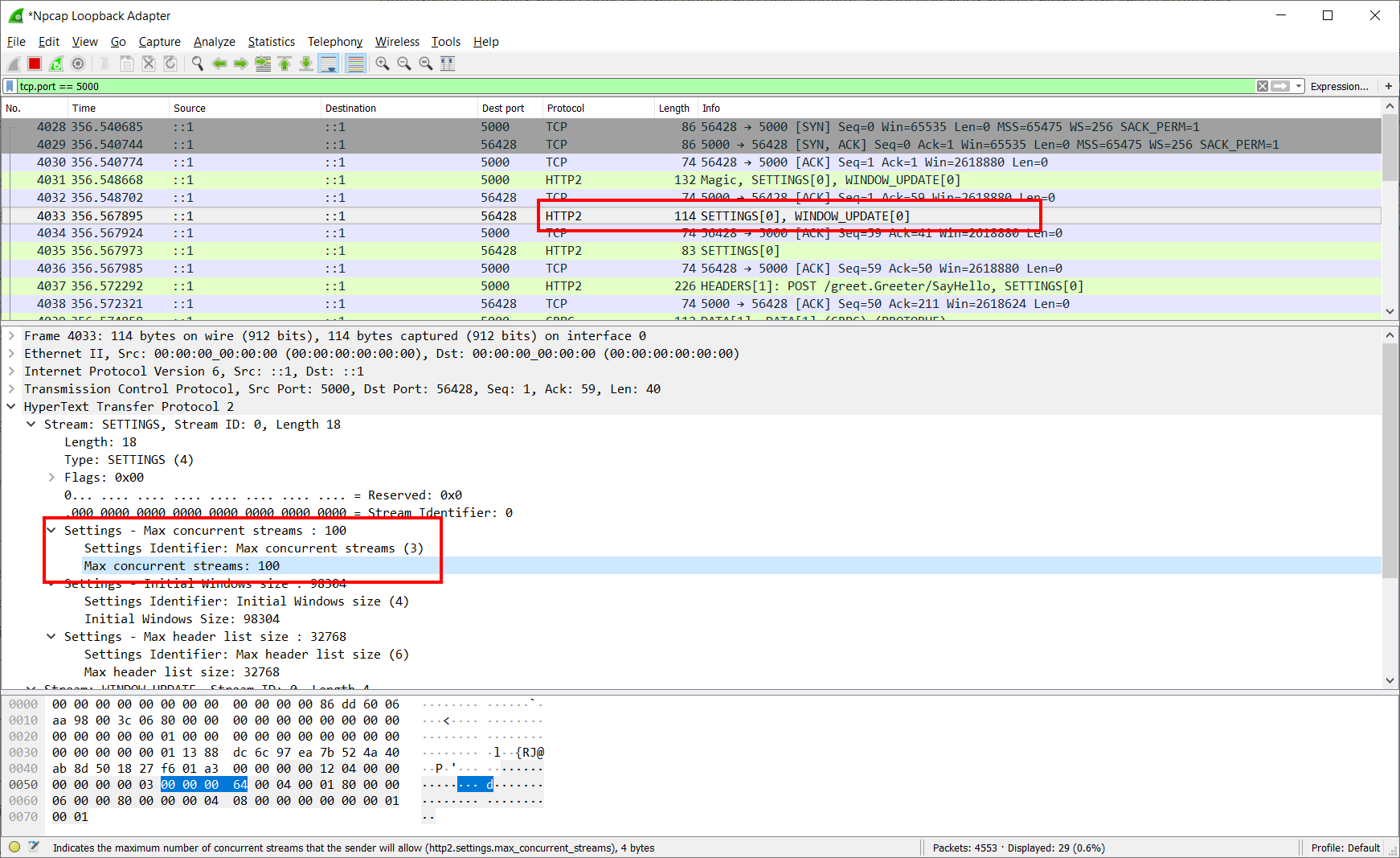
If a server doesn't send back max concurrent streams with the first settings then I think it is safe for the client to assume there is no limit.
JamesNK
on 7 Aug 2020
I think we should should assume a 100 max stream limit until we get the first settings frame, then give it either the settings' value or infinite.
scalablecory
on 7 Aug 2020
think we should should assume a 100 max stream limit until we get the first settings frame
@scalablecory It will solve the issue only for one case when options.Limits.Http2.MaxStreamsPerConnection = 100, but if it's set to any lower value, everything will fail the same way. Moreover, as I mentioned above, RFC explicitly says that even 0 is totally legit.
A value of 0 for SETTINGS_MAX_CONCURRENT_STREAMS SHOULD NOT be treated as special by endpoints. A zero value does prevent the creation of new streams; however, this can also happen for any limit that is exhausted with active streams.
alnikola
on 7 Aug 2020
think we should should assume a 100 max stream limit until we get the first settings frame
@scalablecory It will solve the issue only for one case when
options.Limits.Http2.MaxStreamsPerConnection = 100, but if it's set to any lower value, everything will fail the same way. Moreover, as I mentioned above, RFC explicitly says that even 0 is totally legit.
I agree that what we are doing is legal. However, assuming 100 for a short period will give us better behavior during connection bootstrap for the most common case where a server is following recommended practice of minimum 100.
And I acknowledge that this is not the full solution -- we also need to verify that both HttpClient and Kestrel are handling reset streams in a reliable manor.
scalablecory
on 7 Aug 2020
Ah, if this is just for optimization, then I totally agree.
alnikola
on 7 Aug 2020
I tested the repro client against HTTP.SYS server and everything worked properly. By default server sends SETTINGS with MaxConcurrentStreams = 100 and I couldn't find a way to change it. So, instead I increased the request count to 1000 which was supposed to create 10 connections. However, it seems HTTP.SYS doesn't send REFUSE_STREAM at all, thus the most of the requests simply gets processed by the first connection.
alnikola
on 7 Aug 2020
@geoffkizer It seems HTTP.SYS is quite relaxed in enforcing MaxConcurrentStreams limit, so it is not probably representative. What do you think?
alnikola
on 7 Aug 2020
HTTP.SYS host was configured as follows:
C#
            Host.CreateDefaultBuilder(args)
                .ConfigureWebHostDefaults(webBuilder =>
                {
                    webBuilder.UseStartup<Startup>();
                    webBuilder.UseHttpSys(options =>
                    {
                        options.UrlPrefixes.Add("https://localhost:5001");
                        options.Authentication.Schemes = Microsoft.AspNetCore.Server.HttpSys.AuthenticationSchemes.None;
                        options.Authentication.AllowAnonymous = true;
                        options.MaxConnections = null;
                        options.MaxRequestBodySize = null;
                    });
                })
                .ConfigureLogging(logging =>
                {
                    logging.AddConsole(o => o.TimestampFormat = "[HH:mm:ss]");
                    logging.SetMinimumLevel(LogLevel.Trace);
                });
alnikola
on 7 Aug 2020
However, it seems HTTP.SYS doesn't send REFUSE_STREAM at all, thus the most of the requests simply gets processed by the first connection.
Are you sure it's actually accepting more than 100 concurrent streams?
geoffkizer
on 7 Aug 2020
However, it seems HTTP.SYS doesn't send REFUSE_STREAM at all, thus the most of the requests simply gets processed by the first connection.
Are you sure it's actually accepting more than 100 concurrent streams?
I'm not sure about this. Having debugged more, it looks like HTTP.SYS waits for ACK from client before starting accepting streams, so it might be we can never go over the limit.
alnikola
on 7 Aug 2020
@Tratcher @JamesNK Is it possible to make Kestrel wait for ACK to the first SETTING frame from client? That would be a pretty simple solution to the problem. Waiting will add some delay of course, but since it happens once per HTTP/2 connection, it might be acceptable in scenario with long living connections.
alnikola
on 10 Aug 2020
Kestrel can be more forgiving before receiving the first ack, but it still has to read and process incoming frames in order to do that. So does Http.Sys. I don't think we have a clear understanding of the Http.Sys behavior yet. I'll talk to Niranjan tomorrow.
Tratcher
on 10 Aug 2020
Kestrel already goes very far out of its way to be as forgiving as possible to the client before receiving the first ACK. I don't know that it really can be more forgiving.
@jkotalik worked on https://github.com/dotnet/aspnetcore/pull/12704 which allows the server to track double the configured MaxStreamsPerConnection so Kestrel can respond with ENHANCE_YOUR_CALM stream errors before finally closing the connection with a GOAWAY error only as a last resort when the client far exceeds the configured MaxStreamsPerConnection prior to ACKing any SETTINGs (or after for that matter). Kestrel cannot track an unbounded number of rejected streams without opening itself up to a DoS, and it cannot ignore frames sent to untracked streams which might have closed gracefully for all Kestrel knows.
 halter73
on 11 Aug 2020
halter73
on 11 Aug 2020
Did we test other servers? Nginx, envoy, http.sys?
 davidfowl
on 11 Aug 2020
davidfowl
on 11 Aug 2020
I tested with IIS and couldn't replicate refused streams. However it is hard to tell what was going on between the client and server with IIS. It doesn't provide low-level logging of incoming and outgoing frames on the server, and because IIS requires TLS for HTTP/2 I couldn't check in Wireshark (TLS + Wireshark doesn't want to work on my dev machine)
JamesNK
on 11 Aug 2020
@davidfowl I tested with HTTP.SYS running under Asp.Net Core and did not see any REFUSE_STREAM errors. Test sent 1000 concurrent requests and HTTP.SYS was configured to allow only 1 stream per connection (Http2MaxConcurrentClientStreams = 1). All requests completed successfully. The absence of refused streams was confirmed under the debugger.
alnikola
on 11 Aug 2020
I'm not sure about this. Having debugged more, it looks like HTTP.SYS waits for ACK from client before starting accepting streams, so it might be we can never go over the limit.
Is it possible to make Kestrel wait for ACK to the first SETTING frame from client? That would be a pretty simple solution to the problem.
I don't see how this would be possible without some sort of limit or an unbounded buffer on the server. In this scenario, a client sends at least 101 HEADERS frames opening new streams before it sends a SETTINGS ACK. This is without sending any corresponding END_STREAM flags or RST_STREAM frames in between (or not enough at least).
I guess it's possible that HTTP.sys doesn't fully process these HEADERS frames until after seeing the ACK. But for that to work, HTTP.sys would need to buffer frames until the ACK arrives. There could be some sort of limit on this buffer. But if there's a limit, that would mean even HTTP.sys should fail when a client opens enough concurrent streams before sending the ACK.
Does HTTP.sys close the connection with an error when a client sends a frame to a stream that has already been closed by both the server and client? According to the spec, it must:
closed:
      The "closed" state is the terminal state.

      An endpoint MUST NOT send frames other than PRIORITY on a closed
      stream.  An endpoint that receives any frame other than PRIORITY
      after receiving a RST_STREAM MUST treat that as a stream error
      (Section 5.4.2) of type STREAM_CLOSED.  Similarly, an endpoint
      that receives any frames after receiving a frame with the
      END_STREAM flag set MUST treat that as a connection error
      (Section 5.4.1) of type STREAM_CLOSED, unless the frame is
      permitted as described below.
https://httpwg.org/specs/rfc7540.html#StreamStates
If not, that might explain why HTTP.sys might be able to handle 1000 concurrent streams over a single connection without errors despite being configured to handle only allow 1 concurrent stream per connection. I think the plausible explanations are as follows:
- HTTP.sys enforces a limit on concurrent streams that's effectively higher than 1000 prior to receiving a SETTINGs ACK. This seems very unlikely, but I suppose an initial limit that's effectively higher than 1000 is possible if stores received frames in a limited buffer until the ACK arrives or something similar. Still, any limit at all means the client does not have carte blanche to open an unlimited number concurrent streams before ACKing the SETTINGS.
- HTTP.sys stops tracking streams and counting it towards the limit as soon as it sends the END_STREAM flag or RST_STREAM frame without waiting to receive an END_STREAM flag or RST_STREAM frame from the client. For this to work, HTTP.sys would have to either:
- Allow and ignore frames sent to untracked streams thereby violating the HTTP/2 spec which demands stream or connection errors for fully closed streams.
- Reject frames sent to untracked streams with a stream error thereby violating the HTTP/2 spec because the spec demands a connection error not a stream error if the STREAM_CLOSED flag was received for a fully closed stream.
- Reject frames sent to untracked streams with a connection error which technically complies with the spec (if only because "An endpoint can end a connection at any time") but is extremely unforgiving to the client who might not have observed the END_STREAM flag or RST_STREAM frame prior to sending a frame to the closed stream.
Am I missing any other realistic possibilities? I left out possibilities that would require (nearly) unbounded memory on the server like tracking streams while not counting them towards any sort of limit, using strictly time-based limits, or tracking fully closed streams for the duration of the connection.
All of these seem bad to me, but maybe strategically violating the spec is acceptable. Option 2ii doesn't seem as bad as the others.
halter73
on 12 Aug 2020
I talked to the Http.Sys team today. Some notes:
- Http.Sys will also issue REFUSED_STREAM for streams over its default limit before the settings ack with a 10s timeout.
- Closed streams are cleaned up immediately.
- Data sent to a closed stream is ignored.
I plan to write some h2cat tests to verify this, but Insiders broke my dev box all day. I expect the HttpClient tests don't show the REFUSED_STREAMS because of timing/speed differences with Http.Sys, especially since it requires TLS.
Takeaways:
A) Kestrel could be more lenient to avoid closing the connection, at least before the settings ack.
B) HttpClient needs to handle REFUSED_STREAMS more gracefully, or apply a slow start mechanic.
- Allow and ignore frames sent to untracked streams thereby violating the HTTP/2 spec which demands stream or connection errors for fully closed streams.
It's not actually a connection level error because the client hasn't sent an END_STREAM yet.
Similarly, an endpoint
      that receives any frames after receiving a frame with the
      END_STREAM flag set MUST treat that as a connection error
      (Section 5.4.1) of type STREAM_CLOSED, unless the frame is
      permitted as described below.
B) HttpClient needs to handle REFUSED_STREAMS more gracefully, or apply a slow start mechanic.
I think both are needed.
- My repro shows there is something wrong with how HttpClient reacts to REFUSED_STREAMS. That needs to be fixed.
- A slow start mechanic is required to avoid connection errors with HTTP/2 servers. Kestrel is being technically correct with how it responses to data to unknown streams. We could make it more lenient and ignore data sent unknown streams while the connection is being established, but that just fixes this problem when HttpClient calls Kestrel. There are many HTTP/2 servers out there that HttpClient needs to be successful with.
JamesNK
on 12 Aug 2020
It's not actually a connection level error because the client hasn't sent an END_STREAM yet.
That's the half-closed (local) part of the spec which technically applies to this case. However, in practice, Kestrel (and any other server that doesn't allow a connection to use unbounded memory or violate the spec I figure) has to treat this as a connection error when too many of these half-closed streams build up. The reason is because the streams have to be tracked for the server to distinguish between half-closed streams and fully closed streams. And in the absence of tracking to tell you for sure that the stream is really half-closed, defaulting to a connection error is the only spec-compliant behavior.
So in practice, if HttpClient opens too many streams too quickly before ACKing SETTINGS, Kestrel has no choice but to close the connection or violate the spec. But like I said maybe violating the spec the way 2ii describes is acceptable. I need to better understand what HTTP.sys does and think about it more to be confident that's reasonable.
halter73
on 12 Aug 2020
My repro shows there is something wrong with how HttpClient reacts to REFUSED_STREAMS. That needs to be fixed.
HttpClient acts according to RFC:
- Open new a HTTP/2 connection with
MaxConcurrentStreamsset tounlimited - Start sending requests to the server as follows:
2.1 For each request check if active stream quota is available. If yes, proceed. Otherwise, wait until a stream slot becomes available
2.2. Create new HttpStream
2.2 Send HEADERS frame asynchronously
2.3 Send DATA frame asynchronously
2.4 Start receiving response - (In parallel with 2). Listen to SETTINGS frame from server
3.1. As soon as SETTINGS frame withMaxConcurrentStreamsreceived, apply the new limit. It will affect only creation of new streams, existing streams will be kept around regardless of their number.
3.2 Send ACK to the server
It means, if there is a quota available when a stream is created, the stream is considered legit and we use it as usual.
alnikola
on 12 Aug 2020
https://github.com/dotnet/runtime/issues/40249#issuecomment-670187489
- SocketsHttpHandler behavior goes to hell when it receives REFUSED_STREAM. See this log where it is doing all kinds of weird behavior:
- Continuously retrying a REFUSED_STREAM request on the same connection when the handler has been configured to support multiple connections
- Throttling sending frames to the server (I'm guessing this is what is happening) and eventually the server is closing the connection because DATA frames are also being throttled, and the server requires a min data rate. If min data rate is disabled then DATA frames that have been delay by over 5 seconds close the connection because the server no longer tracks the stream.
JamesNK
on 12 Aug 2020
@JamesNK I checked that log, but didn't find any signs of the mentioned problems. Could you please post here specific log lines which concern you?
alnikola
on 12 Aug 2020
Just to clarify. I fully agree that we need to make HttpClient compatible to Kestrel (or vice versa). But, I believe there is no actual bug in handling MaxConcurrentStreams. It's a flaw in the protocol specification itself.
alnikola
on 12 Aug 2020
Continuously retrying a REFUSED_STREAM request on the same connection when the handler has been configured to support multiple connections
Very first connection started. Note the time. Note the connection id: 0HM1OQ02379OT
14.7844 dbug: Microsoft.AspNetCore.Server.Kestrel[39]
      Connection id "0HM1OQ02379OT" accepted.
14.7867 dbug: Microsoft.AspNetCore.Server.Kestrel[1]
      Connection id "0HM1OQ02379OT" started.
First refused stream on that connection.
14.8274 dbug: Microsoft.AspNetCore.Server.Kestrel[30]
      Connection id "0HM1OQ02379OT": HTTP/2 stream error.
      Microsoft.AspNetCore.Server.Kestrel.Core.Internal.Http2.Http2StreamErrorException: HTTP/2 stream ID 201 error (REFUSED_STREAM): A new stream was refused because this connection has reached its stream limit.
         at Microsoft.AspNetCore.Server.Kestrel.Core.Internal.Http2.Http2Connection.StartStream()
         at Microsoft.AspNetCore.Server.Kestrel.Core.Internal.Http2.Http2Connection.DecodeHeadersAsync(Boolean endHeaders, ReadOnlySequence`1& payload)
         at Microsoft.AspNetCore.Server.Kestrel.Core.Internal.Http2.Http2Connection.ProcessHeadersFrameAsync[TContext](IHttpApplication`1 application, ReadOnlySequence`1& payload)
         at Microsoft.AspNetCore.Server.Kestrel.Core.Internal.Http2.Http2Connection.ProcessFrameAsync[TContext](IHttpApplication`1 application, ReadOnlySequence`1& payload)
         at Microsoft.AspNetCore.Server.Kestrel.Core.Internal.Http2.Http2Connection.ProcessRequestsAsync[TContext](IHttpApplication`1 application)
One of the many many retries to that same connection that happen until the stream errors and closes. Note that it is over 10 seconds later.
26.4905 trce: Microsoft.AspNetCore.Server.Kestrel[37]
      Connection id "0HM1OQ02379OT" received HEADERS frame for stream ID 231 with length 27 and flags END_HEADERS
26.4909 dbug: Microsoft.AspNetCore.Server.Kestrel[30]
      Connection id "0HM1OQ02379OT": HTTP/2 stream error.
      Microsoft.AspNetCore.Server.Kestrel.Core.Internal.Http2.Http2StreamErrorException: HTTP/2 stream ID 231 error (REFUSED_STREAM): A new stream was refused because this connection has reached its stream limit.
         at Microsoft.AspNetCore.Server.Kestrel.Core.Internal.Http2.Http2Connection.StartStream()
         at Microsoft.AspNetCore.Server.Kestrel.Core.Internal.Http2.Http2Connection.DecodeHeadersAsync(Boolean endHeaders, ReadOnlySequence`1& payload)
         at Microsoft.AspNetCore.Server.Kestrel.Core.Internal.Http2.Http2Connection.ProcessHeadersFrameAsync[TContext](IHttpApplication`1 application, ReadOnlySequence`1& payload)
         at Microsoft.AspNetCore.Server.Kestrel.Core.Internal.Http2.Http2Connection.ProcessFrameAsync[TContext](IHttpApplication`1 application, ReadOnlySequence`1& payload)
         at Microsoft.AspNetCore.Server.Kestrel.Core.Internal.Http2.Http2Connection.ProcessRequestsAsync[TContext](IHttpApplication`1 application)
26.4910 trce: Microsoft.AspNetCore.Server.Kestrel[37]
      Connection id "0HM1OQ02379OT" sending RST_STREAM frame for stream ID 231 with length 4 and flags 0x0
26.4917 trce: Microsoft.AspNetCore.Server.Kestrel[37]
Another one. 40 seconds after the connection started.
56.5107 trce: Microsoft.AspNetCore.Server.Kestrel[37]
      Connection id "0HM1OQ02379OT" received HEADERS frame for stream ID 291 with length 28 and flags END_HEADERS
56.5109 dbug: Microsoft.AspNetCore.Server.Kestrel[30]
      Connection id "0HM1OQ02379OT": HTTP/2 stream error.
      Microsoft.AspNetCore.Server.Kestrel.Core.Internal.Http2.Http2StreamErrorException: HTTP/2 stream ID 291 error (REFUSED_STREAM): A new stream was refused because this connection has reached its stream limit.
         at Microsoft.AspNetCore.Server.Kestrel.Core.Internal.Http2.Http2Connection.StartStream()
         at Microsoft.AspNetCore.Server.Kestrel.Core.Internal.Http2.Http2Connection.DecodeHeadersAsync(Boolean endHeaders, ReadOnlySequence`1& payload)
         at Microsoft.AspNetCore.Server.Kestrel.Core.Internal.Http2.Http2Connection.ProcessHeadersFrameAsync[TContext](IHttpApplication`1 application, ReadOnlySequence`1& payload)
         at Microsoft.AspNetCore.Server.Kestrel.Core.Internal.Http2.Http2Connection.ProcessFrameAsync[TContext](IHttpApplication`1 application, ReadOnlySequence`1& payload)
         at Microsoft.AspNetCore.Server.Kestrel.Core.Internal.Http2.Http2Connection.ProcessRequestsAsync[TContext](IHttpApplication`1 application)
56.5111 trce: Microsoft.AspNetCore.Server.Kestrel[37]
      Connection id "0HM1OQ02379OT" sending RST_STREAM frame for stream ID 291 with length 4 and flags 0x0
Search for 0HM1OQ02379OT. The log file is absolutely full of requests being sent to this same connection over a long period of time until the connection is eventually killed by Kestrel (which is related to the second issue).
Why is HttpClient sending requests to the same connection? It knows (after the initial burst of requests) what the max concurrent streams are. Why isn't it immediately creating another connection and using it once it has the server settings? EnableMultipleHttp2Connections is true.
Throttling sending frames to the server (I'm guessing this is what is happening) and eventually the server is closing the connection because DATA frames are also being throttled, and the server requires a min data rate. If min data rate is disabled then DATA frames that have been delay by over 5 seconds close the connection because the server no longer tracks the stream.
https://github.com/dotnet/runtime/issues/40249#issuecomment-669512391
JamesNK
on 12 Aug 2020
Search for 0HM1OQ02379OT. The log file is absolutely full of requests being sent to this same connection over a long period of time until the connection is eventually killed by Kestrel (which is related to the second issue).
Why is HttpClient sending requests to the same connection? It knows (after the initial burst of requests) what the max concurrent streams are. Why isn't it immediately creating another connection and using it once it has the server settings? EnableMultipleHttp2Connections is true.
They are not retries, they are all different requests that passed the initial stream limit check when MaxConcurrentSreams was infinite. This exactly what I explained above at step 3.1
3.1 As soon as SETTINGS frame with MaxConcurrentStreams received, apply the new limit. It will affect only creation of new streams, existing streams will be kept around regardless of their number.
HttpClient works really fast, so if you create a new client and start sending 250 requests concurrently, it's highly likely that all of them will manage to pass through the concurrent streams limit check before the new MaxConcurrentStreams arrives from the server.
alnikola
on 12 Aug 2020
Throttling sending frames to the server (I'm guessing this is what is happening) and eventually the server is closing the connection because DATA frames are also being throttled, and the server requires a min data rate. If min data rate is disabled then DATA frames that have been delay by over 5 seconds close the connection because the server no longer tracks the stream.
40249 (comment)
This is not throttling, it's still the same requests, passed the initial infinite stream limit check, sending their bodies to the server. This seems to be the reason for HTTP.SYS to grant 10s lifetime to unbounded number of streams after sending MaxConcurrentStreams setting to the client, that is to allow streams created immediately after connection establishing to finish successfully.
This is explained above at steps 2.1 - 2.4.
2.1 For each request check if active stream quota is available. If yes, proceed. Otherwise, wait until a stream slot becomes available
2.2. Create new HttpStream
2.3 Send HEADERS frame asynchronously
2.4 Send DATA frame asynchronously
alnikola
on 12 Aug 2020
They are not retries, they are all different requests that passed the initial stream limit check when MaxConcurrentSreams was infinite.
Once httpclient has the setting of 100 it shouldn’t keep sending requests to a connection that has 100 active connections. The connection will refuse it forever. Httpclient should send the request to a new connection. The flag to have multiple connections is true.
JamesNK
on 12 Aug 2020
Once httpclient has the setting of 100 it shouldn’t keep sending requests to a connection that has 100 active connections
But what to do with requests which already started sending bodies? Are you suggesting to terminate them?
alnikola
on 12 Aug 2020
If the request is refused then hasn’t the request body already been terminated?
JamesNK
on 12 Aug 2020
Request refusal is an asynchronous message, it doesn't stop bytes already flying over the wire.
alnikola
on 12 Aug 2020
The server has refused the stream. Body data is ignored by the server.
JamesNK
on 12 Aug 2020
We have a lengthy discussion here - let's try to drive to consensus.
Based on http.sys analysis above and thoughts about what Kestrel could do, I assume it won't be easy for Kestrel to truly support the spec-flaw of unbound streams at beginning.
I think the spec-workaround suggestion from above may be best way out of our troubles:
- Start each connection with initial limit of 100 streams
- Lift the initial stream limit 100 to unbound upon receiving first SETTINGS frame without
MaxConcurrentStreams
- Note: I'd say this part is optional for 5.0. If it is too complicated, or risky, we can consider it post-5.0 when we get reports from real servers where our artificial initial limit will cause perf problems. It won't be with Kestrel for sure.
Is anyone against this solution in 5.0?
Also, based on my understanding of the replies above, I suspect that the problem with REFUSED_STREAM will go away as it was primarily caused by the initial surge of streams. If not, we should separate it into another issue and try to understand it there in the context of using the artificial initial stream limit.
 karelz
on 12 Aug 2020
karelz
on 12 Aug 2020
But per @Tratcher comment above, it looks like it should not be hard for Kestrel to do the same thing as HTTP.SYS
- Http.Sys will also issue REFUSED_STREAM for streams over its default limit before the settings ack with a 10s timeout.
- Closed streams are cleaned up immediately.
- Data sent to a closed stream is ignored.
@karelz Or do you believe it's more hard to implement than it appears to be?
alnikola
on 12 Aug 2020
@alnikola while it may help, I don't think it is going to solve all problems we have seen here -- e.g. your experiment with MaxConcurrentStreams=1 showed that Kestrel (and likely other servers) currently tracks only MaxConcurrentStreams closed streams, and the other ones will cause the connection to be closed :(. That seems to be rather undesirable.
Given that client fix seems to be fairly simple and that it may help other server implementations, I'd choose to go with that for 5.0 also to reduce risk.
If Kestrel (and other servers) are more resilient in future and if we find there are real-world scenarios where it matters, we can revisit in future.
karelz
on 12 Aug 2020
Ok, I see.
But please also note that setting 100 as the initial MaxConcurrentStreams will probably decrease performance of the existing code in request spike scenarios when the server is IIS because currently IIS allows for an unlimited number of streams to keep going for 10 seconds which seems enough for many applications (e.g. health probes, fast GETs, etc.)
I'm fine if we decide to tradeoff that performance drop for simplicity of Kestrel-compatible code, my goal is just to highlight this potential negative effect.
alnikola
on 12 Aug 2020
Yes, understood. I believe that the IIS initial perf is just side-effect of the RFC flaw and not intentional unlimited streams support on http.sys side.
As such, it could go away at any time.
I would rather opt for the safe side, until we see real-world scenarios that require such initial burst perf and the server is appropriately configured for that (with truly unlimited streams count).
karelz
on 12 Aug 2020
- Start each connection with initial limit of 100 streams
Lift the initial stream limit 100 to unbound upon receiving first SETTINGS frame without
MaxConcurrentStreams
- Note: I'd say this part is optional for 5.0. If it is too complicated, or risky, we can consider it post-5.0 when we get reports from real servers where our artificial initial limit will cause perf problems. It won't be with Kestrel for sure.
Agree with first point.
I think the second point shouldn't add complexity*. You're changing the limit based on the SETTINGS result from the server. If a setting isn't present then you're just defaulting the number to int.MaxValue. Pseudo code: int maxConcurrentStreams = settings[MAX_CONCURRENT_STREAMS] ?? int.MaxValue.
*As I finished this paragraph I realized that you'll only want to do this on the first settings frame returned from the server. So there would be some complexity in tracking that.
One thing to consider with an initial limit is how does it interact with EnableMultipleHttp2Connections. My opinion is that if EnableMultipleHttp2Connections is true then the initial surge of requests would be split across multiple connections. e.g. 250 initial requests would result in 3 connections with 100, 100, 50 streams.
Also, based on my understanding of the replies above, I suspect that the problem with REFUSED_STREAM will go away as it was primarily caused by the initial surge of streams. If not, we should separate it into another issue and try to understand it there in the context of using the artificial initial stream limit.
I think the REFUSED_STREAM issues I observed in the repro logs happens when REFUSED_STREAM is combined with a connection that has exceeded its max concurrent streams, and the streams are long running. If that is true then throttling the initial surge of streams to 100 will fix REFUSED_STREAM behavior for the vast majority of people because 100 is the minimum recommended default, so they won't blow past it.
My guess is the REFUSED_STREAM bug could still happen if someone sets the max concurrent streams to lower than 100. The intersection of people with all 3 requirements to create the bug (a burst of streams on connection + long running streams + an artificially low max concurrent streams) is probably very small. If that is the case then I agree that it can be split out into its own issue, and if time is tight it could probably wait until .NET 6.
JamesNK
on 13 Aug 2020
@alnikola can you please file remaining issue around REFUSED_STREAM for 6.0 -- we may want to look into that and make sure the E2E works with Kestrel final.
karelz
on 13 Aug 2020
@karelz Follow-up issue submitted #40784
I believe we need to look at both of client and Kestrel sides to find the most efficient and safe solution to this problem.
So far, it seems the easiest fix would be to handle this scenario in Kester the same way as HTTP.SYS does.
- Http.Sys will also issue REFUSED_STREAM for streams over its default limit before the settings ack with a 10s timeout.
- Closed streams are cleaned up immediately.
- Data sent to a closed stream is ignored.
But let's also can consider other options.
alnikola
on 13 Aug 2020
Related issues
 aggieben
·
3Comments
aggieben
·
3Comments
 omajid
·
3Comments
omajid
·
3Comments
 noahfalk
·
3Comments
noahfalk
·
3Comments
 bencz
·
3Comments
bencz
·
3Comments
 v0l
·
3Comments
v0l
·
3Comments