Runtime: System.DirectoryServices.Protocols - Linux -> authenticating user with special characters
Description
I happen to find some problem with authenticating users with special characters in password. When I try to authenticate my AD test account with only numeric password it works correctly. When I try to authenticate a real user that has some special characters in the password I get ldap error code: 49 (invalid credentials). I am indeed really sure, that I have the right credentials. Also on the Windows it works correctly.
Configuration
Domain joined CentOS 7.8.2003
also Ubuntu 20.04
.NET Core 3.1.301, commit: 7feb845744
.Protocols version 5.0.0-preview.5.20278.1
Regression?
On Windows it works correctly.
Other information
Stack trace I got:
System.DirectoryServices.Protocols.LdapException: The supplied credential is invalid. at System.DirectoryServices.Protocols.LdapConnection.BindHelper(NetworkCredential newCredential, Boolean needSetCredential) at System.DirectoryServices.Protocols.LdapConnection.Bind(NetworkCredential newCredential)
 GrowSharp
All 23 comments
Sounds like an encoding bug. @GrowSharp can you elaborate what you mean by "speical characters"? It's important we know the text combination that causes the repro so that we investigate the correct thing.
 ericstj
on 9 Jul 2020
ericstj
on 9 Jul 2020
Special characters that I know off:
!, $, *
@ericstj
GrowSharp
on 21 Jul 2020
Hello @GrowSharp so sorry that it took us so long to take a look at this. Unfortunately, I'm unable to repro your issue I tried with several different password combinations using several special characters but in every case I'm able to authenticate correctly and are able to query the ldap server. Here is the sample code I used (as you can see the password for my user in this case is Spec1alCharacters!$*,\ which has the ones you called out plus extra ones):
```c#
static void Main()
{
LdapDirectoryIdentifier di = new LdapDirectoryIdentifier(@"joesads.com", true, false);
NetworkCredential credentials = new NetworkCredential("[email protected]", "Spec1alCharacters!$*,\");
LdapConnection connection = new LdapConnection(di, credentials);
connection.SessionOptions.ProtocolVersion = 3;
connection.Bind();
        string filter = $"(&(objectClass=user)(sAMAccountName=johndoe))";
        SearchRequest searchRequest = new SearchRequest("dc=joesads,dc=com", filter, SearchScope.Subtree, null);
        SearchResponse response = (SearchResponse)connection.SendRequest(searchRequest);

        if (response.Entries.Count > 0)
        {
            Console.WriteLine($"Found a user with that name {response.Entries[0].DistinguishedName}");
        }
    }
```
Here is the output I see from my Ubuntu 16.04 machine:

 joperezr
on 13 Aug 2020
joperezr
on 13 Aug 2020
Is it possible you have different versions of libldap or whatever?
 danmosemsft
on 13 Aug 2020
danmosemsft
on 13 Aug 2020
I wonder if this is a problem due to you bein on CentOS instead of Ubuntu, but I doubt it as you say you also saw this problem on Ubuntu20.04. Can you share a code snippet that you are using and also a sample password (obviously not your real one but one where you have constructed and validated that you fail to login)
joperezr
on 13 Aug 2020
Is it possible you have different versions of libldap or whatever?
libldap per se not really, because we actually PInvoke to a very specific version (2.4) and will fail to PInvoke if that exact version is not installed.
That said, even though it is the same version it is possible that there is a slight behaviour change across distros even though the native library code is the same
joperezr
on 13 Aug 2020
@joperezr
Login: testdev2
Password: AhojAhoj!$*+
I can't share the whole code, it's not property of mine. But I can assure you bug is not in my implementation. To make sure I even tried the snippet that works for you. It doesn't work for me, it acts identically.
GrowSharp
on 14 Aug 2020
Still unable to repro this even when using a CentOS 7 machine:
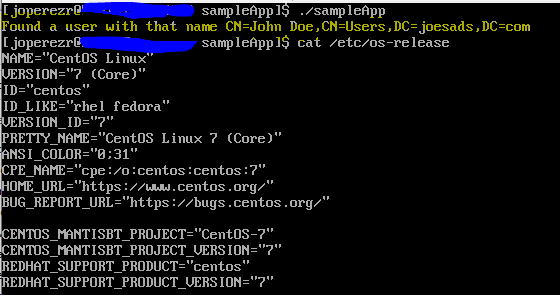
Also BTW I did change the password to use the exact one that you shared: AhojAhoj!$*+
joperezr
on 18 Aug 2020
That's really weird. Is it possible that our AD server is just broken? I have no idea what to do with this, I'm trying to port our oAuth service to linux, but if I won't be able to authenticate even 1% of users, I will have to stay on Windows.
Any ideas? @joperezr
GrowSharp
on 19 Aug 2020
I wonder if this is something where the problem is more on the server-side setup what is making my case work but not yours. I'm using a Windows server 2016 Datacenter Active Directory Domain controller, are you using Active Directory as well or are you using a different type of LDAP server?
Given we haven't been able to repro this yet and that it seems like it is an environment specific issue, I'll move this over to 6.0 for now but will continue investigating and if we find an issue (depending on w hat the issue is and when we find it) we might still consider backporting it to 5.0.
joperezr
on 24 Aug 2020
We are using 2012 version. Maybe that might be it?
GrowSharp
on 25 Aug 2020
I see, I doubt that's the issue then, I was thinking that you may have been using some other server like openldap on an Linux machine but seems like that's not the case. I will still try setting up a 2012 version to see if I'm able to repro.
joperezr
on 25 Aug 2020
@joperezr Any progress on this one? I can maybe live with the random binding time, but this is a no-go bug for me. Without this, its all been for nothing.
GrowSharp
on 10 Sep 2020
Cc @ericstj in absence of @joperezr
danmosemsft
on 10 Sep 2020
if I won't be able to authenticate even 1% of users,
Interesting, so if I understand correctly you aren't using a service account architecture where the service account authenticates with the LDAP server and examines relationships of users, but instead are flowing end-user credentials in text form so that you can use them to login to the LDAP server from your application. This is a bit different than I had heard in other architectures. I understand why this is a blocker for you.
It looks like you already tried a simpler repro that Jose suggested and it's also broken, so this should rule out any encoding issues in your application's handling of passwords. Correct me if I'm wrong here.
One thing to try would be to use the OpenLDAP commandline tools to see if they reproduce the problem.
Here's what worked for me:
sudo apt install ldap-utils
ldapsearch -h <server> -p <port> -D <domain\\user> -w <password> -V
I could confirm a connection was possible with this. Basically I tested this with a user that I knew worked with System.DirectoryServices.Protocols, made sure I could get the command to succeed with that user, then fail (by entering invalid credentials). Then I tried the same with a user with special characters in the password. Do you think you could try the same in your environment?
cc @tarekgh
ericstj
on 10 Sep 2020
@GrowSharp is it possible you can run your repro under the debugger and try to break on the ldap_simple_bind from the lib libldap-2.4.so.2 and then check the input parameters and the return value? as you know we are not able to reproduce the issue to debug it ourselves.
 tarekgh
on 10 Sep 2020
tarekgh
on 10 Sep 2020
@ericstj What do you mean by service account architecture? This is for my oAuth micro-service. It's a custom implementation of JWT 2.0 oAuth service - credentials from end-point applications are safely forwarded to this service, this service then verify given credentials and return JWT token with all the claims and other stuff, like refresh_token etc.
Good idea, but are we sure that ldap-utils use the same native library (libldap-2.4.so.2)? I'm gonna try anyway. Will come back with result in short time.
@tarekgh
Do I need to run CLR locally, or should I be able to get symbols and attach the breakpoint automatically? Because I still haven't figured out how to run the CLR on windows let alone linux.
GrowSharp
on 11 Sep 2020
Okay, I tried the ldap-utils. Same result. With normal password it returns valid response, with my AhojAhoj!$*+ password account it returns Invalid credentials (49). On windows it works as always. I have no idea what could be going on, but I'm starting to believe that the fault must be in our messy AD. But I still find it weird that trough Wldap32 it works and trough openldap it doesn't.
GrowSharp
on 11 Sep 2020
Do we still need to try debugging the ldap_simple_bind? If it doesn't even work trough ldap-utils?
GrowSharp
on 11 Sep 2020
I don't think we need to debug it anymore if the ldap_utils is failing the same way. At least now we are sure we don't have any problem in the Protocols library.
@tquerec do you have any idea why this happening? connecting from Windows work just fine but not from Linux.
@GrowSharp when you tried on Windows, did you try from a domain joined machine? I am just trying to understand the environment you are calling from. It is clear is AD configuration issue but so far I am not sure what is missing. I hope @tquerec would have some thoughts around that.
tarekgh
on 11 Sep 2020
@GrowSharp
@tquerec offline suggested if you can use wireshark to capture the binding packets when connecting using Windows and when using Linux and then compare them. I don't' have experience with wireshark but there is some good documentation it can help https://www.wireshark.org/docs/wsug_html_chunked/index.html. I hope you can give it a try. or at least you capture the binding and share it and we may try dig on it.
tarekgh
on 11 Sep 2020
@tarekgh Yes, on Windows it's domain joined machine.
I think it's not necessary to investigate this any further. Our AD is a god damn mess. It's 12 years old system and our infrastructure guys don't really want to help me investigate what's going on in there. They have a plan to upgrade to newer AD system, but I have no idea when. Until then I will simply run this service on a Windows. It's still little bit faster than it used to be and when our infrastructure guys upgrade the AD I will try to run it again on Linux. Perhaps it will help.
Thank you very much everyone for trying to help me! I really appreciate it.
GrowSharp
on 14 Sep 2020
closing per @GrowSharp comment.
tarekgh
on 14 Sep 2020
Related issues
 nalywa
·
3Comments
nalywa
·
3Comments
 jamesqo
·
3Comments
jamesqo
·
3Comments
 omariom
·
3Comments
omariom
·
3Comments
 EgorBo
·
3Comments
EgorBo
·
3Comments
 jkotas
·
3Comments
jkotas
·
3Comments