Runtime: Building the repo is creating a bunch of host instances and using all the CPU
As of 3 days ago we received an arcade update PR which updated the SDK version that we use to build in the repo to: 5.0.100-preview.6.20266.3.
https://github.com/dotnet/runtime/commit/e0e752ac9ee67f3dc7fa127d6f7495132b4bcee7
Some people including myself have noted weird behaviors like 56 instances of dotnet.exe being created when building the repo, the build having some weird behaviors and taking a long time. I reverted the global.json back to the older version we were using and everything works fine.
I think we should revert to the preview5 sdk we were using.
The new updated SDK was for packaging performance and it was done in: https://github.com/dotnet/arcade/pull/5497
cc: @mmitche @dotnet/runtime-infrastructure @joperezr
 safern
All 31 comments
Tagging subscribers to this area: @ViktorHofer
Notify danmosemsft if you want to be subscribed.
![msftbot[bot] picture](https://avatars2.githubusercontent.com/in/26612?v=4&s=40) msftbot[bot]
on 3 Jun 2020
msftbot[bot]
on 3 Jun 2020
I completely concur, my local Windows builds of the runtime repo take hours, spawn 3K .NET Host process instances, consume 60 GB RAM and brick my devbox completely, that's something I've never seen before. Thanks Santi for following up so quickly!
 trylek
on 3 Jun 2020
trylek
on 3 Jun 2020
cc: @dsplaisted @wli3
safern
on 3 Jun 2020
@safern - this is hell on Earth, can you please share steps how to undo the SDK update locally? I can locally revert the entire PR #37200 but that's going to pollute my local git clone, is it sufficient to undo the changes to global.json or do we also need the change to eng/Versions.props?
trylek
on 3 Jun 2020
@trylek you can revert the changes in global.json only, that would be enough. I'll put up a PR to revert this soon and I'll open an issue on the SDK repo.
@mmitche should we revert this in arcade?
safern
on 3 Jun 2020
It works! Life's back to normal! Reminded me of long ago in .NET Native in early introduction of nugets when the network usage for enormous and my local build took 12 hours over the VPN.
trylek
on 3 Jun 2020
Reverting in arcade is non-trivial as some repos will have to do work to back up. It also won't auto-revert in all the repos (since the version there is newer). I'd recommend we isolate the issue and resolve it rather than hide it.
In the meantime we can update the sdk version in runtime, and ensure that it doesn't get pulled forward in a new update by disabling the arcade subscription or just editing global.json in any auto-created PR (which are sparse these days)
 mmitche
on 4 Jun 2020
mmitche
on 4 Jun 2020
@rrelyea @dsplaisted @rainersigwald @safern has some new info here.
If the p6 SDK is installed globally (matching what is in runtime's global.json) 5.0.100-preview.6.20266.3, then it appears that during project restore early in the build he's getting hundreds of dotnet hosts launched, effectively killing the machine.
This does not happen if the sdk is not installed globally.
mmitche
on 4 Jun 2020
@rainersigwald I see that most of all the processes created are just doing:
"C:\Program Files\dotnet\dotnet.exe" "C:\Program Files\dotnet\sdk\5.0.100-preview.6.20266.3\MSBuild.dll" C:\Program Files\dotnet\sdk\5.0.100-preview.6.20266.3\MSBuild.dll /nologo /nodemode:1 /nodeReuse:true /low:false
The parent process is:
"dotnet.exe" exec "C:\Program Files\dotnet\sdk\5.0.100-preview.6.20266.3\MSBuild.dll" -maxcpucount -verbosity:m /m /nologo /clp:Summary /v:minimal /nr:True /p:ContinuousIntegrationBuild=False /warnaserror /p:TreatWarningsAsErrors=true C:\Users\Santiago\.nuget\packages\microsoft.dotnet.arcade.sdk\5.0.0-beta.20278.4\tools\Build.proj /p:Configuration=Debug /p:RepoRoot=C:\repos\runtime /p:Restore=True /p:DeployDeps=False /p:Build=True /p:Rebuild=False /p:Deploy=False /p:Test=False /p:Pack=False /p:IntegrationTest=False /p:PerformanceTest=False /p:Sign=False /p:Publish=False /p:TargetArchitecture=x64 "-distributedlogger:Microsoft.DotNet.Tools.MSBuild.MSBuildLogger,C:\Program Files\dotnet\sdk\5.0.100-preview.6.20266.3\dotnet.dll*Microsoft.DotNet.Tools.MSBuild.MSBuildForwardingLogger,C:\Program Files\dotnet\sdk\5.0.100-preview.6.20266.3\dotnet.dll"
Sounds like it's failing to connect to the child processes it creates, so it keeps retrying.
Can you set the MSBUILDDEBUGCOMM environment variable to 1, run the build, and then look at the files starting with MSBuild_CommTrace_PID_ in the temp folder?
 dsplaisted
on 4 Jun 2020
dsplaisted
on 4 Jun 2020
Sounds like it's failing to connect to the child processes it creates, so it keeps retrying.
So potentially a fall back from: https://github.com/microsoft/msbuild/commit/fa3df4463ff57b65b6a504bf9b1833ac3354d23d ?
Can you set the MSBUILDDEBUGCOMM environment variable to 1, run the build, and then look at the files starting with MSBuild_CommTrace_PID_ in the temp folder?
Sure. Let me try that and I'll update the issue.
safern
on 4 Jun 2020
Yeah, a bunch of files are created and they have:
OutOfProc Endpoint Packet Pump (TID 5) 637268249724763835 +    1.5585ms: Waiting for connection 900000 ms...
OutOfProc Endpoint Packet Pump (TID 5) 637268249724918563 +   15.4728ms: Parent started connecting. Reading handshake from parent
OutOfProc Endpoint Packet Pump (TID 5) 637268249724941539 +    2.2976ms: Client connection failed but we will wait for another connection. Exception: Client: rejected old host. Received byte 0 but this matched a byte to reject.
OutOfProc Endpoint Packet Pump (TID 5) 637268249724949461 +    0.7922ms: Waiting for connection 899979 ms...
We still need to figure out the root cause for this so we can eventually update the SDK again.
dsplaisted
on 4 Jun 2020
This does seem to confirm that it's a communication / handshake issue when connecting to new nodes.
Can you see what the file corresponding to the parent process says? It will probably be a bit different (and a lot longer).
Also, to try to figure out whether this is a regression in .NET Core or in MSBuild, could you try replacing the runtime in the new SDK with the older runtime from the SDK where this worked? That might break other stuff, but if it fails in the same way, or if it succeeds, that would help us know where the issue is.
dsplaisted
on 4 Jun 2020
Sure, let me try that.
safern
on 4 Jun 2020
This is the file for the parent process:
parent-process.txt
Will try to replace the runtime now.
safern
on 4 Jun 2020
@dsplaisted I replaced the runtime with the one that works, and it has the same issue.
safern
on 4 Jun 2020
Nice progress. I wonder why it matters whether its globally installed or not.
mmitche
on 4 Jun 2020
@dsplaisted @Forgind @safern I am a bit suspicious of this change:
https://github.com/microsoft/msbuild/pull/5196/files#diff-ca8a95218362d15ed86f601b0158ea21R318
Combined with this: https://github.com/microsoft/msbuild/blob/master/src/Shared/NodeEndpointOutOfProcBase.cs#L398-L400
It looks like that leading 0 byte got eliminated. Oddly, the rejection is supposed to be on 0x5F and 0x60:
https://github.com/microsoft/msbuild/blob/master/src/Shared/NodeEndpointOutOfProcBase.cs#L398-L403
And all other callers pass null. So a bit of a mystery.
mmitche
on 4 Jun 2020
That change does look suspicious in the sense that it's a change to the handshake logic.
@forgind could you look at this?
dsplaisted
on 4 Jun 2020
I'll bring this up in tactics today as a p6 issue.
mmitche
on 4 Jun 2020
I just ran in to this, except I am on commit b8e1a49266199ccfaeb9cce8c2f5952048a4e3b0, so the SDK change has already been reverted?. Here is what I am doing:
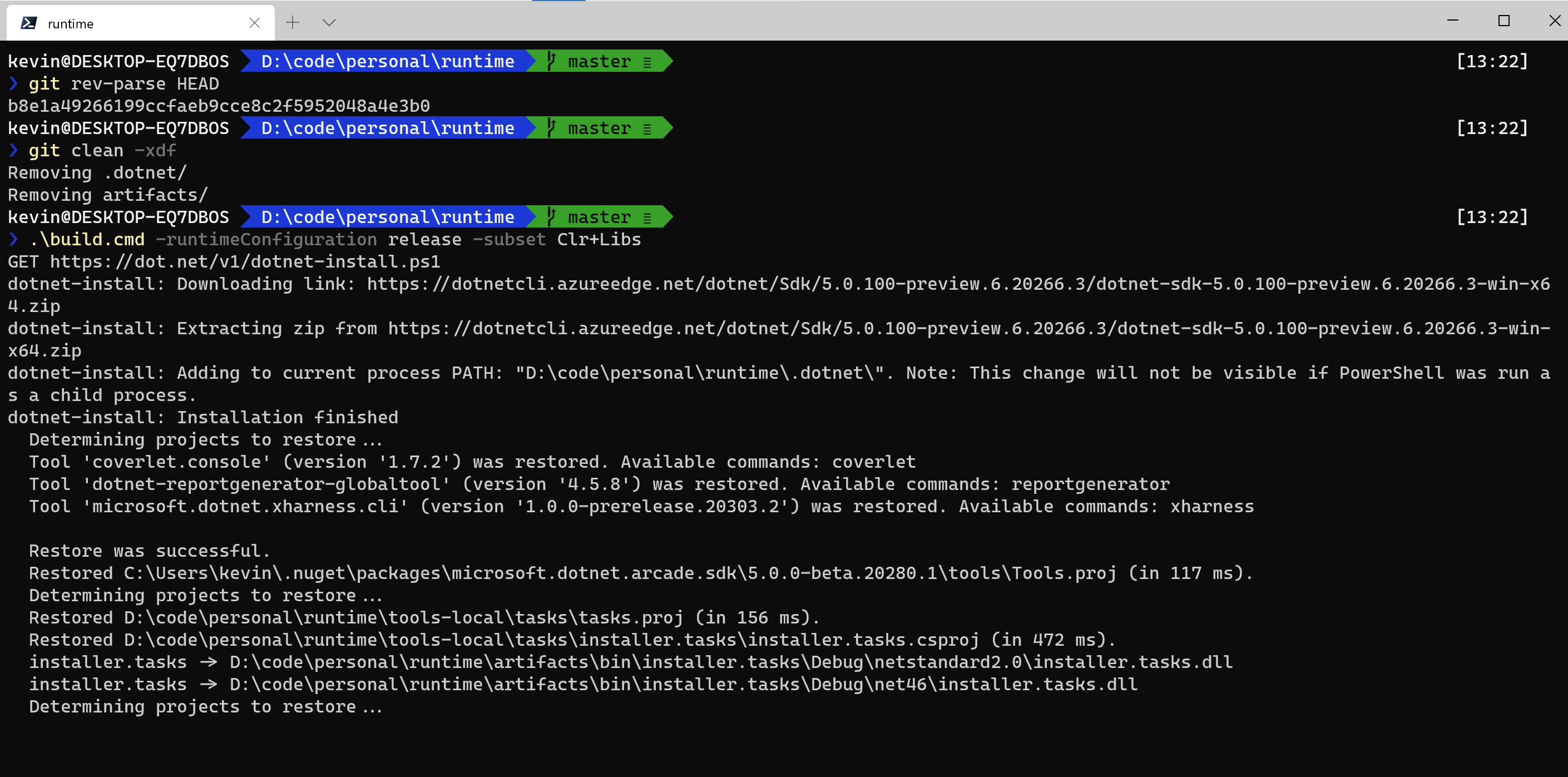
and all h*ck breaks loose.
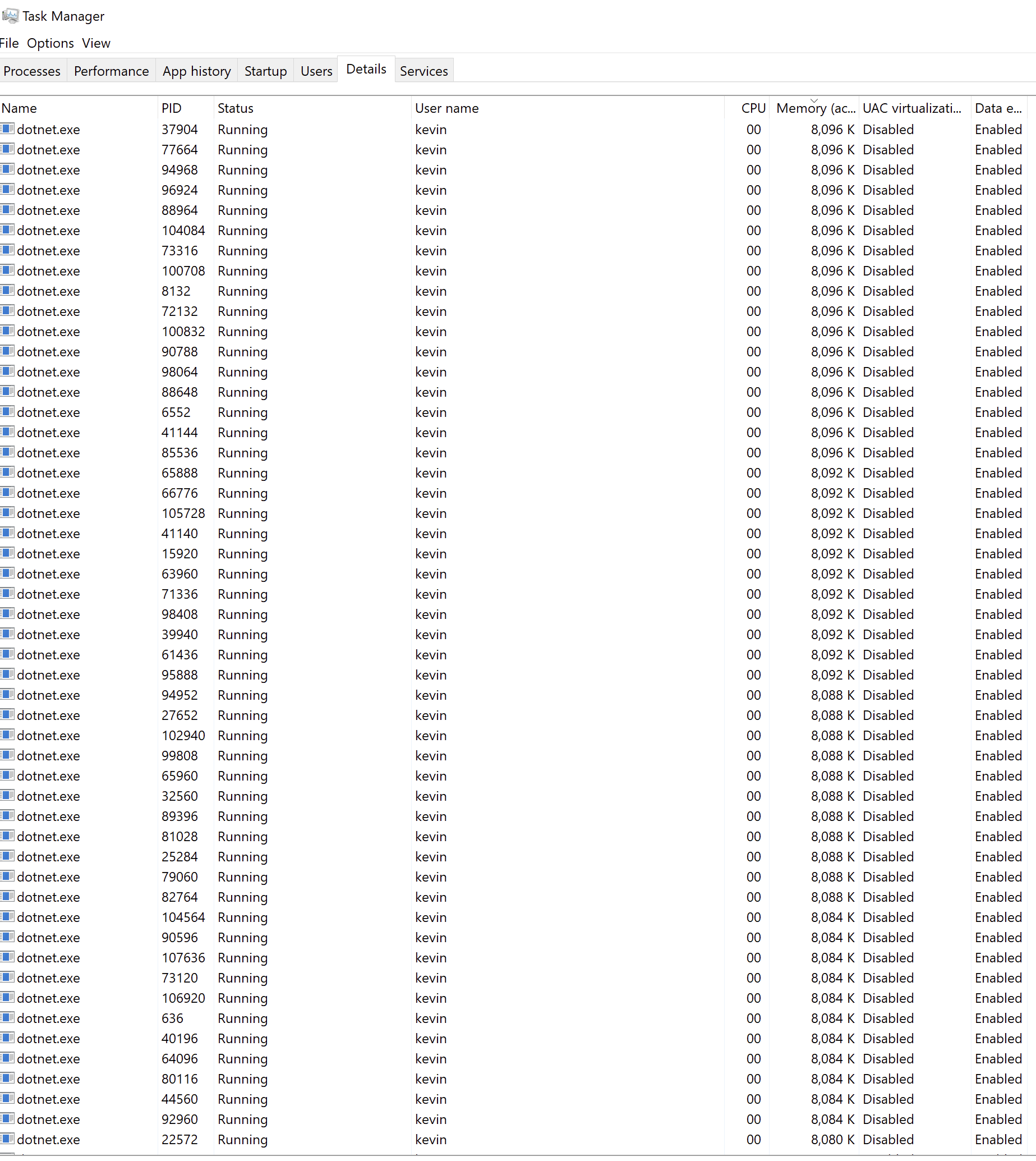
 vcsjones
on 9 Jun 2020
vcsjones
on 9 Jun 2020
@vcsjones I suspect you have: 5.0.100-preview.6.20266.3 installed globally.
Could you run, dotnet --info outside of the repo and if it shows that SDK installed, could you delete the folder for that version under dotnet\sdk folder?
safern
on 9 Jun 2020
@safern Looks like I have preview4.. is that affected? (Ran at C:)
.NET SDK (reflecting any global.json):
Version: 5.0.100-preview.4.20258.7
Commit: 65f0fc2cad
Full Output
.NET SDK (reflecting any global.json):
Version: 5.0.100-preview.4.20258.7
Commit: 65f0fc2cad
Runtime Environment:
OS Name: Windows
OS Version: 10.0.19041
OS Platform: Windows
RID: win10-x64
Base Path: C:\Program Files\dotnet\sdk\5.0.100-preview.4.20258.7\
Host (useful for support):
Version: 5.0.0-preview.4.20251.6
Commit: 47ec733ba7
.NET SDKs installed:
1.1.14 [C:\Program Files\dotnet\sdk]
2.1.700 [C:\Program Files\dotnet\sdk]
2.1.701 [C:\Program Files\dotnet\sdk]
2.1.801 [C:\Program Files\dotnet\sdk]
2.1.802 [C:\Program Files\dotnet\sdk]
2.1.806 [C:\Program Files\dotnet\sdk]
2.2.300 [C:\Program Files\dotnet\sdk]
2.2.301 [C:\Program Files\dotnet\sdk]
2.2.401 [C:\Program Files\dotnet\sdk]
2.2.402 [C:\Program Files\dotnet\sdk]
3.0.100-rc1-014190 [C:\Program Files\dotnet\sdk]
3.1.300 [C:\Program Files\dotnet\sdk]
5.0.100-preview.4.20258.7 [C:\Program Files\dotnet\sdk]
.NET runtimes installed:
Microsoft.AspNetCore.All 2.1.11 [C:\Program Files\dotnet\shared\Microsoft.AspNetCore.All]
Microsoft.AspNetCore.All 2.1.12 [C:\Program Files\dotnet\shared\Microsoft.AspNetCore.All]
Microsoft.AspNetCore.All 2.1.13 [C:\Program Files\dotnet\shared\Microsoft.AspNetCore.All]
Microsoft.AspNetCore.All 2.1.18 [C:\Program Files\dotnet\shared\Microsoft.AspNetCore.All]
Microsoft.AspNetCore.All 2.2.5 [C:\Program Files\dotnet\shared\Microsoft.AspNetCore.All]
Microsoft.AspNetCore.All 2.2.6 [C:\Program Files\dotnet\shared\Microsoft.AspNetCore.All]
Microsoft.AspNetCore.All 2.2.7 [C:\Program Files\dotnet\shared\Microsoft.AspNetCore.All]
Microsoft.AspNetCore.All 2.2.8 [C:\Program Files\dotnet\shared\Microsoft.AspNetCore.All]
Microsoft.AspNetCore.App 2.1.11 [C:\Program Files\dotnet\shared\Microsoft.AspNetCore.App]
Microsoft.AspNetCore.App 2.1.12 [C:\Program Files\dotnet\shared\Microsoft.AspNetCore.App]
Microsoft.AspNetCore.App 2.1.13 [C:\Program Files\dotnet\shared\Microsoft.AspNetCore.App]
Microsoft.AspNetCore.App 2.1.18 [C:\Program Files\dotnet\shared\Microsoft.AspNetCore.App]
Microsoft.AspNetCore.App 2.2.5 [C:\Program Files\dotnet\shared\Microsoft.AspNetCore.App]
Microsoft.AspNetCore.App 2.2.6 [C:\Program Files\dotnet\shared\Microsoft.AspNetCore.App]
Microsoft.AspNetCore.App 2.2.7 [C:\Program Files\dotnet\shared\Microsoft.AspNetCore.App]
Microsoft.AspNetCore.App 2.2.8 [C:\Program Files\dotnet\shared\Microsoft.AspNetCore.App]
Microsoft.AspNetCore.App 3.0.0-rc1.19457.4 [C:\Program Files\dotnet\shared\Microsoft.AspNetCore.App]
Microsoft.AspNetCore.App 3.1.4 [C:\Program Files\dotnet\shared\Microsoft.AspNetCore.App]
Microsoft.AspNetCore.App 5.0.0-preview.4.20257.10 [C:\Program Files\dotnet\shared\Microsoft.AspNetCore.App]
Microsoft.NETCore.App 1.0.16 [C:\Program Files\dotnet\shared\Microsoft.NETCore.App]
Microsoft.NETCore.App 1.1.13 [C:\Program Files\dotnet\shared\Microsoft.NETCore.App]
Microsoft.NETCore.App 2.1.11 [C:\Program Files\dotnet\shared\Microsoft.NETCore.App]
Microsoft.NETCore.App 2.1.12 [C:\Program Files\dotnet\shared\Microsoft.NETCore.App]
Microsoft.NETCore.App 2.1.13 [C:\Program Files\dotnet\shared\Microsoft.NETCore.App]
Microsoft.NETCore.App 2.1.18 [C:\Program Files\dotnet\shared\Microsoft.NETCore.App]
Microsoft.NETCore.App 2.2.5 [C:\Program Files\dotnet\shared\Microsoft.NETCore.App]
Microsoft.NETCore.App 2.2.6 [C:\Program Files\dotnet\shared\Microsoft.NETCore.App]
Microsoft.NETCore.App 2.2.7 [C:\Program Files\dotnet\shared\Microsoft.NETCore.App]
Microsoft.NETCore.App 2.2.8 [C:\Program Files\dotnet\shared\Microsoft.NETCore.App]
Microsoft.NETCore.App 3.0.0-rc1-19456-20 [C:\Program Files\dotnet\shared\Microsoft.NETCore.App]
Microsoft.NETCore.App 3.1.4 [C:\Program Files\dotnet\shared\Microsoft.NETCore.App]
Microsoft.NETCore.App 5.0.0-preview.4.20251.6 [C:\Program Files\dotnet\shared\Microsoft.NETCore.App]
Microsoft.WindowsDesktop.App 3.0.0-rc1-19456-20 [C:\Program Files\dotnet\shared\Microsoft.WindowsDesktop.App]
Microsoft.WindowsDesktop.App 3.1.4 [C:\Program Files\dotnet\shared\Microsoft.WindowsDesktop.App]
Microsoft.WindowsDesktop.App 5.0.0-preview.4.20251.1 [C:\Program Files\dotnet\shared\Microsoft.WindowsDesktop.App]
To install additional .NET runtimes or SDKs:
https://aka.ms/dotnet-download
vcsjones
on 9 Jun 2020
Yeah, please install: 5.0.100-preview.5.20251.2
I think the reason why you're seeing this behavior is because the repo-local SDK installed is still preview6, so since the minimum required specified in global.json (5.0.100-preview.5.20251.2) is not found machine-wide, it uses the one in the repo-local which is the one with the bug.
If the fix takes longer, maybe we should also revert the dotnet CLI to 5.0.100-preview.5.20251.2.
safern
on 9 Jun 2020
If the fix takes longer, maybe we should also revert the dotnet CLI to 5.0.100-preview.5.20251.2.
We're depending on support for the webassembly RID in the later dotnet sdk so we can't revert without breaking that one.
 akoeplinger
on 9 Jun 2020
akoeplinger
on 9 Jun 2020
Yeah, please install: 5.0.100-preview.5.20251.2
... how? The latest preview is preview4. I could install a nightly which is branded as alpha 1, but I'm not sure if that would solve the problem.
vcsjones
on 9 Jun 2020
You can run:
path-to-runtime\.dotnet\dotnet-install.ps1 -Version 5.0.100-preview.5.20251.2 -Install-Dir "C:\Program Files\dotnet"
if dotnet-install.ps1 is not in the runtime repo you can download it from here
safern
on 9 Jun 2020
Hm, that didn't seem to work (I did confirm that preview5 is installed correctly). In the meantime, I unblocked myself by changing the tools version back to preview5 for now.
vcsjones
on 9 Jun 2020
Weird. Well, good thing you're unblocked. The fix was merged in MSBuild so we should be able to consume a new SDK soon that will fix this for good.
safern
on 9 Jun 2020
Specifically: dotnet/sdk#11980 consumes the MSBuild change.
 rainersigwald
on 9 Jun 2020
rainersigwald
on 9 Jun 2020
Related issues
 omajid
·
3Comments
omajid
·
3Comments
 sahithreddyk
·
3Comments
sahithreddyk
·
3Comments
 yahorsi
·
3Comments
yahorsi
·
3Comments
 chunseoklee
·
3Comments
chunseoklee
·
3Comments
 aggieben
·
3Comments
aggieben
·
3Comments
Most helpful comment
Specifically: dotnet/sdk#11980 consumes the MSBuild change.