Runtime: Crash when trying to run non-elevated from an elevate process
Description
PowerToys needs to start a .NET Core application with non-elevated privileges from an elevated process.
We tried two different approaches, they both resulted in this crash report:

Application: PowerLauncher.exe
CoreCLR Version: 4.700.20.20201
.NET Core Version: 3.1.4
Description: The process was terminated due to an unhandled exception.
Exception Info: System.TypeInitializationException: The type initializer for 'System.Windows.Threading.Dispatcher' threw an exception.
 ---> System.ComponentModel.Win32Exception (5): Access is denied.
   at System.Diagnostics.ProcessManager.OpenProcess(Int32 processId, Int32 access, Boolean throwIfExited)
   at System.Diagnostics.NtProcessManager.GetModules(Int32 processId, Boolean firstModuleOnly)
   at System.Diagnostics.Process.get_Modules()
   at System.Windows.WpfDllVerifier.VerifyWpfDllSet(String[] additionalDlls)
   at System.Windows.Threading.Dispatcher..cctor()
   --- End of inner exception stack trace ---
   at System.Windows.Threading.Dispatcher.get_CurrentDispatcher()
   at System.Windows.Threading.DispatcherObject..ctor()
   at System.Windows.Application..ctor()
   at PowerLauncher.App..ctor() in C:\github\microsoft\PowerToys\src\modules\launcher\PowerLauncher\App.xaml.cs:line 33
   at PowerLauncher.App.Main() in C:\github\microsoft\PowerToys\src\modules\launcher\PowerLauncher\App.xaml.cs:line 44
First approch: start the application as suggested in this Raymond Chen's article
https://devblogs.microsoft.com/oldnewthing/20190425-00/?p=102443
It works for Win32 apps and for .Net Framework apps, it causes the crash when tested with the two .NET Core apps we have in PowerToys.
Second approach: use an intermediate process and drop the elevation in that process before starting the .NET Core app. It works when using SDDL_ML_MEDIUM but crashes when using SDDL_ML_MEDIUM_PLUS, in our scenario SDDL_ML_MEDIUM causes other issues so we can't use it.
https://github.com/microsoft/PowerToys/blob/e75a74565b8f7eb208af52dbb10632f943b66d21/src/common/common.cpp#L396-L421
Configuration
.NET Core 3.1.4
Windows 10 1909
x64
Regression?
Other information
I can provide a branch with the changes that cause the crash, if needed.
 enricogior
All 19 comments
Tagging subscribers to this area: @eiriktsarpalis
Notify danmosemsft if you want to be subscribed.
![msftbot[bot] picture](https://avatars2.githubusercontent.com/in/26612?v=4&s=40) msftbot[bot]
on 28 May 2020
msftbot[bot]
on 28 May 2020
The .NET Framework and .NET Core implementations of Process.get_Modules() seem the same -- ending up calling OpenProcess(Interop.Advapi32.ProcessOptions.PROCESS_QUERY_INFORMATION | Interop.Advapi32.ProcessOptions.PROCESS_VM_READ, inherit: false, processId);
I wonder if https://github.com/dotnet/coreclr/pull/28019 is related? But that fix was present beginning in 3.1.3 (I verified) and the above is 3.1.4
@stephentoub anything occur to you?
 danmosemsft
on 29 May 2020
danmosemsft
on 29 May 2020
@enricogior is it possible to try some other .NET Core versions? Specifically 3.1.2 or earlier. Any 5.0 preview might be an interesting datapoint as well.
danmosemsft
on 29 May 2020
Or perhaps @ericstj has a theory.
danmosemsft
on 29 May 2020
The .NET Framework and .NET Core implementations of Process.get_Modules() seem the same
WpfDllVerifier that is calling Process.Modules is new in .NET Core.
It works for Win32 apps and for .Net Framework apps
Does it work for .Net Framework app that just calls foreach (ProcessModule procModule in Process.GetCurrentProcess().Modules) { Console.WriteLine(procModule); } ?
 jkotas
on 29 May 2020
jkotas
on 29 May 2020
The most likely explanation for this behavior is that the techniques to launch non-elevated process from elevated one strip the rights for the process to inspect itself. An experiment with an app that calls ProcessModule procModule in Process.GetCurrentProcess().Modules would confirm or deny it.
jkotas
on 29 May 2020
Thank you! I did not know that the Process.Modules call was new.
danmosemsft
on 29 May 2020
@danmosemsft
is it possible to try some other .NET Core versions? Specifically 3.1.2 or earlier. Any 5.0 preview might be an interesting datapoint as well.
I tried 3.1.0 and got the same problem.
I wanted to try 5.0 but after installing the SDK, VS 2019 16.6 doesn't show it as available option:
C:\Users\enrico>dotnet --list-sdks
3.1.201 [C:\Program Files\dotnet\sdk]
3.1.300 [C:\Program Files\dotnet\sdk]
5.0.100-preview.4.20258.7 [C:\Program Files\dotnet\sdk]
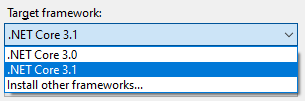
Is there any other step required?
enricogior
on 29 May 2020
@jkotas
when dropping the privileges using SDDL_ML_MEDIUM, the app starts without problems, but it doesn't have enough privileges for what we need. The crash happens when we use SDDL_ML_MEDIUM_PLUS that in theory should have higher privileges.
enricogior
on 29 May 2020
@enricogior can you please try the experiment @jkotas suggested above - create a.NET Framework console app and paste in Process.GetCurrentProcess().Modules;. Then try launching that with your launcher . We are guessing it will have the same issue.
danmosemsft
on 29 May 2020
Agree with @jkotas assessment. In @oldnewthing's blog you see the technique you are using is copying permissions from some other process. You need to make sure the process you choose to copy has all the permissions that match an unelevated process. Likely Explorer doesn't have SeDebugPrivilege.
 ericstj
on 29 May 2020
ericstj
on 29 May 2020
@danmosemsft
I will test it with a .NET Framework.
@ericstj
still I don't understand why it doesn't crash when using SDDL_ML_MEDIUM, but it crashes when using SDDL_ML_MEDIUM_PLUS.
enricogior
on 29 May 2020
I didn't dig deeper into your second method. It seems SDDL_ML_MEDIUM maps to SID S-1-16-8192 and SDDL_ML_MEDIUM_PLUS maps to S-1-16-8448. I couldn't find any documentation around what privilege these SIDs have nor if one has necessarily more than the other. I bet there is a tool that can read the default privilege for these SIDs like whoami does for a user, but I couldn't find it. You can examine the different privilege that Windows gives these using ProcessExplorer.
As an aside, I noticed a possible optimization here that could avoid this codepath in Process calling OpenProcess. It looks like GetCurrentProcess is recommended over OpenProcess when opening the current process, and as far as I can tell GetCurrentProcess wouldn't require SeDebugPrivilege which might avoid this issue. Now that might avoid this exception, but it would still be problematic since if your child process was expecting to do anything else that required SeDebugPrivilege it would fail. I don't think that's a great fix for you since it would still cause your child processes to fail if they tried to use this API (and wouldn't normally, when launched unelevated).
ericstj
on 1 Jun 2020
Perhaps the way forward @enricogior is to create a little Hello World style repro using pure native Win32 that simply calls OpenProcess(PROCESS_QUERY_INFORMATION | PROCESS_VM_READ, false, currentPid);. We're guessing that will fail too, at which point this becomes a question for Win32 security model experts .
Maybe we could work around this in our code, but that might change product behavior, and more importantly doesn't help most of your customers since they want to launch other apps and older versions of .NET Core which may still hit this
danmosemsft
on 1 Jun 2020
@ericstj @danmosemsft
sounds good, I'll get back to you with the results.
Thanks.
enricogior
on 2 Jun 2020
I'll get back to you with the results.
@enricogior any progress on this?
 adamsitnik
on 25 Jun 2020
adamsitnik
on 25 Jun 2020
Hi @adamsitnik
we have been busy preparing the 0.19 release, hopefully next week I'll have some time to do the testing.
enricogior
on 25 Jun 2020
The call to WpfDllVerifier has been removed in WPF .NET 5 RC2: https://github.com/dotnet/wpf/pull/3436
The issue should be fixed. @enricogior please feel free to reopen if it does not work for .NET 5 WPF for you.
adamsitnik
on 28 Sep 2020
@adamsitnik
thank you for the info.
enricogior
on 28 Sep 2020
Related issues
 chunseoklee
·
3Comments
chunseoklee
·
3Comments
 bencz
·
3Comments
bencz
·
3Comments
 jamesqo
·
3Comments
jamesqo
·
3Comments
 yahorsi
·
3Comments
yahorsi
·
3Comments
 EgorBo
·
3Comments
EgorBo
·
3Comments
Most helpful comment
The most likely explanation for this behavior is that the techniques to launch non-elevated process from elevated one strip the rights for the process to inspect itself. An experiment with an app that calls
ProcessModule procModule in Process.GetCurrentProcess().Moduleswould confirm or deny it.