Runtime: Troubleshooting HttpRequestException "A connection attempt failed because the connected party did not properly respond..."
Our production code runs asp.net core 3.1 deployed in azure app service (windows) and is getting a TON of these errors:
System.Net.Http.HttpRequestException: A connection attempt failed because the connected party did not properly respond after a period of time, or established connection failed because connected host has failed to respond.
System.Net.Http.HttpRequestException: A connection attempt failed because the connected party did not properly respond after a period of time, or established connection failed because connected host has failed to respond.
 ---> System.Net.Sockets.SocketException (10060): A connection attempt failed because the connected party did not properly respond after a period of time, or established connection failed because connected host has failed to respond.
   at System.Net.Http.ConnectHelper.ConnectAsync(String host, Int32 port, CancellationToken cancellationToken)
   --- End of inner exception stack trace ---
   at System.Net.Http.ConnectHelper.ConnectAsync(String host, Int32 port, CancellationToken cancellationToken)
   at System.Net.Http.HttpConnectionPool.ConnectAsync(HttpRequestMessage request, Boolean allowHttp2, CancellationToken cancellationToken)
   at System.Net.Http.HttpConnectionPool.CreateHttp11ConnectionAsync(HttpRequestMessage request, CancellationToken cancellationToken)
   at System.Net.Http.HttpConnectionPool.GetHttpConnectionAsync(HttpRequestMessage request, CancellationToken cancellationToken)
   at System.Net.Http.HttpConnectionPool.SendWithRetryAsync(HttpRequestMessage request, Boolean doRequestAuth, CancellationToken cancellationToken)
   at System.Net.Http.RedirectHandler.SendAsync(HttpRequestMessage request, CancellationToken cancellationToken)
   at System.Net.Http.HttpClient.FinishSendAsyncBuffered(Task`1 sendTask, HttpRequestMessage request, CancellationTokenSource cts, Boolean disposeCts)
   at ShopifySharp.ShopifyService.<>c__DisplayClass26_0`1.<<ExecuteRequestAsync>b__0>d.MoveNext()
We're not sure exactly why and we would like to get to the bottom of it.
Even though the process is hosted in asp.net core, it is mostly used to run background jobs.
The background jobs are issuing A LOT of outbound http requests to over 1k different domains (most of which are subdomains of myshopify.com, like <subdomain>.myshopify.com, but also other APIs such as SendGrid and Google Docs APIs). But at any point in time, I estimate it's dealing only with about 50 domains/hosts max.
It seems that the issue gets worse as the number of requests increases (more requests are issued in parallel).
CPU and memory looks reasonable, so I'm guessing there is some sort of bottleneck at the network or runtime level. My understanding is that .net core doesn't enforce any limit (by default) on the number of concurrent requests to a single host (see https://github.com/dotnet/runtime/issues/29038).
Even though the exception message blames the hosts, I think the issue might be due to some sort of limit that we hit in our process or in Windows.
Often we see many of these errors thrown in a short succession (over a single second or a few seconds).
Can anyone recommend a way of troubleshooting this issue?
I heard of port exhaustion but I'm not sure if it's the cause, and how to go about troubleshooting.
Here are a few TCP metrics from the azure portal, in case it helps:

 clement911
All 34 comments
Tagging subscribers to this area: @dotnet/ncl
Notify danmosemsft if you want to be subscribed.
![msftbot[bot] picture](https://avatars2.githubusercontent.com/in/26612?v=4&s=40) msftbot[bot]
on 27 Apr 2020
msftbot[bot]
on 27 Apr 2020
Can you get output of netstat? (or via other means) to get list of active and closing connections?
Do you have sense how many parallel requests you have? There may be also some issues with thread pool starvation e.g. it times out because if did not have chance to run.
What is your use pattern for HttpClient? DO you preserve it and use for multiple requests?
 wfurt
on 27 Apr 2020
wfurt
on 27 Apr 2020
Can you get output of netstat? (or via other means) to get list of active and closing connections?
I'm not too sure. Networking is not my strong suit unfortunately.
The service runs in Azure and I'm not sure how I would even go about collecting netstat data.
Do you have sense how many parallel requests you have? There may be also some issues with thread pool starvation e.g. it times out because if did not have chance to run.
We allow 40 async tasks to run in parallel so I would say about that. It's hard to tell how many have http requests in flight at any point in time, as threads also spend time doing other async operations (with the database mostly). We chose 40 arbitrarily.
That's kind of the problem. I don't know how to go about finding the root cause of the issue.
What is your use pattern for HttpClient? DO you preserve it and use for multiple requests?
Yes, we preserve it in a static field and use it for all requests.
clement911
on 27 Apr 2020
This is becoming an increasingly frequent issue.
Does anyone have any suggestions?
clement911
on 12 May 2020
There are no connection limits in .NET Core itself that would cause this. The error is being returned from the OS to indicate it didn't get any response during the TCP handshake.
If you have a lot of parallel requests (you have indicated parallel _hosts_, which is not quite the same metric), it may be possible you're hitting SNAT port exhaustion which would manifest as the error you're seeing.
 scalablecory
on 12 May 2020
scalablecory
on 12 May 2020
I tried as hard as I could to read the documentation but it doesn't say anything about App service, which what we use.
It's extremely hard to decipher all these articles and understand what they mean for our situation.
We don't manage any load balancer and we can't find any metrics about it.
How are we suppose to monitor this port exhaustion thing when using Azure app service?
clement911
on 29 May 2020
cc: @alnikola
wfurt
on 29 May 2020
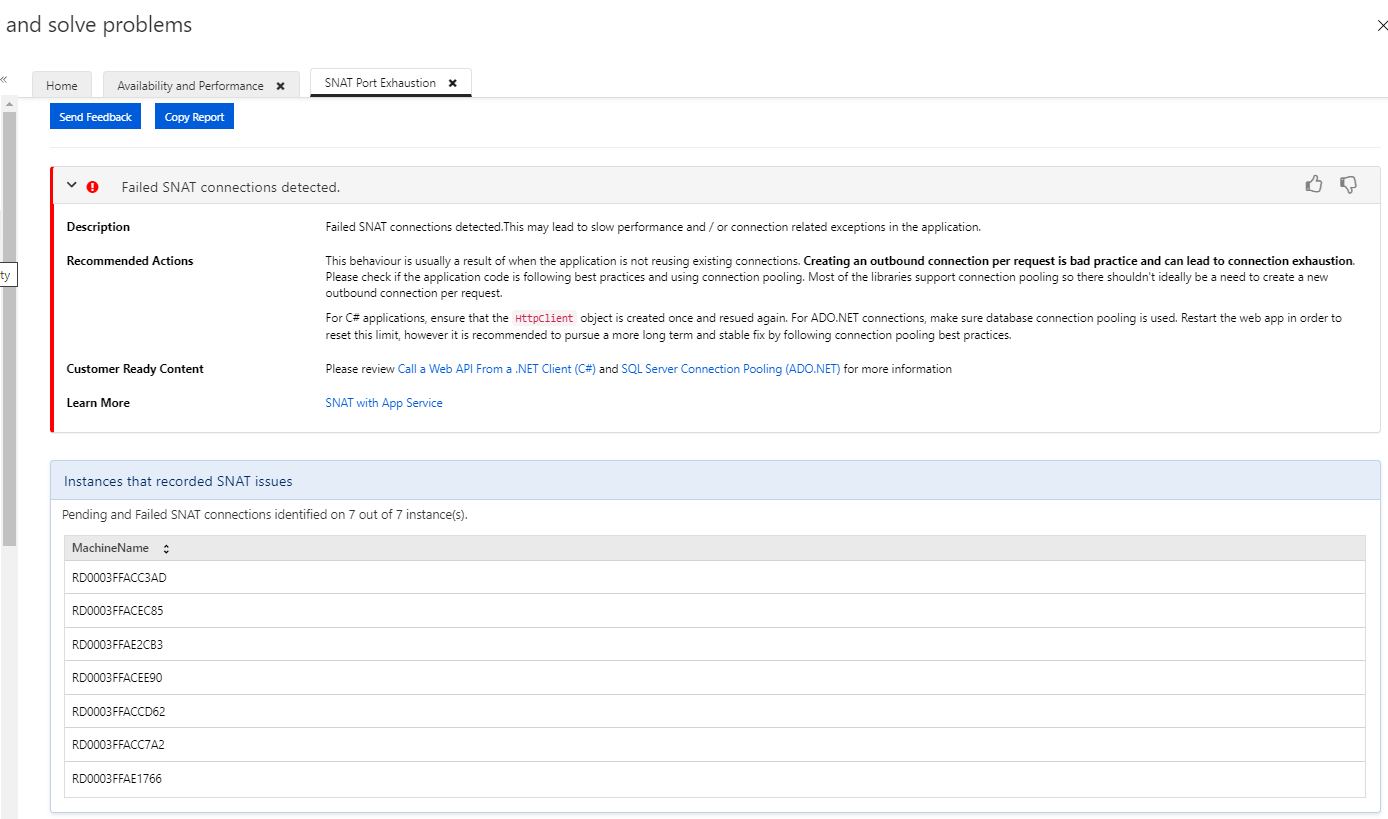
As it turns out, in the azure portal we found by chance that there is a 'SNAT port exhaustion' report under the 'Diagnose and solve problems'.
It seems that this is indeed the root problem of our outbound request errors.
While it's good to know why requests fail, this doesn't really help us to fix it.
We already use a static HttpClient and connection pooling for sql azure. Our app just happens to do a lot of outbound requests to various APIs, an in particular to
After reading some more documentation, it seems that scaling out can't fix the problem, because the number of of SNAT ports is fixed at the load balancer level.
Actually, it seems like it can even make it worse, because the number of ports per instance might actually be lower.
It certainly is very counter intuitive that scaling out more instances can make scalability worse.
Did I get that right?
Given that we already use best practices in terms of connection pooling, what else can we do to confidently scale to an ever increasing number of outbound API calls required by our app?
clement911
on 30 May 2020
99% of our outbound calls are calling to the domain
Originally, I thought that each separate
But after checking the DNS records, I see that all
It is my understanding that SNAT port are consumed per IP and therefore all of the calls to these subdomains should be considered a single target host?
clement911
on 30 May 2020
We are not experts in SNAT here, but to my best knowledge it is per IP as that is the only thing they can observe.
Did you verify that scaling out does not work? I thought that SNAT limits are per machine, not per cluster.
 karelz
on 30 May 2020
karelz
on 30 May 2020
SNAT port is consumed per 5-tuple (source IP address, source port, IP transport protocol, destination IP address, destination port) when source private IP address gets rewritten to the frontend's public one for an outgoing call. In TCP protocol, one SNAT port is consumed per flow to a single destination IP address, port. For multiple TCP flows to the same destination IP address, port, and protocol, each TCP flow consumes a single SNAT port. Thus, if you have confirmed that destination IP address stays the same, but SNAT ports are still being exhausted, it leaves us with 2 potential causes:
- Destination port is changing and the number of unique ports is higher than the number of SNAT ports allocated to the source VM
- Destination server frequently closes connections which forces client to re-establish them consuming more SNAT ports.
 alnikola
on 31 May 2020
alnikola
on 31 May 2020
I'm confused.
You make it sound like multiple flows can share a single SNAT port as long as their 5-tuple is identical.
This is also what I had understood on my first read.
But when I read again the following paragraph, it's actually not the case:
https://docs.microsoft.com/en-us/azure/load-balancer/load-balancer-outbound-connections#tcp
One SNAT port is consumed per flow to a single destination IP address, port. For multiple TCP flows to the same destination IP address, port, and protocol, each TCP flow consumes a single SNAT port. This ensures that the flows are unique when they originate from the same public IP address and go to the same destination IP address, port, and protocol.Multiple flows, each to a different destination IP address, port, and protocol, share a single SNAT port. The destination IP address, port, and protocol make flows unique without the need for additional source ports to distinguish flows in the public IP address space.
So it appears that it's the opposite. If 2 different flows use the same 5-tuple, then they cannot share the same SNAT port. In other words, it sounds like SNAT ports will scale better when the app is connecting to multiple different IPs, and worse if it connects to the same IPs most of the time (which is what our app does).
Well, I'assuming a 'flow' is a connection. Is there a difference?
I've been reading this relevant post: https://www.stevejgordon.co.uk/httpclient-connection-pooling-in-dotnet-core and I wonder if it might be worth experimenting with SocketsHttpHandler's properties such as PooledConnectionLifetime, PooledConnectionIdleTimeout and MaxConnectionsPerServer and observe the behaviour.
Is it possible to run netstat on azure app service instances?
clement911
on 1 Jun 2020
I see now I might not have been clear enough above, so let me please re-phrase my message:
- On IP protocol level one SNAT port is consumed per 5-tuple, however IP protocol doesn't have a notion of connection
- TCP level adds another variable into the equation - connection (aka TCP flow). Thus, one SNAT port is consumed per 5-tuple AND connection. Practically, it simply means that each time you open a TCP connection SNAT port gets consumed. However, if you re-use a connection, the port will be re-used as well
- Taking into account that
3.1. HttpClient maintains a connection pool
3.2. You confirmed above that the target IP stays the same - It leads to one of two possible situations mentioned above:
4.1. Destination port is changing and the number of unique ports is higher than the number of SNAT ports allocated to the source VM
4.2. Destination server frequently closes connections which forces client to re-establish them consuming more SNAT ports.
In the issue description, you mentioned that the app sends requests to over 1K different subdomains, could you please check if it uses different destination ports for each subdomain? If that's the case, I would recommend looking at this troubleshooting guide
alnikola
on 1 Jun 2020
Thanks @alnikola but we connect to all the subdomains on the same port. It's a https:// url without any port information, so it would just use the standard https port 443.
In other words, we are only dealing with only a single 5-tuple.
Will the HttpClient allow reusing the connection even if the domain name is different?
I have no reason to believe that Shopify would be frequently closing the connections. Do you know a way I could verify that? And, if it is case, shouldn't that free the connection anyway and its underlying SNAT port anyway?
clement911
on 1 Jun 2020
I double-checked and you are right - SocketsHttpHandler takes the whole domain name and other parameters into account to construct the connection key. Thus, if you are frequently changing subdomains, it can also exhaust SNAT ports. However, it's basically the same case as with changing ports because it's also part of the connection identity, so the same troubleshooting guide will help here.
I have no reason to believe that Shopify would be frequently closing the connections. Do you know a way I could verify that? And, if it is case, shouldn't that free the connection anyway and its underlying SNAT port anyway?
I don't know exactly how to check this on Azure Portal, but anyways there is some timeout before the port can be used again for another connection.
alnikola
on 1 Jun 2020
The fact that SocketsHttpHandler doesn't allow connection reuse if the domain changes even though the IP remains the same is a huge problem for APIs that expects a subdomain for each user.
This is the case with shopify where every shop gets its own <shop>.myshopify.com domain but they all point to a single IP and could therefore share connection.
Can a fix be implemented in SocketsHttpHandler ?
...but anyways there is some timeout before the port can be used again for another connection.
My understanding is that this idle timeout only applies if the connection is not closed. If the connection is closed, the SNAT port should be freed. Hence why SocketsHttpHandler.PooledConnectionLifetime and SocketsHttpHandler.PooledConnectionIdleTimeout could be critical.
clement911
on 1 Jun 2020
@clement911 did you try to work around the problem by using IPs directly and resolving DNS manually before using HttpClient? Does it unblock you?
I am not sure of we want to change to use IP internally instead of host names. DNS can have multiple IPs mapping from single domain. What if 2 domains overlap, but are not equal on that list? Would that be a problem?
Are there other implications?
Also I am curious how it would fit Connection pooling API @scalablecory is working on ...
karelz
on 1 Jun 2020
The fact that SocketsHttpHandler doesn't allow connection reuse if the domain changes even though the IP remains the same is a huge problem for APIs that expects a subdomain for each user.
I imagine SNI also prevents SocketsHttpHandler from reusing connections connected to the correct IP with the wrong domain. If the TLS handshake indicates that the connection is for one domain, I doubt it's OK to make a request for a different domain over the connection. Maybe TLS renegotiation would allow for this, but I have my doubts about that too.
@clement911 did you try to work around the problem by using IPs directly and resolving DNS manually before using HttpClient? Does it unblock you?
This is worth trying, but this probably won't work well for HTTPS requests. It's rare to have valid certs for an IP address. And even if you ignore cert failures, if the gateway is relying on SNI to find the right backend rather than using the request's HOST header, it still might not work. And that's assuming HttpClient will let you set the HOST header to something other than the IP address which it very well may not.
 halter73
on 1 Jun 2020
halter73
on 1 Jun 2020
To the extreme it sounds like custom connection pooling then -- where SNAT limits is the top driving requirement.
karelz
on 1 Jun 2020
The fact that SocketsHttpHandler doesn't allow connection reuse if the domain changes even though the IP remains the same is a huge problem for APIs that expects a subdomain for each user.
I agree that using IP addresses may not be great as that is unlikely to match the certificates.
There is really no good way to know if they are the same and if it is safe to reuse. They may present different certificate and have different crypto parameters.
I'm wondering if setting HTTP proxy outside of SNAT pool would help.
It seems like in this case there is disconnect between service architecture and infrastructure (or vice versa)
wfurt
on 1 Jun 2020
for the record, rfc6066:
A server that implements this extension MUST NOT accept the request
to resume the session if the server_name extension contains a different name.
That leads to new SslStream and underlying NetworkStream.
I don't know if plain HTTP matters here but HttpClient _could_ (optionally?) reuse connection if different name maps to the same IP. (instead of using uri.IdnHost as key)
Maybe that can be done with new 5.0 connection API.
Reading notes from @anikola, setting MaxConnectionsPerServer may help as well as it would limit SNAT mappings used per server (trading possibly higher latency)
Perhaps best solution here would be to use public IP and avoid SNAT altogether.
It seems like critical part is verification if SNAT is really to blame or if something else is going on.
wfurt
on 2 Jun 2020
I tried to use IP directly but the SSL handshake failed.
It fails also if I paste the url https://23.227.38.64 in Chrome or Edge.

Even if I use HTTP instead of HTTPS and add the correct host header manually, the request is rejected. Same in the browser.

Anyway, Shopify API only works with HTTPS but I was jus curious.
To the extreme it sounds like custom connection pooling then -- where SNAT limits is the top driving requirement.
Are you saying we can implement our own custom pooling? Or are you referring to the existing parameters on SocketsHttpHandler?
Perhaps best solution here would be to use public IP and avoid SNAT altogether.
I have a question about this. Let's say I scale out the app from 10 to 20 instances, do the new spun up instances automatically get assigned a new public IP address dynamically?
It seems like critical part is verification if SNAT is really to blame or if something else is going on.
Azure portal indicates it is the problem:
clement911
on 2 Jun 2020
If you past https://23.227.38.64 to Chrome, it will send Host header with that IP and that will fail since there is no matching AltName in the certificate. I did not verify this but if you create HTTPS request using url with IP but you specify HTTP Host header, the header value _should_ be used for certificate validation. (it would be helpful if you post some example of what you trying to use)
The API I mention is not in 3.1. The work is tracked in https://github.com/dotnet/runtime/issues/1793 for .NET5 and should be (hopefuly) available soon.
wfurt
on 2 Jun 2020
My understanding is that the SSL handshake always happens before the HTTP request is even sent, so the host header is not even available until after SSL handshake is complete. Isn't it so?
clement911
on 2 Jun 2020
as time flow, yes. But the SslStream is instantiated by HttpClient and that sets the TargetName based on HostHeader from the request. First, request needs to be made, then we look through the pool and if needed TCP/SSL is created.
(on assumption this is http request using HttpClient to external server)
And that flows to ConstructSslOptions() and that flows to ConnectHelper.EstablishSslConnectionAsync()
wfurt
on 2 Jun 2020
I ran the two following tests on .net core 3.1 to compare connecting via the host-based url and connecting via the IP based url + host header.
        [TestMethod]
        public async Task TestConnectByHost()
        {
            var client = new HttpClient();
            int i = 0;

            while (true)
            {
                var msg = new HttpRequestMessage
                {
                    Method = HttpMethod.Get,
                    RequestUri = new Uri($"https://shop{i++}.myshopify.com")
                };
                var res = await client.SendAsync(msg);
            }
        }

        [TestMethod]
        public async Task TestConnectByIP()
        {
            var client = new HttpClient();
            int i = 0;

            while (true)
            {
                var msg = (new HttpRequestMessage
                {
                    Method = HttpMethod.Get,
                    RequestUri = new Uri($"https://23.227.38.64")
                });
                msg.Headers.Host = $"shop{i++}.myshopify.com";
                var res = await client.SendAsync(msg);
            }
        }
Unfortunately, they both create a separate connection PER HOST, which will very quickly exhausts the available
ports.
@wfurt Is that what you expected?
clement911
on 8 Jun 2020
I'm tempted to use a very low idle timeout to remedy the problem but is this a bad idea?
            var client = new HttpClient(new SocketsHttpHandler
            {
                PooledConnectionIdleTimeout = TimeSpan.FromSeconds(1)
            });
As far as I understand, the connections will still remain in TIME_WAIT state for a few minutes, but they will still clear up faster than with the default idle timeout of 2 minutes.
Is it really that expensive to initiate a brand new connection for each call?
clement911
on 8 Jun 2020
it was not what I expected @clement911. After some digging, I found that the sslName does change the GetHashCode() on the connection key so the trick I was hoping for will not work (even if URI is the same) Sorry for there false trail.
As far as the cost, this biggest one is latency IMHO and SSL handshake. From the initial post, it seems like CPU is not your limit.Depending on the request pattern, it can lead to port exhaustion on the host it self e.g. if your new connection rate is higher than clenup with delay. According to document @alnikola posted, it takes 4 minutes for Azure to release SNAT port. It seems it also recommends public IP for service with many outbound connection.
Aside from that, it seems like SNAT pool can be increased by using multiple frontends.
If you know you are done with given sub-site, you can set "Connection: close" and that will close connection automatically without waiting for idle timeout.
wfurt
on 9 Jun 2020
it was not what I expected @clement911. After some digging, I found that the sslName does change the GetHashCode() on the connection key so the trick I was hoping for will not work (even if URI is the same) Sorry for there false trail.
I see.
But moving forward, is this something that could be improved in a future version? In other words, could the HttpClient (or underlying code) be enhanced to improve connection pooling so that sharing can occur even if the hostname is different?
It must be quite a common issue. Even Azure itself heavily uses subdomains such as [account].azurewebsites.net, [account].blob.core.windows.net, etc...
clement911
on 9 Jun 2020
@clement911 We are encountering the same issue, did you come up with a fix for your scenario?
 danielrobinson95
on 2 Jul 2020
danielrobinson95
on 2 Jul 2020
Unfortunately no. I'm still looking for a solution.
clement911
on 2 Jul 2020
Got this also in Azure Functions...
 valdisiljuconoks
on 14 Oct 2020
valdisiljuconoks
on 14 Oct 2020
Just to follow up here. All the diagnostic checks in portal were green, no sign of any ports exhausted. Nothing. How we mitigated this issue (at least for now) - we moved service plan from S2 to S3.
valdisiljuconoks
on 15 Oct 2020
failed again in job: runtime-libraries-coreclr outerloop 20201206.1
failed test: System.Net.Http.Functional.Tests.SocketsHttpHandlerTest_AutoRedirect.GetAsync_AllowAutoRedirectFalse_RedirectFromHttpToHttp_StatusCodeRedirect(remoteServer: (BaseUri: https://corefx-net-http2.azurewebsites.net/, HttpVersion: 2.0), statusCode: 308)
net6.0-windows-Release-x64-CoreCLR_release-(Windows.Server.Core.1909.Amd64.Open)windows.10.amd64.server20h1.[email protected]/dotnet-buildtools/prereqs:windowsservercore-2004-helix-amd64-20200904200251-272704c
Error message
~~~
System.Net.Http.HttpRequestException : A connection attempt failed because the connected party did not properly respond after a period of time, or established connection failed because connected host has failed to respond. (corefx-net-http2.azurewebsites.net:443)
---- System.Net.Sockets.SocketException : A connection attempt failed because the connected party did not properly respond after a period of time, or established connection failed because connected host has failed to respond.
Stack trace
at System.Net.Http.HttpConnectionPool.ConnectToTcpHostAsync(String host, Int32 port, HttpRequestMessage initialRequest, Boolean async, CancellationToken cancellationToken) in /_/src/libraries/System.Net.Http/src/System/Net/Http/SocketsHttpHandler/HttpConnectionPool.cs:line 1326
at System.Net.Http.HttpConnectionPool.ConnectAsync(HttpRequestMessage request, Boolean async, CancellationToken cancellationToken) in /_/src/libraries/System.Net.Http/src/System/Net/Http/SocketsHttpHandler/HttpConnectionPool.cs:line 1273
at System.Net.Http.HttpConnectionPool.GetHttp2ConnectionAsync(HttpRequestMessage request, Boolean async, CancellationToken cancellationToken) in /_/src/libraries/System.Net.Http/src/System/Net/Http/SocketsHttpHandler/HttpConnectionPool.cs:line 699
at System.Net.Http.HttpConnectionPool.SendWithRetryAsync(HttpRequestMessage request, Boolean async, Boolean doRequestAuth, CancellationToken cancellationToken) in /_/src/libraries/System.Net.Http/src/System/Net/Http/SocketsHttpHandler/HttpConnectionPool.cs:line 849
at System.Net.Http.Functional.Tests.HttpClientHandlerTestBase.VersionCheckerHttpHandler.SendAsync(HttpRequestMessage request, CancellationToken cancellationToken) in /_/src/libraries/Common/tests/System/Net/Http/HttpClientHandlerTestBase.cs:line 124
at System.Net.Http.HttpClient.SendAsyncCore(HttpRequestMessage request, HttpCompletionOption completionOption, Boolean async, CancellationTokenSource cts, Boolean disposeCts, CancellationTokenSource pendingRequestsCts, CancellationToken originalCancellationToken) in /_/src/libraries/System.Net.Http/src/System/Net/Http/HttpClient.cs:line 550
at System.Net.Http.Functional.Tests.HttpClientHandlerTest_AutoRedirect.GetAsync_AllowAutoRedirectFalse_RedirectFromHttpToHttp_StatusCodeRedirect(RemoteServer remoteServer, Int32 statusCode) in /_/src/libraries/Common/tests/System/Net/Http/HttpClientHandlerTest.AutoRedirect.cs:line 78
--- End of stack trace from previous location ---
----- Inner Stack Trace -----
at System.Net.Sockets.Socket.AwaitableSocketAsyncEventArgs.ThrowException(SocketError error, CancellationToken cancellationToken) in /_/src/libraries/System.Net.Sockets/src/System/Net/Sockets/Socket.Tasks.cs:line 947
at System.Net.Sockets.Socket.AwaitableSocketAsyncEventArgs.System.Threading.Tasks.Sources.IValueTaskSource.GetResult(Int16 token) in /_/src/libraries/System.Net.Sockets/src/System/Net/Sockets/Socket.Tasks.cs:line 935
at System.Net.Sockets.Socket.
at System.Net.Http.HttpConnectionPool.ConnectToTcpHostAsync(String host, Int32 port, HttpRequestMessage initialRequest, Boolean async, CancellationToken cancellationToken) in /_/src/libraries/System.Net.Http/src/System/Net/Http/SocketsHttpHandler/HttpConnectionPool.cs:line 1326
~~~
 v-haren
on 7 Dec 2020
v-haren
on 7 Dec 2020
Related issues
 jchannon
·
3Comments
jchannon
·
3Comments
 nalywa
·
3Comments
nalywa
·
3Comments
 GitAntoinee
·
3Comments
GitAntoinee
·
3Comments
 omajid
·
3Comments
omajid
·
3Comments
 jamesqo
·
3Comments
jamesqo
·
3Comments