Runtime: Not able to edit and continue when using .Net Core framework >= 3.0
Issue Title
Not able to edit and continue when using .Net Core framework >= 3.0.
General
I had .Net Core 2.2 web application project which was created with VS 2017 CE. I recently migrated that to 3.0 framework. I was able to run the solution in VS 2019 CE. But when I tried to edit and continue the application, I was not able to do that and I was getting error "ENC2011 - Changes made in project '
I tried installing Jetbrains Rider and I am having same issue with .Net Core 3.0 Framework. Please note that earlier versions work perfectly fine and I can edit and continue my work without issue in both VS 2019 CE and Rider.
I am sorry that I don't know what to upload here as it is only new console application with 3.0 framework created from VS template. I am trying to provide as much information at this stage. Please let me know if you need any other information. I had raised the issue in VS DeveloperCommunity last month and I had been asked to upload dump of VS 2019 process (which I did). At the moment I am still waiting for their findings.
Environment details
- VS 2019 CE updated till 16.4.2. No previews installed earlier.
- .Net Core 3.0, 3.1 (and all previous frameworks like 2.1, 2.2)
- I have VS 2017 CE on the same machine as VS 2019 CE. In both editions I can edit and continue for any project which is .Net Framework 2.2 and lesser. Even tried in Rider and it works.
- Windows 10 Enterprise
My other 3 teammates are also experiencing this same issue on their machines.
Steps
- Create normal console application in VS 2019 CE with .Net Framework 3.0
- Put breakpoint anywhere in main
- Run application
- When breakpoint hits, just type Console.WriteLine("test") or something
- VS shows purple squiggly lines under CW statement and in the errors pane, it shows "Error ENC2011 Changes made in project 'ConsoleApp2' will prevent the debug session from continuing: Changes are not allowed on the current module."
Appreciate for your help!
 Jay1305
All 15 comments
@jeffschwMSFT do you know where to route this?
 scalablecory
on 7 Jan 2020
scalablecory
on 7 Jan 2020
@tommcdon
 jeffschwMSFT
on 7 Jan 2020
jeffschwMSFT
on 7 Jan 2020
Just checking here if any expert can throw some light on the resolution or sending it to correct team, please?
Jay1305
on 11 Feb 2020
Sorry that we seemed to have dropped this @jay1305. I'll try to take a look this week and update you on what I can find.
 hoyosjs
on 24 Feb 2020
hoyosjs
on 24 Feb 2020
Hmm. @Jay1305 I tried to reproduce the issue with a 3.0.3 runtime and others, but I was able to perform edits on a console app as expected.
For the console app scenario:
- What's the output of
dotnet --info - What is the
TargetFrameworkset to in the csproj file. - When debugging before editing the simple console app, what's the version in path for
System.Private.CoreLib.dllin the module window (Debug->Windows->Modules)? Say, if the path reported isC:\Program Files\dotnet\shared\Microsoft.NETCore.App\3.0.3\System.Private.CoreLib.dllwe'd be looking at debugging under a 3.0.3 runtime build. - If possible, can you attach a full dump of the process you are debugging and the debugger process (devenv if x86, or msvsmon and devenv if x64)? You can use procdump with the
-maflag. Do this only if there's no sensitive information in your process (including sensitive paths and variables).
hoyosjs
on 25 Feb 2020
Thank you so much for looking into this issue! Yeah it's weird but this issue is happening with my team for long time now and everybody started talking to go back to 2.2 until it is fixed.
I have compiled everything that you need in one 7z file - https://mega.nz/#!oIkFwLQR!DL3GduPJMVagtUC9hf7CaEfIZr2QNmLEx5Nl0Elt9SM. Please let me know earliest once you download this file so I can remove this file from server. Appreciate again for your help!
Jay1305
on 25 Feb 2020
I have downloaded the files. Thanks!
hoyosjs
on 25 Feb 2020
So far from what I can see:
- You aren't running .NET Core 3.0, but rather .NET Core 3.1. This is version 3.1.101 of the SDK and a 3.1.1 runtime. This is good as this is LTS.
- I tried to repro, but couldn't make it happen at the runtime level. This didn't repro even if I locked the SDK version. I can only see VS being a different version of VS. You have 16.4 29806.167, while my setup is a preview of a later VS.
- However, I do see the video you attached proving it fails. These error messages are not runtime level, but rather the Roslyn language server. @tmat are you aware of any issues in EnC that got fixed in that timeframe? Maybe you can try to see what happens if you try a 16.5 preview version? Not sure how this would happen though as @jay1305 reports being able to do it on 2.2 and before.
hoyosjs
on 25 Feb 2020
@tmat are you aware of any issues in EnC that got fixed in that timeframe?
Yes, we have fixed some EnC issues.
Maybe you can try to see what happens if you try a 16.5 preview version?
@Jay1305 Would you mind trying with the latest 16.5 preview?
 tmat
on 25 Feb 2020
tmat
on 25 Feb 2020
Thank you so much @hoyosjs , @tmat for your investigation and help!
I had earlier tried with .Net core 3.0 version when I was working with MS support team. The latest demo that I prepared was in 3.1, as you said. But it is failing on both versions and earlier versions work just fine.
Any chance that I can have only Rosylyn language server component as a setup or something like that? My team has only full version of VS and not tried with any preview before as don't want to investigate if something goes wrong. If separate component setup is not possible, then I may try it on one of the machine. Please let me know!
More information here is that we all have VS 2017 running side by side. So it was running since couple of years and we installed VS 2019 first time without preview recently in last quarter.
Thanks again for your help!
Jay1305
on 26 Feb 2020
Hi @hoyosjs @tmat, I cloned roslyn git repo and built it. I see several executable and dlls. Sorry about my poor understanding but is server project exists in this repo? If yes, can I just build it and replace original file that I have on my machine with new one to check if EnC issue is resolved? Or am I fully on wrong path?
Jay1305
on 26 Feb 2020
@Jay1305 There is nothing in .NET Core that has changed re Edit and Continue. The changes were in VS.
You can install VS preview on the same machine as the production version without one interfering with the other. See https://visualstudio.microsoft.com/vs/preview/
For EnC Roslyn build is not sufficient. You also need the newer version of VS Debugger. The only way to install it is using the VS Preview.
tmat
on 26 Feb 2020
Unfortunately I am not able to install preview on any of machines. Also as probably it is happening with only our machines since we installed 2019 first time (version 16.3.7) and not to rest of the world, I was assuming that none of the VS build would fix this. We literally updated VS every time and it didn't fix.
I had put most of the time on finding resolution of this issue today and found that on all machines "COR_ENABLE_PROFILING" variable was set to 1. I don't know which process had put that flag but I read on another forum about this flag and decided to remove the flag. It started working. We are so happy that our beloved Enc is back in 2019! I am not sure what are the issues of removing that flag from environment variable, but it worked for us for our issue.
I am going to close this issue for now but would love to know which process had put that flag. It took over 2 months to figure it out and fortunately the post on another forum was updated recently.
Thank you @tmat , @hoyosjs for your time!
Jay1305
on 27 Feb 2020
@Jay1305 glad to hear it worked out in the end. As for the environment variable, that one enables the runtime at startup to load a profiler. Check if you have COR_PROFILER_PATH or COR_PROFILER set as well. These are loaded at startup and allow you to trace code, or add instrumentation around specific events (module load, method jitted, etc). There are tools that set it without you noticing (normally APM vendor products and monitoring systems). If none of your systems or tools use this, then it's ok to remove it.
hoyosjs
on 27 Feb 2020
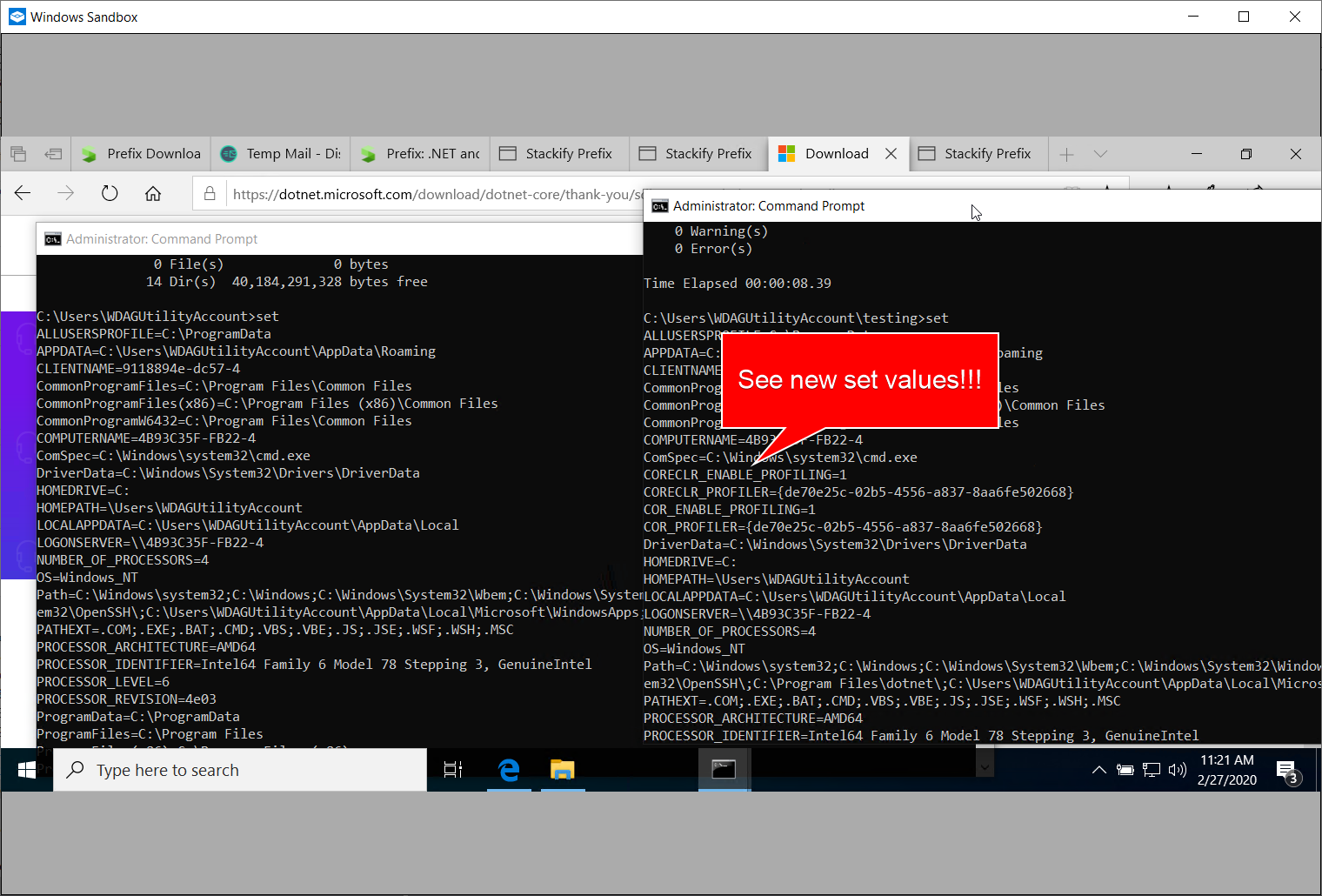
@hoyosjs I found the process that caused this issue just before this post! We had installed stackify prefix on our machines and that added that flag to system. Thanks to Windows Sandbox feature that I could find the issue very quickly!! I had already uninstalled prefix very long time but seems that it didn't remove these entries.
Jay1305
on 27 Feb 2020
Related issues
 jchannon
·
3Comments
jchannon
·
3Comments
 bencz
·
3Comments
bencz
·
3Comments
 iCodeWebApps
·
3Comments
iCodeWebApps
·
3Comments
 jzabroski
·
3Comments
jzabroski
·
3Comments
 GitAntoinee
·
3Comments
GitAntoinee
·
3Comments
Most helpful comment
@hoyosjs I found the process that caused this issue just before this post! We had installed stackify prefix on our machines and that added that flag to system. Thanks to Windows Sandbox feature that I could find the issue very quickly!! I had already uninstalled prefix very long time but seems that it didn't remove these entries.