Runtime: Libraries Build and VS Experience Changes
Libraries Build will now be using dotnet sdk outerbuild and innerbuild infrastructure to build the BCL.
Configurations.props file will no longer be required. TargetFrameworks can be directly used instead of BuildConfigurations.
I will just summarize the build and VS experience changes for the dotnet community.
Build Changes
- We are no longer overloading the configuration property. The only allowable configurations are Debug and Release. ConfigurationGroup property is replaced by Configuration.
- TargetGroup property has also been removed. We will use the Target Framework and TargetFrameworkSuffix(refers to the OSGroup in the TargetFrameworks if present) properties in the csproj file to specify the conditions. You can also still keep using TargetsWindows\Unix\Linux properties.
BuildTargetFramework is the new property which will be used for vertical build. For Building Individual Projects, you can use either TargetFramework or BuildTargetFramework to build against a specific TargetFramework.
The default is netcoreapp5.0.
TargetFramework can only be used to build one project. It cannot be used to build more than one projects and it can contain an osgroup as well eg you can build the project /p:TargetFramework=netcoreapp5.0-windows_NT. It will result in sdk running only the innerBuild for specified framework.
BuildTargetFramework can be used for a vertical build as well as for individual project build. In case of an individual project it will result in outerBuild triggering an innerBuild by setting the TargetFramework to best supported framework. - BuildConfigurations are replaced by TargetFrameworks property. Currently we will always have to use TargetFrameworks property in our csprojs to specify the supported frameworks even if its only one. (TargetFramework in csproj file wont work)
- PackageConfigurations have also been removed. By default all TargetFrameworks will be included in the package. You can remove the TargetFramework from a package by specifically setting ExcludeFromPackage property = true for the specific targetFramework. Eg
<ExcludeFromPackage Condition="'$(TargetFramework)' != 'netstandard2.0'">true</ExcludeFromPackage>
- There hasn’t been any change in how we build our allConfigurations leg
VS Experience Changes
- Editor experience has improved as you will now able to choose the TargetFramework from the dropdown menu for individual files.
- By default, the vs builds all netcoreapp5.0 TargetFrameworks i.e if a project builds for netcoreapp5.0-WindowsNT, netcoreapp5.0-Unix, Building the project from the VS will result in building for both the target Frameworks.
However, you can build for more TargetFrameworks by setting AdditionalBuildTargetFrameworks property. - The testing experience is mostly the same i.e launch with -VS switch and debug or run tests using test explorer.
Some Benefits Besides Cleanup
- This is the first step towards enabling restore for src and ref csprojs and removing deprojs.
- We can use now common msbuild properties with coreclr and installer subsets eg Earlier we were using ConfigurationGroup and everything else was using Configuration.
- We can now enable running tests in VS for net472.
The build is faster.
@ericstj @ViktorHofer @safern feel free to edit and add benefits.
PR making the change https://github.com/dotnet/runtime/pull/1787
cc @danmosemsft
 Anipik
All 39 comments
Yay - especially for the Visual Studio improvements.
 danmosemsft
on 5 Feb 2020
danmosemsft
on 5 Feb 2020
By default, the vs builds all netcoreapp5.0 targetFrameworks i.e if a project builds for netcoreapp5.0-windowsNT, netcoreapp5.0-unix, Building the project from the VS will result in building for both the target Frameworks.
What about netstandard2.0 and 2.1? Aren't those implicit as well?
 ViktorHofer
on 5 Feb 2020
ViktorHofer
on 5 Feb 2020
FYI: I just pinned the issue so that it is visible.
 safern
on 5 Feb 2020
safern
on 5 Feb 2020
I changed the title to indicate that this is only about libraries (for now).
ViktorHofer
on 5 Feb 2020
What's the current workflow to run a specific test suite?
e.g. I follow the doc: https://github.com/dotnet/runtime/blob/master/docs/workflow/testing/libraries/testing.md#running-tests-on-the-command-line, e.g.:
cd src/libraries/System.Collections.Immutable/tests && \
dotnet msbuild /t:RebuildAndTest /p:Configuration=Release
I get
error NETSDK1013: The TargetFramework value '' was not recognized.
if I specify /p:TargetFramework=netcoreapp5.0 I get
error NETSDK1042: Could not load PlatformManifest from '/Users/egorbo/prj/runtime/artifacts/bin/testhost/netcoreapp5.0-OSX-Debug-x64/shared/Microsoft.NETCore.App/5.0.0/PlatformManifest.txt' because it did not exist.
 EgorBo
on 6 Feb 2020
EgorBo
on 6 Feb 2020
Could not load PlatformManifest
This sounds like you haven't built libraries with a Release configuration from root first: .\libraries.cmd -c Release.
ViktorHofer
on 6 Feb 2020
Could not load PlatformManifest
This sounds like you haven't built libraries with a Release configuration from root first:
.\libraries.cmd -c Release.
Didn't help 😢
EgorBo
on 6 Feb 2020
error NETSDK1042: Could not load PlatformManifest from '/Users/egorbo/prj/runtime/artifacts/bin/testhost/netcoreapp5.0-OSX-Debug-x64/shared/Microsoft.NETCore.App/5.0.0/PlatformManifest.txt' because it did not exist.
The path is searching on Debug. Can you confirm you're passing down /p:Configuration=Release
safern
on 6 Feb 2020
I got a very similar error.
git clone https://github.com/dotnet/runtime
cd runtime
build -c Release
cd .\src\libraries\System.Net.Sockets\
dotnet msbuild /p:Configuration=Release
PS C:\Projects\runtime\src\libraries\System.Net.Sockets> dotnet msbuild /p:Configuration=Release                                                        Microsoft (R) Build Engine version 16.3.0+0f4c62fea for .NET Core
Copyright (C) Microsoft Corporation. All rights reserved.

  System.Runtime -> C:\Projects\runtime\artifacts\bin\System.Runtime\ref\netcoreapp5.0-Debug\System.Runtime.dll
  System.IO.FileSystem.Primitives -> C:\Projects\runtime\artifacts\bin\System.IO.FileSystem.Primitives\ref\netcoreapp5.0-Debug\System.IO.FileSystem.Primitives.dll
  System.Collections -> C:\Projects\runtime\artifacts\bin\System.Collections\ref\netcoreapp5.0-Debug\System.Collections.dll
  Microsoft.Win32.Primitives -> C:\Projects\runtime\artifacts\bin\Microsoft.Win32.Primitives\ref\netcoreapp5.0-Debug\Microsoft.Win32.Primitives.dll
  System.Runtime.InteropServices -> C:\Projects\runtime\artifacts\bin\System.Runtime.InteropServices\ref\netcoreapp5.0-Debug\System.Runtime.InteropServices.dll
  System.Memory -> C:\Projects\runtime\artifacts\bin\System.Memory\ref\netcoreapp5.0-Debug\System.Memory.dll
  System.Net.Primitives -> C:\Projects\runtime\artifacts\bin\System.Net.Primitives\ref\netcoreapp5.0-Debug\System.Net.Primitives.dll
  System.Net.Sockets -> C:\Projects\runtime\artifacts\bin\System.Net.Sockets\ref\netcoreapp5.0-Release\System.Net.Sockets.dll
  System.Net.Sockets -> C:\Projects\runtime\artifacts\bin\System.Net.Sockets\netcoreapp5.0-Windows_NT-Release\System.Net.Sockets.dll
C:\Program Files\dotnet\sdk\3.0.100\Sdks\Microsoft.NET.Sdk\targets\Microsoft.NET.ConflictResolution.targets(39,5): error NETSDK1042: Could not load PlatformManifest from 'C:\Projects\runtime\artifacts\bin\testhost\netcoreapp5.0-Windows_NT-Debug-x64\shared\Microsoft.NETCore.App\5.0.0\PlatformManifest.txt' because it did not exist. [C:\Projects\runtime\src\libraries\Common\tests\CoreFx.Private.TestUtilities\CoreFx.Private.TestUtilities.csproj]
 adamsitnik
on 6 Feb 2020
adamsitnik
on 6 Feb 2020
I am looking into it.
Anipik
on 6 Feb 2020
Found the problem BuildConfiguration is being set to a wrong value. I will throw a pr to fix this
Anipik
on 6 Feb 2020
works on my machine though 🗡
C:\git\runtime3\src\libraries\System.Text.RegularExpressions\tests>dotnet build /t:RebuildAndTest
Microsoft (R) Build Engine version 16.3.0+0f4c62fea for .NET Core
Copyright (C) Microsoft Corporation. All rights reserved.

  Restore completed in 326.8 ms for C:\git\runtime3\src\libraries\System.Text.RegularExpressions\tests\System.Text.RegularExpressions.Tests.csproj.
  Restore completed in 326.8 ms for C:\git\runtime3\src\libraries\Common\tests\CoreFx.Private.TestUtilities\CoreFx.Private.TestUtilities.csproj.
  CoreFx.Private.TestUtilities -> C:\git\runtime3\artifacts\bin\CoreFx.Private.TestUtilities\netcoreapp5.0-Debug\CoreFx.Private.TestUtilities.dll
  System.Text.RegularExpressions.Tests -> C:\git\runtime3\artifacts\bin\System.Text.RegularExpressions.Tests\netcoreapp5.0-Debug\System.Text.RegularExpressions.Tests.dll
  ----- start Thu 02/06/2020 19:14:39.77 ===============  To repro directly: =====================================================
  pushd C:\git\runtime3\artifacts\bin\System.Text.RegularExpressions.Tests\netcoreapp5.0-Debug\
  "C:\git\runtime3\artifacts\bin\testhost\netcoreapp5.0-Windows_NT-Debug-x64\dotnet.exe" exec --runtimeconfig System.Text.RegularExpressions.Tests.runtimeconfig.json --depsfile System.Text.RegularExpressions.Tests.deps.json xunit.console.dll System.Text.RegularExpressions.Tests.dll -xml testResults.xml -nologo -notrait category=OuterLoop -notrait category=failing -notrait category=nonnetcoreapptests -notrait category=nonwindowstests
  popd
  ===========================================================================================================
    Discovering: System.Text.RegularExpressions.Tests (method display = ClassAndMethod, method display options = None)
    Discovered:  System.Text.RegularExpressions.Tests (found 181 of 195 test cases)
    Starting:    System.Text.RegularExpressions.Tests (parallel test collections = on, max threads = 8)
    Finished:    System.Text.RegularExpressions.Tests
  === TEST EXECUTION SUMMARY ===
     System.Text.RegularExpressions.Tests  Total: 7147, Errors: 0, Failed: 0, Skipped: 0, Time: 3.528s
  ----- end Thu 02/06/2020 19:14:44.44 ----- exit code 0 ----------------------------------------------------------

Build succeeded.
    0 Warning(s)
    0 Error(s)

Time Elapsed 00:00:09.64
I think it fails just for test projects having reference to Corefx.private.TestUtilities.
Anipik
on 6 Feb 2020
Which is every test project :)
ViktorHofer
on 6 Feb 2020
@EgorBo you should be able to use it both ways with or without targetFramework
C:\git\runtime\src\libraries\System.Collections.Immutable\tests>dotnet msbuild /t:RebuildAndTest /p:Configuration=Release /p:TargetFramework=netcoreapp5.0
Microsoft (R) Build Engine version 16.3.0+0f4c62fea for .NET Core
Copyright (C) Microsoft Corporation. All rights reserved.

  CoreFx.Private.TestUtilities -> C:\git\runtime\artifacts\bin\CoreFx.Private.TestUtilities\netcoreapp5.0-Release\CoreFx.Private.TestUtilities.dll
  System.Collections.Immutable.Tests -> C:\git\runtime\artifacts\bin\System.Collections.Immutable.Tests\netcoreapp5.0-Release\System.Collections.Immutable.Tests.dll
  ----- start Wed 02/12/2020 14:49:47.34 ===============  To repro directly: =====================================================
  pushd C:\git\runtime\artifacts\bin\System.Collections.Immutable.Tests\netcoreapp5.0-Release\
  "C:\git\runtime\artifacts\bin\testhost\netcoreapp5.0-Windows_NT-Release-x64\dotnet.exe" exec --runtimeconfig System.Collections.Immutable.Tests.runtimeconfig.json --depsfile System.Collections.Immutable.Tests.deps.json xunit.console.dll System.Collections.Immutable.Tests.dll -xml testResults.xml -nologo -notrait category=OuterLoop -notrait category=failing -notrait category=nonnetcoreapptests -notrait category=nonwindowstests
  popd
  ===========================================================================================================
    Discovering: System.Collections.Immutable.Tests (method display = ClassAndMethod, method display options = None)
    Discovered:  System.Collections.Immutable.Tests (found 935 of 939 test cases)
    Starting:    System.Collections.Immutable.Tests (parallel test collections = on, max threads = 12)
      System.Collections.Immutable.Tests.ImmutableSortedDictionaryTest.EnumerationPerformance_Empty [SKIP]
        Useful to enable when collecting perf traces
      System.Collections.Immutable.Tests.ImmutableSortedDictionaryTest.EnumerationPerformance [SKIP]
        Useful to enable when collecting perf traces
    Finished:    System.Collections.Immutable.Tests
  === TEST EXECUTION SUMMARY ===
     System.Collections.Immutable.Tests  Total: 1905, Errors: 0, Failed: 0, Skipped: 2, Time: 0.880s
  ----- end Wed 02/12/2020 14:49:49.20 ----- exit code 0 ----------------------------------------------------------
C:\git\runtime\src\libraries\System.Collections.Immutable\tests>dotnet msbuild /t:RebuildAndTest /p:Configuration=Release
Microsoft (R) Build Engine version 16.3.0+0f4c62fea for .NET Core
Copyright (C) Microsoft Corporation. All rights reserved.

  CoreFx.Private.TestUtilities -> C:\git\runtime\artifacts\bin\CoreFx.Private.TestUtilities\netcoreapp5.0-Release\CoreFx.Private.TestUtilities.dll
  System.Collections.Immutable.Tests -> C:\git\runtime\artifacts\bin\System.Collections.Immutable.Tests\netcoreapp5.0-Release\System.Collections.Immutable.Tests.dll
  ----- start Wed 02/12/2020 14:48:21.30 ===============  To repro directly: =====================================================
  pushd C:\git\runtime\artifacts\bin\System.Collections.Immutable.Tests\netcoreapp5.0-Release\
  "C:\git\runtime\artifacts\bin\testhost\netcoreapp5.0-Windows_NT-Release-x64\dotnet.exe" exec --runtimeconfig System.Collections.Immutable.Tests.runtimeconfig.json --depsfile System.Collections.Immutable.Tests.deps.json xunit.console.dll System.Collections.Immutable.Tests.dll -xml testResults.xml -nologo -notrait category=OuterLoop -notrait category=failing -notrait category=nonnetcoreapptests -notrait category=nonwindowstests
  popd
  ===========================================================================================================
    Discovering: System.Collections.Immutable.Tests (method display = ClassAndMethod, method display options = None)
    Discovered:  System.Collections.Immutable.Tests (found 935 of 939 test cases)
    Starting:    System.Collections.Immutable.Tests (parallel test collections = on, max threads = 12)
      System.Collections.Immutable.Tests.ImmutableSortedDictionaryTest.EnumerationPerformance_Empty [SKIP]
        Useful to enable when collecting perf traces
      System.Collections.Immutable.Tests.ImmutableSortedDictionaryTest.EnumerationPerformance [SKIP]
        Useful to enable when collecting perf traces
    Finished:    System.Collections.Immutable.Tests
  === TEST EXECUTION SUMMARY ===
     System.Collections.Immutable.Tests  Total: 1905, Errors: 0, Failed: 0, Skipped: 2, Time: 1.011s
  ----- end Wed 02/12/2020 14:48:24.89 ----- exit code 0 ----------------------------------------------------------
@adamsitnik your case is slightly different, you are trying to build the project using a .sln, the workflow for that is slightly different. It generates temp sln files which includes the debug and release configs for project dependencies but not for project references which results in GlobalConfiguration being removed from the project references. I am trying to find a way to fix this. But if you build the test project you will be fine.
@ViktorHofer this will occur for every test project when we build it from the .sln file
C:\git\runtime\src\libraries\System.Text.RegularExpressions>dotnet msbuild /p:Configuration=release
Microsoft (R) Build Engine version 16.3.0+0f4c62fea for .NET Core
Copyright (C) Microsoft Corporation. All rights reserved.

  System.Runtime -> C:\git\runtime\artifacts\bin\System.Runtime\ref\netcoreapp5.0-Debug\System.Runtime.dll
  System.Security.Principal -> C:\git\runtime\artifacts\bin\System.Security.Principal\ref\netcoreapp5.0-Debug\System.Security.Principal.dll
  System.Runtime.Extensions -> C:\git\runtime\artifacts\bin\System.Runtime.Extensions\ref\netcoreapp5.0-Debug\System.Runtime.Extensions.dll
  System.Collections.NonGeneric -> C:\git\runtime\artifacts\bin\System.Collections.NonGeneric\ref\netcoreapp5.0-Debug\System.Collections.NonGeneric.dll
  System.Reflection.Primitives -> C:\git\runtime\artifacts\bin\System.Reflection.Primitives\ref\netcoreapp5.0-Debug\System.Reflection.Primitives.dll
  System.Collections -> C:\git\runtime\artifacts\bin\System.Collections\ref\netcoreapp5.0-Debug\System.Collections.dll
  System.Runtime.InteropServices -> C:\git\runtime\artifacts\bin\System.Runtime.InteropServices\ref\netcoreapp5.0-Debug\System.Runtime.InteropServices.dll
  System.Reflection.Emit.ILGeneration -> C:\git\runtime\artifacts\bin\System.Reflection.Emit.ILGeneration\ref\netcoreapp5.0-Debug\System.Reflection.Emit.ILGeneration.dll
  System.Text.RegularExpressions -> C:\git\runtime\artifacts\bin\System.Text.RegularExpressions\ref\netcoreapp5.0-Release\System.Text.RegularExpressions.dll
  System.Text.RegularExpressions -> C:\git\runtime\artifacts\bin\System.Text.RegularExpressions\netcoreapp5.0-Release\System.Text.RegularExpressions.dll
C:\Program Files\dotnet\sdk\3.0.100\Sdks\Microsoft.NET.Sdk\targets\Microsoft.NET.ConflictResolution.targets(39,5): error NETSDK1042: Could not load PlatformManifest from 'C:\git\runtime\artifacts\bin\testhost\netcoreapp5.0-Windows_NT-Debug-x64\shared\Microsoft.NETCore.App\5.0.0\PlatformManifest.txt' because it did not exist. [C:\git\runtime\src\libraries\Common\tests\CoreFx.Private.TestUtilities\CoreFx.Private.TestUtilities.csproj]
I will create a separate issue to track the .sln build
Anipik
on 12 Feb 2020
I ran into something that might be relevant to this issue... in one particular scenario, tests ran from Test Explorer in VS will fail, although they succeed when ran from the command line. The scenario is when there are overloads of a test method with the same name, but distinct parameters (number or type), e.g. System.Text.Json has the following test methods, one with no parameters, one with a single string:
[Fact]
public static void ReadKeyValuePairOfKeyValuePair()
{
    KeyValuePair<string, KeyValuePair<int, int>> input = JsonSerializer.Deserialize<KeyValuePair<string, KeyValuePair<int, int>>>(@"{""Key"":""Key"", ""Value"":{""Key"":1, ""Value"":2}}");

    Assert.Equal("Key", input.Key);
    Assert.Equal(1, input.Value.Key);
    Assert.Equal(2, input.Value.Value);
}

[Theory]
[InlineData(@"{""Key"":""Key"", ""Value"":{""Key"":1, ""Value"":2}}")]
[InlineData(@"{""Key"":""Key"", ""Value"":{""Value"":2, ""Key"":1}}")]
[InlineData(@"{""Value"":{""Key"":1, ""Value"":2}, ""Key"":""Key""}")]
[InlineData(@"{""Value"":{""Value"":2, ""Key"":1}, ""Key"":""Key""}")]
public static void ReadKeyValuePairOfKeyValuePair(string json)
{
    KeyValuePair<string, KeyValuePair<int, int>> input = JsonSerializer.Deserialize<KeyValuePair<string, KeyValuePair<int, int>>>(json);

    Assert.Equal("Key", input.Key);
    Assert.Equal(1, input.Value.Key);
    Assert.Equal(2, input.Value.Value);
}
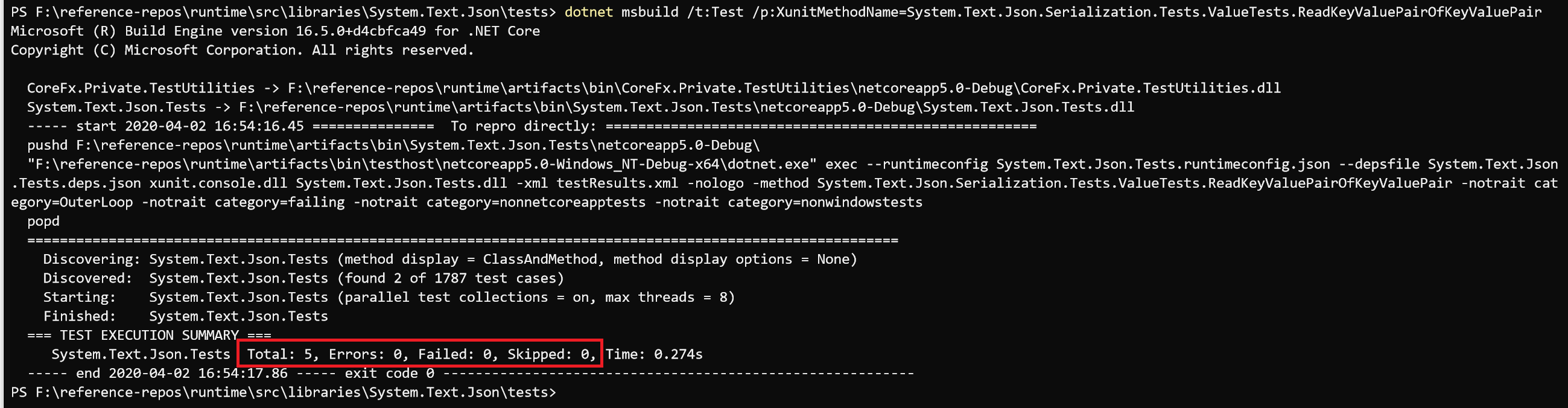
This is what I get running tests from the command line:
And this is what I get running them in VS with Test Explorer (after launching it with .\build.cmd -vs System.Text.Json):
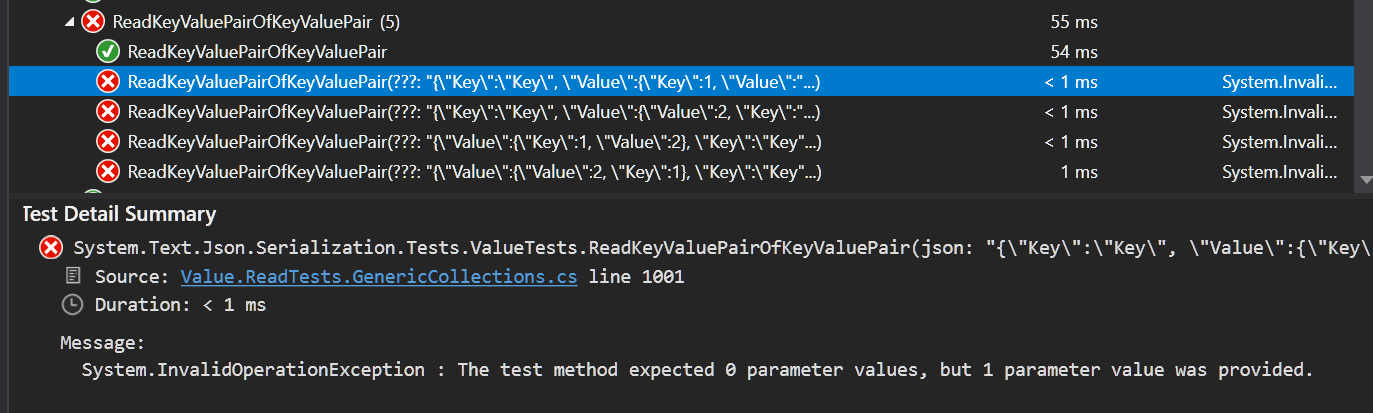
This is by design in XUnit. I guess it applies only to the VS test runner, since running the tests from command line works (and I'd imagine XUnit is also involved in that case...?). So maybe there should be guidance to not define tests with the same name and different parameters?
 alexvy86
on 3 Apr 2020
alexvy86
on 3 Apr 2020
So maybe there should be guidance to not define tests with the same name and different parameters?
@alexvy86 we wouldn't have a problem with that, but ideally there'd be a way to make it fail on the command line so we stayed in a clean state. All our validation, CI etc is command line.
danmosemsft
on 3 Apr 2020
@danmosemsft right, I agree that's a better objective... I'm still curious as to why tests run successfully in that case, I guessed that the issue might be in the VS runner, but all discussions I could find in Github make me think the decision is at the core of xUnit, and thus that this scenario should also fail... I'll try to dive into the engineering infrastructure to see why that might be. If you have any pointers (e.g. is something special being done to run tests from the command line?), I'd appreciate them.
alexvy86
on 3 Apr 2020
@alexvy86 I do not. @ViktorHofer has more familiarity with this.
danmosemsft
on 3 Apr 2020
So, quick update... There's an xUnit analyzer rule for this "issue" that flags it as an error, but it is disabled explicitly in the runtime. The history in this repo doesn't have a reason for it.
Then this comment suggests that it's important to listen to that analyzer rule because different runners could behave differently (although I'm not sure why that should be the case).
I'll try to understand more about the differences between xUnit's VS runner and its console runner and come back with any findings.
alexvy86
on 3 Apr 2020
I can't see the full history but it is likely only disabled because we have not had time to make it run clean. We enabled a bunch of analyzers at once and are enabling their rules one at a time as they are made clean. I'm sure we would be happy to have a PR to do that for this rule!
danmosemsft
on 3 Apr 2020
What Dan said. We kept this disabled as it only impacted VS Test Explorer. Unsure how many tests would hit this, hundreds?
ViktorHofer
on 3 Apr 2020
Yeah, I'd imagine a lot. I was only looking at System.Text.Json when I ran into this and at a glance, I counted 45 failing test cases.
I'd be happy to start putting some time into this though. I can re-enable the rule locally and start pushing PRs for each library, purely for renaming the offending test methods. Should I create a "central issue" to track against?
alexvy86
on 3 Apr 2020
@alexvy86 that would be welcome! yes, a single issue would be good - I think it would probably be simplest to make all the changes (and enable the rule) in a single PR.
danmosemsft
on 3 Apr 2020
Or, if the work is too large, potentially you could do a few projects at a time and enable the rule on each as you go along.
danmosemsft
on 3 Apr 2020
Alright! I'll create the issue later today and start working on it.
I can do a single PR, but since it would touch a lot of different places I thought that might complicate reviews and approvals? I don't know if code owner approvals are required in this repo.
alexvy86
on 3 Apr 2020
Since we're just talking about renaming test methods it should be possible for any one of us to review the whole thing. If there are distinct parts then separate commits might be helpful.
danmosemsft
on 3 Apr 2020
@alexvy86 now your PR is merged, how is the VS experience? Do most (all?) test projects run clean in VS now for you?
danmosemsft
on 8 Apr 2020
@danmosemsft it's hard to say, I've only tried opening a few in VS, and lately I've been running into new issues with that. At some point I was able to run tests for System.Text.Json in VS, that's how I took some of the initial screenshots, but right now test discovery is failing.
---------- Starting test discovery ----------
Microsoft.VisualStudio.TestPlatform.ObjectModel.TestPlatformException: Testhost process exited with error: Error:
  An assembly specified in the application dependencies manifest (Microsoft.NETCore.App.deps.json) was not found:
    package: 'Microsoft.NETCore.App', version: '5.0.0'
    path: 'runtimes/rid/lib/netcoreapp0.0/System.ComponentModel.TypeConverter.dll'
. Please check the diagnostic logs for more information.
   at Microsoft.VisualStudio.TestPlatform.CrossPlatEngine.Client.ProxyOperationManager.ThrowOnTestHostExited(Boolean testHostExited)
   at Microsoft.VisualStudio.TestPlatform.CrossPlatEngine.Client.ProxyOperationManager.SetupChannel(IEnumerable`1 sources, String runSettings)
   at Microsoft.VisualStudio.TestPlatform.CrossPlatEngine.Client.ProxyDiscoveryManager.DiscoverTests(DiscoveryCriteria discoveryCriteria, ITestDiscoveryEventsHandler2 eventHandler)
========== Test discovery aborted: 0 Tests found in 392 ms ==========
System.ComponentModel.TypeConverter takes a ton of time discovering tests... Once I was able to debug one particular test, but ever since when I try to debug it, breakpoints won't get hit (they say symbols are not loaded for the project... but it is the project that I have open in VS!), and complains about missing symbols for something related to xUnit, after an Assert already failed.
I'm not sure how much of this is messed up configuration in my machine/environment and how much related to changes in the repo. I'll keep playing around with all of this and post any updates.
alexvy86
on 8 Apr 2020
OK, thanks. It would be great to enumerate issues and perhaps we can keep making progress.
danmosemsft
on 8 Apr 2020
Of note, I haven't gone back to master, all of this is in the branch I created for the PR. I'll start testing back in master now that it got merged.
alexvy86
on 8 Apr 2020
Note there were some recent changes to how building is done: https://github.com/dotnet/runtime/issues/33821
You may want to git clean -fdx after pulling, and use the new commands own.
danmosemsft
on 8 Apr 2020
System.ComponentModel.TypeConverter takes a ton of time discovering tests...
Maybe you built coreclr in Debug mode?
Note that you also need to install the latest daily build of the SDK once you pull from master as we updated the SDK we list in the global.json. https://github.com/dotnet/installer/blob/master/README.md#installers-and-binaries
safern
on 8 Apr 2020
Maybe you built coreclr in Debug mode?
I did at the beginning, yes, but after noticing that test runs in many projects were taking longer than I though they would, I noticed the issue and built the Release version. Tests started running faster, and I thought I was fine, but maybe something (in VS?) was still using the Debug version.
I just installed the latest SDK after reading about it in the announcement, I'll keep playing around with the scenarios that I already saw working and report any problems I encounter.
alexvy86
on 8 Apr 2020
So I cleaned up with git clean -fdx, I pulled master, built CoreCLR in Release mode (.\build.cmd clr -c Release), then built the libraries in Debug mode (.\build.cmd libs), and 33 of them errored out complaining about missing Debug-mode artifacts from CoreCLR in \artifacts\bin\coreclr\Windows_NT.x64.Debug\. I thought working on the libraries should be possible building CoreCLR in Release mode, right?
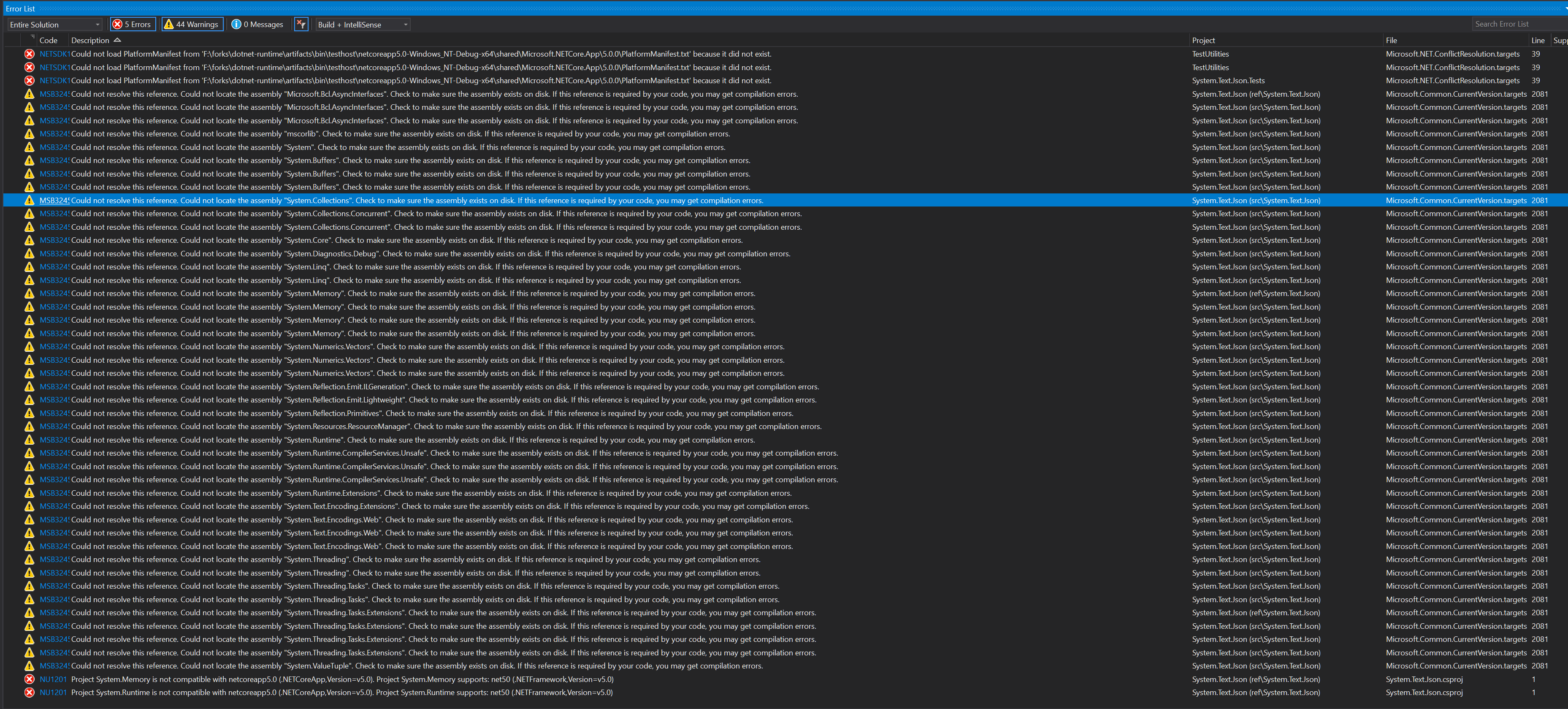
Now, System.Text.Json is one of the libraries that succeeded the build, so I then opened it in VS 16.5.2 (.\build.cmd -vs System.Text.Json), tried to build the solution in Debug mode through the context menu, and got warnings and errors about missing assemblies (most of them from the list of libraries whose build failed above, but also others):
I also tried building System.ComponentModel.TypeConverter from VS and got similar, if fewer, errors:

Just to get more data, I built the libraries in Release mode (\build.cmd libs -c Release) and that succeeded. But even then, building the System.Text.Json solution in VS (I tried Debug and Release this time) failed.
I tried looking at commonalities for the library projects whose Debug build failed, and this is a shot in the dark but they all have this in their csproj file:
<ItemGroup>
  <ReferenceFromRuntime Include="System.Private.CoreLib" />
</ItemGroup>
Since I read that CoreLib is pretty tied to the runtime and they need to be built in the same configuration, maybe that has something to do with it?
alexvy86
on 9 Apr 2020
then built the libraries in Debug mode (.build.cmd libs)
I think you missed passing -runtimeConfiguration Release. Also you need to pass this to build.cmd -vs command, that way projects that have a ReferenceFromRuntime find the right coreclr path.
safern
on 9 Apr 2020
Some of the intellisense iand testing issues are resolved by https://github.com/dotnet/runtime/pull/34721
Anipik
on 9 Apr 2020
I think you missed passing -runtimeConfiguration Release. Also you need to pass this to build.cmd -vs command, that way projects that have a ReferenceFromRuntime find the right coreclr path.
Ah, that's what -runtimeConfiguration is for, it makes sense now. It partially helped, the Debug-mode command line build of the libraries succeeded, but once in VS I get weird behavior (this is System.Text.Json):
A Rebuild on the solution or any of the projects supposedly succeeds:
1>------ Rebuild All started: Project: System.Text.Json (ref\System.Text.Json), Configuration: Debug Any CPU ------
2>------ Rebuild All started: Project: TestUtilities, Configuration: Debug Any CPU ------
1>System.Text.Json -> F:\forks\dotnet-runtime\artifacts\bin\System.Text.Json\ref\netcoreapp5.0-Debug\System.Text.Json.dll
2>TestUtilities -> F:\forks\dotnet-runtime\artifacts\bin\TestUtilities\netcoreapp5.0-Debug\TestUtilities.dll
3>------ Rebuild All started: Project: System.Text.Json (src\System.Text.Json), Configuration: Debug Any CPU ------
3>System.Text.Json -> F:\forks\dotnet-runtime\artifacts\bin\System.Text.Json\netcoreapp5.0-Debug\System.Text.Json.dll
4>------ Rebuild All started: Project: System.Text.Json.Tests, Configuration: Debug Any CPU ------
4>System.Text.Json.Tests -> F:\forks\dotnet-runtime\artifacts\bin\System.Text.Json.Tests\netcoreapp5.0-Debug\System.Text.Json.Tests.dll
========== Rebuild All: 4 succeeded, 0 failed, 0 skipped ==========
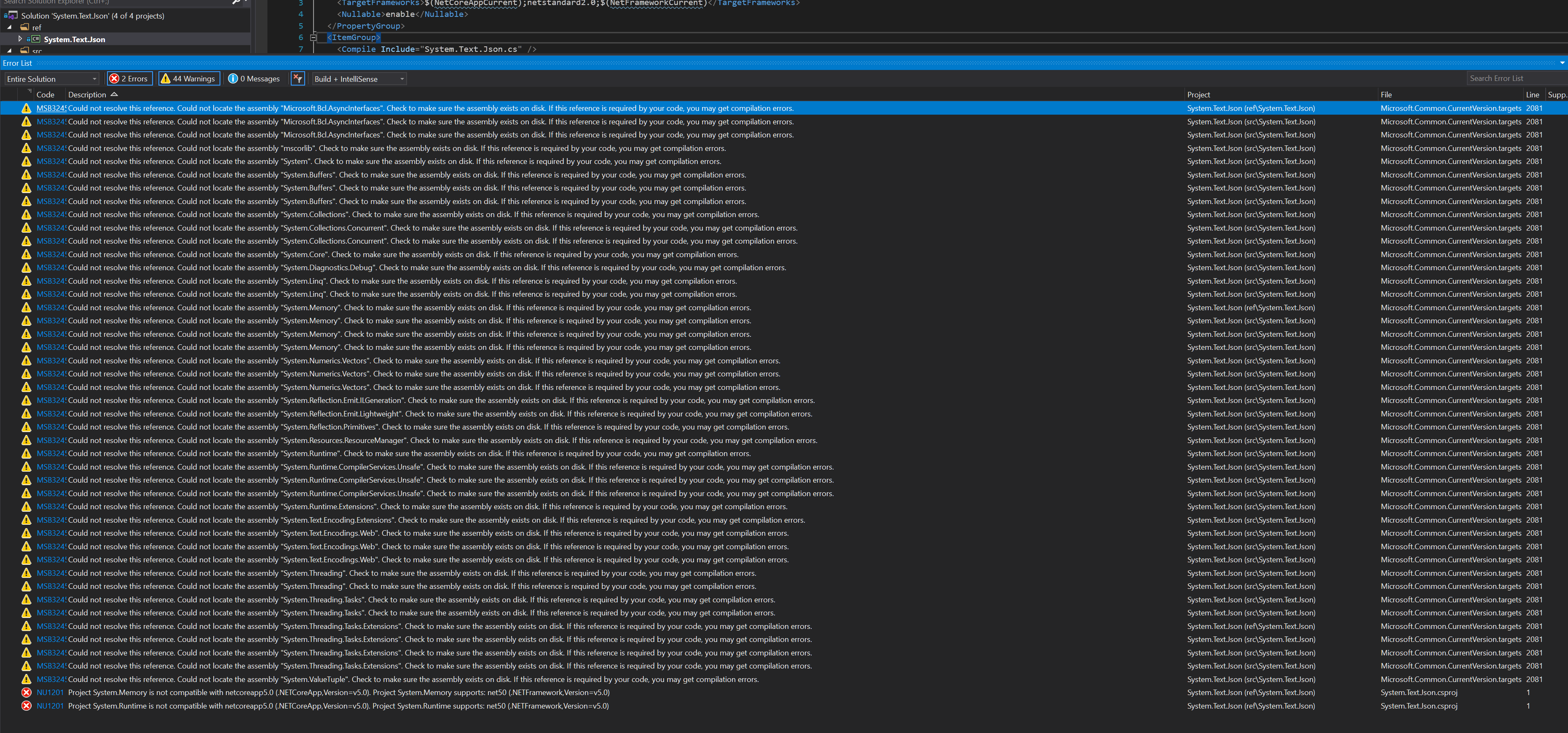
But a Build of the solution or any of the projects fails and shows these warnings/errors:
1>------ Build started: Project: System.Text.Json (ref\System.Text.Json), Configuration: Debug Any CPU ------
2>------ Build started: Project: TestUtilities, Configuration: Debug Any CPU ------
1>F:\forks\dotnet-runtime\src\libraries\System.Text.Json\ref\System.Text.Json.csproj : error NU1201: Project System.Memory is not compatible with netcoreapp5.0 (.NETCoreApp,Version=v5.0). Project System.Memory supports: net50 (.NETFramework,Version=v5.0)
1>F:\forks\dotnet-runtime\src\libraries\System.Text.Json\ref\System.Text.Json.csproj : error NU1201: Project System.Runtime is not compatible with netcoreapp5.0 (.NETCoreApp,Version=v5.0). Project System.Runtime supports: net50 (.NETFramework,Version=v5.0)
1>Done building project "System.Text.Json.csproj" -- FAILED.
3>------ Build started: Project: System.Text.Json (src\System.Text.Json), Configuration: Debug Any CPU ------
3>System.Text.Json -> F:\forks\dotnet-runtime\artifacts\bin\System.Text.Json\netcoreapp5.0-Debug\System.Text.Json.dll
2>TestUtilities -> F:\forks\dotnet-runtime\artifacts\bin\TestUtilities\netcoreapp5.0-Debug\TestUtilities.dll
4>------ Build started: Project: System.Text.Json.Tests, Configuration: Debug Any CPU ------
4>System.Text.Json.Tests -> F:\forks\dotnet-runtime\artifacts\bin\System.Text.Json.Tests\netcoreapp5.0-Debug\System.Text.Json.Tests.dll
========== Build: 3 succeeded, 1 failed, 0 up-to-date, 0 skipped ==========
Even after a supposedly successful rebuild, Test Explorer is not reporting any tests, and if I click on Run All Tests it complains of a failed build.
So I went to the two projects that complain about "not being compatible with netcoreapp5.0". I opened System.Memory with VS and building throws these issues (duplicate frameworks?):

System.Runtime throws these (a missing CompileDesignTime target, and looking for a Unix artifacts folder?):

Haven't been able to figure them out, so posting them here in case they ring a bell for anyone.
alexvy86
on 9 Apr 2020
Ah the "duplicate frameworks" issue is already tracked in https://github.com/dotnet/runtime/issues/32205
alexvy86
on 9 Apr 2020
Related issues
 chunseoklee
·
3Comments
chunseoklee
·
3Comments
 bencz
·
3Comments
bencz
·
3Comments
 jzabroski
·
3Comments
jzabroski
·
3Comments
 aggieben
·
3Comments
aggieben
·
3Comments
 matty-hall
·
3Comments
matty-hall
·
3Comments