Runtime: System.Net.Mail.Tests.SmtpClientTest.TestZeroTimeout hangs in CI
System.Net.Mail.Functional.Tests Work Item
Console Log Summary
===========================================================================================================
/root/helix/work/workitem /root/helix/work/workitem
  Discovering: System.Net.Mail.Functional.Tests (method display = ClassAndMethod, method display options = None)
  Discovered:  System.Net.Mail.Functional.Tests (found 145 of 146 test cases)
  Starting:    System.Net.Mail.Functional.Tests (parallel test collections = on, max threads = 2)
   System.Net.Mail.Functional.Tests: [Long Running Test] 'System.Net.Mail.Tests.SmtpClientTest.TestZeroTimeout', Elapsed: 00:02:10
   System.Net.Mail.Functional.Tests: [Long Running Test] 'System.Net.Mail.Tests.SmtpClientTest.TestZeroTimeout', Elapsed: 00:04:10
Process terminated. TestZeroTimeout
   at System.Environment.FailFast(System.String)
   at System.Net.Mail.Tests.SmtpClientTest.TestZeroTimeout()
   at System.RuntimeMethodHandle.InvokeMethod(System.Object, System.Object[], System.Signature, Boolean, Boolean)
   at System.Reflection.RuntimeMethodInfo.Invoke(System.Object, System.Reflection.BindingFlags, System.Reflection.Binder, System.Object[], System.Globalization.CultureInfo)
   at System.Reflection.MethodBase.Invoke(System.Object, System.Object[])
   at Xunit.Sdk.TestInvoker`1[[System.__Canon, System.Private.CoreLib, Version=5.0.0.0, Culture=neutral, PublicKeyToken=7cec85d7bea7798e]].CallTestMethod(System.Object)
   at Xunit.Sdk.TestInvoker`1+<>c__DisplayClass48_1+<<InvokeTestMethodAsync>b__1>d[[System.__Canon, System.Private.CoreLib, Version=5.0.0.0, Culture=neutral, PublicKeyToken=7cec85d7bea7798e]].MoveNext()
   at System.Runtime.CompilerServices.AsyncMethodBuilderCore.Start[[Xunit.Sdk.TestInvoker`1+<>c__DisplayClass48_1+<<InvokeTestMethodAsync>b__1>d[[System.__Canon, System.Private.CoreLib, Version=5.0.0.0, Culture=neutral, PublicKeyToken=7cec85d7bea7798e]], xunit.execution.dotnet, Version=2.4.1.0, Culture=neutral, PublicKeyToken=8d05b1bb7a6fdb6c]](<<InvokeTestMethodAsync>b__1>d<System.__Canon> ByRef)
   at System.Runtime.CompilerServices.AsyncTaskMethodBuilder.Start[[Xunit.Sdk.TestInvoker`1+<>c__DisplayClass48_1+<<InvokeTestMethodAsync>b__1>d[[System.__Canon, System.Private.CoreLib, Version=5.0.0.0, Culture=neutral, PublicKeyToken=7cec85d7bea7798e]], xunit.execution.dotnet, Version=2.4.1.0, Culture=neutral, PublicKeyToken=8d05b1bb7a6fdb6c]](<<InvokeTestMethodAsync>b__1>d<System.__Canon> ByRef)
   at Xunit.Sdk.TestInvoker`1+<>c__DisplayClass48_1[[System.__Canon, System.Private.CoreLib, Version=5.0.0.0, Culture=neutral, PublicKeyToken=7cec85d7bea7798e]].<InvokeTestMethodAsync>b__1()
   at Xunit.Sdk.ExecutionTimer+<AggregateAsync>d__4.MoveNext()
   at System.Runtime.CompilerServices.AsyncMethodBuilderCore.Start[[Xunit.Sdk.ExecutionTimer+<AggregateAsync>d__4, xunit.execution.dotnet, Version=2.4.1.0, Culture=neutral, PublicKeyToken=8d05b1bb7a6fdb6c]](<AggregateAsync>d__4 ByRef)
   at System.Runtime.CompilerServices.AsyncTaskMethodBuilder.Start[[Xunit.Sdk.ExecutionTimer+<AggregateAsync>d__4, xunit.execution.dotnet, Version=2.4.1.0, Culture=neutral, PublicKeyToken=8d05b1bb7a6fdb6c]](<AggregateAsync>d__4 ByRef)
   at Xunit.Sdk.ExecutionTimer.AggregateAsync(System.Func`1<System.Threading.Tasks.Task>)
   at Xunit.Sdk.TestInvoker`1+<>c__DisplayClass48_1[[System.__Canon, System.Private.CoreLib, Version=5.0.0.0, Culture=neutral, PublicKeyToken=7cec85d7bea7798e]].<InvokeTestMethodAsync>b__0()
   at Xunit.Sdk.ExceptionAggregator+<RunAsync>d__9.MoveNext()
   at System.Runtime.CompilerServices.AsyncMethodBuilderCore.Start[[Xunit.Sdk.ExceptionAggregator+<RunAsync>d__9, xunit.core, Version=2.4.1.0, Culture=neutral, PublicKeyToken=8d05b1bb7a6fdb6c]](<RunAsync>d__9 ByRef)
   at System.Runtime.CompilerServices.AsyncTaskMethodBuilder.Start[[Xunit.Sdk.ExceptionAggregator+<RunAsync>d__9, xunit.core, Version=2.4.1.0, Culture=neutral, PublicKeyToken=8d05b1bb7a6fdb6c]](<RunAsync>d__9 ByRef)
   at Xunit.Sdk.ExceptionAggregator.RunAsync(System.Func`1<System.Threading.Tasks.Task>)
   at Xunit.Sdk.TestInvoker`1+<InvokeTestMethodAsync>d__48[[System.__Canon, System.Private.CoreLib, Version=5.0.0.0, Culture=neutral, PublicKeyToken=7cec85d7bea7798e]].MoveNext()
Eventually leads to core dump
./RunTests.sh: line 161:    21 Aborted                 (core dumped) "$RUNTIME_PATH/dotnet" exec --runtimeconfig System.Net.Mail.Functional.Tests.runtimeconfig.json --depsfile System.Net.Mail.Functional.Tests.deps.json xunit.console.dll System.Net.Mail.Functional.Tests.dll -xml testResults.xml -nologo -nocolor -notrait category=IgnoreForCI -notrait category=OuterLoop -notrait category=failing -notrait category=nonnetcoreapptests -notrait category=nonlinuxtests $RSP_FILE
/root/helix/work/workitem
----- end Tue Feb 4 11:52:04 UTC 2020 ----- exit code 134 ----------------------------------------------------------
exit code 134 means SIGABRT Abort. Managed or native assert, or runtime check such as heap corruption, caused call to abort(). Core dumped.
Builds
|Build|Pull Request | Test Failure Count|
| --- | --- | --- |
|#505231|#2052|1|
|#507937|#1787|30|
|#508637|Rolling|1|
|#508988|Rolling|2|
Configurations
- netcoreapp5.0-Linux-Debug-x64-Mono_release-RedHat.7.Amd64.Open
- netcoreapp5.0-Linux-Release-x64-CoreCLR_release-(Alpine.311.Amd64.Open)ubuntu.1604.amd64.Open@mcr.microsoft.com/dotnet-buildtools/prereqs:alpine-3.11-helix-bfcd90a-20200123191053
- netcoreapp5.0-Linux-Release-x64-CoreCLR_release-(Fedora.30.Amd64.Open)ubuntu.1604.amd64.open@mcr.microsoft.com/dotnet-buildtools/prereqs:fedora-30-helix-4f8cef7-20200121150022
- netcoreapp5.0-Linux-Release-x64-CoreCLR_release-(Ubuntu.1910.Amd64.Open)ubuntu.1604.amd64.open@mcr.microsoft.com/dotnet-buildtools/prereqs:ubuntu-19.10-helix-amd64-cfcfd50-20191030180623
- netcoreapp5.0-OSX-Debug-x64-CoreCLR_checked-OSX.1013.Amd64.Open
- netcoreapp5.0-OSX-Debug-x64-CoreCLR_release-OSX.1013.Amd64.Open
- netcoreapp5.0-OSX-Debug-x64-CoreCLR_release-OSX.1014.Amd64.Open
- netcoreapp5.0-OSX-Debug-x64-Mono_release-OSX.1013.Amd64.Open
- netcoreapp5.0-OSX-Debug-x64-Mono_release-OSX.1014.Amd64.Open
- netcoreapp5.0-Windows_NT-Debug-x64-CoreCLR_checked-Windows.10.Amd64.Open
- netcoreapp5.0-Windows_NT-Debug-x64-CoreCLR_release-(Windows.Nano.1809.Amd64.Open)windows.10.amd64.serverrs5.open@mcr.microsoft.com/dotnet-buildtools/prereqs:nanoserver-1809-helix-amd64-08e8e40-20200107182504
- netcoreapp5.0-Windows_NT-Debug-x64-CoreCLR_release-Windows.10.Amd64.Server19H1.ES.Open
- netcoreapp5.0-Windows_NT-Debug-x64-CoreCLR_release-Windows.7.Amd64.Open
- netcoreapp5.0-Windows_NT-Debug-x64-CoreCLR_release-Windows.81.Amd64.Open
- netcoreapp5.0-Windows_NT-Debug-x86-CoreCLR_release-Windows.10.Amd64.Server19H1.Open
- netcoreapp5.0-Windows_NT-Release-x86-CoreCLR_checked-Windows.10.Amd64.Open
- netcoreapp5.0-Windows_NT-Release-x86-CoreCLR_release-Windows.10.Amd64.Server19H1.ES.Open
- netcoreapp5.0-Windows_NT-Release-x86-CoreCLR_release-Windows.7.Amd64.Open
- netcoreapp5.0-Windows_NT-Release-x86-CoreCLR_release-Windows.81.Amd64.Open
Helix Logs
|Build|Pull Request|Console|Core|Test Results|
| --- | --- | --- | --- | --- |
|#505231|#2052|console.cf5d4a18.log|||
|#507937|#1787|console.52c06ff7.log|||
|#507937|#1787|console.8a6875b5.log|||
|#507937|#1787|console.77373743.log|||
|#507937|#1787|console.0fa5991f.log|||
|#507937|#1787|console.b46de469.log|||
|#507937|#1787|console.f47b82b1.log|||
|#507937|#1787|console.d80c958c.log|||
|#507937|#1787|console.3fc3b863.log|||
|#507937|#1787|console.1fc50d75.log|||
|#507937|#1787|console.6201955d.log|||
|#507937|#1787|console.3be7d884.log|||
|#507937|#1787|console.5358a763.log|||
|#507937|#1787|console.14572e15.log|||
|#507937|#1787|console.ca81541b.log|||
|#507937|#1787||||
|#507937|#1787|console.bd751177.log|||
|#507937|#1787||||
|#507937|#1787|console.6311394b.log|||
|#507937|#1787||||
|#507937|#1787|console.2c6f447c.log|||
|#507937|#1787|console.6c139f05.log|||
|#507937|#1787|console.abb6fc5a.log|||
|#507937|#1787|console.918dd10f.log|||
|#507937|#1787|console.c2f0ae3a.log|||
|#507937|#1787|console.a9417280.log|||
|#507937|#1787|console.9a7171ac.log|||
|#507937|#1787|console.7bce9a2f.log|||
|#507937|#1787|console.44857451.log|||
|#507937|#1787|console.d7c6b863.log|||
|#507937|#1787|console.8e713a49.log|||
|#508637|Rolling|console.3fff95b3.log|||
|#508988|Rolling|console.2139154d.log|core.1000.24||
|#508988|Rolling|console.a8515b7c.log|core.1000.58||
 jaredpar
All 45 comments
cc: @tmds
 stephentoub
on 4 Feb 2020
stephentoub
on 4 Feb 2020
@jaredpar, did we successfully get a coredump?
https://github.com/dotnet/runtime/blob/9a8f52c0d4ca2e866642444397e17ee297b9089c/src/libraries/System.Net.Mail/tests/Functional/SmtpClientTest.cs#L330
stephentoub
on 4 Feb 2020
@stephentoub
It doesn't appear like we got a coredump. It's not present in the Work Items info. Also looking through the log it seems like the core just wasn't found on the helix machine at all
exit code 134 means SIGABRT Abort. Managed or native assert, or runtime check such as heap corruption, caused call to abort(). Core dumped.
Looking around for any Linux dump...
... found no dump in /root/helix/work/workitem
+ export '_commandExitCode=134'
@danmosemsft, who's working on ensuring coredumps are working correctly in CI?
stephentoub
on 4 Feb 2020
@dotnet/dnceng @mjanecke who owns the coredump facility in Helix jobs?
 danmosemsft
on 4 Feb 2020
danmosemsft
on 4 Feb 2020
Which build(s) are missing the dump files? I peeked at a couple of the build links noted above and it looks like there are dump files attached to the failing work item.
 missymessa
on 4 Feb 2020
missymessa
on 4 Feb 2020
@mjanecke
You're correct. The code I had for grabbing dump file links was busted (simple Regex error). I've updated the bug with all of the core dump links.
jaredpar
on 4 Feb 2020
Thank you @mjanecke !
danmosemsft
on 4 Feb 2020
@tmds we finally got a dump: https://helix.dot.net/api/2019-06-17/jobs/7eec8737-2b16-4911-a4c3-b5171573bcb1/workitems/System.Net.Mail.Functional.Tests/files/core.1000.21
 ViktorHofer
on 4 Feb 2020
ViktorHofer
on 4 Feb 2020
This unexpected. I thought we had solved this with https://github.com/dotnet/runtime/pull/22867. I will take a look at the dump.
 tmds
on 6 Feb 2020
tmds
on 6 Feb 2020
I tried opening the dump with dotnet dump analyze, but libmscordaccore.so is missing:
$ dotnet dump analyze core.1000.21
Loading core dump: core.1000.21 ...
Ready to process analysis commands. Type 'help' to list available commands or 'help [command]' to get detailed help on a command.
Type 'quit' or 'exit' to exit the session.
> clrstack
Failed to load data access module, 0x80004005
Can not load or initialize libmscordaccore.so. The target runtime may not be initialized.
> setsymbolserver -ms
Added Microsoft public symbol server
> clrstack
Failed to load data access module, 0x80004005
Can not load or initialize libmscordaccore.so. The target runtime may not be initialized.
>
From previous time I looked at a coredump, I think these should be downloaded under ~/.dotnet/symbolcache, but I don't have such a folder.
And an attempt with lldb:
$ lldb core.1000.21
Error: Runtime module (libcoreclr.so) not loaded yet
SetSymbolServer -ms  failed
(lldb) target create "core.1000.21"
Current executable set to 'core.1000.21' (x86_64).
(lldb) clrstack
Failed to find runtime module (libcoreclr.so), 0x80070057
Extension commands need it in order to have something to do.
ClrStack  failed
(lldb)
@mikem8361 do you know how I can make this work?
tmds
on 10 Feb 2020
I'm currently looking into this.
 mikem8361
on 10 Feb 2020
mikem8361
on 10 Feb 2020
You need to use the setclrpath command to set the path to the coreclr/DAC modules because it looks like this is a local/private runtime build so it would be on the symbol server.
mikem8361
on 10 Feb 2020
 jkotas
on 11 Feb 2020
jkotas
on 11 Feb 2020
How are these dumps generated? Is it a "system" Linux dump with the coredump_filter flags set to 0x3f? Looking at the core.1000.21 dump some more makes me think it is missing some of the state lldb (and SOS) needs.
mikem8361
on 11 Feb 2020
You need to use the setclrpath command to set the path to the coreclr/DAC modules because it looks like this is a local/private runtime build so it would be on the symbol server.
To what do I need to set setclrpath? This is a coredump from the CI runs.
Is having .NET Core 3.1 on my system enough, and will other needed bits be downloaded?
Is it a "system" Linux dump with the coredump_filter flags set to 0x3f?
@mjanecke can you answer this for the CI machine?
On my system this is coredump_filter:
$ cat /proc/self/coredump_filter
00000033
Since the CI runs are testing a runtime that hasn't been publish to the symbol servers (I assume), SOS can't download the DAC and needs to know where the runtime binaries are to load libmscordaccore.so. These runtime binaries need tp be downloaded from the CI run somehow if possible and where those runtime binaries are downloaded to is the path for setclrpath.
Or the core dumps generated need to basically be "full" dumps (coredump_filter == 0x3f or 0xff) or setting the createdump env var for the full dump (see createdump). I thought the CI runs were producing useful core dumps in the past but something may have changed because of the all engineering changes.
mikem8361
on 11 Feb 2020
@mjanecke, based on @mikem8361 's comment, we need some infrastructure changes to make the coredumps from CI usable (again). Is this something you can look into?
tmds
on 12 Feb 2020
@dotnet/dnceng @MattGal @epananth Can we turn this work into an FR issue?
missymessa
on 12 Feb 2020
@tmds we create the dump ourselves with MIniDump: https://github.com/dotnet/arcade/blob/master/src/Microsoft.DotNet.RemoteExecutor/src/RemoteInvokeHandle.cs#L152.
As far as I understood, those dumps aren't full dumps. cc @jkotas
These runtime binaries need tp be downloaded from the CI run somehow if possible and where those runtime binaries are downloaded to is the path for setclrpath
You can find the artifacts that we publish under the Summary page in the AzDO Build page.
ViktorHofer
on 12 Feb 2020
@ViktorHofer so everything I need is available for download?
You can find the artifacts that we publish under the Summary page in the AzDO Build page.
Is it on this page somewhere: https://dev.azure.com/dnceng/public/_build/results?buildId=514798&view=results?
tmds
on 12 Feb 2020
Yes, in the "build artifacts uploaded" section. Choose the configuration for which the dump was created and download the CoreCLR artifacts. I admit there are a lot of different artifacts there and it's hard to read. You can display the full artifact name by mouse hovering over an item.
ViktorHofer
on 12 Feb 2020
Got it, so I'm looking for the CoreCLRProduct_linux_x64_checked on https://dev.azure.com/dnceng/public/_build/results?buildId=514798&view=artifacts&type=publishedArtifacts, probably.
How did you find the download link to the coredump you had shared earlier?
tmds
on 12 Feb 2020
I think I got it from the links from the top post. Looks like that specific link is gone now. Can you pick another one where the dump is linked as well, ie the last one in the table?
ViktorHofer
on 12 Feb 2020
Where do the coredumps show up on the azure page?
tmds
on 12 Feb 2020
You can find the dumps here in the initial post. The dumps are gathered from helix and are uploaded as attachments to the test work item failures. You can find them in the "Tests" tab in the AzDO UI:
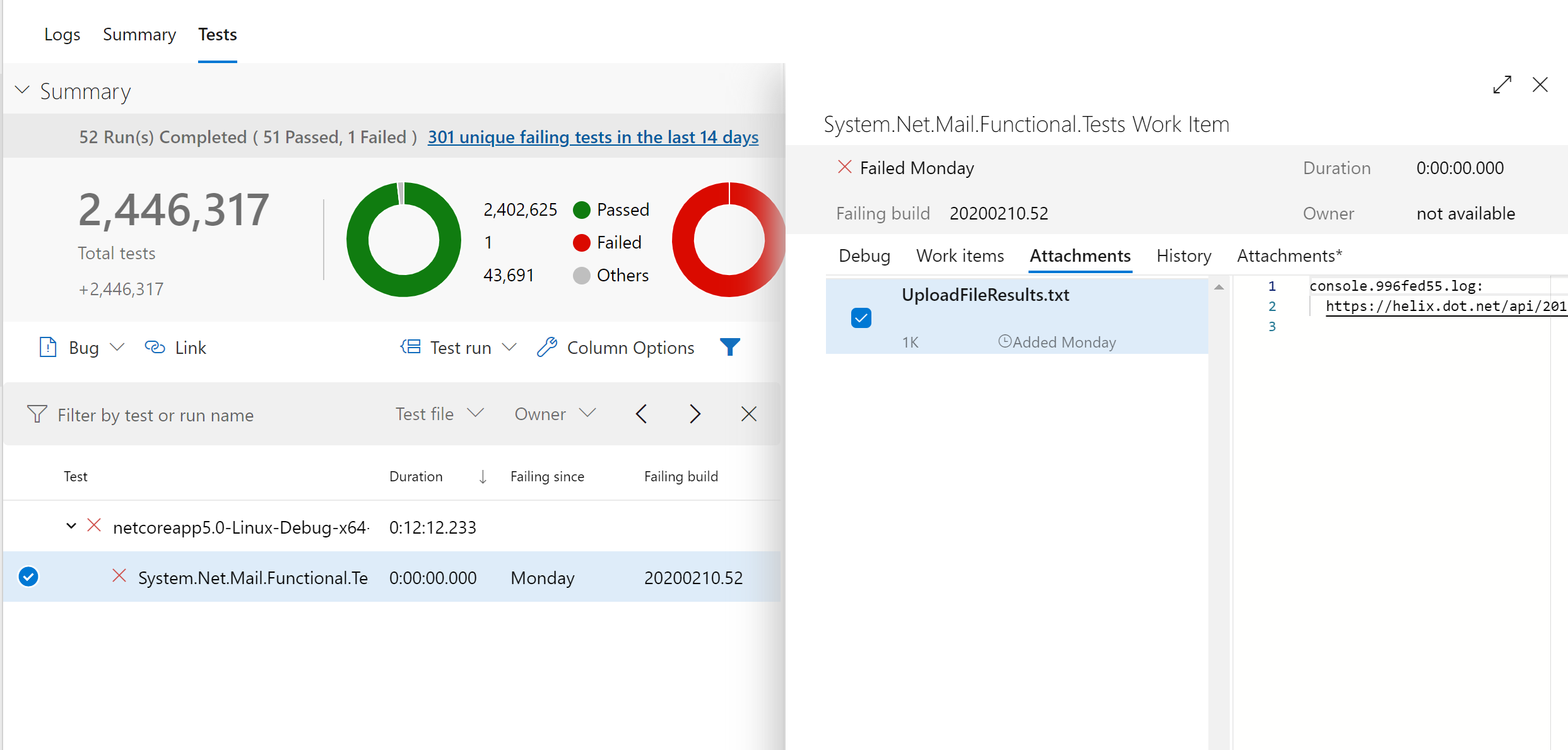
For that specific build I can see that no dump was uploaded.
ViktorHofer
on 12 Feb 2020
Thanks Viktor! Now I know where to find these myself :)
tmds
on 12 Feb 2020
@mikem8361 I'm making another attempt with lldb.
I've downloaded from this run:
$ lldb core.1000.24
Error: Runtime module (libcoreclr.so) not loaded yet
SetSymbolServer -ms  failed
(lldb) target create "core.1000.24"
Current executable set to 'core.1000.24' (x86_64).
(lldb) setclrpath /tmp/debug/CoreCLRProduct_Linux_x64_release
Set load path for dac/dbi to '/tmp/debug/CoreCLRProduct_Linux_x64_release/'
(lldb) clrstack
Failed to find runtime module (libcoreclr.so), 0x80070057
Extension commands need it in order to have something to do.
ClrStack  failed
(lldb)
Under /tmp/debug/CoreCLRProduct_Linux_x64_release/ I have libcoreclr.so and friends.
$ ldd /tmp/debug/CoreCLRProduct_Linux_x64_release/libcoreclr.so
    linux-vdso.so.1 (0x00007ffc2d6a7000)
    libgcc_s.so.1 => /lib64/libgcc_s.so.1 (0x00007fec93c3b000)
    libpthread.so.0 => /lib64/libpthread.so.0 (0x00007fec93c19000)
    librt.so.1 => /lib64/librt.so.1 (0x00007fec93c0e000)
    libdl.so.2 => /lib64/libdl.so.2 (0x00007fec93c07000)
    libstdc++.so.6 => /lib64/libstdc++.so.6 (0x00007fec93a0d000)
    libm.so.6 => /lib64/libm.so.6 (0x00007fec938c7000)
    libc.so.6 => /lib64/libc.so.6 (0x00007fec936fc000)
    /lib64/ld-linux-x86-64.so.2 (0x00007fec945db000)
I'm using these versions:
$ lldb --version
lldb version 9.0.0
$ dotnet tool list -g
Package Id          Version               Commands
-----------------------------------------------------
dotnet-sos          3.1.57502             dotnet-sos
I don't have a .NET Core installed at /usr/share/dotnet. On Fedora we put it at /usr/lib64/dotnet (and store that in /etc/dotnet/install_location, and set DOTNET_ROOT to it).
When I add a symlink, the Error: Runtime module (libcoreclr.so) not loaded yet goes away, but libcoreclr.so still fails to load.
$ lldb core.1000.24
Added Microsoft public symbol server
(lldb) target create "core.1000.24"
Current executable set to 'core.1000.24' (x86_64).
(lldb) setclrpath /tmp/debug/CoreCLRProduct_Linux_x64_release
Set load path for dac/dbi to '/tmp/debug/CoreCLRProduct_Linux_x64_release/'
(lldb) clrstack
Failed to find runtime module (libcoreclr.so), 0x80070057
Extension commands need it in order to have something to do.
ClrStack  failed
lldb needs the "host" usually dotnet on the command line and it needs to be the exact version of the host the core dump was generated. It gets updated anytime the .NET Core SDK is updated.
lldb -c core.1000.24 dotnet
@tmds that should be the dotnet that you can find in runtime.dotnetdotnet.
ViktorHofer
on 13 Feb 2020
@ViktorHofer what is the name of the artifact on https://dev.azure.com/dnceng/public/_build/results?buildId=508988&view=artifacts&type=publishedArtifacts which has the dotnet host?
tmds
on 19 Feb 2020
For x64 it should be CoreCLRProduct_Linux_x64_Release.
ViktorHofer
on 19 Feb 2020
For x64 it should be CoreCLRProduct_Linux_x64_Release.
It's not there.
These executables are in that zip file:
./corerun
./mcs
./R2RDump/R2RDump
./crossgen2/crossgen2
./superpmi
./crossgen
In this case it looks like the tests use corerun has the host so the command line should be:
lldb -c core.1000.24 corerun
mikem8361
on 21 Feb 2020
@mikem8361 I'm still not able to load the coredump:
$ lldb -c core.1000.24 /home/tmds/debug_timeout/CoreCLRProduct_Linux_x64_release/corerun
Added Microsoft public symbol server
(lldb) target create "/home/tmds/debug_timeout/CoreCLRProduct_Linux_x64_release/corerun" --core "core.1000.24"
Core file '/home/tmds/debug_timeout/core.1000.24' (x86_64) was loaded.
(lldb) setclrpath /home/tmds/debug_timeout/CoreCLRProduct_Linux_x64_release
Set load path for dac/dbi to '/home/tmds/debug_timeout/CoreCLRProduct_Linux_x64_release/'
(lldb) clrstack
Failed to find runtime module (libcoreclr.so), 0x80070057
Extension commands need it in order to have something to do.
ClrStack  failed
(lldb)
Can you make it work on your machine with the contents of:
In this case it looks like the tests use corerun
When I execute tests locally, they use dotnet:
For example:
/home/tmds/repos/runtime/artifacts/bin/testhost/netcoreapp-Linux-Debug-x64/dotnet exec --runtimeconfig Common.Tests.runtimeconfig.json --depsfile Common.Tests.deps.json xunit.console.dll Common.Tests.dll -xml testResults.xml -nologo -notrait category=OuterLoop -notrait category=failing -notrait category=nonnetcoreapptests -notrait category=nonlinuxtests
@ViktorHofer it seems this dotnet isn't packed in the published artifacts.
tmds
on 24 Feb 2020
There are two things blocking me to debug the TestZeroTimeout issue:
- I think the
dotnethost that is used to run the tests is not part of the artifacts. @ViktorHofer, is that the case? Or do the test use thecorerunexecutable that is part ofCoreCLRProduct_Linux_x64_Release? lldbsosisn't working for me.setclrpathto the proper directory, results inFailed to find runtime module (libcoreclr.so), 0x80070057. @mikem8361, I assume this works for you? I will try to debug next week why I get this error.
tmds
on 27 Feb 2020
That SOS error usually means that the proper version of the host (corerun in this case) wasn't passed to lldb. The test that it is the right version is that libcoreclr.so is displayed in the target modules list.
$ lldb --core core.1000.24 <path>/corerun
@mikem8361 does this tell you something?
$ lldb --core core.1000.24 ./CoreCLRProduct_Linux_x64_release/corerun
Added Microsoft public symbol server
(lldb) target create "./CoreCLRProduct_Linux_x64_release/corerun" --core "core.1000.24"
Core file '/home/tmds/debug_timeout/core.1000.24' (x86_64) was loaded.
(lldb) target modules list
[  0] ACCA8E90-13FB-510B-8644-B9F97AFF5AED-195CBDD8 0x0000555586ff4717 /home/tmds/debug_timeout/CoreCLRProduct_Linux_x64_release/corerun
      /home/tmds/debug_timeout/CoreCLRProduct_Linux_x64_release/corerun.dbg
[  1] DD321E91-90D9-BD55-E4CD-0080B2F9A163-099EBD04 0x00007ffff9104000 [vdso] (0x00007ffff9104000)
(lldb)
@ViktorHofer can you please take a look the question about the host that is used to run tests?
tmds
on 6 Mar 2020
It might be the wrong version of corerun? No libcoreclr.so, etc. in the module list usually means either lldb needs the host program (which you did pass) or it is the wrong version.
Did you try dotnet-dump analyize? See https://github.com/dotnet/diagnostics/blob/master/documentation/dotnet-dump-instructions.md
mikem8361
on 6 Mar 2020
It might be the wrong version of corerun? No libcoreclr.so, etc. in the module list usually means either lldb needs the host program (which you did pass) or it is the wrong version.
@mikem8361 do I understand correctly that if libcoreclr.so doesn't show up as a module, there is no way I can make it work (e.g. using sethostruntime/setclrpath)?
Did you try dotnet-dump analyize?
Yes -> https://github.com/dotnet/runtime/issues/31719#issuecomment-584007876
Do you think it will work better using a daily build?
tmds
on 9 Mar 2020
@mikem8361 do I understand correctly that if
libcoreclr.sodoesn't show up as a module, there is no way I can make it work (e.g. usingsethostruntime/setclrpath)?
Yes that is correct. Both lldb and gdb require the matching version of the host program to correctly load a dump. It has nothing to do with SOS and I haven't found a workaround. Looking back through this issue, it looks like the host may be "dotnet" instead of "corerun".
Yes -> #31719 (comment)
Because of all the back and forth, it wasn't clear if dotnet-dump analyze with setclrpath pointing to the directory containing the matching version of the DAC actually worked for you. I can't seem to download core.1000.24/zip file anymore to try it myself.
Do you think it will work better using a daily build?
Daily build of dotnet-dump?
mikem8361
on 9 Mar 2020
@ViktorHofer we are missing the dotnet host needed to debug the test coredump using lldb.
@mikem8361 I will try using dotnet-dump this week.
tmds
on 10 Mar 2020
@ViktorHofer we are missing the dotnet host needed to debug the test coredump using lldb.
@missymessa test coredumps cannot be debugged using lldb.
I still have to check whether they can be debugged with dotnet-dump, but probably we want lldb to be usable also?
tmds
on 17 Mar 2020
@tmds Hi Tom, I created an issue for this feature: https://github.com/dotnet/core-eng/issues/9393
missymessa
on 17 Mar 2020
Related issues
 omajid
·
3Comments
omajid
·
3Comments
 Timovzl
·
3Comments
Timovzl
·
3Comments
 matty-hall
·
3Comments
matty-hall
·
3Comments
 jzabroski
·
3Comments
jzabroski
·
3Comments
 yahorsi
·
3Comments
yahorsi
·
3Comments
Most helpful comment
Which build(s) are missing the dump files? I peeked at a couple of the build links noted above and it looks like there are dump files attached to the failing work item.