Runtime: Path.GetPathRoot should have NotNullIfNotNull("path")
Path.GetPathRoot is currently defined as this:
public static string? GetPathRoot(string? path)
And the docs state:
The resulting string is null if path is null
However, nullable reference types annotations on this method don't match the docs and make think the compiler/analyzer that it can return null under any conditions. So even if I check the path for null I can't use returned value without checking it for null as well or using ! operator.
Thus, I believe this method should be annotated with
[return: System.Diagnostics.CodeAnalysis.NotNullIfNotNull("path")]
 andriysavin
All 8 comments
Thanks, but that wouldn't be correct. It's true that the API returns null if null is passed in. But it also for example returns null if an empty string is passed in. Thus it's not NotNullIfNotNull.
 stephentoub
on 24 Sep 2019
stephentoub
on 24 Sep 2019
@stephentoub The docs say that
If the path is empty or only contains whitespace characters an ArgumentException gets thrown.
Is it the docs what needs to be fixed?
andriysavin
on 24 Sep 2019
Is it the docs what needs to be fixed?
If that's what they say, then it sounds like it.
cc: @JeremyKuhne, @carlossanlop
stephentoub
on 24 Sep 2019
If the path is empty or only contains whitespace characters an ArgumentException gets thrown.
@andriysavin The docs for GetPathRoot do not say that. They only say null is returned if null is passed. ArgumentException is only thrown if the path contains invalid chars.
What I could do is update the docs to specify that we will also return null if the string is effectively empty (contains only space characters), which we currently don't mention.
Here's the code:
src/Common/src/CoreLib/System/IO/Path.Windows.cs#L214
public static string? GetPathRoot(string? path)
{
    if (PathInternal.IsEffectivelyEmpty(path.AsSpan()))
        return null;

    ReadOnlySpan<char> result = GetPathRoot(path.AsSpan());
    if (path!.Length == result.Length)
        return PathInternal.NormalizeDirectorySeparators(path);

    return PathInternal.NormalizeDirectorySeparators(result.ToString());
}
The IsEffectivelyEmpty will return true if the passed path's IsEmpty property returns true or at least one of its characters is _not_ a space:
CommonsrcCoreLibSystemIOPathInternal.Windows.cs#L402
internal static bool IsEffectivelyEmpty(ReadOnlySpan<char> path)
{
    if (path.IsEmpty)
        return true;

    foreach (char c in path)
    {
        if (c != ' ')
            return false;
    }
    return true;
}
 carlossanlop
on 24 Sep 2019
carlossanlop
on 24 Sep 2019
@carlossanlop I copied that quote directly from the comments on the method on GitHub. Talking about xml docs which led me to confusion here are a couple of quotes:
- From the link you gave:
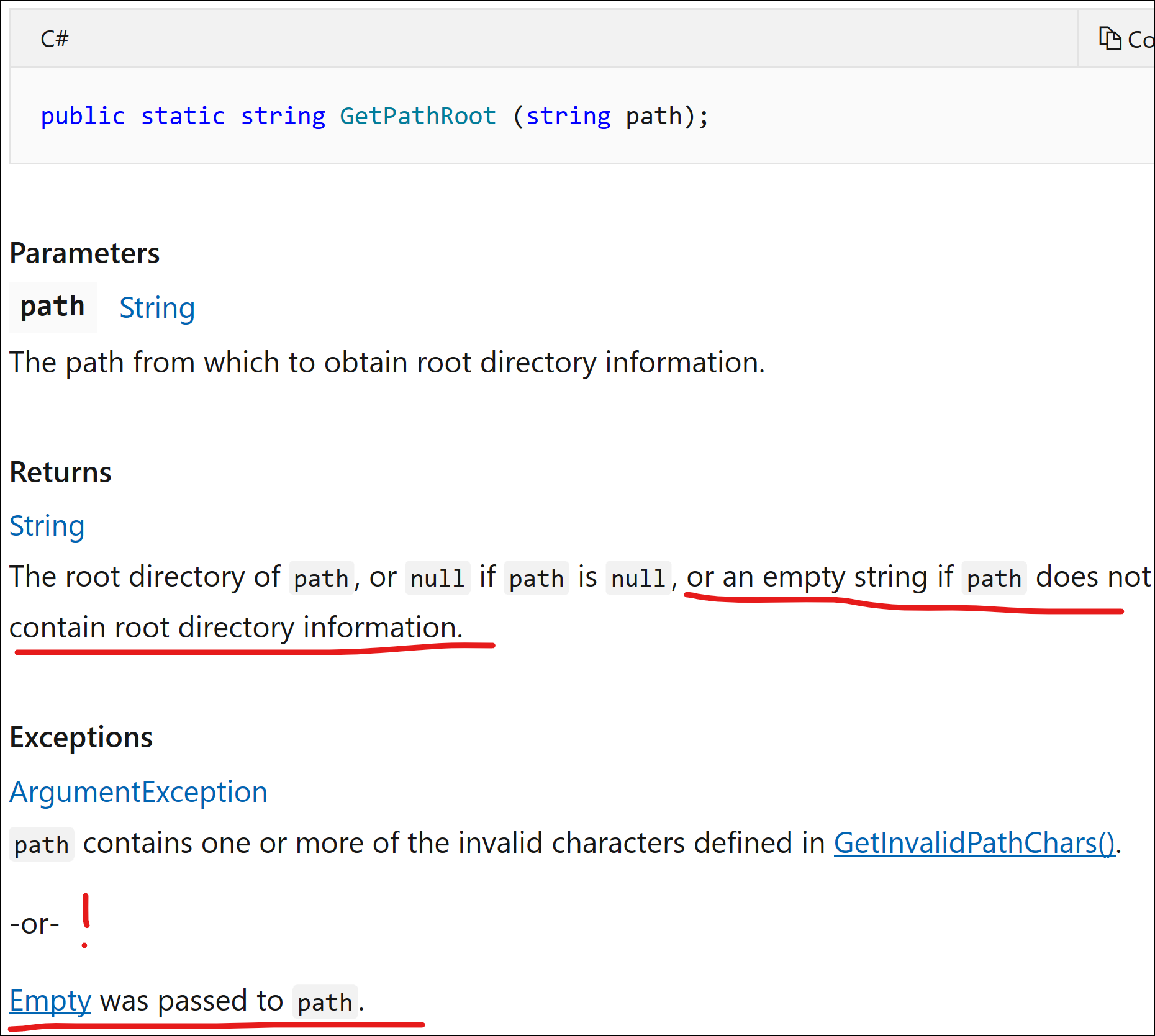
- From VS when pressing F12 on the method:

I have no doubts the code behaves as you say, but obviously the docs do not reflect that clearly. Thank you in advance for fixing that!
andriysavin
on 25 Sep 2019
@andriysavin
I tested the two GetPathRoot functions in Windows, and these were my findings:
In both MS Docs and the source comments, we mention that we throw
ArgumentExceptionin the overload that receives and returns a string, but we don't mention the exception in the overload that receives and returns aReadOnlySpan<char>.MS Docs is the source of truth for us when it comes to documentation. We should not expect the triple slash source comments to get stale, but it might happen eventually, because whenever we add documentation clarifications, we try to add them directly to the MS Docs website, not to triple slash. Thanks for pointing out that you found the documentation in the source comments, I understand why it could be confusing. I am having discussions with my team regarding this topic. We are always open to suggestions and to make it easier for people to understand an API's behavior.
I did not find any case where
GetPathRootthrows because, contrary to what the documentation says, it never callsGetInvalidPathChars, and when the string is effectively empty, we returnnull.An interesting thing to mention is that the two overloads behave a bit differently when they receive a string that is effectively empty: the string version returns null, the
ReadOnlySpanversion returnsReadOnlySpan<char>.Empty. We do not mention the latter case in the MS Docs.I didn't test this in Unix, but by reading the code:
a.GetPathRoot(System.String)returnsnullif the string is effectively empty or it is not rooted.
b.GetPathRoot(System.ReadOnlySpan<System.Char>)returnsReadOnlySpan<char>.Emptyif the string is effectively empty or it is not rooted.
Here are the results of my tests, and I will update the MS Docs documentation accordingly for the Windows case. Pending mentioning the behavior in Unix:
            string unrootedPath = "Windows\\System32\\calc.exe";
            string rootedPath = "C:\\Windows\\System32\\calc.exe";
            string nullPath = null;
            string emptyPath = string.Empty;
            string invalidCharPath = "\0";

            string unrootedPathRoot = Path.GetPathRoot(unrootedPath); // no root, so this returns string.Empty
            string rootedPathRoot = Path.GetPathRoot(rootedPath); // This returns "C:\\" (the root)
            string nullPathRoot = Path.GetPathRoot(nullPath); // This returns null. Does not throw.
            string emptyPathRoot = Path.GetPathRoot(emptyPath); // This returns null. Does not throw.
            string invalidCharPathRoot = Path.GetPathRoot(invalidCharPath); // This returns string.Empty, does not throw. I expect the same behavior in Unix.

            ReadOnlySpan<char> rosUnrootedPath = "Windows\\System32\\calc.exe";
            ReadOnlySpan<char> rosRootedPath = "C:\\Windows\\System32\\calc.exe";
            ReadOnlySpan<char> rosNullPath = null;
            ReadOnlySpan<char> rosEmptyPath = string.Empty;
            ReadOnlySpan<char> rosInvalidCharPath = "\0";

            ReadOnlySpan<char> rosUnrootedPathRoot = Path.GetPathRoot(rosUnrootedPath); // no root, so this returns string.Empty
            ReadOnlySpan<char> rosRootedPathRoot = Path.GetPathRoot(rosRootedPath); // This returns "C:\\" (the root)
            ReadOnlySpan<char> rosNullPathRoot = Path.GetPathRoot(rosNullPath); // This returns ROS.Empty. Does not throw.
            ReadOnlySpan<char> rosEmptyPathRoot = Path.GetPathRoot(rosEmptyPath); // This returns ROS.Empty. Does not throw.
            ReadOnlySpan<char> rosInvalidCharPathRoot = Path.GetPathRoot(rosInvalidCharPath); // This returns ROS.Empty, , does not throw. I expect the same behavior in Unix.
_Edit: Made sure to include both the string.Empty and the null cases._
_Edit 2: Split the tests for string and ROS._
cc @JeremyKuhne
carlossanlop
on 25 Sep 2019
@carlossanlop I always thought that MS Docs are generated based on xml docs in the code, but looks like things have changed.
andriysavin
on 25 Sep 2019
@andriysavin yes, we initially seed MS Docs with the triple slash comments, but after that, MS Docs becomes the source of truth and any modifications need to be done there after seeding.
carlossanlop
on 25 Sep 2019
Related issues
 Timovzl
·
3Comments
Timovzl
·
3Comments
 omariom
·
3Comments
omariom
·
3Comments
 jchannon
·
3Comments
jchannon
·
3Comments
 yahorsi
·
3Comments
yahorsi
·
3Comments
 jkotas
·
3Comments
jkotas
·
3Comments
Most helpful comment
If that's what they say, then it sounds like it.
cc: @JeremyKuhne, @carlossanlop