Runtime: Internal.Cryptography.CryptoThrowHelper+WindowsCryptographicException: The system cannot find the file specified
Hello, i'm trying to download a certificate from Azure KeyVault and create a X509Certificate2:
var azureServiceTokenProvider = new AzureServiceTokenProvider();
// using managed identities
var kv = new KeyVaultClient(new KeyVaultClient.AuthenticationCallback(azureServiceTokenProvider.KeyVaultTokenCallback));

var certificateSecret = kv.GetSecretAsync(vaultBaseUrl, certName).Result;
var privateKeyBytes = Convert.FromBase64String(certificateSecret.Value);
X509Certificate2 cert = null;
try
{
    cert = new X509Certificate2(privateKeyBytes, (string)null);
    Logger.LogInformation($"cert created");
}
catch(Exception ex)
{
    Logger.LogError(ex, "Error creating cert");
}
This code works perfectly on my Machine, but when published to Azure App Service I get the error Internal.Cryptography.CryptoThrowHelper+WindowsCryptographicException: The system cannot find the file specified:
at Internal.Cryptography.Pal.CertificatePal.FilterPFXStore(Byte[] rawData, SafePasswordHandle password, PfxCertStoreFlags pfxCertStoreFlags)
at Internal.Cryptography.Pal.CertificatePal.FromBlobOrFile(Byte[] rawData, String fileName, SafePasswordHandle password, X509KeyStorageFlags keyStorageFlags)
at System.Security.Cryptography.X509Certificates.X509Certificate..ctor(Byte[] rawData, String password, X509KeyStorageFlags keyStorageFlags)
at System.Security.Cryptography.X509Certificates.X509Certificate2..ctor(Byte[] rawData, String password)
at Fillment.Auth.Startup.GetIdentityServerCertificate(String vaultBaseUrl, String certName) in ..\Startup.cs:line 144
I logged the app, and the certificate is being retrieved successfully from Key Vault and privateKeyBytes is not null.
Running .NET Core 2.2
Thoughts?
 jstawski
All 7 comments
Try setting the app config setting WEBSITE_LOAD_USER_PROFILE = 1 (from https://github.com/dotnet/corefx/issues/27358#issuecomment-509961051). Or change cert = new X509Certificate2(privateKeyBytes, (string)null); to cert = new X509Certificate2(privateKeyBytes, (string)null, X509KeyStorageFlags.EphemeralKeySet);
This is duplicate of dotnet/runtime#25143 (Azure App Service doesn't use a user profile, by default).
 bartonjs
on 22 Aug 2019
bartonjs
on 22 Aug 2019
Neither worked. Using WEBSITE_LOAD_USER_PROFILE = 1 results in the same error, while using X509KeyStorageFlags.EphemeralKeySet results in the exception: Bad data:
Internal.Cryptography.CryptoThrowHelper+WindowsCryptographicException: Bad Data
at Internal.Cryptography.Pal.CertificatePal.FilterPFXStore(Byte[] rawData, SafePasswordHandle password, PfxCertStoreFlags pfxCertStoreFlags)
at Internal.Cryptography.Pal.CertificatePal.FromBlobOrFile(Byte[] rawData, String fileName, SafePasswordHandle password, X509KeyStorageFlags keyStorageFlags)
at System.Security.Cryptography.X509Certificates.X509Certificate..ctor(Byte[] rawData, String password, X509KeyStorageFlags keyStorageFlags)
at Fillment.Auth.Startup.GetIdentityServerCertificate(String vaultBaseUrl, String certName) in. ..\Startup.cs:line 128
I am using the free SKU of App Service, not sure if that affects anything.
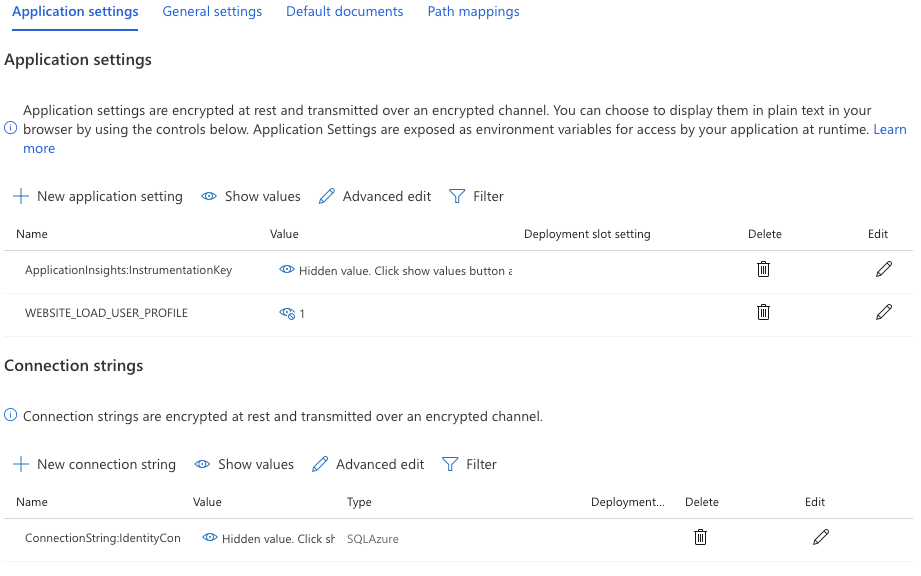
jstawski
on 22 Aug 2019
"Bad data" seems weird. Maybe X509KeyStorageFlags.EphemeralKeySet | X509KeyStorageFlags.UserKeySet would help, but (IIRC) once EphemeralKeySet is set neither UserKeySet or MachineKeySet should matter.
The other issue also contains a suggestion to use WEBSITE_LOAD_CERTIFICATES to Azure App Services to load the user profile stuff.
If EphemeralKeySet | UserKeySet can't load it I don't really know what else to offer; but this is an Azure App Services / Windows environment configuration problem, there's not much else .NET can do about it.
bartonjs
on 22 Aug 2019
So i'm not sure if it is a bug or by design, but this issue occurs when using one of the shared infrastructure plans.
When running on any other plans it seems to work when using WEBSITE_LOAD_USER_PROFILE = 1 regardless of the X509KeyStorageFlags
jstawski
on 22 Aug 2019
Reading this in more detail:
This approach to using certificates in your code makes use of the SSL functionality in App Service, which requires your app to be in Basic tier or above
So it seems to be by design
jstawski
on 22 Aug 2019
Reading this in more detail:
This approach to using certificates in your code makes use of the SSL functionality in App Service, which requires your app to be in Basic tier or above
So it seems to be by design
boomer 😢
 Luis-Palacios
on 19 Nov 2019
Luis-Palacios
on 19 Nov 2019
Life saver :-D
Hopefully the Exception can be improved from "The system cannot find the file specified" ;-)... especially as I was sending in a byte[] ;-)
 NikolaosWakem
on 7 Aug 2020
NikolaosWakem
on 7 Aug 2020
Related issues
 omajid
·
3Comments
omajid
·
3Comments
 chunseoklee
·
3Comments
chunseoklee
·
3Comments
 yahorsi
·
3Comments
yahorsi
·
3Comments
 bencz
·
3Comments
bencz
·
3Comments
 jchannon
·
3Comments
jchannon
·
3Comments
Most helpful comment
Try setting the app config setting
WEBSITE_LOAD_USER_PROFILE = 1(from https://github.com/dotnet/corefx/issues/27358#issuecomment-509961051). Or changecert = new X509Certificate2(privateKeyBytes, (string)null);tocert = new X509Certificate2(privateKeyBytes, (string)null, X509KeyStorageFlags.EphemeralKeySet);This is duplicate of dotnet/runtime#25143 (Azure App Service doesn't use a user profile, by default).