Runtime: .NET Core fails XML validation while .NET Framework succeeds
Hi,
Why, I don't validate a document using .net standard 2.0? I get that's message: Type not declared
That's my code:
 var xDoc = XDocument.Parse("<consStatServ versao=\"4.00\" xmlns=\"http://www.portalfiscal.inf.br/nfe\"><tpAmb>2</tpAmb><cUF>29</cUF><xServ>STATUS</xServ></consStatServ>");
   var xss = new XmlSchemaSet();
   xss.Add("http://www.portalfiscal.inf.br/nfe", @"D:\Schemas\consStatServ_v4.00.xsd");
   //Validar Xml
   xDoc.Validate(xss, (sender, args) =>
            {
                throw new FalhaValidacaoSchemaException(args.Message);

            });
 DSBRBrasil
All 8 comments
Sorry, I don't understand your question. Can you post the full exception you're getting? Also, without your files it's hard to reproduce.
 terrajobst
on 20 Apr 2019
terrajobst
on 20 Apr 2019
Hi,
I'm trying validate a xml file against a file xsd, but that it works in .net 46.1 but not in standard 2.0.
That's my files:
<?xml version="1.0"?>
<consStatServ xmlns="http://www.portalfiscal.inf.br/nfe" versao="4.00">
  <tpAmb>2</tpAmb>
  <cUF>12</cUF>
  <xServ>STATUS</xServ>
</consStatServ>
Xsd
<?xml version="1.0" encoding="UTF-8"?>
<xs:schema xmlns:ds="http://www.w3.org/2000/09/xmldsig#"
           xmlns="http://www.portalfiscal.inf.br/nfe"
           xmlns:xs="http://www.w3.org/2001/XMLSchema"
           targetNamespace="http://www.portalfiscal.inf.br/nfe"
           elementFormDefault="qualified"
           attributeFormDefault="unqualified">
    <xs:include schemaLocation="leiauteConsStatServ_v4.00.xsd"/>
    <xs:element name="consStatServ" type="TConsStatServ">
        <xs:annotation>
            <xs:documentation>Schema XML de validação do Pedido de Consulta do Status do Serviço</xs:documentation>
        </xs:annotation>
    </xs:element>
</xs:schema>
My code
C#
var schema = "consStatServ_v4.00.xsd";
var cfg = new XmlReaderSettings { ValidationType = ValidationType.Schema };
cfg.Schemas.Add(null, schema);
XmlReader reader = XmlReader.Create(new StringReader(stringXml), cfg);
XmlDocument document = new XmlDocument();
document.Load(reader);
document.Validate(ValidationEventHandler);
And than I get this error:
Type 'http://www.portalfiscal.inf.br/nfe:TConsStatServ' is not declared.

Image from consStatServ_v4.00.xsd schema

Link to Files XSD
DSBRBrasil
on 20 Apr 2019
I can reproduce this issue. On .NET Framework the code works, but on .NET Core it fails. A full repro is here. You can change the target framework in the project file to see the difference in behavior.
@buyaa-n, @krwq could one of you take a look and check this isn't a regression?
terrajobst
on 23 Apr 2019
I suspect the issue is that https://source.dot.net/#System.Private.Xml/System/Xml/Core/XmlReaderSettings.cs,654 is not respecting resolver setting set previously - it should be using XmlUrlResolver or at minimum respect setting from XmlReaderSettings (which I have just validated it isn't) but not 100% sure without debugging.
 krwq
on 23 Apr 2019
krwq
on 23 Apr 2019
This can be fixed one of two ways. You can either allow the default resolver by default using the AppContext switch:
AppContext.SetSwitch("Switch.System.Xml.AllowDefaultResolver", true);
or explicitly configure the XmlSchemaSet to use the XmlUrlResolver:
cfg.Schemas.XmlResolver = new XmlUrlResolver();
This appears to be related to this known behavior.
at minimum respect setting from XmlReaderSettings (which I have just validated it isn't)
I observed that behavior as well. Setting the XmlUrlResolver on XmlReaderSettings instead of XmlSchemaSet does not address the behavior.
Aside:
I suspect the change in behavior regarding the XmlUrlResolver is related to security since a number of documented security issues exist around XInclude; it would be nice if there was more documentation on this change (If there is I couldn't find it). At the very least a clear exception should be thrown, such as was observed in dotnet/runtime#26969.
 vcsjones
on 23 Apr 2019
vcsjones
on 23 Apr 2019
yes, I believe we should throw an exception or at least report it to validator callback, so will leave the issue open.
I initially set resolver only on settings but not on the .Schemas, since this is not unusual scenario and this or similar issue is coming back every couple of months I think we should fix it for 3.0 (validation error + docs update) but if we don't have enough time for the fix it's ok move it to the next release.
krwq
on 23 Apr 2019
There is 2 steps before schema validation:
Adding schema to schema set:
cfg.Schemas.Add(null, schema);where the schea is loaded and parsed, also included schemas loaded and parsed on this step. The error we want to show could be thrown here, but seems we should ignore unsuccessfully loaded schemas included, from ShemaSet.Add() method documenation:
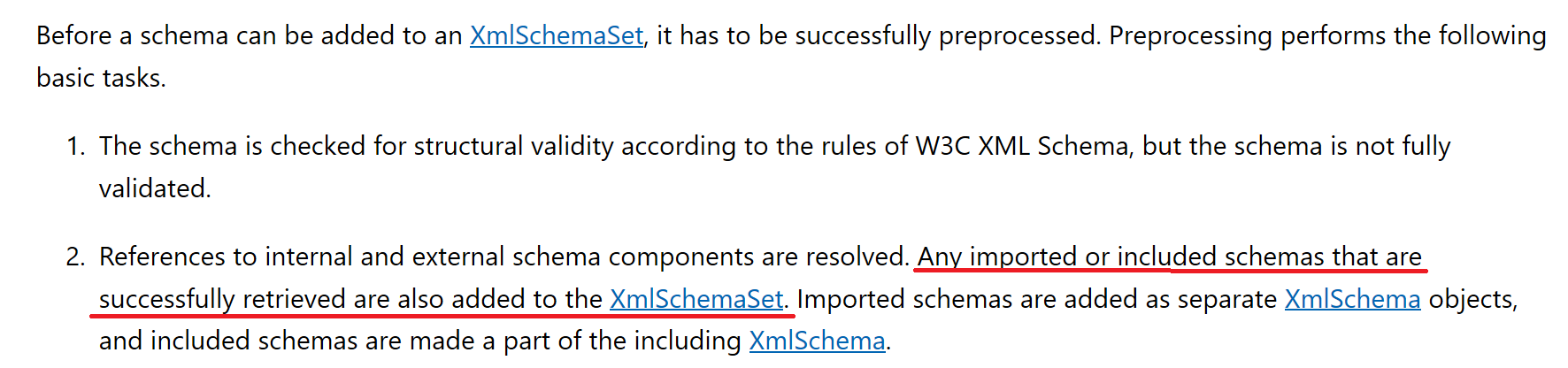
Create reader step where the xml will be read and loaded schemas will be applied:
XmlReader.Create(new StringReader(stringXml), cfg);where the exception in question is thrown:Type 'http://www.portalfiscal.inf.br/nfe:TConsStatServ' is not declared.For me this message is not that wrong as the type was not exist within shema set, becasue it was not loaded in step 1. But we cannot change this error message withResolving of external URIs was prohibiteddirectly because the type might haven't declared even if all included shemas loaded successfully.
So the question is how we want to solve this:
- Throw on step 1 with
Resolving of external URIs was prohibited - Or keep exception messages thrown in step 1 and show them as possible issue:
Type 'http://www.portalfiscal.inf.br/nfe:TConsStatServ' is not declared. Possible cause: Cannot resolve the 'schemaLocation' attribute. Resolving of external URIs was prohibited. - Or keep track of all errors for all types/elements from step 1 to show more meaningful error message on step 2 (this will be more costly)
- Or just leave it as is
 buyaa-n
on 2 May 2019
buyaa-n
on 2 May 2019
Hi,
I did can do works it, this way:
private void ValidateSchema(NFe entity)
        {
            var cfg = new XmlReaderSettings {ValidationType = ValidationType.Schema};
            //List XSD files
            var list = GetListXsdFiles();
            list.ForEach(n => { cfg.Schemas.Add(null, Path.Combine(pathSchema, n)); });
            cfg.ValidationEventHandler += ValidationEventHandler;
            var xml = Utils.ClassToXmlString(entity);
            var reader = XmlReader.Create(new StringReader(xml), cfg);
            var document = new XmlDocument();
            document.Load(reader);
            document.Validate(ValidationEventHandler);
        }
private List<string>GetListXsdFiles() {
 var list = new List<string>();
            list.Add("enviNFe_v4.00.xsd");
            list.Add("leiauteNFe_v4.00.xsd");
            list.Add("tiposBasico_v4.00.xsd");
            list.Add("nfe_v4.00.xsd");
            list.Add("xmldsig-core-schema_v1.01.xsd");
            return list;
}
I listed all files schemas names, thats worked it for me.
Thank you guys !
DSBRBrasil
on 2 May 2019
Related issues
 noahfalk
·
3Comments
noahfalk
·
3Comments
 chunseoklee
·
3Comments
chunseoklee
·
3Comments
 omajid
·
3Comments
omajid
·
3Comments
 v0l
·
3Comments
v0l
·
3Comments
 EgorBo
·
3Comments
EgorBo
·
3Comments
Most helpful comment
This can be fixed one of two ways. You can either allow the default resolver by default using the
AppContextswitch:or explicitly configure the
XmlSchemaSetto use theXmlUrlResolver:This appears to be related to this known behavior.
I observed that behavior as well. Setting the
XmlUrlResolveronXmlReaderSettingsinstead ofXmlSchemaSetdoes not address the behavior.Aside:
I suspect the change in behavior regarding the
XmlUrlResolveris related to security since a number of documented security issues exist aroundXInclude; it would be nice if there was more documentation on this change (If there is I couldn't find it). At the very least a clear exception should be thrown, such as was observed in dotnet/runtime#26969.